The correct chair height for desk sitting is one of those invisible setup details most people ignore until their body complains. And by then, weeks or months of poor posture have already built up. You’ve probably felt it at some point.
A dull ache in the lower back. Numb fingers after a long session. Thighs that feel like they’re carrying too much weight.
That’s not normal wear and tear. That’s your body telling you something is off.
Most desk workers log thousands of hours sitting over a working lifetime. Small errors in chair height compound dramatically over time. When the seat is too low, the hips drop below the knees and the lower spine rounds into a C-curve.
When it’s too high, the thighs press into the seat edge and cut off circulation. Either way, the body compensates constantly without you even realizing it.
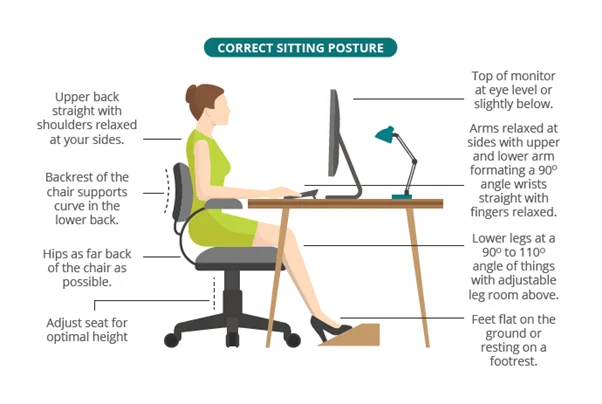
Image source: Bing (Web (fair-use with source credit))
Why Getting Chair Height Right Actually Matters
The Hidden Cost of Sitting Wrong
Your spine carries far more load when you sit than most people understand. Leaning forward even a few degrees increases spinal compression significantly, but that’s only part of the problem. Incorrect chair height changes everything else around it, hip angle, knee position, shoulder tension, and head alignment.
One mistake in seat height creates a chain reaction through your entire posture.
Poor chair height also puts direct pressure on soft tissue in the thighs. When the front edge of the seat digs into the back of the knees or the underside of the thighs, blood flow slows down. That’s why legs feel heavy or tingly after long days at the desk.
It’s not just discomfort. It’s a mechanical problem caused by one adjuster you probably haven’t touched in years.
How Poor Chair Height Shows Up in Your Body
The signs rarely point directly to the chair. People blame their back, their pillow, their mattress, even stress. But the root cause is often simpler.
Here’s how different problems map to specific seating mistakes.
Lower back pain that worsens through the day and improves when you stand, the seat is likely too low, forcing the pelvis to tilt backward and flatten the lumbar curve. Hip pain or tightness in the front of the hips, the seat may be too high, pinching tissue and limiting natural movement. Numbness or tingling in the legs, the seat edge is pressing into the thighs and restricting blood flow.
Shoulder and neck tension that builds steadily, the desk is too high relative to the chair, forcing the shoulders upward to reach the keyboard.
Recognizing these patterns helps because fixing them starts with one adjustment. Get the seat height right and many of these issues ease on their own.
What the Research Says About Correct Chair Height
Ergonomics research has spent decades studying how the human body interacts with seated work. The findings aren’t always popular, but they’re consistent. The core message is simple.
There is no universal chair height number that fits everyone. What works for one person will cause problems for another. That’s why generic advice like “keep your feet flat at 90 degrees” only goes so far.
It misses the nuance of individual body proportions.
Studies published in occupational health journals consistently support a few key principles. Seat height must allow the feet to rest flat without forcing the hips below knee level. Forearms should rest horizontally at the work surface without shrugging the shoulders.
Thighs should lie flat on the seat pan with even pressure distribution across the entire surface. These principles apply across body types. The exact measurements change.
The rules don’t.
What Ergonomics Experts Agree On
Professional organizations and ergonomic researchers have converged on several baseline standards. None of them claim to cover every situation, but taken together they form a reliable framework. The Occupational Safety and Health Administration emphasizes workstation setups that prevent musculoskeletal strain rather than prescribing a single measurement.
The National Institute for Occupational Safety and Health recommends evaluating each worker individually because body dimensions vary too widely for one-size-fits-all guidance.
Research published in peer-reviewed occupational health journals supports these conclusions. Findings from the Journal of Electromyography and Kinesiology, for example, show that hip angle and seat height interact in complex ways. Raising the seat too much, even if feet remain flat, can increase pressure on the thighs and reduce circulation.
Lowering it too much forces the pelvis into a posterior tilt, which flattens the natural lumbar curve and loads the lower back unevenly.
The consensus among ergonomics experts boils down to this. Proper chair height means the hips sit slightly higher than or level with the knees. The feet rest fully supported.
The thighs lie flat without pressure points. And the forearms reach the desk surface without the shoulders rising or the back rounding. Those are the anchors.
Everything else adjusts around them.
Why There’s No Single “Perfect Number”
Two people standing side by side can easily need different seat heights by four or five inches. That’s a massive gap in ergonomic terms. One might sit comfortably at 18 inches.
The other might need 22 or 23 inches to hit the same posture. Body proportions explain why. Some people have long torsos and short legs.
Others have long legs and shorter torsos. Neither shape is wrong. Both need different chair settings.
Even within the same height range, preferences shift based on tasks. Someone typing all day needs a slightly different setup than someone leaning back to read documents. Desk height compounds the problem.
A standard desk sits around 30 inches. That works fine for someone who is five-foot-eight. For someone who is five-foot-four, that desk forces the shoulders up and the arms into an awkward angle, no matter how the chair is adjusted.
The chair alone can’t fix a mismatched desk.
This variability is exactly why any guide offering a single number as the definitive answer is fundamentally flawed. The real answer lives in a process. You measure.
You adjust. You test. You refine.
That process is what separates a proper ergonomic setup from a guess.
Your Step-by-Step Chair Height Assessment
Before touching the lever, you need to know what you’re working with. Assessment beats adjustment every time because guessing is how people end up with chairs that look fine but still cause pain after a few hours. Follow this sequence carefully.
Each step builds on the last and together they give you a clear picture of exactly what your body needs.
Start with your measurements. You’ll need a flexible tape measure and a flat surface. Grab a book and a straightedge if you want more precision, but the basic steps work fine with just the tape.
Measuring Your Body First
Begin with your inseam. Stand barefoot against a wall and measure from the floor up to the crease where your leg meets your torso. This tells you roughly how tall your femur is and gives you a baseline for seat height.
Most average-height adults fall somewhere between 28 and 34 inches for inseam length. Taller individuals measure above that range. Shorter individuals measure below.
Next, measure your thigh length. Sit on a hard surface with your knees bent at 90 degrees and measure from the back of your knee to the front of your hip. This helps you understand how much of your thigh can rest on the seat without sliding forward.
It also flags whether you’ll need a deeper seat pan or a shorter one.
Write both numbers down. They’ll matter in a moment when you’re interpreting what the chair test results mean.
Testing the Floor-to-Knee Gap
Here’s where things get practical. Sit in your chair with the seat at its current height. Place both feet flat on the floor.
Ask yourself one question. Is there a gap between the bottom of your thighs and the floor?
If you can slide two or more fingers under your thighs comfortably, you have excess gap. This usually means the seat is too high or your feet aren’t reaching properly. If your knees are pressing hard into the underside of the desk or there’s zero space between your knees and the desk, the seat may be too low and pushing your legs upward.
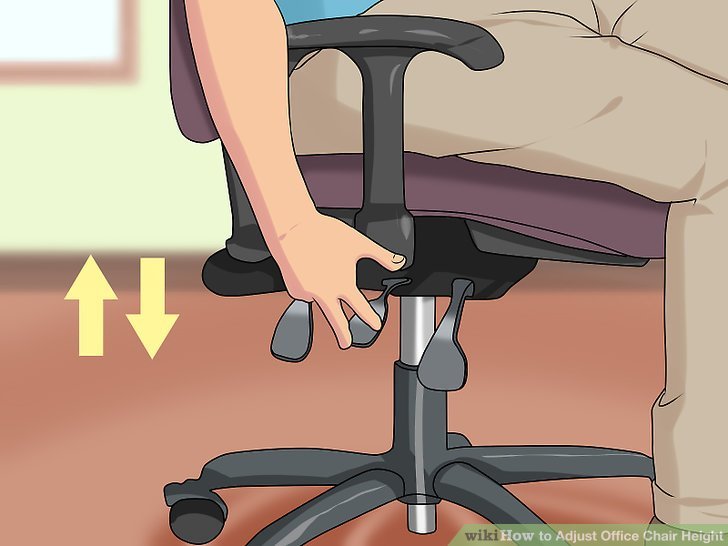
Image source: Bing (Web (fair-use with source credit))
Measure that gap precisely. Use a ruler or tape measure to check the distance from the floor to the underside of your thighs at the widest part. If it’s more than two inches, you’re in footrest territory.
If it’s less than half an inch, your seat might need lowering slightly.
Checking Hip Angle While Seated
Hip angle is one of the most overlooked measurements. Sit back in your chair with your feet flat and spine against the backrest. Let your knees bend naturally.
Look at the angle formed between your torso and your thighs. That’s your hip angle.
Aim for approximately 90 to 110 degrees. If your knees are clearly above your hips, the seat is too high. If your knees sink well below your hips and your pelvis is rolling backward, the seat is too low.
The difference between 90 and 110 degrees isn’t dramatic, but it’s meaningful for comfort over long sitting periods.
You can check this visually by sitting sideways in front of a mirror or by taking a photo from behind. Both methods reveal whether your pelvis is tilting forward, staying neutral, or tucking under. Neutral is the target.
Placing Your Feet Correctly
Foot placement sounds straightforward until you realize most people are doing it wrong. Both feet should rest flat on the floor or on a footrest. The entire sole should make contact.
Toes, ball of foot, and heel all grounded. No hovering. No tiptoeing.
No heels lifted off the surface.
If you’re wearing shoes, keep them on during the assessment. Shoe thickness matters. A pair of thick-soled sneakers adds nearly an inch compared to thin running shoes or bare feet.
Decide whether you’ll normally work with shoes on or off and measure accordingly. Consistency matters more than perfection here.
Once your feet are set, double-check the other angles. Are your knees still at or below hip level? Is there pressure under your thighs?
If everything feels balanced, you’re ready to move to actual adjustment.
Adjusting Your Chair — The Practical Method
Assessment gives you data. Adjustment turns it into action. This section walks through the physical process of changing your chair height and verifying the result.
Follow the steps in order. Skipping ahead is how people miss small but important misalignments.
The core principle guiding this process is simple. You adjust the seat to your body first, then bring the desk to meet the chair, not the other way around. Most people reverse this and wonder why nothing feels right.
Lowering When Your Feet Dangle
Feet dangling is the clearest warning sign. If your heels lift off the floor or you’re balancing on the balls of your feet, the seat is too high for your leg length. Lower it slowly.
Use the lever under the seat pan and drop the chair one click at a time. Stop frequently to recheck foot contact and hip angle.
As you lower the seat, pay attention to two things simultaneously. First, confirm both feet stay flat with even pressure. Second, watch what happens to your knees and thighs.
If lowering the chair causes your knees to rise above your hips, you’ve gone too far. The correct height sits somewhere between those two extremes.
Raising When Your Thighs Compress
Thigh compression feels like pressure running along the bottom of your legs. It’s often described as a heavy or dead sensation after 30 minutes or so. When the seat edge presses into the back of the thighs, circulation slows and discomfort follows.
Raise the chair incrementally until the pressure lifts. You’re looking for full thigh support without any digging at the front edge. The seat pan should contact the thighs evenly from hip to just below the knee.
If raising the seat causes your feet to lose floor contact, stop and reassess. You may need a footrest instead of continuing to raise the chair, which would create a different set of problems.
Balancing Desk and Chair Together
The desk and the chair exist in relationship to each other. Raise the chair and the desk suddenly feels too low. Lower the chair and the desk feels too high.
The goal is to find the shared middle ground where both work harmoniously.
If your desk is adjustable, raise or lower it to match the chair you just set. Your elbows should rest at approximately 90 degrees with shoulders relaxed and forearms parallel to the floor. If your desk is fixed, you’ll adjust the chair to meet it rather than the reverse.
That means accepting the fixed desk height and tuning the seat to stay comfortable at that level. Sometimes that means using a footrest to fill the gap. Sometimes it means choosing a different chair with a wider range.
Locking It In So It Stays Put
An adjustable chair is useless if it drifts back to the wrong height during the day. Make sure the height lock engages firmly. Some chairs have a secondary lock feature.
Use it if yours does. Test the stability by shifting your weight slightly forward and backward. The seat should hold position without sinking or bouncing.
After locking, run through the full posture check again. Height adjustments sometimes shift armrests, tilt tension, or other settings slightly. A quick verification prevents second-guessing later.
What Changes Your Ideal Height
Once you’ve found a baseline height that feels right, various factors can nudge that number up or down. Understanding these variables helps you fine-tune rather than restart the entire process each time conditions change. Think of this as calibration on top of your foundation.
Tall Adults Who Need Extra Seat Range
Adults who are six feet tall or taller frequently struggle with standard office chairs. The average chair tops out around 21 inches, which often isn’t enough for proper thigh support combined with flat-footed positioning. Tall individuals usually need a seat height of 23 to 26 inches to hit the right balance.
Look for chairs labeled as tall-friendly or big-and-tall models. These often extend the gas lift range upward and include longer seat pans to accommodate longer thighs. A chair that stops at 21 inches will leave tall users compromised no matter how carefully they adjust it.
Check resources on top-rated ergonomic seating solutions for models that accommodate a wider range of body sizes.
Shorter Adults Who Often Need a Footrest
People under five-foot-four face the opposite challenge. The lowest setting on many chairs still leaves a significant gap beneath the feet. Dropping the seat further usually causes the thighs to slide forward or the knees to bang into the desk underside.
A footrest solves this cleanly.
A quality footrest raises the legs to the correct height without forcing the chair into an awkward low position. It keeps the knees level with or slightly below the hips and maintains proper thigh support. This approach preserves the ergonomic benefits of a properly adjusted seat while solving the foot-gap problem.

Image source: Bing (Web (fair-use with source credit))
Wearing Shoes vs. Barefoot at Your Desk
Shoe thickness changes effective leg length by nearly an inch depending on the pair. Thick-soled boots and chunky sneakers push your feet higher off the floor. Thin running shoes or loafers sit closer.
Barefoot work eliminates that variable entirely.
Choose one consistent state and assess in it. If you always wear shoes at work, assess while wearing them. If you work barefoot or in socks, assess that way.
Mixing states between assessment and daily use introduces error and confusion.
Using Caster Wheels or Hard Floors
Caster wheels add height to the seated position. Standard two-inch casters are common and add about two inches to overall seat elevation. Larger three-inch or four-inch casters add even more.
Some users swap to hard-floor casters that are slightly flatter. These small differences matter when you’re measuring in quarter-inch increments.
If you change caster type or roll the chair between soft carpet and hard flooring, the effective height shifts slightly. Carpet compresses under weight and lowers the seat a bit. Hard floors don’t.
Account for these variations by testing in the environment where you actually sit most often.
Switching Between Desk Types
A sit-stand desk changes the equation entirely because the desk moves with you. Traditional fixed-height desks force the chair to accommodate a static surface. Adjustable desks allow both components to shift toward a shared optimal position.
When using a sit-stand desk, set the standing height first based on comfortable elbow and wrist alignment while standing. Then lower the desk slightly for sitting mode and adjust the chair to match. This approach prevents the awkward gap problem that occurs when the desk stays too high for sitting comfort.
Sit-Stand Desks and Chair Height — How They Interact
Sit-stand desks have become mainstream in recent years. They offer clear benefits for circulation and reduced sitting time. But they also introduce a new layer of complexity when it comes to chair height.
The desk no longer sits at a single fixed level. That’s helpful for some things and complicated for others.
The key insight is that a sit-stand desk doesn’t eliminate the need for careful chair adjustment. It reframes it. You still need to find the right seat height for sitting.
You also need to ensure the transition between sitting and standing feels smooth rather than jarring.
Setting Height for Sitting Mode
Start by lowering the desk to a comfortable sitting height. For most people, this lands somewhere between 24 and 28 inches from the floor, depending on arm length and torso proportions. Adjust the chair to match this desk height using the same process outlined earlier.
Feet flat. Knees at or slightly below hips. Forearms parallel at the desk surface.
Test this position for at least ten minutes before declaring it correct. Sit through a normal task cycle. Type, scroll, reach for the mouse, shift position slightly.
Real comfort reveals itself through sustained use, not instant first impressions.
What Happens When You Stand Up
Standing transforms the geometry entirely. The desk rises, the chair stays put, and your posture shifts from seated to upright. The goal here is to ensure the desk reaches a height where your elbows rest comfortably at your sides while standing.
Typically this falls between 38 and 44 inches, again depending on individual proportions.
Check that your wrists stay straight and your shoulders remain relaxed while standing at the desk. If you find yourself shrugging to reach the surface or hunching to see the monitor, the desk height needs tweaking. Standing ergonomics matter just as much as sitting ones.
Avoiding the “Gap Problem” Between Arms and Desk
The gap problem occurs when the chair and desk heights are tuned independently rather than together. You raise the desk for standing comfort and forget to adjust the chair height for sitting. Now your arms float above the desk surface when seated, or your shoulders stay permanently raised reaching upward.
This creates immediate tension in the trapezius and neck muscles.
The fix is deliberate synchronization. Pick a standing height that works, then calculate a sitting height that shares a reasonable middle ground. Some people choose to keep the desk at a single mid-range height and only adjust the chair.
Others raise and lower the desk throughout the day and adjust the chair accordingly. Both approaches work. Consistency within each approach is what counts.
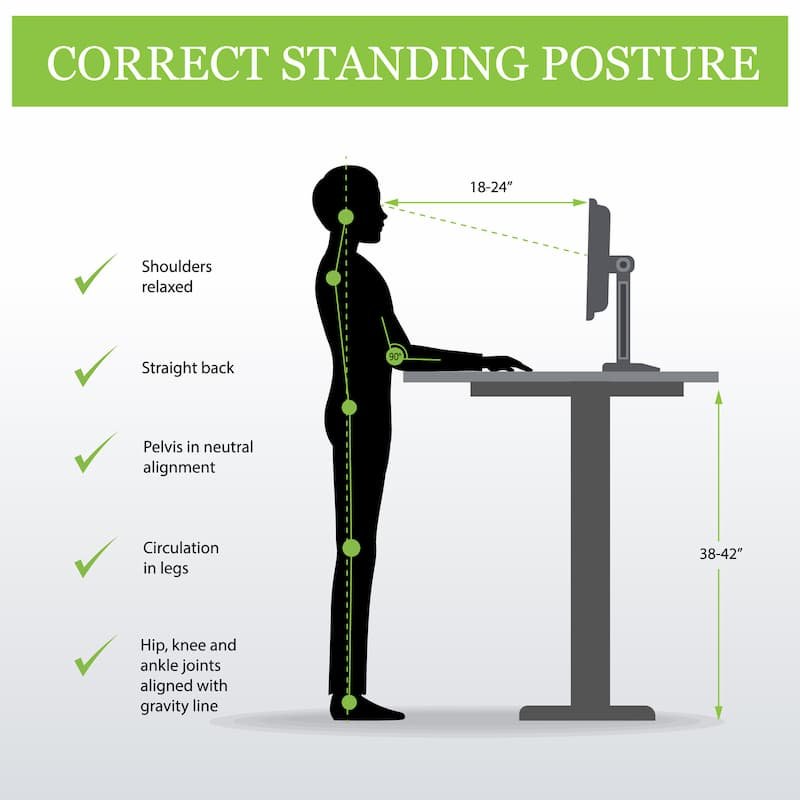
Image source: Bing (Web (fair-use with source credit))
Best Practices for Mixed Desk Setups
Mixed setups demand clear habits. Establish a routine for switching between sitting and standing that includes a quick posture check each time. Two minutes prevents hours of compensatory strain.
Keep notes on your preferred sitting height and standing height so you can return to them quickly after adjustments.
If you share the desk with someone else, agree on a baseline sitting height that accommodates both body types reasonably well. No single height will be perfect for both people, but a shared default reduces constant readjustment and keeps the workspace functional for everyone.
The Most Common Chair Height Mistakes
Most people adjust their chair height once and never think about it again. A few months later, they’re dealing with back pain or neck tension and have no idea why. The problem is rarely the chair itself.
It’s usually one of a handful of repetitive mistakes that compound over time.
These errors are easy to make because they feel fine at first. The discomfort creeps in gradually. By the time you notice something is wrong, weeks or months of poor posture have already taken effect.
Setting Height Without Considering the Desk
This is the single most common mistake and also the easiest to fix. People adjust the seat to a comfortable feeling without checking how the desk surface aligns with their arms. The result?
Shoulders hunched up toward the ears while typing, or elbows forced below a comfortable angle.
The desk and chair must work together as a system. If your forearms sit above the keyboard or you’re reaching upward constantly, the chair height doesn’t match the desk. Raise the seat slightly or lower the desk if possible.
Your elbow angle should rest near 90 degrees with shoulders relaxed down, not lifted up.
Ignoring Armrest Position
Armrests often get set independently from seat height, but they interact directly with each other. If the seat is too low, armrests end up pressing into the upper arms and restricting blood flow. If the seat is too high, armrests force the shoulders upward to maintain contact with the keyboard.
Adjust armrests after setting the seat height, not before. They should support the forearms lightly without lifting the shoulders. There should be space between the armrest and the top of your shoulder when you relax them down.
If the armrest touches your trap, lower it.
Leaving Feet Hanging for Too Long
Dangling feet might seem harmless until you notice your legs going numb or your lower back starting to ache. When feet don’t reach the floor, pressure builds in the thighs and circulation slows. The body compensates by shifting weight forward onto the sit bones, which changes pelvic alignment and stresses the lower spine.
Fix this with a footrest immediately. Don’t try to raise the chair higher to compensate because that creates a new problem. A properly positioned footrest restores neutral leg alignment and takes pressure off the thighs.
Overcompensating With a Cheap Footrest
Not all footrests work the same way. Cheap plastic ramps tilt the feet upward at an awkward angle and offer no cushioning. Better options provide a textured surface that grips shoes and supports the arch naturally.
Some include rollers for gentle foot movement during long sessions.
When selecting a footrest, look for one that allows the knees and hips to stay at their natural angles without forcing the feet into an elevated position. The goal is flat-footed support, not pointing the toes upward like a ballet dancer.
Forgetting to Re-Assess After Changes
Life changes. You switch to thick winter boots. You swap out chair casters for different ones.
You move from carpet to hardwood flooring. Each of these shifts the geometry subtly but meaningfully. Regular reassessment catches these changes before they become problems.
Check your setup whenever something changes. Five minutes of verification now prevents hours of discomfort later. Keep a simple mental checklist: feet flat, knees level or slightly below hips, forearms parallel, shoulders down.
If Your Chair Height Still Doesn’t Fit
Sometimes despite careful adjustment, the chair simply won’t cooperate with your body dimensions. This happens more often than you might think. Chairs come in limited size ranges.
Standard models cover an average population but leave outliers underserved.
When your body falls outside the typical range, creative solutions beat giving up. Read on to explore practical options that don’t require buying an entirely new chair immediately.
Adding a Footrest the Right Way
A quality footrest solves the dangling-feet problem cleanly. It raises the feet to the correct height while keeping the seat at a comfortable level for thigh support. Look for adjustable models that let you customize both height and angle.
Position the footrest directly under the desk where both feet can rest comfortably. The surface should be wide enough to support the entire foot without toes hanging off the edge. Angled designs that keep heels lower than the ball of the foot mimic natural standing posture better than flat platforms.
Choosing a Chair With a Wider Height Range
If you frequently find yourself at the extreme ends of your chair’s adjustment range, consider upgrading to a model with broader specifications. Tall-friendly chairs extend the gas lift upward to 26 inches or more. Compact chairs go lower to accommodate shorter frames.
Before purchasing, verify the seat height range against your measurements. Compare your inseam and thigh length to manufacturer specifications. Don’t guess.
A chair that covers your range comfortably leaves room for fine-tuning throughout the day. Explore options from well-reviewed desk chairs to find models with sufficient height range for your body.
Custom Solutions for Unusual Body Sizes
People who fall significantly outside standard sizing may need specialized approaches. Custom seat cushions can add or reduce effective height by an inch or two. Modified chair bases with extended or shortened gas lifts exist through specialty suppliers.
Some ergonomic consultants build custom setups from component parts.
These solutions carry higher costs but deliver personalized fit that off-the-shelf chairs can’t match. For someone who sits eight-plus hours daily, the investment often pays for itself in reduced discomfort and fewer health issues down the line.
When to Replace Rather Than Adjust
Replacement makes sense when the chair lacks basic adjustability features or shows signs of wear that compromise function. Gas cylinders that sink slowly, worn tilt mechanisms, or base plates that crack under normal use all signal end-of-life.
Compare repair costs against replacement costs honestly. Sometimes replacing the gas cylinder or adding replacement casters restores function adequately. Other times, the entire chair has simply exceeded its useful lifespan.
Both paths deserve consideration.
The 60-Second Posture Check
Once your chair height is adjusted, you need a quick way to verify everything sits correctly throughout the workday. This six-part checklist takes roughly sixty seconds and catches common drift before discomfort sets in.
Run through these points every morning and whenever you return from a break. Habits degrade slowly. Regular checks catch small errors before they become chronic problems.
Your Shoulders Shouldn’t Be Raised
Tension gathers first in the shoulders and neck. If you catch yourself shrugging while reaching the keyboard or mouse, the desk sits too high relative to the chair. Lower the chair slightly or raise the desk if possible.
Shoulders should rest naturally against the backrest without active effort to keep them down. Any deliberate muscle engagement indicates misalignment.
Your Elbows Should Sit Comfortable
Rest your arms at your sides and bend them to type. The elbow angle should land near 90 to 100 degrees with the desk surface supporting the forearms lightly. If the angle feels cramped or stretched, adjust seat or desk height.
Elbow position directly influences wrist alignment and keyboard typing comfort. Small corrections here ripple outward through the entire upper body.
Your Knees and Hips Have the Right Angles
Knees should bend naturally at approximately 90 degrees with feet flat on the floor or footrest. Hips should sit slightly higher than or level with the knees. Thighs should lie flat across the full seat width without sliding forward.
If knees rise above hips or thighs press hard against the seat edge, recheck seat height and reassess foot support.
Your Lower Back Has Support Without Slouching
The lumbar curve should maintain its natural inward arch without conscious effort. If you find yourself rounding the lower back to reach the desk, the seat is likely too low or the desk too far away. Pull the chair closer and raise the seat slightly.
Proper lumbar support reduces strain significantly. Consider whether your chair includes adjustable lumbar positioning and set it to match your spine’s natural curve. If you experience persistent pain, reading about best office chairs for back pain might help identify seating with better ergonomic support.
Your Eyes Meet the Top Third of the Monitor
Screen height connects indirectly to chair height because raising or lowering the chair changes your eye level relative to the monitor. The top third of the screen should sit at or slightly below eye level when seated comfortably.
Adjust monitor arm or stand height after finalizing chair position. Don’t raise the screen to compensate for a low chair. Fix the chair first, then tune the monitor.
Expert Tips From People Who Adjust This Daily
Occupational therapists, ergonomics consultants, and office managers see hundreds of workstation setups yearly. Their accumulated observations reveal patterns that casual users miss. These tips distill that practical wisdom into actionable guidance.
Apply these insights consistently and your setup improves faster than trial-and-error alone would allow.
What Occupational Therapists Look For
OTs prioritize dynamic movement over static perfection. No position stays comfortable indefinitely. They recommend micro-adjustments throughout the day rather than searching for one perfect setting.
Look for chairs that allow frequent posture shifts without constant readjustment. Seat depth adjustment, tilt tension control, and independent backrest recline all support movement variability.
How Office Managers Set Up Teams Consistently
Large offices face unique challenges. Employees span vastly different body types. Shared desks create turnover complications.
Standardization battles personalization.
Best practice involves documenting preferred settings for each employee on a simple reference card taped inside the desk drawer. New hires receive orientation that includes basic adjustment training. Quarterly check-ins catch drift before it becomes pain.
Tips That Take Two Minutes but Last All Day
Tiny habits produce outsized results over time. Here are three worth adopting immediately:
- Every hour, shift position slightly and check whether shoulders remain relaxed
- After standing for a break, sit back down and verify feet still touch the floor comfortably
- Before ending work, do a full posture scan and note any areas of tension for tomorrow’s adjustments
Red Flags That Mean Your Setup Is Off
Certain sensations demand immediate attention. Sharp pain anywhere along the spine, persistent numbness in fingers or toes, and headaches that begin mid-afternoon all signal potential misalignment.
Don’t push through these signals. Adjust your setup and reassess. If discomfort persists after correction, consider consulting a healthcare professional who specializes in ergonomic assessment.
Safety Standards and What to Look For
Chair safety isn’t just about preventing falls. Proper certification ensures structural integrity, reliable adjustment mechanisms, and materials that won’t degrade unexpectedly. Understanding these standards helps you avoid products that look good but pose hidden risks.
Manufacturers bear responsibility for meeting recognized safety benchmarks. Buyers benefit from knowing what certifications matter and how to verify them before purchase.
BIFMA Certification — Why It Matters
The Business and Institutional Furniture Manufacturers Association sets voluntary performance standards widely adopted across the industry. BIFMA certification covers stability testing, durability cycles, and structural load ratings.
Look for the BIFMA seal on product documentation or the chair base itself. Items lacking this certification may still be safe but haven’t undergone the same rigorous testing protocols.
Gas Cylinder Safety and Stability
Pneumatic lift cylinders power seat height adjustment in most modern chairs. Quality cylinders undergo pressure testing and include safety valves to prevent uncontrolled ascent. Cheaper alternatives sometimes lack adequate safeguards.
Verify that replacement cylinders or existing mechanisms carry appropriate safety ratings. Signs of cylinder failure include slow sinking, sudden drops, or difficulty holding position at selected heights.
OSHA’s General Guidelines on Workstation Setup
OSHA doesn’t prescribe exact measurements but provides guidance emphasizing individualized assessment and proper equipment selection. Their resources stress preventing musculoskeletal disorders through thoughtful workstation design rather than one-size-fits-all rules.
Refer to OSHA ergonomics guidelines for detailed recommendations on workstation configuration and employee training programs. Government agencies like OSHA provide comprehensive ergonomics resources at https://www.osha.gov/ergonomics.
Red-Flag Features to Avoid When Buying
Certain design choices signal corner-cutting regardless of price point. Wheels that don’t lock properly, seats that shift position during normal use, and armrests that wobble or snap into place unpredictably all indicate quality issues.
Base plates made from thin stamped metal rather than molded polymer or reinforced composite deserve scrutiny. These components bear concentrated stress and failure can result in sudden collapse. Choose chairs built from reputable manufacturers with demonstrated track records.
Keeping Your Ergonomic Setup Working Long-Term
Finding the right chair height represents progress, not completion. Bodies change. Work habits evolve.
Seasons affect clothing thickness and footwear choices. Staying current requires periodic review rather than one-time adjustment.
Establish a simple maintenance routine that keeps your setup optimized month after month. Small efforts prevent major disruptions down the road.
Rechecking After You Change Chairs or Desk
Moving to a new workspace triggers reset cascades. New chair dimensions differ. New desk heights vary.
New flooring affects caster behavior. Each variable demands fresh assessment.
Treat every move as an opportunity to improve rather than a chore. Run through the full assessment process again and note improvements or regressions compared to previous configurations.
What to Do When You Feel New Discomfort
New aches appearing weeks after successful setup usually trace back to one of three sources: changed body proportions from weight fluctuation, altered daily routines introducing new postural demands, or gradual mechanism wear allowing drift from optimal positions.
Address each possibility systematically. Track lifestyle changes. Inspect chair mechanisms for looseness.
Reassess from scratch using the measurement process described earlier.
Maintenance Checks That Prevent Setback
Monthly inspections take five minutes and catch problems early. Tighten loose bolts and screws. Lubricate moving parts per manufacturer instructions.
Clean casters regularly to ensure smooth rolling. Test all adjustment functions for proper engagement.
Document findings in a simple log. Noting that a bolt tightened last month helps predict when future maintenance intervals might occur.
Tracking What Works for Your Body Over Time
Personal ergonomics data proves valuable across years of use. Record your ideal seat height, armrest settings, and footrest position after achieving comfort. Update entries whenever adjustments improve results.
Future purchases become easier decisions when you carry documented preferences rather than vague memories. Recommendations from others gain relevance when grounded in specific measurements tied to your frame. Consider reviewing comprehensive chair guides to understand how different chair types compare in adjustability and longevity.
Quick Answer
The correct chair height for desk sitting positions the seat so your feet rest flat on the floor or footrest, knees sit level with or slightly below hips, thighs lie flat across the full seat pan, and forearms reach the desk surface comfortably at approximately a 90-degree angle. For most average-height adults using a standard 29-to-30-inch desk, this typically falls between 18 and 22 inches from the floor to the top of the seat pan. Adjust in quarter-inch increments and verify each change by checking hip angle, knee position, and shoulder relaxation before moving to the next adjustment.
Frequently Asked Questions About What’s the Right Chair Height for Your Desk
What’s the ideal seat height for a standard 30-inch desk?
For a standard 30-inch desk, aim for a seat height around 18 to 20 inches for most average-height adults. This places elbows near 90 degrees with shoulders relaxed while keeping feet flat. Individual proportions shift this range up or down by several inches.
Taller users often need 21 to 24 inches. Shorter users may require 16 to 18 inches paired with a footrest.
Should my knees be higher than my hips when sitting?
No, knees should sit level with or slightly below hip level when seated correctly. When knees rise above hips, the pelvis tilts backward and the lower spine rounds into a C-curve. This position increases disc pressure and strains supporting muscles throughout the day.
Keep thighs flat across the seat pan with gentle knee bend to maintain neutral pelvic alignment.
How do I know if I actually need a footrest?
You need a footrest when you can slide more than two fingers between the floor and the underside of your thighs while sitting with feet flat. You also need one when your heels dangle or balance precariously on the balls of your feet. A gap larger than two inches indicates insufficient support.
Choose a footrest that raises feet to fill that gap without forcing knees upward.
Does chair height affect monitor position?
Yes, chair height directly changes eye level relative to the screen. Raising the seat lifts your eyes, potentially requiring the monitor to move higher. Lowering the seat drops your line of sight, possibly necessitating a lower screen position.
Always adjust chair height first, then set monitor height afterward. This sequence prevents compensatory head tilting and neck strain during prolonged use.
Can too-low or too-high seating cause back pain?
Yes, both extremes contribute to lower back discomfort over time. Too-low seating forces the pelvis backward, flattening the natural lumbar curve and loading discs unevenly. Too-high seating compresses thigh tissue against the seat edge, reducing circulation and causing compensatory posture shifts that strain the lower back.
Maintaining neutral hip and knee angles prevents these cascading problems.
When should I consider buying a new chair instead of adjusting?
Replace the chair when the existing model lacks sufficient height range for your body dimensions, shows mechanical wear like sinking gas cylinders or loose tilt mechanisms, or fails basic safety certifications. Also replace if adjustments cannot eliminate persistent discomfort despite following proper assessment procedures. Quality adjustable chairs from reputable manufacturers typically serve average to above-average frames well within their specified ranges.