Sitting for eight hours a day wrecks your back if your chair fails you. The right seat saves your spine and keeps you productive through long workdays. Finding the best chair for long working hours starts with understanding what actually matters.
Most people buy based on looks or price alone. They end up with poor lumbar support that digs into the wrong part of the spine. They ignore seat depth and wake up with numb legs.
That’s why we’re breaking this down step by step so you can make the right call.
Quick Answer
The best chairs for long working hours feature full adjustability across seat height, seat depth, lumbar support, and armrests. Herman Miller and Steelcase lead the premium tier with ten-year warranties. For most people under 250 pounds, a mesh-back chair with synchro-tilt and four-dimensional armrests hits the sweet spot.
Always test the chair before committing. Return policies and trial periods protect your investment if comfort doesn’t match expectations after a full workday.
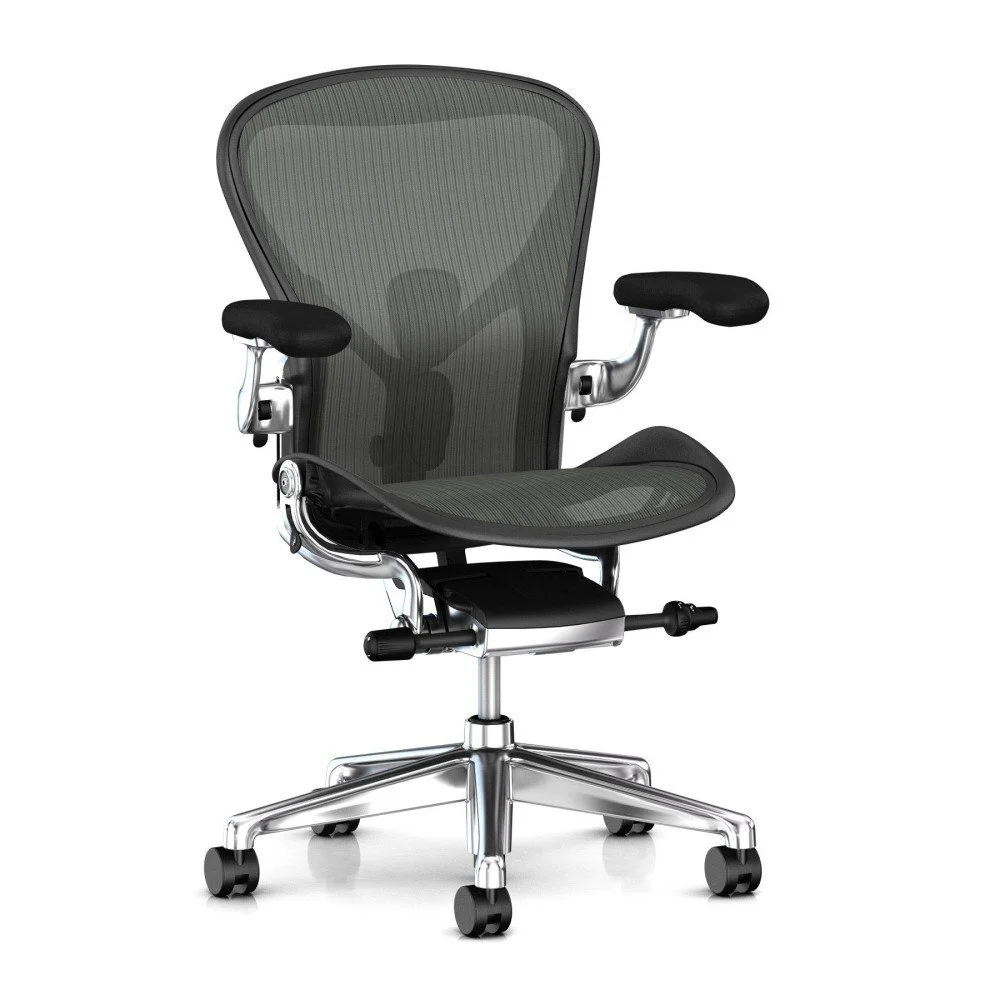
Image source: Bing (Web (fair-use with source credit))
The Problem With Most Office Chairs — And Why It Hurts
You’ve probably sat in a chair that felt fine at first. Then three hours in, your lower back screams. Your shoulders creep up toward your ears.
Your thighs go numb because the seat edge cuts off circulation. You blame yourself for sitting too long instead of blaming the chair.
Most office chairs fail during extended use because they prioritize appearance over actual adjustability. The price tag says ergonomic but the specs tell a different story. Fixed lumbar pads sit at the same height regardless of whether you’re five-foot-two or six-foot-four.
Non-adjustable armrests force your shoulders into elevation. Cheap foam bottoms out after twelve months and never recovers.
The Real Physical Cost of Poor Seating
Chronic poor posture from inadequate seating creates compounding problems. Lower back pain affects approximately 80 percent of adults at some point in their lives. Prolonged sitting increases pressure on lumbar discs by up to 40 percent compared to standing.
That disc pressure compounds with each hour spent in a poorly supported seat.
Upper trap tension develops when armrests sit too high or too far forward. Your shoulders raise instinctively to meet them. That constant mini-shrug fatigues the muscles between your neck and shoulder blades.
Headaches follow as tension migrates upward.
Thigh numbness signals compromised blood flow. If the seat pan edge presses into the back of your knees or thighs, arterial flow restricts. Nerve compression causes that pins-and-needles sensation.
Over time, repeated episodes can contribute to chronic circulation issues in the legs and feet.
Hip discomfort often goes unnoticed until it becomes severe. Incorrect seat depth forces you either too far forward with no back support or too far back with your lower spine unsupported. Both positions misalign the pelvis and strain the hip flexors.
Sciatica flare-ups frequently trace back to this exact pelvic positioning problem.
Why Cheap Foam Degrades Fast
Foam compression is permanent once it passes its elastic limit. Budget chairs use low-density polyurethane rated below 1.8 pounds per cubic foot. That foam collapses within eighteen to twenty-four months of daily use.
You feel it as a dip in the center or sagging near the front edge. No amount of adjustment fixes bottomed-out foam.
Mesh holds its shape longer because the material distributes weight across a wider surface area. But mesh isn’t immune to wear. Cheap mesh sags within two to three years.
Quality mesh retains tension for the lifespan of the chair when properly tensioned at purchase.
Breathability matters more than marketing claims suggest. Foam traps heat against your body. Mesh allows air circulation through the entire seat and backrest.
If you run warm or live in a hot climate, mesh prevents the sweat-soaked discomfort that makes long sits unbearable.
What Actually Makes a Chair Good for Long Sitting Hours
Four adjustments separate chairs worth buying from chairs collecting dust. Skip any one of these and you’re gambling with your comfort. The adjustments work together as a system.
Get them right and your body stays neutral. Miss one and compensatory postures take over.
Seat Height: The Foundation of Everything
Seat height determines whether your feet stay flat on the floor. Your thighs should rest parallel to the ground with knees bent at roughly ninety degrees. If your feet dangle, pressure builds behind your knees.
If your knees rise above your hips, lumbar support loses effectiveness.
Adjustment range matters significantly here. Chairs spanning 16 to 21 inches accommodate most people between five-foot and six-foot-two. Anyone outside that range needs to verify the specific model’s minimum and maximum heights before purchasing.
Seat Depth: The Forgotten Adjustment
Seat depth determines how much space exists between the seat edge and the back of your knees. The rule of thumb is two to three finger widths. Too shallow and your thighs lack support.
Too deep and the edge digs into your hamstrings.
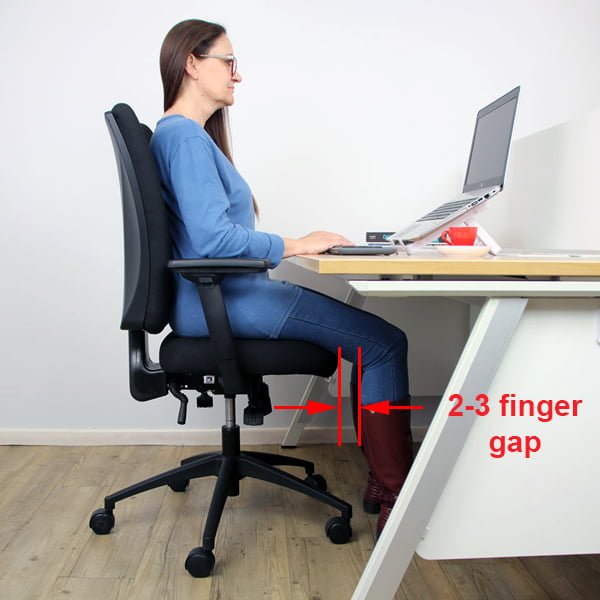
Image source: Bing (Web (fair-use with source credit))
Shorter individuals frequently struggle with standard seat depths. Many executive chairs start at 19 inches deep. A person who is five-foot-four might need 15.5 inches to clear their knees properly.
Look for chairs with sliding seat pans or models specifically designed for petite frames.
Lumbar Support: Where Lower Back Health Lives
Lumbar support must match the natural inward curve of your lower spine. That curve sits between your ribcage and pelvis, roughly at the L3 to L5 vertebrae. Support positioned too high presses against your thoracic spine.
Support positioned too low misses the curve entirely and does nothing.
Adjustable lumbar support lets you position the pad precisely where your spine curves inward. Dynamic lumbar systems move with you as you shift positions. Fixed lumbar pads come in one size and one height.
They work for some bodies and completely miss others.
Armrest Adjustability: Shoulders Should Stay Down
Armrests should support your forearms without lifting your shoulders. When you rest your elbows on properly set armrests, your shoulders stay relaxed at their natural height. If you have to shrug to reach them, you’re creating tension that accumulates over hours.
Two-dimensional armrests adjust only height and width. Three-dimensional adds depth movement forward and backward. Four-dimensional includes pivot and swivel capabilities.
More dimensions mean better customization. Fewer dimensions cost less but may not accommodate your body.
Recline Tension: Weight-Dependent Adjustment
Recline tension should resist your body weight, not some arbitrary setting. A 130-pound person needs significantly less resistance than a 250-pound person. If the recline feels too easy, you’ll slide forward and slouch.
If it feels too stiff, you won’t recline at all.
Look for a tension knob that adjusts smoothly across a meaningful range. Synchro-tilt mechanisms move the backrest and seat pan in proportion to each other. This maintains proper thigh support while reclining.
Single-lever reclines often shift your position uncomfortably.
Top Picks: Who Makes the Best Ergonomic Chair Right Now
The market splits into three tiers. Premium chairs cost $800 to $1,800 and last fifteen years or more. Mid-range chairs fall between $300 and $700 with five-to-ten-year warranties.
Budget options under $300 serve short-term needs but rarely survive beyond three years of daily use.
Premium Tier: Herman Miller and Steelcase Dominance
Herman Miller chairs command premium prices for good reason. The Aeron features a patented Pellicle mesh suspension that distributes weight evenly across the entire seat and backrest. PostureFit SL adds sacral and lumbar support points that adapt to your spine’s natural curves.
The mesh breathes exceptionally well, making it ideal for warm environments.
The Embody takes a different approach with pixelated support technology. Small individual support elements move independently to maintain contact with your back throughout movement. The recline philosophy encourages dynamic sitting rather than fixed positions.
Heavy-set users often prefer the Embody’s broader seat profile over the Aeron’s contoured design.
Steelcase Leap v2 focuses on natural spine movement. Its LiveBack technology changes shape as you move, mimicking the curvature of your spine through every position. The 4D armrests adjust in every direction including width and depth.
The seat depth adjustment accommodates a wide range of leg lengths without requiring additional accessories.
The Gesture model expands on the Leap’s philosophy for modern work habits. It accommodates laptop use, tablet holding, and varied arm positions better than most competitors. The name comes from how the chair supports the gestures people make while working.
Price typically runs slightly higher than the Leap due to the expanded adjustability.
Mid-Range Contenders: Branch, Autonomous, and Fully
Branch Trend delivers solid ergonomics at roughly half the Herman Miller price. Four-dimensional armrests and adjustable lumbar support match premium specifications. The seat depth adjustment covers most body types.
Build quality holds up well according to aggregate reviews, though long-term durability beyond five years remains unproven for many units in the field.
Autonomous ErgoChair Pro offers aggressive adjustability at competitive pricing. The synchro-tilt mechanism and breathable mesh back address core ergonomic needs. Headrest adjustability covers a wide range.
Some reviewers note the armrests feel less sturdy than premium alternatives after extended use.
Fully’s Set-A-Form line provides factory-customized options. You select dimensions, materials, and adjustability features during configuration. This approach ensures the chair matches your body measurements at purchase rather than requiring post-purchase tweaking.
Custom orders carry longer lead times and limited return flexibility.
Gaming Chairs: A Note on Ergonomics
Gaming chairs prioritize aesthetics and bucket-seat styling over true ergonomic function. The high backs and headrests look impressive but rarely adjust properly for different body types. Most gaming chairs use fixed recline mechanisms without tension adjustment.
Foam cushions compress faster than mesh or quality upholstery.
Ergonomic variants from brands like secretlab attempt to bridge the gap. Adjustable lumbar pillows and 4D armrests improve functionality. However, the bucket-seat foundation still limits pelvic freedom compared to traditional task chairs.
If gaming aesthetics matter to you, these hybrid options exist. True ergonomic performance usually requires a dedicated task chair. Check out our picks for the best gamer chairs if style still matters alongside comfort.
Budget Wins: Where Compromises Happen
IKEA Markus serves well for lighter users and shorter sit sessions. The fixed mesh back breathes adequately. Height adjustment covers standard ranges.
The seat depth is non-adjustable, which frustrates shorter users. Build quality lasts approximately five years with moderate daily use before mechanisms loosen.
HON and AmazonBasics offer functional basics at minimal cost. Fixed lumbar support and limited armrest adjustability define these chairs. They work adequately for part-time use or rotation with other seating.
Daily eight-hour use typically exceeds their design parameters within two years. Foam degradation and gas lift failures appear commonly in extended reviews. See our analysis of cheap office chairs for additional budget options that balance cost and durability.
Side-by-Side Comparison: Key Specs That Actually Matter
Numbers on spec sheets tell the real story. Compare these metrics across models before committing to any purchase. Adjustable ranges matter more than absolute numbers because they determine whether the chair fits your body.
| Specification | Herman Miller Aeron | Steelcase Leap v2 | Branch Trend | Autonomous ErgoChair Pro |
|---|---|---|---|---|
| Seat Height Range | 16″ to 20.75″ | 16″ to 20.5″ | 16.5″ to 21″ | 17″ to 21.5″ |
| Seat Depth | Fixed 16.75″ | Adjustable 15.5″ to 18.75″ | Adjustable 16″ to 19″ | Adjustable 15.75″ to 19.25″ |
| Weight Capacity | 350 lbs | 400 lbs | 300 lbs | 330 lbs |
| Armrest Adjustment | 3D (height, width, depth) | 4D (height, width, depth, pivot) | 4D | 3D |
| Recline Range | 15 degrees | 22 degrees | 18 degrees | 20 degrees |
| Warranty | 12 years | 12 years | 5 years | 3 years |
| Return Window | 45 days | 120 days | 30 days | 14 days |
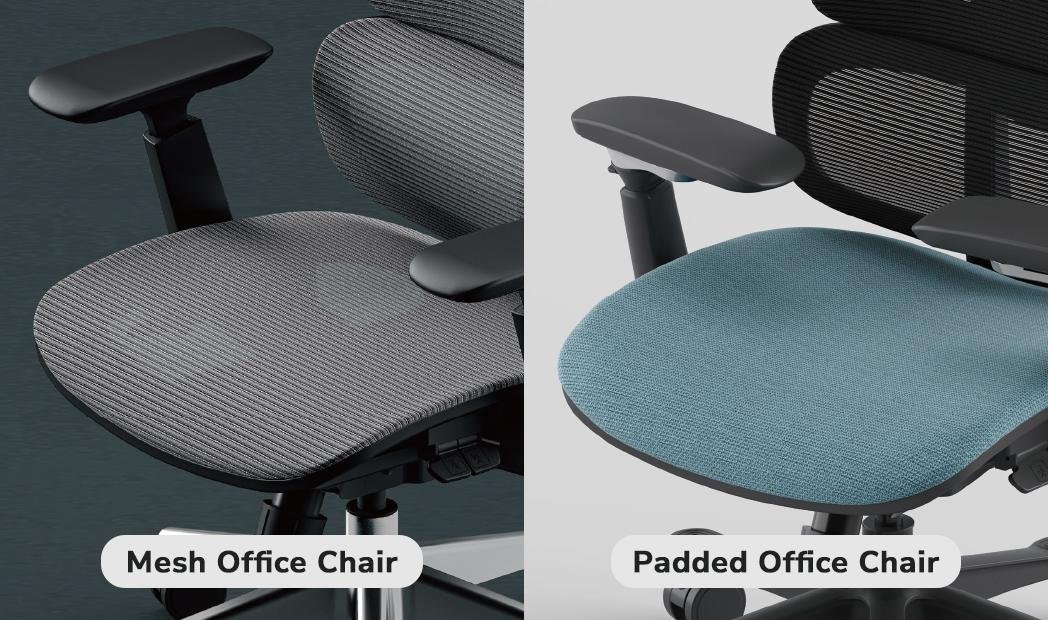
Image source: Bing (Web (fair-use with source credit))
What These Numbers Mean for Your Decision
Seat depth adjustability appears in premium and mid-range models but remains absent in many budget chairs. If you’re under five-foot-six or over six-foot, seek out sliding seat pans. Fixed depth chairs force compromises that create pressure points over time.
Weight capacity determines frame and mechanism longevity. A 350-pound rated chair handling a 200-pound user experiences significantly less stress than a 250-pound rated chair handling the same user. Exceeding the rated capacity voids warranties and risks mechanical failure.
Always select a chair rated at least 50 pounds above your body weight.
Warranty length correlates with manufacturer confidence in durability. Ten-year warranties typically cover all mechanisms and parts including gas lifts and casters. Five-year warranties often exclude certain components.
Three-year warranties represent budget-tier products where replacement parts may be unavailable after a few years.
Return windows vary dramatically. Thirty-day trials let you test a chair through multiple workweeks. Fourteen-day windows barely allow basic assessment.
Extended return policies from manufacturers like Steelcase reflect confidence in product fit and provide buyer protection.
Best Chair for Your Body Type and Situation
Body type dictates which adjustments matter most. A chair perfect for a tall heavyset man may torture a petite woman. Understanding your own measurements and pain points is the first step to narrowing down the right choice.
Here’s how to match your body and situation to the best model.
Short Frames (5’2″ and Under)
People under five-foot-two often have legs that are too short for standard chairs. Their feet either dangle or require a footrest to stay flat. The seat pan frequently presses against the back of their knees, cutting off circulation.
Look for chairs with a minimum seat height around 15.5 inches and an adjustable seat depth. Models like the Herman Miller Aeron (size B) or the Branch Trend with a sliding pan work well. If you must buy a fixed-depth chair, pair it with a firm footrest to keep thighs level.
Tall Frames (6’0″ and Over)
Tall sitters face two problems: the seat bottom isn’t deep enough for their femurs, and the backrest tops out below their shoulder blades. You need a chair with a seat depth of at least 18 inches and a backrest height that reaches the upper traps. Steelcase Gesture and Embody both accommodate taller frames comfortably.
Always check the manufacturer’s listed maximum user height, not just weight capacity.
Heavy-Set Users (250+ lbs)
Weight capacity isn’t just a safety number. It predicts how long the gas lift and tilt mechanism will hold up under daily stress. If you weigh between 250 and 300 pounds, select a chair rated for at least 350 pounds.
This buffer prevents premature wear on the cylinder and base. The Steelcase Leap and Gesture both support up to 400 pounds. Wider seat cushions and heavier-duty nylon bases are also worth looking for.
Hot Sleepers and Warm Climates
Foam seats trap body heat like a memory foam pillow. Mesh chairs breathe because air moves freely through the suspension material. If you live in a warm climate or simply run hot, prioritize full mesh designs.
The Herman Miller Aeron and many mid-range mesh chairs keep you cool during summer marathons. Upholstered chairs can still work if they use open-weave fabric, but mesh remains the gold standard for airflow.
Chronic Lower Back Pain
If you already deal with disc issues, sciatica, or general lumbar strain, your chair needs active support. Fixed lumbar pillows often push against the wrong vertebrae. Instead, seek dynamic lumbar systems that follow your spine’s curve.
The Steelcase Leap’s LiveBack technology or Herman Miller’s PostureFit SL adjust to your posture in real time. Learn more about chairs designed specifically for back pain to understand which features actually relieve pressure rather than just padding it.
Cold Offices
In air-conditioned offices or drafty rooms, mesh can feel uncomfortably cold on exposed skin. High-quality leather or dense fabric seats retain warmth better. Some users add a thin wool cushion for extra insulation without sacrificing ergonomic support.
The key is finding a chair with good posture mechanics first, then addressing temperature second with accessories.
The Hidden Costs of Getting This Wrong
Buying the wrong chair costs far more than the price tag suggests. Cheap chairs fail fast, forcing repeat purchases within two years. That adds up quickly.
A $200 office chair replaced every two years costs $100 annually. A $1,200 premium chair lasting ten years costs $120 per year. The math favors quality when you count total cost of ownership.
The Real Expense of Physical Discomfort
Lower back pain leads to missed workdays, physical therapy co-pays, and over-the-counter medication bills. The CDC notes that ergonomic interventions reduce musculoskeletal disorders by up to 50 percent. Poor seating decisions reverse that progress.
Every hour spent adjusting uncomfortably chips away at focus and mood.
Productivity drops significantly when your body constantly signals distress. Studies show that discomfort reduces cognitive performance by up to 15 percent during sustained tasks. Your chair isn’t just furniture.
It’s infrastructure for your body.
Refurbished Premium Chairs: Smart Savings or Risk?
Refurbished Herman Miller and Steelcase chairs sell for 40 to 60 percent off retail. They can be an excellent deal if the refurbisher replaces worn parts. Gas lifts, casters, armrest pads, and mesh tension all wear out over time.
A quality refurbsitor replaces these components and tests the chair to original specifications.
Buy only from certified refurbishers who offer warranties comparable to new models. Avoid private marketplace listings with no return policy. A stripped warranty turns a “great deal” into a costly mistake.
Look for companies that provide at least a two-year warranty on refurbished units.
Common Mistakes People Make When Buying an Ergonomic Chair
Even well-intentioned buyers fall into traps. These mistakes waste money and time, leaving you stuck with a chair that looks great but hurts to sit in.
Buying the Most Expensive Chair Without Testing
Price does not guarantee fit. A $1,500 chair can feel terrible on your body if the proportions mismatch yours. Always test before you buy, ideally in person.
If buying online, verify the return window is at least 30 days so you can assess comfort after several workdays.
Ignoring Seat Depth
This is the most common oversight. A seat too deep creates pressure behind the knees. A seat too shallow leaves your thighs unsupported.
Measure your knee-to-seat distance and look for adjustable depth. If a chair lacks this feature, measure its fixed depth against your body. Subtract two finger widths as a safety margin.
Setting Lumbar Support Too High
Many users push lumbar support all the way up. It ends at the mid-back instead of the lower curve. This misalignment pushes the spine forward into a C-shape.
Adjust it until you feel support at the small of your back, not above the belt line.
Choosing a Chair That Matches the Desk Height
Your desk height should remain fixed. Your chair height adjusts to match it. Raise or lower the chair so your elbows hit the desk surface at roughly 90 degrees with shoulders relaxed.
Never raise the desk to match a poorly adjusted chair.
Forgetting About Casters
Carpet floors need large, soft wheels. Hardwood or tile needs hard, smooth casters. Using the wrong type scratches floors or makes rolling nearly impossible.
Most chairs ship with dual-wheel casters for both surfaces. Verify the included type matches your flooring.
Skipping the Trial Period
Zero-risk purchases don’t exist unless you use a trial period. Sitting in a showroom for five minutes tells you almost nothing. You need a full workweek of actual use.
Use the return window generously. Test the chair during your longest sitting sessions.
Over-indexing on Looks
A chair might look stunning in product photos but feel like a brick after an hour. Prioritize adjustment range and materials over color or aesthetic trends. Mesh and neutral fabrics age better visually and functionally.
How to Set Up and Adjust Your New Chair (Step by Step)
Proper setup makes a massive difference. Even the best chair feels wrong if configured incorrectly. Follow these steps in order, spending at least 30 minutes per session during the first week.
Step 1: Measure Yourself First
Grab a tape measure. Record your total height, inseam length, and current weight. Note any existing pain points: lower back, hips, neck, shoulders.
This baseline tells you what adjustments to prioritize later.
Step 2: Set Seat Height
Sit in the chair with your feet flat on the floor. Adjust the height lever until your thighs are parallel to the ground. Your knees should bend at roughly 90 degrees.
If your feet don’t reach the floor comfortably, add a footrest rather than raising the seat further.
Step 3: Adjust Seat Depth
Slide the seat pan forward or backward. You should be able to fit two to three fingers between the seat edge and the back of your knees. Your entire thigh should rest supported without pressure on the hamstrings.
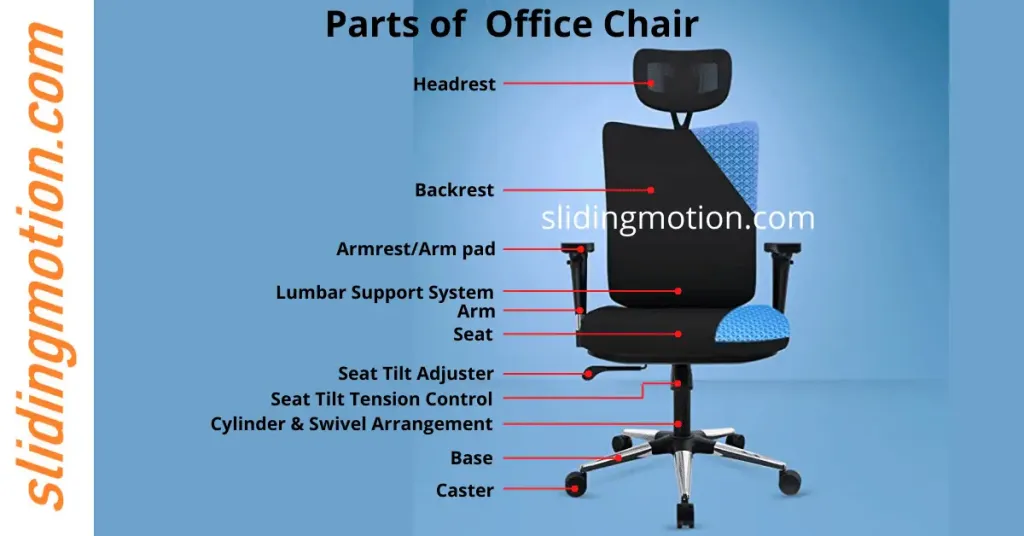
Image source: Bing (Web (fair-use with source credit))
Step 4: Position Lumbar Support
Adjust the lumbar pad height and depth until it fills the inward curve of your lower spine. You should feel even support across the lumbar region, not a single pressure point. Sit back fully so your spine contacts the backrest along its entire length.
Step 5: Set Armrest Height
Raise or lower the armrests so your elbows rest at about 90 to 100 degrees. Your shoulders should remain down and relaxed, not shrugged upward. The armrests should support your forearms without pushing your shoulders toward your ears.
Step 6: Calibrate Recline Tension
Use the tension knob, usually located under the seat, to adjust recline resistance. Start with a medium setting. Lean back and see if the chair resists smoothly without feeling too loose or too stiff.
You should be able to recline with minimal effort but still feel supported. Heavier users typically need higher tension settings.
Step 7: Test for 30 Minutes
Sit normally for at least 30 minutes. Pay attention to pressure points, slouching tendencies, and any new discomfort. Shift positions frequently.
Notice whether your lower back stays in contact with the lumbar support when you recline slightly.
Step 8: Re-adjust After One Week
Your body settles into new positions over several days. After a week, re-check every adjustment. Minor tweaks often become necessary as you discover your natural resting posture.
Maintaining Your Chair: Making It Last 10+ Years
Regular maintenance extends chair life dramatically. Even premium models neglect care will develop squeaks, loose mechanisms, and worn parts within five years. A few simple habits keep everything running smoothly.
Cleaning Mesh and Fabric
Vacuum mesh seats weekly with a brush attachment to remove dust and lint. For fabric upholstery, use a gentle fabric cleaner monthly. Never saturate mesh with water, as moisture weakens the suspension fibers over time.
Spot-clean spills immediately with a damp cloth.
Lubricating Moving Parts
Once a year, apply a small amount of silicone spray or white lithium grease to the tilt mechanism pivot points and the gas lift piston rod. Wipe away excess. Squeaking usually means friction where there should be smooth motion.
Replacing Worn Components
Armrest pads crack and peel with daily use. Many manufacturers sell replacement pads separately. Casters wear out when bearings degrade or wheels flatten.
Swap them out using the same clip-in method. Lumbar cushions may compress over time. Consider replacing them or adding a thin gel topper.
Tightening Bolts Monthly
Check all visible bolts and screws once a month. Vibration from daily use gradually loosens them. Tighten with the appropriate Allen wrench or screwdriver.
Keep track of any missing hardware from assembly and order spares if needed.
Rotating Position
If you park your chair in one spot under bright sunlight, the seat material may fade unevenly. Rotate the chair 180 degrees every few months to distribute UV exposure. This simple habit preserves appearance and material integrity.
Safety Standards and Certifications to Look For
Certifications verify that a chair meets rigorous safety and performance benchmarks. They protect you from flimsy constructions and harmful chemical emissions. Always prioritize chairs that carry recognized certifications.
BIFMA Certification
BIFMA (Business + Institutional Furniture Manufacturers Association) sets voluntary consensus standards for office furniture. ANSI/BIFMA X5.1 covers general office chair strength and durability. ANSI/BIFMA X5.5 addresses task chair performance.
Look for the BIFMA seal on product pages or packaging.
Greenguard Gold Certification
Greenguard Gold verifies low chemical emissions from furniture materials. It ensures indoor air quality isn’t compromised by volatile organic compounds off-gassing from foams and adhesives. This certification matters especially for home offices where ventilation may be limited.
Weight Rating Transparency
Manufacturers must disclose maximum weight capacity. Exceeding this limit voids warranties and risks catastrophic failure of the gas lift or base. Choose a chair rated at least 50 pounds above your body weight as a safety margin.
Floor Protection Requirements
Caster wheels damage hardwood, tile, and vinyl if not chosen correctly. Hardfloor casters have smooth rubber or polyurethane treads. Carpet casters have larger, ball-bearing wheels that roll easily on pile.
Using the wrong type scratches floors and makes movement difficult.
Frequently Asked Questions
### How long should I expect a quality ergonomic chair to last?
A well-maintained premium ergonomic chair lasts 10 to 15 years with daily use. Mid-range models typically endure 5 to 8 years. Budget chairs often show significant wear within 2 to 4 years.
Replace components like casters and armrest pads to extend lifespan.
### Can I use an ergonomic chair for gaming sessions?
Yes, many ergonomic chairs support long gaming sessions equally well. Gaming chairs sacrifice adjustability for style. True ergonomic task chairs offer superior lumbar support and customizable fit.
Choose an ergonomic chair if comfort matters more than racing aesthetics.
### Is a mesh chair better than foam for back pain?
Mesh distributes pressure more evenly and keeps the spine in a neutral position. Foam can conform closely but often compresses unevenly. Both can work for back pain if they provide adequate lumbar support.
Mesh wins on breathability and long-term shape retention.
### What’s the best chair for someone with sciatica?
Look for a chair with adjustable seat depth and firm, contoured lumbar support. Avoid seats that tilt the pelvis backward, which aggravates sciatic nerve compression. A slight forward tilt or neutral pelvis position reduces nerve tension.
Test multiple models before deciding.
### How do I know if a chair is truly ergonomic?
True ergonomics means full adjustability: seat height, seat depth, lumbar support height and depth, armrest height and width, and recline tension. If a chair lacks more than one of these, it’s not fully ergonomic. Certifications like BIFMA also indicate independent testing.
### Should I buy a refurbished Herman Miller or Steelcase?
Refurbished premium chairs can save 40 to 60 percent while delivering near-new performance. Only buy from certified refurbishers who replace worn parts and offer warranties. Private sales carry risk due to unknown usage history and missing components.
The Bottom Line: Which Chair Should You Actually Buy?
Choosing the right chair comes down to matching your body, budget, and priorities. There is no single best chair for everyone, but there is a best chair for you. Use this quick decision matrix to narrow your options.
Premium Investment ($800+)
Choose a Herman Miller Aeron or Steelcase Leap if you sit eight or more hours daily, have chronic back issues, or want a chair that outlasts your career. These models hold value exceptionally well and can often be resold for half the original price.
Best Value ($400 to $700)
The Branch Trend and Autonomous ErgoChair Pro deliver about 80 percent of premium performance at half the cost. They suit most remote workers who need solid adjustability without luxury pricing. Expect five to seven years of reliable service.
Budget Win (Under $400)
IKEA Markus or HON models work for lighter users and part-time home offices. If you sit less than four hours daily, a budget chair may suffice. Plan to replace it within three years and factor that into your total cost.
See our guide to desk chairs for additional affordable recommendations.
When to Buy Used
A certified refurbished Herman Miller or Steelcase with remaining warranty is often smarter than buying new mid-range. The resale market is strong, meaning you can recoup costs later. Always verify part replacements and warranty terms before purchasing.
Your chair is the foundation of your workspace. Invest time in selecting and adjusting it properly. The difference between a good chair and a great one shows up in your comfort, focus, and long-term health.