Image source: Bing (Web (fair-use with source credit))
Finding the right office chair for back pain can feel overwhelming when you sit in discomfort every single day. The market floods with options promising relief, but most people pick the wrong chair simply because they do not understand what their specific condition actually needs. A Herman Miller Aeron and a Steelcase Leap solve entirely different problems.
Choosing between them without knowing your diagnosis is like picking pain medication without knowing what causes the ache.
Research from ergonomic studies shows that lumbar support positioning alone can change spinal loading by up to 40 percent. Per OSHA ergonomic guidelines, chairs with adjustable lumbar depth and height significantly reduce lower back strain compared to fixed-support models. That difference matters enormously when you sit eight or more hours daily.
Understanding how back conditions map to chair features helps you avoid costly mistakes and find relief faster.
Quick Answer
An office chair for back pain needs adjustable lumbar support that matches your spine curve precisely. Look for seat depth adjustment so your knees stay slightly bent without pressure behind them. Recline tension should match your body weight, not exceed it.
Quality brands like Herman Miller and Steelcase offer five-to-twelve-year warranties as of 2026. BIFMA certification ensures the chair meets structural safety standards. Most ergonomic chairs cost between $500 and $2,000 for reliable long-term use.
What’s Really Causing Your Back Pain at Desk
Why Most Office Chairs Make It Worse
Your back pain likely starts long before you notice it. Most people sit with their pelvis tilted backward, flattening the natural lumbar curve. This position puts excessive pressure on the discs in your lower spine.
An office chair designed poorly amplifies this problem instead of solving it.
The average office worker sits for nine hours per day according to workplace ergonomics data. Nine hours of sustained poor posture creates cumulative damage. Your lumbar discs compress under this load.
Over time, the discs lose hydration and begin to degenerate. That is why afternoon back pain feels worse than morning stiffness.
Cheap office chairs often have fixed lumbar pads positioned too high or too low. Some lack any lumbar support at all. Others offer padding that is too firm, creating pressure points instead of supporting the curve.
Seat pans that are too deep force you to slouch forward to reach the desk. Your shoulders roll ahead, your neck cranes forward, and your lower back bears the brunt of the collapse.
Many people blame their chair for pain that actually stems from sitting too long in any chair. Movement is what your spine craves. Static postures, even good ones, become problematic after extended periods.
Chairs that encourage subtle movement and allow recline variation reduce disc pressure significantly compared to rigid upright positions.
The Hidden Factors Behind Desk Back Pain
Body mechanics play a massive role in whether a chair helps or hurts. If you are six feet four inches tall, most standard chairs will be too short. Your feet dangle, your thighs bear weight unevenly, and your lumbar support misses your spine entirely.
Petite users face the opposite problem. A typical executive chair becomes a cavernous void where the lumbar pad presses against your ribcage instead of your lower back.
Weight distribution matters just as much. Heavier individuals compress foam seats rapidly, losing support where they need it most. Mesh chairs handle higher weights better because tension adjusts rather than bottoming out.
Conversely, lighter users may find mesh chairs offer insufficient support without proper tension calibration.
Work environment temperature influences material choice noticeably. Mesh breathes well in warm offices. Foam retains heat but provides consistent cushioning.
Leather looks professional but traps sweat in humid conditions. Your comfort and posture both suffer when you are distracted by overheating or chilling during long work sessions.
Previous injuries change the equation completely. Someone recovering from a herniated disc needs different support than someone with general postural strain. Sciatica sufferers require specific seat edge contouring to avoid nerve compression.
Understanding your exact condition determines which chair features matter most and which are mere marketing noise.
How to Match Your Back Condition to the Right Chair
Understanding Lumbar, Sciatica, and Posture Needs
Different back problems demand fundamentally different chair solutions. Generic ergonomic advice fails because it treats all back pain as identical. It is not.
Your specific diagnosis should drive every feature priority in your search.
Lumbar disc issues require chairs with deep, adjustable lumbar support that pushes into the curve without pressing on the spine itself. The pad should sit at L3-L5 vertebrae level for most adults. Height adjustment lets you align it precisely.
Depth adjustment controls how far the support reaches into your back. Firmness variations accommodate different sensitivity levels.
Sciatica pain often originates from piriformis muscle tightness or nerve compression in the pelvic region. Seat contours matter enormously here. A waterfall seat edge reduces pressure behind the knees.
Separate seat cushion zones or cutouts can relieve sciatic nerve pressure directly. Reclining slightly opens the hip angle and takes tension off the nerve pathway.
General postural strain responds best to chairs encouraging active sitting. Forward tilt mechanisms promote a neutral spine position. Dynamic recline systems allow constant micro-movements.
These features prevent the static loading that causes muscular fatigue and compensatory slouching over time. You might also explore Best WFH Chairs: Top Picks for Comfort and Support to find options built around these principles.
The Body Type Matching Process
Height and weight determine whether a chair fits your anatomy or works against it. Standard size chairs accommodate roughly the middle fifty percent of the population. Being outside that range requires careful selection.
Tall users above six feet two inches need extended backrests reaching at least twenty-four inches from the seat pan. Seat height ranges must extend to nineteen or twenty inches to allow proper foot placement. Standard chairs force tall people to curl or rest their forearms on armrests, creating shoulder and neck strain that compounds back pain.
Short users below five four inches face opposite geometry problems. Their feet cannot reach the floor properly. Their lumbar support lands on the thoracic spine instead of the lumbar region.
Armrests sit too high, elevating shoulders unnecessarily. Compact frame chairs or models with wide adjustment ranges solve these issues.
Heavy users above two hundred fifty pounds should verify weight capacity ratings carefully. Many mid-range chairs rate at two hundred fifty or two hundred seventy-five pounds. Premium chairs often support three hundred to four hundred pounds.
Exceeding weight limits voids warranties and accelerates wear on gas lifts and tilt mechanisms. Mesh suspension chairs generally handle higher weights better than foam-seated models because tension adjusts rather than compressing permanently.
Condition-to-Feature Mapping Guide
| Back Condition | Priority Features | Features to Avoid |
|---|---|---|
| Lumbar disc herniation | Adjustable lumbar depth, recline tension control, forward tilt option | Fixed lumbar pads, overly firm seats, aggressive recline locks |
| Sciatica | Waterfall seat edge, seat cushion zoning, slight recline capability | Flat seat edges, overly soft seats, no recline option |
| General postural strain | Dynamic tilt mechanism, forward tilt, breathable mesh back | Static upright locks, excessive cushioning, non-adjustable arms |
| Degenerative disc disease | Moderate firmness lumbar support, recline variety, seat depth adjustment | Ultra-firm supports, unlimited recline without tension control |
| Spinal stenosis | Upright support preference, minimal recline, firm lumbar contact | Deep recline positions, soft seating surfaces |
This mapping gives you a starting framework. Your individual anatomy always trumps general recommendations. What works perfectly for one person with lumbar issues may aggravate another’s condition.
Trial periods exist precisely because individual variation matters enormously.
The Ergonomic Features That Actually Matter for Back Pain
Adjustable Lumbar Support: Height, Depth, and Firmness
Lumbar support is the single most important feature for back pain relief. But not all lumbar support is created equal. Cheap chairs have fixed pads molded into the backrest.
These cannot adapt to your spine curvature or body changes throughout the day. Quality chairs offer three-dimensional adjustment.
Height adjustment positions the lumbar pad at the correct vertebral level. Your lumbar spine curves inward between your bottom ribs and pelvis. The pad must press into that curve, not above or below it.
Height adjustment typically spans two to three inches of travel, accommodating different torso lengths.
Depth adjustment controls how far the support extends toward your back. Some people need gentle contouring. Others require firm protrusion to maintain spinal alignment.
Adjustable depth lets you find that sweet spot without compromising seat space.
Firmness variations matter too. Softer lumbar support suits sensitive spines or recovery periods. Firmer support maintains posture during intense work sessions.
Some premium chairs offer both through interchangeable pads or tension knobs.
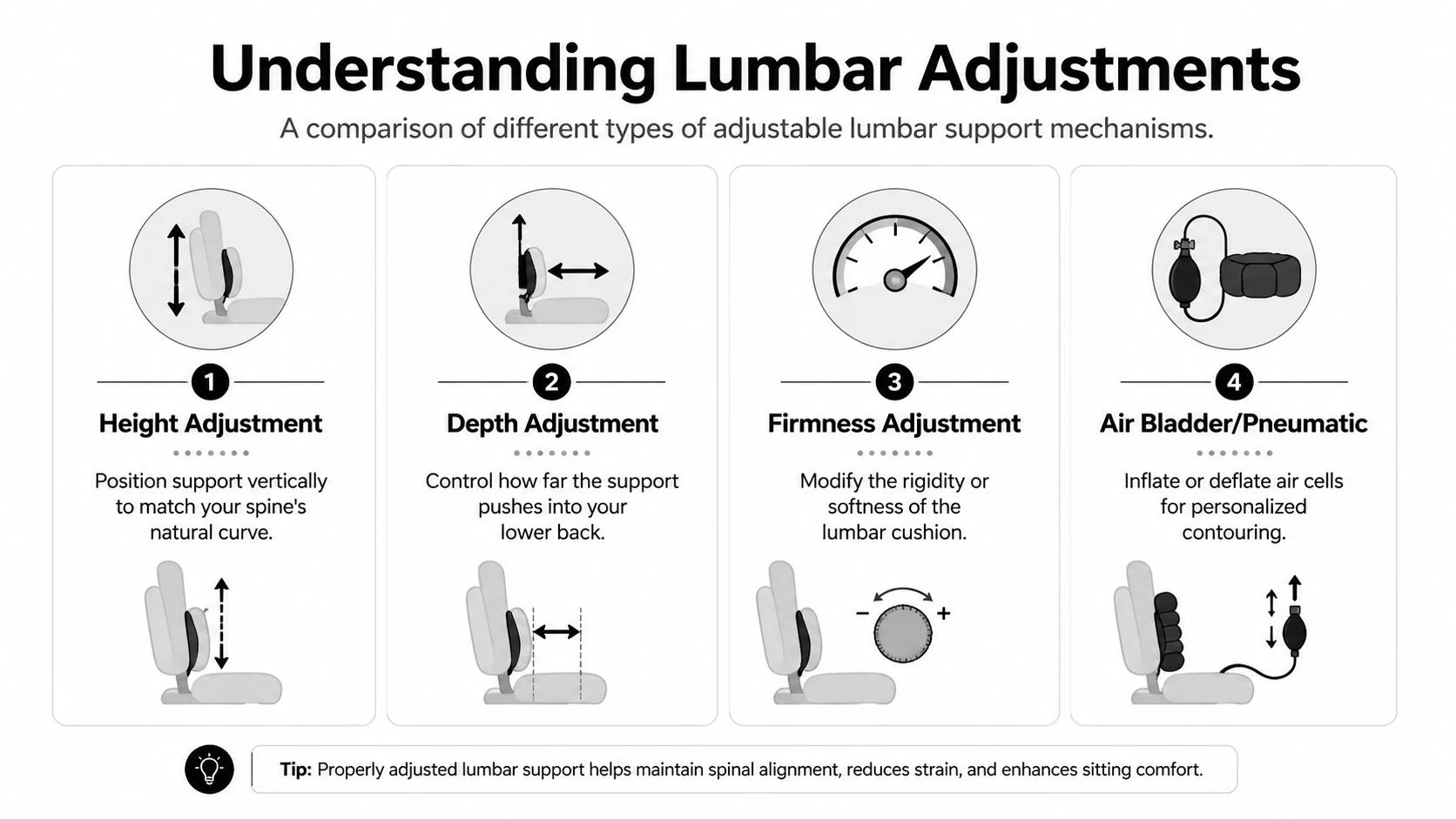
Image source: Bing (Web (fair-use with source credit))
Seat Depth and Its Role in Leg Circulation
Seat depth directly affects both circulation and posture. If the seat pan extends too far forward, the front edge presses against the back of your knees. This restricts blood flow and irritates nerves.
You instinctively slide forward to relieve pressure, abandoning proper lumbar contact in the process.
Adjustable seat depth solves this problem completely. Sliding the seat pan forward or backward ensures two to three fingers fit between the edge and your knee popliteal fold. This position maintains circulation while keeping your back supported against the lumbar pad.
Fixed-depth chairs force compromises. Tall users often cannot achieve both proper knee clearance and lumbar contact simultaneously. They choose one and sacrifice the other.
Short users frequently have seats extending past their thighs with nowhere for their legs to go. Both scenarios create cascading posture problems.
Waterfall seat edges provide partial relief for those unable to adjust depth. The curved front edge reduces pressure distribution across a wider area. It does not solve depth problems but minimizes circulation restriction when depth is fixed.
Recline Tension and Dynamic Movement
Static sitting stresses spinal structures more than dynamic movement. Reclining shifts load from your discs to your ligaments and muscles. Proper recline tension allows this shift without requiring excessive effort or sliding forward unintentionally.
Recline tension must match your body weight. Lighter users need less resistance to recline. Heavier users require more.
Adjustable tension mechanisms accommodate this variation. Fixed-tension reclines either lock lighter users in place or allow heavier users to collapse backward uncontrollably.
Multi-position recline locks let you hold angles comfortable for different tasks. Typing might suit ninety-degree positioning. Reading or thinking benefits from slight recline.
Continuous floating recline mechanisms allow unrestricted movement within a comfortable range without locking at specific angles.
Forward tilt functions deserve special attention for back pain sufferers. Tilting the seat pan forward encourages pelvic rotation into a neutral position. This positioning loads the lumbar curve optimally and engages core muscles naturally.
Users with anterior pelvic tilt or hyperlordosis benefit particularly from this feature.
Armrest Adjustability and Shoulder Relief
Armrests influence shoulder, neck, and upper back tension significantly. Poorly positioned armrests elevate shoulders unnecessarily, creating trapezius strain that radiates downward. Correctly positioned armrests support forearms while keeping shoulders relaxed and depressed.
Four-dimensional armrests adjust height, width, depth, and pivot angle independently. Height adjustment ensures your elbows rest at approximately ninety degrees with shoulders down. Width adjustment accommodates different shoulder breadths without forcing arm elevation.
Depth adjustment positions supports relative to your torso. Pivot adjustment allows arms to rotate naturally during typing or mouse use.
Fixed or minimally adjustable armrests create problems. Arms forced upward increase cervical spine loading. Arms positioned too far forward strain the shoulder girdle.
Arms that cannot move with you create compensatory twisting motions that stress the thoracic spine.
Armrest material affects comfort during prolonged contact. Soft-touch materials distribute pressure evenly. Hard plastic creates focal pressure points.
Removable armrests provide flexibility for side-loading tasks or knee-under-desk positioning when appropriate.
Material Choices: Mesh vs. Foam for Breathability and Support
Seat and back materials influence comfort, support longevity, and thermal regulation. Mesh and high-density foam represent the two primary categories with distinct advantages and limitations.
Mesh backs provide superior breathability and adaptable support. The suspended fabric conforms to spinal curvature dynamically. Heat dissipates efficiently during long sessions.
Mesh durability has improved significantly, though cheaper versions sag prematurely under heavy use or excessive weight.
Foam backs offer consistent initial support but retain more heat. High-density foam maintains shape longer than polyurethane alternatives. Memory foam conforms closely but can feel restrictive during movement.
Some foam backs incorporate zoning with firmer central support and softer lateral areas for ribcage clearance.
Seat material choices mirror back options. Mesh seats promote airflow but may feel too rigid for some users. Foam seats provide cushioning but compress over time, especially under higher weights.
Gel-infused foam addresses some heat issues while maintaining cushioning properties.
Material combinations vary widely. Mesh back with foam seat offers breathability where needed most while providing seated comfort. Foam back with mesh seat creates unusual pressure distribution that few users prefer.
Understanding these combinations helps evaluate trade-offs accurately.
Price ranges differ substantially between material types. Basic mesh chairs often cost less than equivalent foam models from the same brand. Premium foam chairs incorporating advanced materials frequently exceed mesh pricing.
Budget considerations should weigh against longevity expectations and climate factors.
Side-by-Side: Top Chair Recommendations for Different Back Issues
Best Overall for General Lower Back Pain
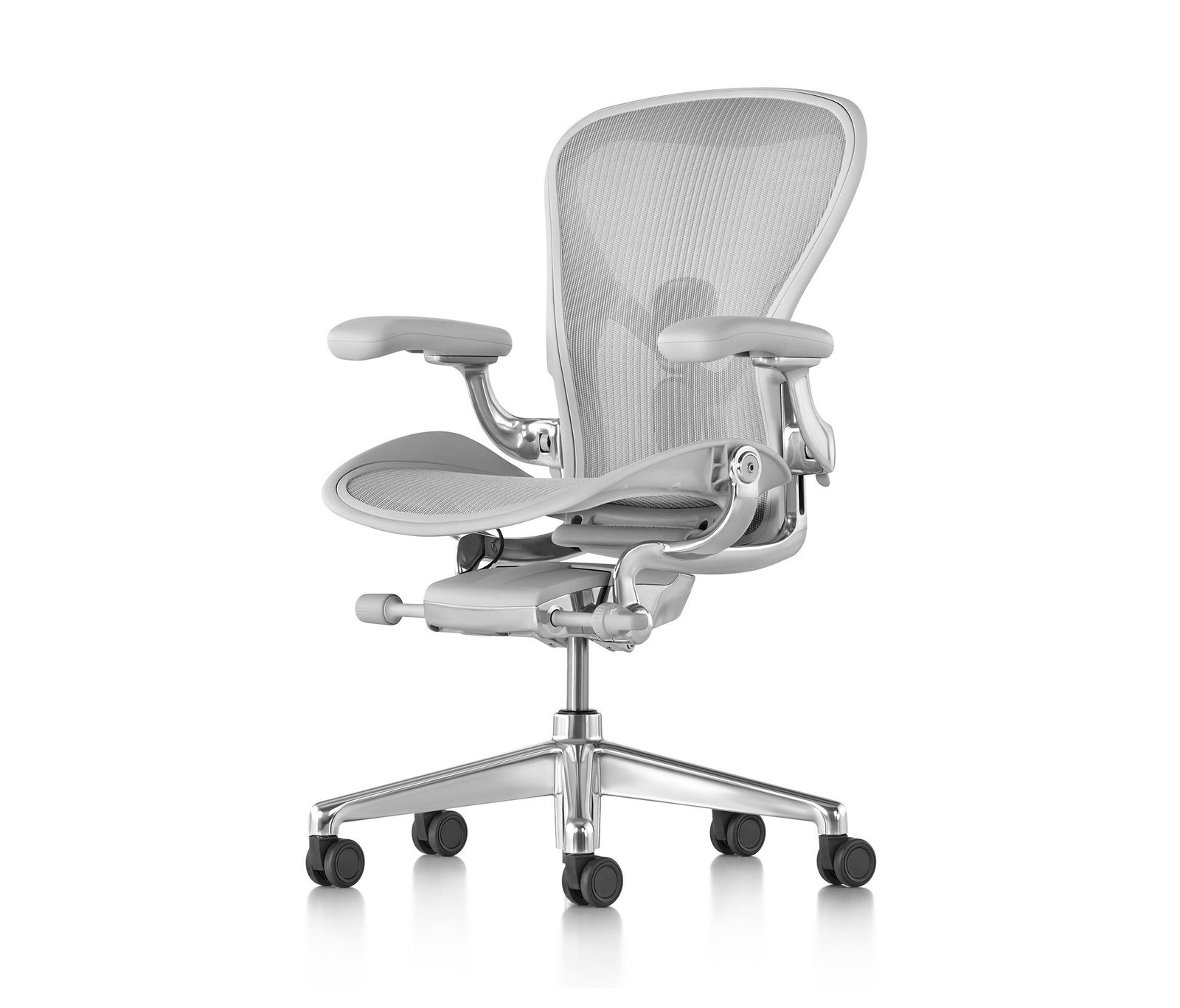
General lower back pain from prolonged sitting responds well to chairs balancing adjustability, support quality, and movement encouragement. The Herman Miller Aeron remains a benchmark in this category. Its PostureFit SL system supports both the sacrum and lumbar region independently.
The pellicle mesh suspension distributes weight evenly while promoting airflow. Three size options (A, B, C) address different body dimensions better than one-size-fits-all approaches.
The Steelcase Leap V2 offers comparable adjustability with a more forgiving seat cushion. Its LiveBack technology changes shape matching spinal curvature during movement. Four-way adjustable arms accommodate various task positions.
Weight-sensitive recline mechanism requires minimal adjustment for most users. The Leap tends to suit slightly heavier individuals better than the Aeron due to its cushioning characteristics.
Both chairs carry twelve-year warranties covering all mechanisms and materials. Both offer extensive trial periods through authorized dealers. Price points range from $1,200 to $1,600 depending on configuration and options selected.
If you are comparing broader options across price points, reviewing Best Office Chairs: Top Picks for Comfort and Support can help you understand where these premium models sit relative to mid-range alternatives.
Best for Herniated Disc or Sciatica
Herniated disc sufferers need chairs maintaining neutral spinal alignment without creating pressure points along the vertebral column. The Herman Miller Embody addresses this need through its pixelated support matrix. Thousands of tiny support points conform individually to spinal contours rather than relying on broad surface contact.
The Embody’s backrest design encourages leaning back into a position that unloads compressed discs. Its seat geometry promotes healthy hip angles reducing piriformis tension relevant to sciatica. Forward tilt capability available as an option supports corrective positioning during recovery phases.
The Steelcase Gesture addresses similar needs through wider seat dimensions and more pronounced lumbar push. Its name reflects adaptation to modern gesture-based computing positions beyond traditional typing. Multiple recline positions allow disc-offloading angles without fully reclining.
Budget-conscious buyers might examine Best Cheap Office Chairs: Top Picks for Comfort and Value for more affordable alternatives, though herniated disc management typically warrants investing in proven ergonomic solutions rather than compromising on adjustability.
Best Tall User Chairs (6’2″+)
Tall users face unique geometry challenges standard chairs cannot address adequately. The Herman Miller Aeron in size C accommodates heights up to approximately six feet six inches with its extended backrest and seat pan. Size B handles five eight to six four range effectively.
The Steelcase Leap accommodates taller frames through its adjustable seat depth extending further forward and backrest height reaching higher positions. Wide armrest width range accommodates broader shoulder breadths without forcing shoulder elevation.
The Humanscale Freedom offers simpler adjustment philosophy but effective tall-user accommodation through its self-adjusting recline and headrest options. Its backrest height adjusts independently of seat mechanisms.
Budget tall-user options include the Branch Ergonomic Chair with extended backrest variants. The Sihoo M57 provides affordable tall-frame accommodation through generous dimensional tolerances despite fewer premium features.
For additional perspective on tall-specific seating needs, checking out Best Tall Desk Chairs: Top Picks for Comfort and Support reveals how specialized sizing impacts long-term comfort significantly.
Best Short User Chairs (Under 5’4″)
Petite users struggle with standard chair dimensions most dramatically. Foot placement becomes impossible without footrests. Lumbar support lands misaligned with spinal curves.
Armrests elevate shoulders unnaturally.
The Herman Miller Sayl offers compact proportions and lower seat height ranges suitable for petite frames. Its Y-tower backrest provides support without overwhelming small torsos. Armrest adjustments accommodate narrower shoulder widths effectively.
The Branch Venture provides shorter seat depths and lower minimum heights compared to many competitors. Fixed lumbar positioning works for average petite proportions though lacks customizable depth adjustment.
The Okamura Sylphy Lite offers Japanese engineering precision in compact dimensions. Its seat depth adjustment proves particularly valuable for shorter users needing precise thigh support without knee pressure.
Users seeking budget-friendly petite options should explore Best White Desk Chairs: Top Picks for Comfort and Style where compact designs sometimes appear alongside aesthetic preferences.
Best Budget Options Under $500
Budget constraints do not eliminate ergonomic possibilities entirely. Several chairs under five hundred dollars deliver reasonable back support for moderate use patterns.
The Sihoo M57 stands out with adjustable lumbar depth, seat height, and tilt tension within budget constraints. Mesh construction provides breathability often absent in this price range. Four-way adjustable armrests accommodate various positions.
Build quality reflects the price point but delivers functional ergonomics.
The Autonomous ErgoChair Core offers comparable adjustability with slightly more aggressive recline ranges. Its headrest inclusion adds value though lumbar support proves less refined than premium alternatives. Assembly required but straightforward.
The Branch Task Chair strips adjustability to essentials while maintaining solid build quality. Fixed lumbar positioning suits users whose anatomy aligns with its preset curvature. Seat depth remains non-adjustable but adequate for average proportions.
Understanding overall chair costs helps contextualize budget decisions. Reviewing information about How Much Does a Chair Cost? 2026 Price Guide by Type shows where budget ergonomic options sit within the broader marketplace.
Premium Picks Worth the Investment
Investments above fifteen hundred dollars typically reflect superior materials, longer warranties, and refinement beyond basic adjustability. The Herman Miller Aeron and Embody lead this category alongside Steelcase’s flagship offerings.
The Haworth Fern distinguishes itself through organic design language and sustainable material construction. Its adaptive backrest responds automatically to movement without manual tension adjustment. Forward tilt capability encourages active sitting patterns beneficial for preventive back care.
The Vitra Syloon represents European design sensibility with technical excellence. Its single-lever control system simplifies adjustment complexity while maintaining comprehensive positioning capability. Material quality and finish reflect premium positioning confidently.
For those considering massage functionality alongside ergonomic support, exploring Best Massage Chairs: Top Picks for Comfort and Durability reveals how these categories sometimes overlap in premium segments.
These recommendations serve as starting points rather than definitive answers. Individual anatomy, specific back conditions, and personal preference always override generalized recommendations. Trial periods and return policies exist precisely because chair suitability remains highly individualized.
Understanding your condition and body dimensions narrows the field considerably before testing begins.
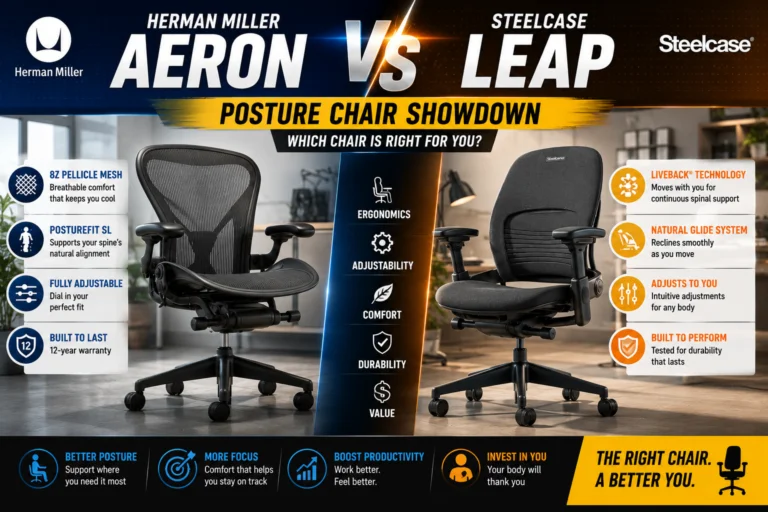
Image source: Bing (Web (fair-use with source credit))
Key Specs and Pricing Breakdown
Price Ranges by Tier and What You Get
Chair pricing correlates strongly with adjustability range, material quality, and warranty length. Understanding what each price tier delivers helps you allocate budget effectively rather than overspending on features you do not need or underspending on essentials.
Entry-level ergonomic chairs between two hundred and four hundred dollars typically offer basic seat height adjustment and fixed lumbar support. Mesh backs appear frequently in this range. Armrests may adjust only up and down.
Recline tension often remains non-adjustable. These chairs suit light daily use under six hours but may prove inadequate for full workdays.
Mid-range options spanning four hundred to nine hundred dollars introduce meaningful adjustability improvements. Seat depth mechanisms become common. Lumbar support gains height and sometimes depth adjustment.
Four-way armrests replace basic models. Recline tension adjustment accommodates different body weights. Manufacturers in this tier include Branch, Sihoo, and certain HON models.
Premium chairs ranging from nine hundred to two thousand five hundred dollars deliver comprehensive adjustability across all parameters. Materials demonstrate superior longevity. Warranties extend beyond ten years.
Herman Miller and Steelcase dominate this category alongside select Haworth and Humanscale models. The investment proves justifiable for daily eight-plus hour users managing chronic back conditions.
Warranty Comparisons: 5-Year vs. Lifetime
Warranty length signals manufacturer confidence in product durability. It also protects your financial investment against premature failure. Understanding coverage terms prevents unpleasant surprises during claims.
Five-year warranties commonly cover basic mechanisms and structural components. They often exclude wear items like armrest pads, casters, and fabric surface degradation. This tier appears frequently with mid-range pricing.
Ten-to-twelve-year warranties represent the premium standard. Herman Miller provides twelve years covering all mechanisms, materials, and components including casters and pneumatics. Steelcase offers similar twelve-year comprehensive coverage.
These warranties typically transfer to second owners if product registration occurs properly.
Lifetime warranties require careful reading. Some manufacturers define lifetime as the product’s useful life rather than your lifetime. Others limit coverage to the original purchaser.
Many exclude commercial use despite residential labeling. Coverage gaps often emerge around normal wear patterns versus manufacturing defects.
Weight Capacity Limits by Chair Type
Weight capacity determines both safety and long-term comfort. Exceeding rated limits voids warranties and accelerates mechanical failure. Understanding capacity ranges helps match chairs to body types accurately.
Standard office chairs rate between two hundred fifty and three hundred pounds. This range covers most average adult body weights comfortably. Foam seats compress predictably within these limits.
Mesh suspension maintains tension appropriately.
Heavy-duty ergonomic chairs support three hundred to four hundred pounds. Reinforced gas lifts, heavier gauge bases, and reinforced tilt mechanisms enable these capacities. Mesh chairs handle higher weights better because tension adjusts rather than bottoming out permanently.
Bariatric-rated chairs exceed four hundred pounds with specialized construction. These models command premium pricing due to reinforced components and wider seat dimensions. Verify actual weight ratings rather than assuming capacity based on visual robustness alone.
Trial Periods and Return Policies
Trial periods allow testing chairs in real working conditions before committing financially. Return policies define the logistics and costs involved. Understanding both protects against expensive mistakes.
Major manufacturers like Herman Miller and Steelcase offer ninety-day trial periods through authorized dealers. Some retailers extend trials to one hundred twenty days. Trial periods let you assess comfort across full workweeks rather than brief showroom sessions.
Return policies vary considerably. Authorized dealer returns typically include pickup service without restocking fees. Direct-to-consumer brands may charge return shipping or processing fees.
Retailer returns through Amazon or Wayfair follow platform policies rather than manufacturer terms.
Condition requirements matter enormously. Chairs must show no sign of wear, damage, or soiling. Some manufacturers inspect returned items closely.
Personal use during trials can disqualify returns if visible wear emerges. Photograph chair condition upon unboxing as documentation.
Common Mistakes When Buying a Chair for Back Pain
Ignoring Your Exact Body Measurements
Generic sizing assumptions cause widespread purchasing errors. Your height, weight, and torso proportions determine whether a chair fits your anatomy or works against you. Measuring accurately before shopping prevents costly wrong purchases.
Record your seated height from floor to top of shoulders while sitting upright. Note your thigh length from hip crease to behind knee. Measure shoulder breadth between outer edges.
Document your current lumbar curve sensitivity if you have existing back conditions.
Compare measurements against manufacturer dimension charts rather than assuming chair names indicate proper fit. Size A, B, C designations differ between brands. What fits one manufacturer’s medium may be too small for another’s large.
People regularly purchase chairs then return them because dimensions do not match their bodies. Some never bother returning due to restocking fees or inconvenience. The resulting mismatch perpetuates back pain instead of relieving it.
Taking time to measure upfront saves frustration and money downstream.
Focusing Only on Price Instead of Adjustability
Price attracts attention but adjustability determines function. A two hundred dollar chair with five adjustment points often outperforms a five hundred dollar model offering only height change. Prioritize feature count and range over sticker price alone.
Compare adjustment specifications side by side. Count how many parameters each chair modifies. Note travel ranges for each adjustment type.
Higher adjustment counts generally indicate better accommodation for individual anatomy variations.
Premium adjustability pays dividends for back pain sufferers. Fine-tuned lumbar positioning reduces disc pressure measurably. Precise seat depth prevents knee compression.
Weight-matched recline tension enables natural movement patterns without effort or sliding forward.
Budget constraints sometimes necessitate compromises. In those cases, prioritize lumbar adjustability and seat depth above aesthetic features or unnecessary add-ons. A simpler chair with crucial adjustments beats a feature-rich model lacking spine support customization.
Skipping the Trial Period
Trial periods exist for important reasons. Showroom comfort differs dramatically from home office conditions. Lighting, temperature, desk height, and work routines all influence perceived chair suitability.
Testing in your actual environment reveals problems invisible during brief demonstrations.
Never purchase an ergonomic chair without a trial period unless you have previously owned identical or similar models successfully. Even then, new back conditions or weight changes alter suitability requirements significantly.
Some sellers advertise trials while imposing restrictive return conditions. Read policy details carefully before purchasing. Verify who covers return shipping.
Check inspection requirements. Understand time limits for initiating returns.
People skip trials due to urgency or perceived hassle. They end up stuck with uncomfortable chairs generating additional back pain while waiting for return windows to expire or avoiding return costs entirely. The temporary inconvenience of thorough testing prevents long-term suffering.
Misadjusting Lumbar Support Height
Correct lumbar support positioning requires understanding spinal anatomy first. The lumbar spine curves inward between approximately the third lumbar vertebra and the fifth. Supporting above this zone pressures the thoracic spine inappropriately.
Supporting below leaves the lumbar curve unsupported entirely.
Most adults find optimal lumbar placement two to three inches above the seat pan surface. Individual variation exists based on torso length and sitting posture preferences. Height adjustment mechanisms should accommodate this range effortlessly.
Many users position lumbar supports too high deliberately or inadvertently. They seek greater lower back contact but actually press against their ribcage instead. This creates upper back discomfort and fails to support the lumbar region where relief matters most.
Repositioning tests help verify correct placement. Sit normally against the backrest. Have someone palpate your lower spine to locate the inward curve.
Adjust the lumbar pad until it contacts that curve directly rather than above or below it.
Choosing Gaming Chairs Over Ergonomic Task Chairs
Gaming chairs attract buyers through aggressive styling and attractive pricing. Their ergonomic credentials frequently fall short of task-oriented designs. Understanding these differences prevents mismatched purchases based on aesthetics alone.
Gaming chairs prioritize aesthetics over adjustability precision. Bucket-seat designs constrain lateral movement unnecessarily. Limited lumbar adjustment ranges accommodate fewer body types effectively.
Flat seat cushions lack contouring beneficial for prolonged sitting.
Task chairs developed specifically for office environments undergo ergonomic research validation. Adjustment mechanisms address spinal loading, circulation, and movement patterns systematically. Professional users report better long-term comfort outcomes compared to gaming alternatives.
The price-to-feature ratio favors ergonomic task chairs in the same budget range. Gaming chairs often include flashing LEDs and racing aesthetics consuming budget without functional benefit. Task chairs invest that budget into adjustment mechanisms and durable materials instead.
Exception gaming chairs exist with genuine ergonomic features. However, these examples remain outliers rather than the category standard. Verify specific adjustment capabilities rather than assuming gaming designation equals ergonomic quality.
For readers interested in alternative seating categories, Best Gamer Chairs: Top Picks for Comfort and Support provides context on where gaming chairs fit relative to dedicated ergonomic options.
How to Properly Adjust Your New Chair for Immediate Relief
Setting Correct Seat Height
Proper seat height establishes the foundation for all other adjustments. Incorrect height creates cascading posture problems affecting knees, hips, spine, and shoulders simultaneously. Getting this right transforms chair comfort dramatically.
Adjust seat height so your feet rest flat on the floor with thighs parallel to ground level. If feet cannot reach flatly, use a footrest rather than raising seat height further. Raised seats increase pressure behind knees and reduce lumbar contact effectiveness.
Elbow angle verification confirms height appropriateness. With shoulders relaxed and elbows bent at ninety degrees, armrests should support forearms without elevating shoulders upward. Shoulders rising toward ears indicates armrests positioned too high relative to seat height.
Positioning Lumbar Support
Lumbar support positioning requires anatomical awareness and patient adjustment. The goal places firm contact precisely within the inward spinal curve without pressing directly onto vertebrae.
Locate your lumbar curve by feeling along your lower back while standing upright. The inward indentation typically begins two to three inches above your hip bones. Sit fully back in the chair and adjust lumbar height until support contacts this curved region.
Depth adjustment matters equally. Support should protrude enough to maintain the curve without forcing excessive arching. Too much depth creates uncomfortable pressure points.
Too little depth allows the spine to flatten gradually during sitting sessions.
Test positioning by leaning forward slightly then returning to upright. The support should maintain contact throughout minor position changes without shifting uncomfortably. If support migrates away from the curve, adjust depth or height accordingly.
Aligning Armrests and Recline
Armrest alignment completes the ergonomic setup process. Proper positioning prevents shoulder elevation and neck strain developing secondary to incorrect arm support.
Set armrest height so shoulders remain depressed and relaxed when forearms rest on padding. Elbows should angle between eighty-five and ninety-five degrees naturally. Arms extending straight down indicates height too low.
Shoulder elevation signals height too high.
Width adjustment positions armrests slightly wider than shoulder breadth. Armrests pushing shoulders outward creates tension. Armrests too narrow force arms inward unnaturally.
Center positioning allows natural arm swinging during movement.
Recline tension adjustment requires finding the resistance point matching your body weight. Lighter users need minimal tension to initiate recline. Heavier users require increased resistance.
Test by leaning back gently. The mechanism should respond smoothly without requiring forceful backward pressure or feeling uncomfortably loose.
Breaking In Your New Chair
New chairs require adaptation periods for both materials and your body. Immediate perfect comfort rarely occurs. Understanding this expectation prevents premature returns based on unfamiliar sensations.
Mesh materials soften and conform gradually with use. Initial firmness decreases slightly as fibers settle into supporting positions. Expect minor comfort improvement over one to two weeks of regular use.
Foam cushions compress minimally but establish consistent support characteristics quickly. Memory foam variants may feel firmer initially before warming and softening to body temperature. Room temperature influences foam responsiveness noticeably.
Your body adapts to new support positions through neurological recalibration. Feeling different after switching from a collapsed chair represents positive adaptation. Persistent sharp pain or numbness indicates improper adjustment rather than normal break-in sensations.
Document baseline comfort levels during initial week use. Reassess after fourteen days of consistent sitting. Improvements should trend positively during this period.
Stagnation or deterioration suggests adjustment issues requiring correction rather than continued break-in expectations.

Image source: Bing (Web (fair-use with source credit))
Long-Term Care and Maintenance
Cleaning and Preserving Mesh vs. Leather
Material-specific maintenance extends chair lifespan significantly. Different surfaces require different cleaning approaches preventing premature degradation.
Mesh surfaces collect dust and skin particles within suspension fibers. Vacuum attachments remove loose debris effectively. Damp cloth wiping addresses surface contamination without saturating materials.
Complete drying prevents mold development in humid environments.
Leather surfaces require conditioning periodically preventing cracking and stiffness. Synthetic leather alternatives demand simpler cleaning with mild soap solutions. Avoid harsh chemicals degrading protective coatings.
Regular dusting prevents abrasive particle accumulation scratching surfaces.
Fabric upholstery responds to vacuuming and spot cleaning with appropriate fabric cleaners. Professional cleaning services handle deep contamination removal for valuable chairs worth professional maintenance investment.
Tightening Loose Joints and Replacing Casters
Mechanical wear produces loose joints affecting stability and safety. Regular inspection identifies developing issues before they worsen significantly.
Quarterly tightening of accessible bolts prevents progressive loosening from vibration and movement. Hex keys typically supplied with chairs enable this maintenance easily. Torque specifications rarely exceed hand-tight thresholds for most furniture applications.
Caster replacement addresses floor damage prevention and rolling efficiency restoration. Dual-wheel casters distribute weight better reducing floor marking compared to single-wheel designs. Carpet casters feature wider diameters preventing sinking into pile materials.
Hard floor casters incorporate soft rubber or polyurethane wheels protecting surfaces while maintaining smooth movement. Switching caster types matches floor conditions appropriately rather than using universal casters performing poorly on specific surfaces.
Knowing When It’s Time for a Replacement
Chairs deteriorate progressively even with proper maintenance. Recognizing replacement indicators prevents continuing use of compromised support equipment.
Gas lift failure manifests as involuntary seat height changes during sitting. This creates unsafe positioning requiring immediate mechanism replacement or chair retirement. Hydraulic failure poses safety risks during height adjustment attempts.
Tilt mechanism wear produces inconsistent resistance or complete lockup. Both conditions prevent proper recline function eliminating dynamic movement benefits. Repair parts availability varies by manufacturer and age.
Structural cracks appearing in bases or backrest frames indicate material fatigue beyond safe operation thresholds. Continuing use risks catastrophic failure during weight bearing. Replace chairs exhibiting frame compromise immediately regardless of cosmetic appearance.
Foam seat degradation shows as permanent compression indentations exceeding half inch depth. Support loss in weight-bearing areas creates pressure points accelerating discomfort and posture deterioration. Reseating services sometimes restore function cost-effectively compared to full replacement.
Understanding expected chair lifespans informs replacement planning. Budget-conscious buyers factor replacement cycles into total cost calculations rather than focusing solely on initial purchase price.
Safety Standards and Certifications to Look For
BIFMA Certification Explained
BIFMA certification represents the primary industry standard validating chair safety and durability. Compliance indicates products passed rigorous testing protocols covering structural integrity, mechanical safety, and material performance.
ANSI/BIFMA X5.1 governs general office chair standards including stability testing, cycle endurance, and component strength requirements. Chairs bearing this certification completed laboratory validation demonstrating compliance with established safety thresholds.
X5.4 standards address seating-specific requirements including armrest strength, tilt mechanism safety, and castor attachment reliability. Combined certification covering both standards indicates comprehensive testing beyond basic structural requirements.
Certification labels sometimes appear on chair documentation rather than physical products. Request test reports from manufacturers unable to provide certification documentation readily. Verified test results protect against fraudulent certification claims.
Greenguard Gold for Low Emissions
Chemical emission standards address indoor air quality concerns increasingly relevant for occupied workspaces. Greenguard Gold certification validates low volatile organic compound emissions from chair materials.
Formaldehyde, benzene, and other VOCs off-gas from adhesives, foams, and synthetic materials over product lifespans. Certification testing measures emission rates under controlled conditions simulating real-world usage environments.
Spaces with poor ventilation amplify emission concentration effects. Home offices lacking climate control benefit particularly from low-emission furniture selections protecting respiratory health during extended exposure periods.
Manufacturers submit products to independent laboratories verifying compliance. Certification programs maintain public databases searchable confirming product inclusion status. Verification prevents reliance on manufacturer claims alone.
Understanding Warranty Coverage and Limitations
Warranty documentation defines protection scope clearly. Reading terms before purchase prevents misunderstandings during claim processes.
Coverage duration specifies protection length from purchase date or product manufacture date depending on manufacturer policy. Registration requirements sometimes affect warranty validity starting dates. Keep purchase receipts and registration confirmations organized for claims.
Excluded items typically include wear components like caster wheels, armrest padding, and fabric surface deterioration from normal use. Mechanical failures inside covered periods usually receive repair or replacement depending on part availability.
Commercial use exclusions appear frequently in residential-rated warranties. Using residential chairs in workplace settings potentially voids coverage. Verify intended use classification matches your application before purchasing.
Transferability provisions affect resale value considerations. Transferable warranties increase secondhand chair desirability. Non-transferable coverage benefits only original purchasers reducing resale market appeal significantly.
Real Scenarios: Which Chair Solves Your Specific Problem?
Remote Worker with Chronic Lumbar Strain
Remote workers face extended daily sitting without workplace ergonomics intervention. Chair selection carries personal responsibility for long-term spinal health outcomes.
Lumbar support prioritization addresses chronic strain most effectively. Adjustable depth mechanisms accommodate varying curve sensitivity throughout workdays. Forward tilt capability encourages active positioning reducing sustained disc loading.
Movement encouragement through dynamic recline systems counters static posture fatigue accumulating during long work sessions. Users reporting afternoon deterioration often lack adequate recline tension adjustment enabling natural position variation.
Budget allocation should favor core ergonomic features over aesthetic additions. Premium mesh construction with comprehensive lumbar adjustability outperforms heavily cushioned budget models lacking spine support refinement.
Developer Sitting 10+ Hours Daily
Extreme sitting durations demand chairs accommodating extended comfort requirements beyond typical use patterns. Material breathability and pressure distribution become critical factors.
Mesh seating prevents heat accumulation occurring with foam during marathon sessions. Airflow through suspended materials maintains comfort consistency across extended use periods without degradation.
Seat edge contouring prevents circulation restriction during prolonged sitting. Waterfall edges reduce popliteal pressure maintaining leg comfort through extended duration sessions.
Regular micro-break encouragement remains essential regardless of chair quality. No chair eliminates movement necessity completely. Standing transitions every thirty to sixty minutes complement even excellent ergonomic seating effectively.
Heavy User Needing Extra Support
Higher body weights impose additional demands on chair components and materials. Standard chairs frequently fail prematurely under elevated loads creating safety and comfort concerns.
Weight capacity verification prevents warranty voidance and mechanical failure risks. Selecting chairs rated well above actual body weight provides safety margins accommodating dynamic loading during movement.
Mesh suspension often outperforms foam under heavy weights because tension adjusts rather than compressing permanently. Foam bottoming out eliminates support entirely creating uncomfortable hard surface contact.
Reinforced base materials prevent structural failure under elevated loads. Aluminum bases exceed nylon strength requirements for heavier users reliably. Verify base material specifications before purchasing rather than assuming structural adequacy.
Petite Frame Struggling with Standard Chairs
Petite users encounter geometry mismatches standard chair dimensions create consistently. Foot placement, lumbar positioning, and armrest alignment all require special consideration.
Seat depth reduction prevents knee pressure from excessive pan extension. Adjustable mechanisms accommodating shorter thigh lengths enable proper posture maintenance without circulation restriction.
Lower minimum seat heights allow foot contact without dangling leg positioning. Footrest adoption becomes necessary only when seat height ranges cannot accommodate floor clearance requirements adequately.
Compact frame chairs specifically designed for smaller bodies solve these problems systematically. Searching dedicated petite-friendly options prevents compromise-driven purchases failing to address root dimensional mismatches.
Reviewing resources like Best Table High Chairs: Top Picks for Safety and Convenience demonstrates how specialized sizing categories exist across furniture types, reinforcing that proper dimension matching applies universally rather than only to standard adult seating.
Frequently Asked Questions About Best Office Chair for Back Pain
Do ergonomic chairs really help with back pain?
Quality ergonomic chairs with proper adjustability reduce back strain significantly when matched correctly to individual anatomy and conditions. Proper lumbar support positioning decreases disc pressure during sitting. Dynamic movement encouragement prevents static loading fatigue.
Studies show measurable biomechanical improvements with appropriately fitted ergonomic seating compared to fixed-position alternatives.
Can a chair fix existing back damage?
Chairs cannot reverse structural damage already present in discs, vertebrae, or surrounding tissues. However, proper supportive seating prevents further deterioration during sitting periods. Reduced mechanical loading allows healing processes continue more effectively.
Chairs serve as protective equipment rather than curative treatments for established spinal conditions.
How long should I sit before switching to a standing desk?
Current ergonomic research suggests transitioning positions every thirty to sixty minutes optimizes spinal health during extended work sessions. Alternating between sitting and standing reduces cumulative loading on any single posture system. No evidence supports remaining seated continuously even in premium ergonomic chairs without periodic position changes throughout extended work periods.
Are refurbished Herman Miller chairs worth buying?
Refurbished premium chairs often deliver exceptional value when sourced from authorized refurbishers completing comprehensive rebuilds. Replaced worn components restore functionality close to new condition while saving substantial cost compared to new purchases. Verify refurbishment scope includes mechanism overhaul, upholstery replacement if needed, and warranty coverage matching new product terms before purchasing used inventory.
What’s the difference between Aeron and Leap for back pain?
Aeron emphasizes mesh suspension providing superior breathability and weight distribution suited warmer climates and heavier users. Leap offers foam cushioning with LiveBack technology conforming dynamically to spinal curvature changes during movement. Both address lumbar support effectively through different philosophies.
Selection depends on material preference, climate considerations, and individual comfort response to suspension versus cushioning support approaches.
How do I know if my lumbar support is positioned correctly?
Correct lumbar positioning places support firmly within the inward lower spine curve without pressing directly onto vertebral structures. Stand upright and palpate your lower back identifying the natural inward indentation. Sit fully back in chair adjusting lumbar height until support contacts that curved region directly.
Proper positioning feels supportive rather than uncomfortable during normal sitting postures.
Final Recommendation: Your Decision Guide
Quick Selection Flowchart by Condition and Budget
Decision-making simplifies considerably when matching specific conditions to appropriate chair categories systematically. Use this framework narrowing options efficiently before detailed comparison shopping.
Identify your primary back condition first. Lumbar disc issues prioritize deep adjustable lumbar support. Sciatica requires waterfall seat edges and slight recline capability.
General postural strain benefits from dynamic tilt and forward tilt options. Each condition maps to distinct feature priorities guiding selection effectively.
Filter candidates by body dimensions next. Height and weight ranges eliminate mismatched chairs immediately rather than discovering incompatibility after purchase. Manufacturers publish dimension charts enabling quick elimination of unsuitable models.
Budget considerations finalize selection among compatible candidates. Within your price range, prioritize maximum adjustability covering your identified priority features. Additional bells and whistles matter less than core ergonomic functionality addressing your specific condition.
When to Invest in Premium vs. Choose Budget
Investment decisions depend entirely on usage intensity and condition severity rather than arbitrary budget categories. Full-time remote workers managing chronic back conditions warrant premium chair investment justifying long-term health benefits.
Part-time users sitting fewer than six hours daily may find mid-range chairs sufficient addressing occasional discomfort without premium pricing requirements. Occasional use patterns do not justify premium investment cost differentials typically.
Active back condition management through physical therapy or chiropractic care complements ergonomic seating investments substantially. No chair replaces comprehensive care approaches addressing root causes beyond sitting posture alone. Combine proper seating with professional guidance for optimal outcomes.
Exploring broader seating options through How Much Does a Lift Chair Cost? Complete 2026 Price Guide provides context on alternative seating categories sometimes appropriate for users with mobility considerations alongside back pain management needs.
Next Steps After Purchasing
Immediate post-purchase actions establish proper adjustment habits ensuring maximum comfort benefit from day one. Document your adjustment settings photographically or through written notes enabling consistent repositioning after moves or relocation.
Allow break-in periods completing before evaluating long-term comfort. Initial unfamiliar sensations often resolve within two weeks as materials conform and your body adapts to new support positions. Persistent discomfort beyond adjustment periods indicates improper matching requiring reassessment.
Schedule regular maintenance checks quarterly addressing loose fasteners, caster condition, and mechanism functionality before issues escalate into safety concerns or comfort deterioration. Preventive maintenance extends chair lifespan considerably compared to reactive repairs addressing failures after occurrence.
Track comfort progression over months documenting improvements or deterioration patterns. Changing conditions warrant adjustment modifications or eventual chair replacement as needs evolve throughout different life phases and work pattern changes.