
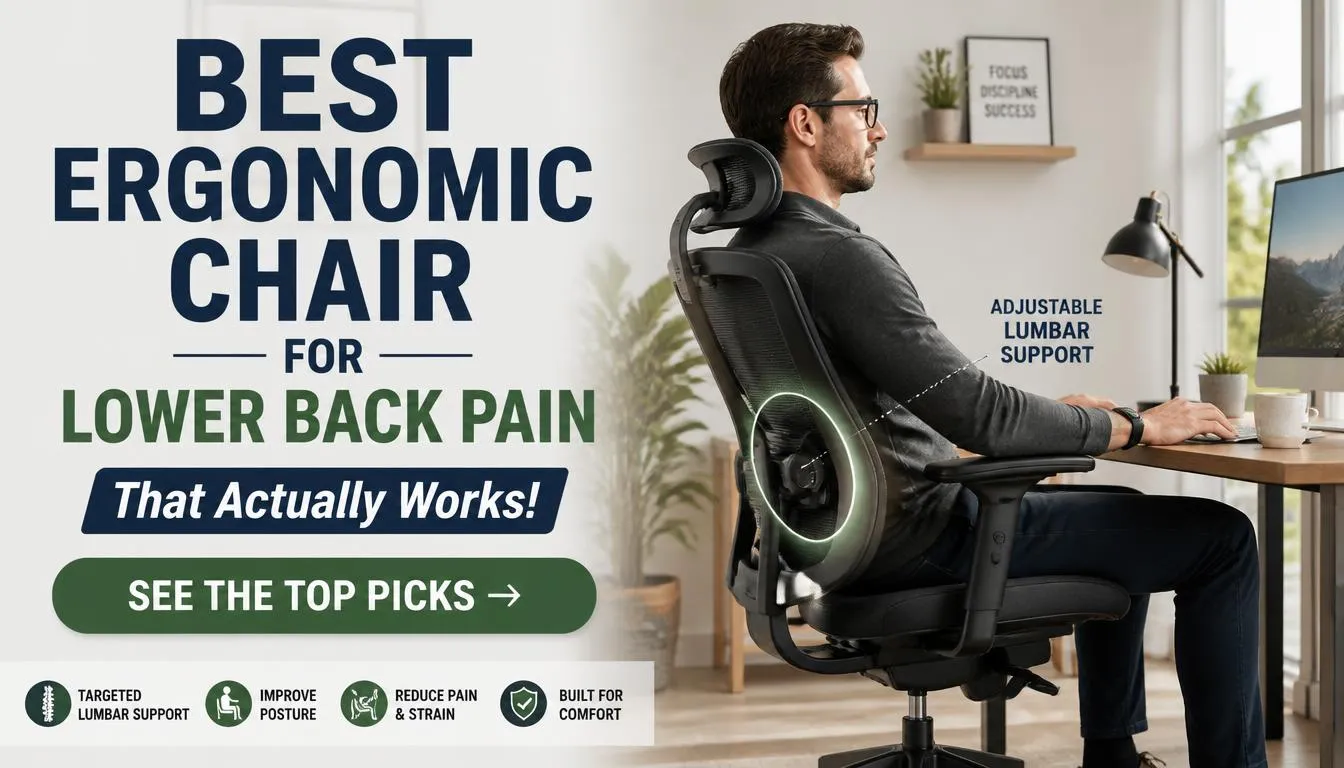
Finding the best ergonomic chair for lower back pain requires understanding your body first, not just reading reviews. No single chair fits everyone because spine curvature, weight distribution, and daily habits vary so widely. The right choice depends on measurable factors like your height, inseam, and specific condition rather than brand prestige alone.
After researching manufacturer specifications, independent testing standards, and aggregated buyer feedback, here is what actually matters.
Adjustment range beats feature count every time. A chair with precise lumbar height and depth control will serve you better than one with ten pointless knobs. Per Occupational Safety and Health Administration guidelines on workstation ergonomics, proper seat and back support reduces musculoskeletal strain significantly.
Let us walk through how to match the right chair to your unique needs.
Why There Is No Single "Best" Ergoscopic Chair for Lower Back Pain
How Sitting Pressure Affects Your Spine
Sitting increases pressure on your lumbar discs compared to standing. Research published in the journal Spine shows seated postures can raise disc pressure substantially, especially when slouching forward. Proper support maintains the spine s natural curve and distributes load evenly.
Without adequate lumbar support, your lower back rounds and bears uneven stress. This positioning leads to muscle fatigue and chronic discomfort over time. The right chair keeps weight spread across your sit bones and thighs while supporting the inward lumbar curve.
Why Body Type and Pain Pattern Matter More Than Brand Names
A chair that works for one person may worsen another s pain. Your height determines whether seat depth and lumbar height reach the correct positions. Someone who is five foot three and someone who is six foot four will rarely fit the same chair perfectly.
Your weight influences the firmness needed in lumbar support and cushion density. A herniated disc often benefits from reclined postures and deep lumbar support. Sciatica may require a contoured seat and pressure relief on the lower back.
Muscle strain usually improves with frequent position changes and moderate recline. Brand names alone do not guarantee these individualized adjustments. Always match the chair to your specific measurements first.
Then consider which model offers those features best.
What Makes a Chair Actually Help Versus Just Look Supportive
Many chairs market ergonomic features that make little difference for back pain. True ergonomic help comes from meaningful adjustability in key areas. Fixed lumbar pads or basic recline mechanisms provide minimal benefit.
Adjustable lumbar that reaches the correct height and depth matters most. A seat that is too deep presses behind your knees and reduces circulation. This causes compensatory slouching and increased lower back strain.
A properly adjusted chair keeps your feet flat and thighs supported without pressure behind the knees. Recline tension must match your body weight to allow movement without feeling unstable. Armrests should support your forearms without raising your shoulders.
Marketing claims about posture correction often refer to rigid designs that feel restrictive. Real ergonomic chairs encourage subtle movement and position changes throughout the day. They adapt to your body rather than forcing your body into one shape.
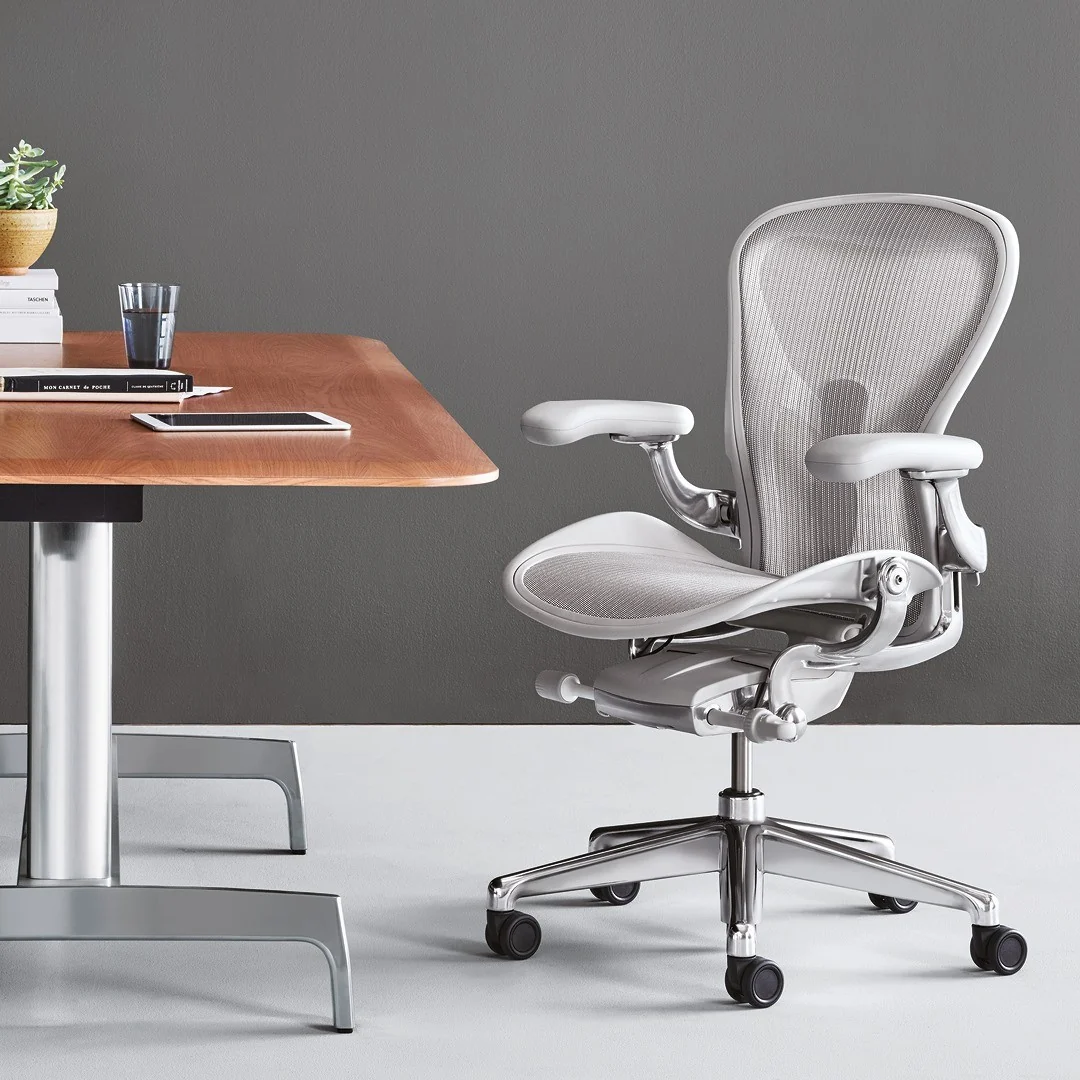
Image source: Bing (Web (fair-use with source credit))
The Adjustments That Actually Protect Your Lower Back
Adjustable Lumbar: Height, Depth, and Firmness Explained
Image source: Web (Bing) / richardsdiary.com (Web image (fair-use with source credit))
Adjustable lumbar support is the single most important feature for lower back pain relief. Fixed lumbar pads often sit too high or too low for your individual spine curve. Adjustable systems let you place support exactly where your lower back curves inward.
This position varies greatly between individuals based on height and body proportions. Depth adjustment ensures the support pushes into your back without causing discomfort. Firmness control allows you to match support level to your weight and preference.
Some chairs use inflatable lumbar cushions for customizable pressure distribution. Others offer mechanical levers to change both height and depth independently. Chairs that only adjust height still provide meaningful relief for many users.
The goal is maintaining your spine s natural S-curve while seated. When lumbar support is correctly positioned, you should feel gentle pressure filling the gap between your lower back and the chair. If you feel nothing or excessive pressure, the adjustment is wrong.
You can explore detailed comparisons of office chair options to understand these features better in our guide to top-rated desk chairs for comfort.
Seat Depth and Why It Changes Everything for Your Knees and Back
Seat depth directly impacts both lower back posture and leg circulation. If the seat is too deep, you cannot sit fully back against the lumbar support. Your legs will extend too far, pressing the seat edge against the back of your knees.
This compresses blood vessels and nerves, causing numbness and reduced circulation. Your pelvis then tilts backward, flattening your lower back curve. This position shifts all your weight onto your sit bones and increases disc pressure.
Adjustable seat depth allows you to shorten the seat pan so your back rests fully against lumbar support. You should be able to fit two to four fingers between the seat edge and the back of your knees. This gap prevents pressure behind the knees while keeping thighs adequately supported.
Even with fixed seat depth, choosing a chair that matches your inseam length is crucial. Taller individuals often need seats with deeper ranges or longer pans. Shorter users benefit from seats that slide forward to reduce the gap behind the knees.
Some premium chairs offer sliding seat pans that adjust without tools. Others require you to choose a model sized for your height category. Always test seat depth if possible before purchasing.
Recline Tension and Synchro-Tilt: Moving Without Losing Support
Recline tension controls how easily the backrest moves and how firmly it supports you leaning back. Incorrect tension makes reclining feel either too stiff or too loose. Too stiff, and you stop moving, staying locked in one static posture.
Too loose, and the backrest falls away before you feel supported, causing you to hold yourself up with muscles. Proper tension matches your body weight so you can lean back smoothly and return to upright with minimal effort. Synchro-tilt mechanisms move the seat pan and backrest in a coordinated ratio, typically two to one or three to two.
This preserves your hip angle and keeps feet planted while reclining. Simple tilt mechanisms only move the backrest, which can slide you forward on the seat. Both systems allow periodic posture changes that reduce muscle fatigue and disc loading.
Static sitting, even in the best chair, increases stiffness and discomfort over hours. Aim to shift positions every thirty minutes by reclining slightly or adjusting your posture. This movement encourages fluid flow in spinal discs and reduces sustained pressure on any one area.
Armrest Adjustability and Its Hidden Effect on Your Shoulders and Spine
Armrests are often overlooked but significantly influence upper back and neck tension. When armrests are too high, your shoulders elevate toward your ears, straining trapezius muscles. This tension travels down your spine and can contribute to upper and lower back discomfort.
Low armrests fail to support your arms, causing you to hunch forward or round your shoulders. Correct height allows your elbows to rest at roughly ninety degrees with shoulders relaxed. Width adjustment lets you position armrests close enough to support your forearms while typing.
Depth adjustment moves armrests forward or back to match your desk distance. Pivot capability allows armrests to rotate inward or outward for comfortable reading or mouse use. Removing armrests entirely can sometimes be better if they interfere with getting close to your desk.
Adjustable armrests should not wobble or shift under light pressure. Poorly designed arms lose adjustment settings over time due to weak locking mechanisms. If you rarely use armrests, basic height adjustment may suffice.
If you rely on them heavily for typing or mouse work, multi-dimensional adjustment becomes essential. See also our guidance on wheelchair pricing breakdowns for broader seating cost considerations.
What Fully Adjustable Really Means (and What Marketing Hides)
Fully adjustable is a common marketing phrase that lacks standard definition. It does not guarantee the chair will fit your body or solve your back pain. Meaningful adjustability includes independent controls for lumbar height and depth, seat depth, seat height, recline tension, and armrest height and width.
Some manufacturers label chairs as ergonomic while offering only a few trivial adjustments. A chair that adjusts height and basic tilt but has a fixed backrest may still suit some users. Others promise extensive adjustability but use stiff, imprecise mechanisms that are hard to set correctly.
Check manufacturer specifications for exact adjustment ranges in inches and degrees. A seat height range of sixteen to twenty-one inches accommodates most users, but taller or shorter people may need broader ranges. Lumbar height adjustment should span at least four inches to match different spine lengths.
Seat depth adjustment of three or more inches is ideal for varying leg lengths. If a product description lists multiple adjustments without specifics, assume adjustability is limited. Read verified buyer reviews to learn which adjustments work well over time.
Some knobs and levers become difficult to operate after months of use. Sturdy, precise mechanisms justify higher prices and last longer. Weigh the importance of each adjustment against how you plan to use the chair daily.
Premium Chairs That Excel at Lumbar Support
Herman Miller Aeron: Who It Fits and Where It Falls Short
The Herman Miller Aeron remains one of the most recognized ergonomic chairs worldwide. Its postural mesh design promotes airflow and distributes weight evenly across the seat and back. The built-in lumbar support offers both height and firmness adjustment through a simple lever.
This system adapts reasonably well to different spine curvatures without complex tools. The Aeron comes in three size variants labeled B, C, and D, corresponding to body dimensions and weight. Size B suits average heights around five-foot-zero to five-foot-eight and weights up to approximately one hundred thirty pounds.
Size C fits heights from five-foot-zero to six-foot-six and weights up to about two hundred fifty pounds. Size D accommodates larger frames, supporting up to three hundred fifty pounds with wider dimensions. The iconic tilt mechanism allows synchronized seat and backrest movement with adjustable tension.
Armrests adjust in height, width, depth, and pivot, providing comprehensive upper body support. Many users report long-term comfort and reduced back pain with consistent use. However, the firm mesh seat requires an acclimation period for some individuals.
People accustomed to plush foam cushions often find the mesh uncomfortable initially. The low seat height may be unsuitable for very tall users exceeding six feet. The backrest contour is fixed in its overall shape, though lumbar adjustment mitigates this somewhat.
At current pricing, the Aeron sits near the top of the market, reflecting its durability and warranty. It is best suited for average to tall-average users who prefer a firmer, breathable seat surface.
Steelcase Leap V2: Natural Fit for Variable Postures
The Steelcase Leap V2 was engineered specifically to support the human spine through natural movement. Its LiveBack technology features a flexible backrest that changes shape to mimic and support the curvature of your spine as you move. This dynamic support adapts continuously rather than relying solely on fixed lumbar pads.
The chair offers extensive adjustability including seat depth, seat height, lumbar height, lumbar firmness, armrest height, width, depth, and pivot. The recline mechanism includes a weight-sensitive tension control that adjusts automatically based on your body weight. You can also lock the chair at various angles from upright to deep recline.
The seat edge is waterfall-shaped to reduce pressure behind the knees. Upholstery options include fabric and leather, with foam cushioning that feels plush compared to mesh. The Leap V2 accommodates a wide range of body types due to its broad adjustment spectrum.
It supports users from approximately five-foot-zero to over six-foot-six and weights up to three hundred pounds. The chair s build quality is robust, with a five-year comprehensive warranty standard. Some users find the initial firmness of the lumbar support and seat cushion too rigid.
Others appreciate the structured support that encourages an engaged posture. The Leap V2 excels for users who shift positions frequently throughout the day. Its adaptive backrest responds to leaning forward while working or reclining during breaks.
It represents a strong investment for those prioritizing dynamic lumbar support and premium construction.
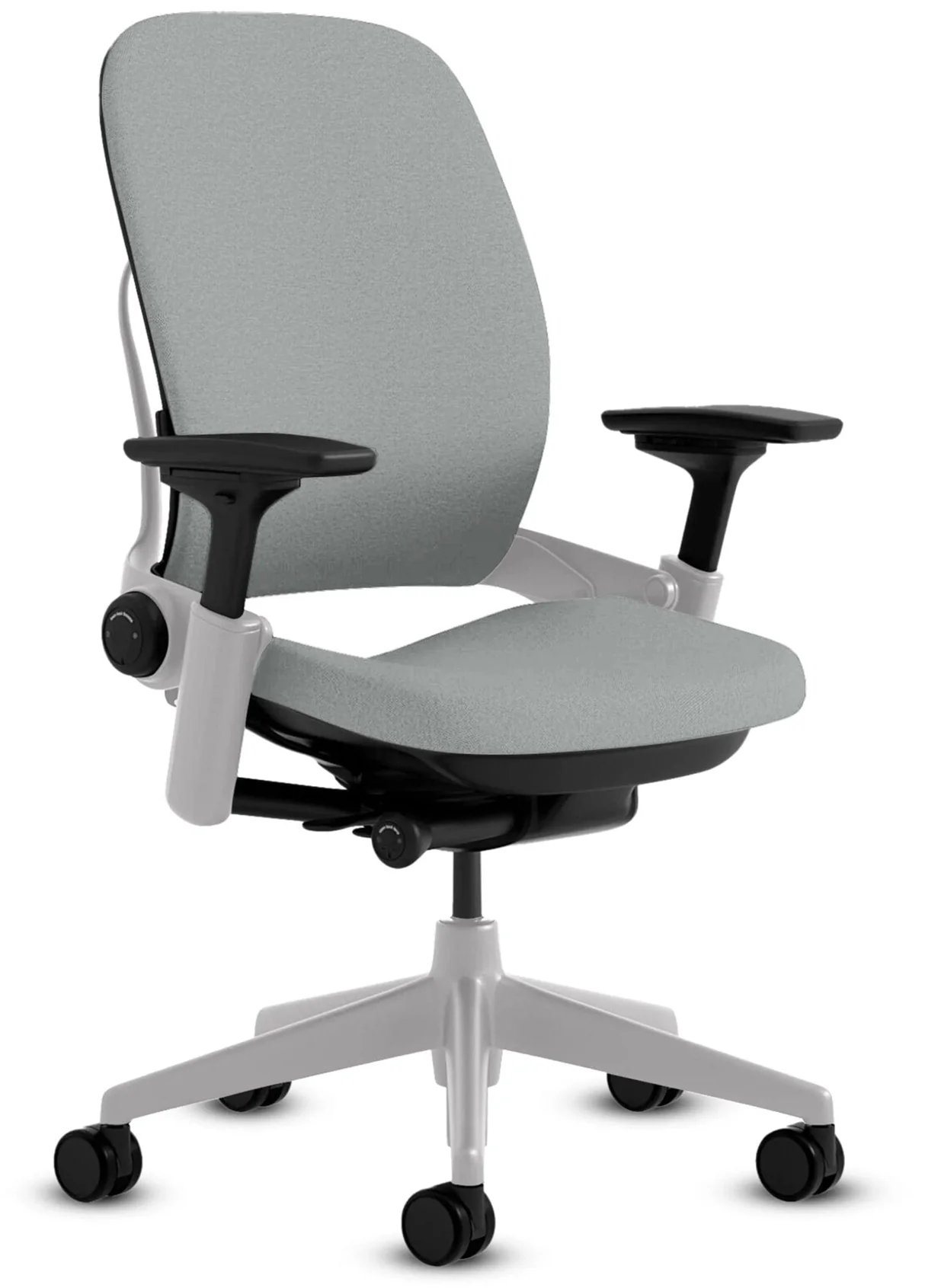
Image source: Bing (Web (fair-use with source credit))
Haworth Fern: Adaptive Support for All-Day Sitters
The Haworth Fern combines aesthetic design with functional ergonomic support. Its key innovation is the iSitu backrest, which features flexible pods that conform to your back shape and movement. This adaptive lumbar zone provides targeted support without manual adjustment mechanisms.
The chair offers seat depth adjustment, seat height control, and recline tension tuning. Armrests are adjustable in height, width, and pivot, though depth adjustment may be limited on certain configurations. The Fern accommodates users from about five-foot-zero to six-foot-two and supports weights up to three hundred pounds.
The mesh backrest promotes air circulation, while the seat cushion offers balanced firmness. Its recline action is smooth and progressive, encouraging periodic posture changes. The base design is compact, making it suitable for various workspace environments.
Some reviewers note that the automatic lumbar support may feel insufficient for individuals with pronounced lumbar curves. Others find the seat depth adjustment range adequate but not exceptionally broad. The Fern excels for users who prefer a chair that requires minimal setup and still delivers reliable support.
It bridges the gap between high-end adjustability and user-friendly operation. The build quality justifies its mid-to-premium price point, backed by a five-year warranty.
Humanscale Freedom: Minimalist Adjustments, Maximum Results
The Humanscale Freedom chair is renowned for its self-adjusting recline mechanism that responds automatically to your body weight. You simply lean back, and the chair s counterbalance system adjusts tension without manual dials or levers. This simplicity appeals to users who dislike fiddling with numerous controls.
The chair offers minimal manual adjustments: seat height, armrest height, and headrest angle. Seat depth is fixed, determined by the model you select. The Freedom prioritizes natural movement and spinal alignment through its synchronized recline action.
The backrest cradles the spine, providing continuous lumbar contact as you recline. Its clean design and premium materials contribute to a professional appearance. The chair supports a wide weight range, typically up to three hundred pounds, depending on the configuration.
However, the lack of extensive adjustability can be a drawback for users with atypical proportions. Those who are very short or very tall may struggle to achieve optimal positioning with only height and armrest adjustments. The fixed seat depth and absence of lumbar articulation mean it cannot be customized for individual spine curves.
Despite this, many users with standard proportions report significant back pain relief due to the encouraging recline and support. The Freedom is best suited for individuals who value intuitive operation and are willing to accept limited customization. It represents a different philosophy: design simplicity that works for the majority rather than perfect adaptation for everyone.
Mid-Range Chairs With Real Back Benefits
Branch Ergonomic Chair: Solid Adjustability Without the Premium Price
The Branch Ergonomic Chair enters the market with a focus on essential adjustability at a more accessible price point. It features adjustable lumbar support with height and depth control, allowing users to target their lower back curve. The seat height range and armrest adjustments cover height, width, and pivot functions.
Recline tension is manually adjustable via a knob beneath the seat. The chair uses a durable mesh backrest for breathability and a padded seat cushion for comfort. It accommodates users from approximately five-foot-zero to six-foot-two and supports weights up to two hundred seventy-five pounds.
The overall design is sleek and modern, suitable for home offices and professional settings. Several users highlight the straightforward assembly process and the chair s sturdy construction. Some note that the lumbar support, while adjustable, may not offer as much depth variation as premium models.
The seat cushion firmness is considered moderate, which may suit those preferring balanced support over plush softness. For its price, the Branch Ergonomic Chair delivers a compelling package of key ergonomic features. It appeals to users who want meaningful adjustability without investing in ultra-premium brands.
The warranty coverage is comprehensive, adding to its value proposition.
Autonomous ErgoChair Pro: Feature-Rich but Worth the Trade-offs?
The Autonomous ErgoChair Pro markets itself as a highly adjustable option with numerous features. It boasts a flexible spine design, adjustable lumbar support with height and depth control, and a recline function with multiple lockable angles. Armrests adjust in height, width, depth, and angle, offering extensive customization.
The chair also includes a headrest and a seat depth adjustment slider. These features aim to cater to a wide variety of body types and preferences. The ErgoChair Pro supports users up to approximately three hundred pounds.
While the specification sheet looks impressive, real-world performance varies among users. Some reviewers praise the chair s comfort and adaptability for the price. Others report issues with durability, such as mechanisms becoming loose or mesh sagging over time.
The complexity of adjustments can be overwhelming, and some controls may feel less refined than those on higher-end chairs. Assembly has been described as challenging by some buyers, requiring careful attention to detail. The brand s direct-to-consumer model offers competitive pricing but may lack the extensive showroom testing opportunities available for established brands.
The ErgoChair Pro represents a gamble for some: you get many adjustable features potentially at a lower cost, but quality control and long-term reliability may not match top-tier competitors. It suits budget-conscious shoppers who prioritize a long list of features and are comfortable with some risk regarding longevity.
Sihoo M18: Budget-Conscious Users Who Still Need Lumbar Care
The Sihoo M18 targets the budget segment while attempting to include essential ergonomic features. It offers adjustable lumbar support, seat height control, and recline functionality. Armrests typically adjust in height and possibly pivot.
The chair often features a mesh back for ventilation and a foam seat cushion. Price points generally fall below four hundred dollars, making it an attractive option for those limiting spending. Users seeking basic lumbar support and ventilation may find the M18 adequate for short to medium sitting sessions.
However, compromises become apparent in materials and build quality compared to higher-priced alternatives. The lumbar support may lack sufficient depth adjustment or firmness options. Armrests might feel less stable or offer limited range.
Long-term durability is a common concern, with reports of mechanisms wearing out faster. The seat cushion may flatten over time, reducing comfort and support. Assembly can be straightforward but sometimes involves poorly aligned parts.
The Sihoo M18 is best suited for users who need an ergonomic chair primarily for occasional use or light daily work. Those spending eight or more hours daily seated may outgrow its limitations quickly. It serves as a temporary solution or entry point into ergonomic seating for those unwilling to invest substantially upfront.
Budget-Friendly Options That Still Support Your Spine
What to Expect When Spending Under Four Hundred Dollars
Chairs under four hundred dollars present significant challenges in delivering genuine lower back support. Manufacturing costs limit the quality of materials, adjustment mechanisms, and durability. Most budget chairs offer basic pneumatic height adjustment and limited recline.
Lumbar support is often fixed or minimally adjustable, lacking the range needed for optimal spinal alignment. Seat cushions tend to be thinner and firmer, potentially causing discomfort during prolonged sitting. Materials like lower-grade plastics and synthetic fabrics may wear faster and offer less breathability.
Build quality variations are common, with some units arriving defective or developing issues within months. However, several budget options provide more adjustability than typical cheap office chairs. Look for models that include at least height adjustment, basic tilt, and some form of lumbar support.
Online retailers frequently offer sales that can bring mid-range chairs into the budget territory. Refurbished or certified pre-owned premium chairs from previous generations can also fall under four hundred dollars, offering far superior support and longevity. When evaluating budget chairs, scrutinize warranty terms carefully.
Shorter warranties, such as one to two years, indicate lower confidence in product lifespan. Reading aggregated user reviews is crucial to identify common failure points and overall satisfaction levels. Realistic expectations are vital: a sub-four-hundred-dollar chair may alleviate mild discomfort for short durations but is unlikely to resolve chronic lower back pain effectively.
Which Budget Chairs Deliver Meaningful Lumbar Support
Some budget chairs manage to incorporate usable lumbar features despite cost constraints. Models like the Sihoo M18 and certain versions of the AutoFull C3 offer adjustable lumbar pillows or basic backrest contours. These features provide more support than completely fixed-back chairs but may not match the precision of higher-end systems.
The lumbar pillows often attach via straps and can be repositioned vertically, though depth and firmness adjustments are rare. Some chairs include a built-in lumbar curve in the backrest, which can suit users whose spine curvature aligns with that shape. However, this one-size-fits-all approach fails many individuals with different spinal geometries.
Seat depth is almost always fixed in this price range, which can lead to improper fitting for taller or shorter users. Armrests are frequently non-adjustable or only offer height changes. Despite these limitations, users with average proportions and mild discomfort may find acceptable relief.
The key is finding a budget chair whose fixed features align closely with your body dimensions. Precise measurement of your inseam, torso length, and weight range against the chair s specifications is essential before purchasing. Returns policies and trial periods become critical safeguards when buying lower-cost items online.
Where Cheap Chairs Cut Corners and How to Spot It
Identifying where budget chairs compromise helps avoid costly mistakes. Common cutbacks include:
- Weak gas lifts that fail prematurely, causing the seat to sink unexpectedly. Look for chairs certified with BIFMA standards for gas lift safety and durability.
- Flimsy mechanisms made from thin metal or plastic that bend, break, or become erratic with regular use.
- Low-quality casters that scratch floors, roll unevenly, or get stuck. Hardwood floor casters are a specific upgrade worth checking for.
- Thin padding with low-density foam that flattens quickly, losing supportive properties and creating pressure points.
- Unstable bases made from lightweight plastic rather than nylon or aluminum cracking or wobbling under stress.
- Poor stitching and upholstery where seams split or fabric pills and tears early.
- Lack of adjustment labels, making proper setup difficult and leading to misuse.
When shopping, prioritize chairs that transparently list material compositions and weight capacities. Avoid products with vague descriptions or no mention of safety certifications. Customer photos in reviews often reveal build quality details better than professional images.
Invest a little more if possible, as the difference in longevity and support impact is frequently substantial. See our detailed breakdown in budget office chair recommendations for further insights.
Quick Comparison: Best Chairs for Different Needs
Head-to-Head Specs and Adjustability Ranges
Comparing specifications side by side reveals which chairs match your priorities. The table below summarizes adjustability ranges for representative models across price tiers.
| Chair Model | Lumbar Adjustment | Seat Depth | Armrest Options | Max Weight | Typical Warranty |
|---|---|---|---|---|---|
| Herman Miller Aeron | Height, Firmness | Fixed by size | 4D | Up to 350 lbs | 12 years |
| Steelcase Leap V2 | Height, Depth, Firmness | Adjustable | 4D | Up to 300 lbs | 5 years |
| Haworth Fern | Adaptive iSitu | Limited | 3D | Up to 300 lbs | 5 years |
| Humanscale Freedom | Self-adjusting | Fixed | Height only | Up to 300 lbs | 5 years |
| Branch Ergonomic | Height, Depth | Limited | 3D | Up to 275 lbs | 5 years |
| Sihoo M18 | Basic positioning | Fixed | Height only | Up to 300 lbs | 3 years |
These ranges help you narrow options quickly. Always verify exact specs with the manufacturer before purchasing, as configurations vary.
Best Chair for Tall Users, Short Users, and Larger Body Types
Tall users over six feet need high seat adjustments and deep seat pans. The Herman Miller Aeron size D and Steelcase Leap V2 both accommodate taller frames well. Their maximum seat heights clear most desk configurations.
Shorter users under five-four struggle with chairs that cannot lower enough. Look for models with minimum seat heights around sixteen inches. Adjustable seat depth becomes essential so shorter legs do not dangle.
Larger body types require higher weight capacities and wider seats. Many budget chairs cap at two hundred fifty pounds, which leaves little safety margin. Premium chairs support three hundred to three hundred fifty pounds comfortably.
Check the actual seat width, not just the weight limit. A narrow seat digs into hips and causes discomfort regardless of capacity.
Best for Sciatica, Herniated Discs, and General Lower Back Strain
Different back conditions respond to different chair features. Sciatica involves nerve irritation that worsens with pressure on the buttocks and thighs. Waterfall seat edges and contoured cushions reduce pressure behind the knees and improve circulation.
Moderate recline takes load off the lumbar spine while maintaining support. Herniated discs benefit from deep lumbar support that preserves the natural inward curve. Adjustable lumbar height and depth let you target the affected area precisely.
Reclining slightly shifts weight from the discs to the backrest. General lower back strain improves with chairs encouraging movement throughout the day. Synchro-tilt mechanisms and adjustable recline tension support frequent posture changes.
Breathable mesh backs prevent heat buildup that stiffens muscles. Foam seats provide consistent cushioning but may retain warmth. Match your primary symptom to the chair features that address it directly.
Warranty Lengths and Real-World Durability Benchmarks
Warranty length often signals expected product lifespan. Herman Miller and Steelcase offer ten to twelve-year warranties on premium models. This coverage reflects confidence in mechanism durability and material longevity.
Mid-range brands typically provide five-year warranties covering parts and labor. Budget chairs frequently offer one to three years, reflecting shorter expected lifespans. Real-world longevity depends on daily use intensity and maintenance.
A chair used eight hours daily ages faster than one used occasionally. Mesh materials can sag after several years of heavy use, especially under higher weights. Foam cushions compress over time, losing resilience and support.
Plastic components may become brittle from UV exposure or temperature swings. Metal mechanisms generally outlast other parts but can develop play in adjustment points. Reading long-term reviews beyond the warranty period reveals actual durability patterns.
Average lifespan for quality ergonomic chairs ranges from seven to twelve years with proper care. See our detailed guide on office chair lifespan and replacement signs for deeper insights.
How to Pick the Right Chair for Your Body Type and Pain Pattern
Matching Seat Depth, Weight Capacity, and Lumbar Profile to Your Measurements
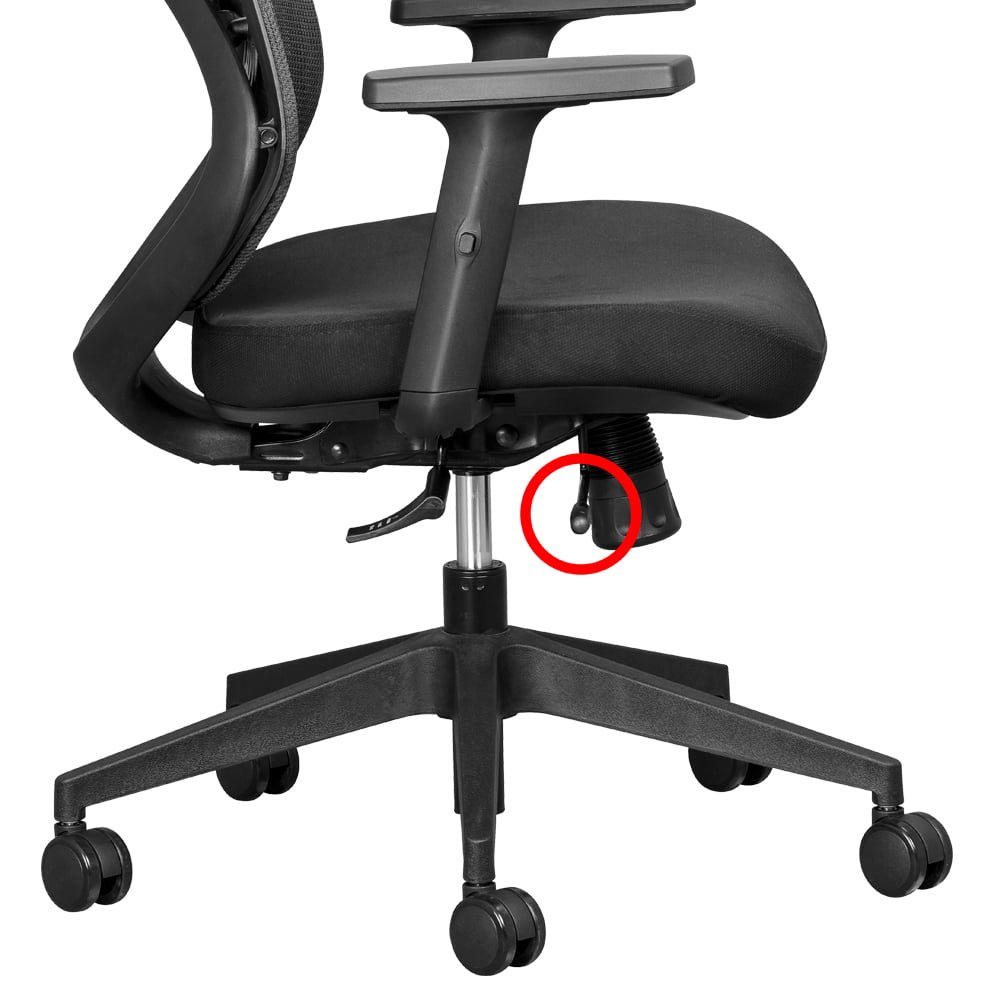
Image source: Bing (Web (fair-use with source credit))
Measuring your body before buying prevents costly mismatches. Record your height, inseam length, and current weight. These numbers determine the chair size range you need.
Your inseam length dictates minimum seat depth requirements. A simple tape measure works fine for home measurement. Compare your measurements against manufacturer dimension charts.
Do not rely on generic size labels like medium or large. Exact numerical ranges are far more reliable. If your inseam measures twenty-eight inches, you need a seat depth that accommodates that leg length while leaving two to four fingers of gap behind your knees.
Weight determines both chair capacity and recline tension settings. Heavier users compress foam faster and need firmer lumbar support. Lighter users may find premium lumbar pads feel too rigid.
Always choose a chair rated well above your current weight for safety and longevity.
Herniated Disc versus Muscle Strain versus Sciatica: Which Chair Features Matter Most
Understanding your specific condition guides feature selection. Herniated discs require support that maintains lumbar curvature and discourages forward slouching. Deep adjustable lumbar with firm support is essential.
Recline capability allows periodic pressure relief on affected discs. Muscle strain responds better to supportive yet flexible seating. You need enough firmness to maintain posture without rigid constraints.
Moderate recline tension encourages movement and reduces sustained loading. Sciatica benefits from pressure relief on the sit bones and thighs. Contoured seats and waterfall edges minimize nerve compression.
Side-lying recline positions can take pressure off the sciatic nerve pathway. If you have multiple conditions, prioritize the feature addressing your most limiting symptom. For example, someone with both herniation and sciatica should favor adjustable lumbar plus a contoured seat edge.
Consult a healthcare provider for diagnosis if you are unsure of your condition. Proper identification ensures you invest in the right support features.
Sit-Stand Desk Users: What to Look for in Recline and Height Range
Workers alternating between sitting and standing face unique chair requirements. Frequent transitions demand quick, intuitive adjustments. Seat height must clear your standing desk surface comfortably when raised.
Measure your desk height with arms at your sides, then ensure the chair max height exceeds that measurement by two to three inches. Recline tension should allow easy leaning back without requiring constant readjustment. If your chair locks firmly in place, you will avoid it and defeat the purpose of movement.
Synchro-tilt mechanisms excel for sit-stand users because they maintain foot contact during recline. Wheels should roll smoothly across your floor type without catching. Hardwood floor casters prevent scratching and enable quiet repositioning.
Carpet users benefit from larger, softer wheels that glide easily. Storage space matters less if you move the chair frequently between sitting and standing zones. Choose a model with durable castors and reliable tilt functionality for this workflow.
When a Chair Alone Is Not Enough and What to Add
No chair eliminates the need for movement and proper workspace setup. Sitting statically in even the best ergonomic chair increases disc pressure over time. Break up prolonged sitting with short walks or position changes every thirty minutes.
A standing desk converter complements your chair by allowing posture alternation. Footrests improve circulation if your feet do not rest flat at your current desk height. Lumbar pillows add support to chairs lacking adequate built-in adjustment.
However, relying on a pillow to fix a poorly designed chair creates dependency rather than solving the root problem. Proper base support comes from adjustable, well-positioned lumbar mechanisms built into the chair. Exercise strengthens core muscles that support your spine naturally.
Stretching routines reduce muscle tightness that contributes to discomfort. Heat therapy relaxes tense muscles after long sitting sessions. View the chair as one component of a broader back health strategy.
Combine proper seating with movement, strengthening, and ergonomics awareness for lasting relief. Explore options like best work-from-home seating solutions to find complementary solutions.
Setting Up Your New Chair to Actually Relieve Back Pain
Step-by-Step Adjustment Guide for Lumbar, Seat, Arms, and Recline
Proper setup transforms a good chair into a pain-relief tool. Follow this sequence to achieve optimal positioning.
Start with seat height. Sit fully back in the chair with feet flat on the floor. Adjust the lever until your thighs rest parallel to the ground.
Knees should bend at approximately ninety degrees. Hips sit slightly higher than knees to promote pelvic alignment. Next, set seat depth.
Slide the seat pan forward or back until you fit two to four fingers between the seat edge and the back of your knees. This gap prevents pressure on the popliteal area while supporting full thigh length. Then adjust lumbar support.
Position the lumbar pad to fill the inward curve of your lower back. The support should sit at or slightly below the belt line for most users. Feel gentle pressure filling the gap, not digging into the spine.
Set armrest height next. Rest your shoulders relaxed and lower your elbows to ninety degrees. Adjust armrests so your forearms rest comfortably without shoulder elevation.
Armrests should support without pushing shoulders up toward your ears. Finally, tune recline tension. Lean back and adjust the tension knob until the backrest supports your weight smoothly.
You should recline with moderate effort and return to upright without feeling unstable. Test each setting by moving through typical work postures. Make micro-adjustments until everything feels balanced.
The Two-to-Four Finger Rule for Seat Depth
Seat depth verification uses a simple hand measurement. Slide into the chair with your back against the rest. Reach behind your knees and count how many fingers fit between the seat edge and the back of your knees.
Two to four fingers indicates correct depth. Zero fingers means the seat is too shallow, leaving thighs unsupported and increasing disc load. Five or more fingers means the seat is too deep, pressing against your knees and reducing circulation.
Adjust the seat slider or choose a differently sized chair if the fit falls outside this range. Fixed-depth chairs require selecting a model matched to your inseam measurements beforehand.
Finding the Right Recline Angle and Tension for Your Body Weight
Recline settings depend heavily on your body mass. Heavier users need firmer tension to prevent the backrest from collapsing under them. Lighter users require looser tension to feel supported when leaning back.
Test the recline by leaning back slowly. If the chair fights you or refuses to move, tighten the tension. If the backrest falls away before you feel secure, increase resistance.
Most users find a recline angle between one hundred and one hundred ten degrees comfortable for focused work. Angles beyond one hundred thirty degrees suit relaxation breaks but reduce visibility at your desk. Keep the chair within a functional range for your primary tasks.
Experiment with different angles throughout the day to vary spinal loading.
Breaking In Your Chair: What Is Normal Discomfort versus Warning Signs
New chairs require an adjustment period for both the mechanism and your body. Some initial unfamiliarity is normal as you learn each control. Mild stiffness after extended first sessions reflects changed posture habits.
True discomfort warning signs include sharp pain, numbness, or tingling that persists after adjusting the chair. If pain develops despite correct setup, the chair likely does not match your body. Return it during the trial period rather than forcing adaptation.
Mesh chairs sometimes feel unusually firm initially. This sensation usually fades within one to two weeks as the material settles. Foam chairs should feel comfortable immediately.
If your current chair causes persistent pain after proper adjustment, consult an ergonomic specialist or physical therapist. The issue may involve workspace ergonomics beyond the chair itself. Refer to guidance on best desk chairs for support for additional context.
Troubleshooting: When Pain Persists After Proper Setup
Persistent pain despite correct adjustment signals a mismatch. Common culprits include incorrect desk height, improper monitor placement, or inadequate movement breaks. Verify that your keyboard and mouse keep elbows at ninety degrees with shoulders relaxed.
Monitor tops should sit at or slightly below eye level to prevent neck strain. If these factors check out, the chair may lack sufficient adjustability for your unique proportions. Try a different model with broader adjustment ranges.
Some bodies simply require features that standard chairs do not offer. Consider professional ergonomic assessment if pain continues. Occupational therapists and physical therapists can evaluate your workstation and recommend specific chair features tailored to your needs.
Remember that chairs address mechanical support. They do not replace exercise, stretching, or medical treatment for chronic conditions.
Common Mistakes That Turn an Ergonomic Chair Into a Back Pain Trap
Buying Based on Looks, Reviews, or Name Recognition Alone
Aesthetic appeal and popular reviews frequently mislead buyers. Beautiful chairs with minimal adjustability offer little back relief. High review counts reflect sales volume, not necessarily suitability for back pain.
Recognized brands command premium prices but may not fit every body type. Always prioritize adjustability specifications over appearance. Read reviews from users with similar body dimensions and conditions.
Filter feedback for mentions of back pain improvement or worsening. Purchase from retailers offering generous trial periods. This protects you if the chair looks great but feels wrong after extended use.
Ignoring Your Actual Measurements and Body Dimensions
Skipping measurement leads to poor sizing choices. Assuming you fit a medium chair because you are average height ignores individual variation. Torso length, leg length, and weight distribution differ significantly even among people of identical height.
Measure your inseam, waist circumference, and current weight before shopping. Compare these numbers directly to specification sheets. Do not guess based on past chair experiences.
Your body changes over time, and previous fits may no longer apply.
Over-Reclining or Locking the Chair in One Position
Extreme recline angles reduce desk productivity and may strain your neck. Locking the chair upright defeats the purpose of dynamic seating. Both extremes increase discomfort over prolonged periods.
Use recline modestly, staying within the one hundred to one hundred ten-degree range for work. Allow free movement rather than fixing one posture. Change positions deliberately every twenty to thirty minutes.
Movement distributes disc pressure and prevents muscle stiffness.
Skipping the Trial Period or Returning Too Late
Many retailers offer thirty to ninety-day trial periods. Returning after this window leaves you stuck with an unsuitable chair. Test the chair thoroughly during the trial.
Sit in it for multiple sessions spanning several hours. Note any developing discomfort or pressure points. Document specific issues to guide exchange decisions.
Do not wait until pain becomes chronic to reconsider your choice. Exchange policies vary by retailer. Understand the terms before purchasing to avoid restocking fees or non-returnable items.
Using a Lumbar Pillow on a Chair That Already Has Poor Base Support
Lumbar pillows cannot compensate for fundamentally flawed chair design. Adding a pillow to a chair with fixed, misplaced lumbar support creates uneven pressure points. The pillow slides out of position during movement, providing inconsistent relief.
Proper base support comes from adjustable, well-positioned lumbar mechanisms built into the chair. Invest in a chair with effective built-in lumbar adjustment rather than patching shortcomings with accessories. If your current chair lacks adjustability, consider replacement instead of modification.
Choosing a Gaming Chair for Work and Why It Often Fails for Back Pain
Gaming chairs prioritize aesthetics and recline range over ergonomic precision. Bucket-seat designs confine hips and limit lateral movement. Fixed lumbar pillows rarely align correctly with individual spine curves.
Armrests on gaming chairs often lack adjustability and feel flimsy under sustained typing pressure. The aggressive styling appeals to some buyers but sacrifices functional support. If your primary goal is back pain relief, an ergonomic office chair serves you better.
Gaming chairs may suit occasional leisure use but fall short for eight-hour workdays. Review our analysis of top gaming chair picks for comparison context.
Pricing, Warranties, and True Long-Term Value
What Two Hundred, Five Hundred, Nine Hundred, and Fourteen Hundred Dollars Actually Buys You
Price tiers correlate loosely with material quality, adjustability range, and longevity. At two hundred dollars, you receive basic height adjustment and minimal lumbar support. Materials degrade faster, and mechanisms show wear within a few years.
Five hundred dollars buys meaningful adjustability in lumbar, seat depth, and armrests. Build quality improves noticeably, with warranties extending to five years. Nine hundred dollars enters premium territory with synchro-tilt mechanisms and extensive adjustment ranges.
Materials like breathable mesh and high-density foam last longer under daily use. Fourteen hundred dollars secures flagship models from established ergonomic brands. These chairs feature patented mechanisms, comprehensive warranties, and resale value retention.
The price difference reflects engineering investment and durable construction rather than luxury branding alone.
Refurbished and Certified Pre-Owned: Savings or Risk?
Refurbished premium chairs offer significant savings, sometimes forty to sixty percent below retail. Certified pre-owned programs from manufacturers or authorized dealers inspect, repair, and warrant these units thoroughly. These chairs undergo rigorous testing to restore original functionality.
Uncertified refurbished chairs carry higher risk. Sellers may skip critical repairs or use incompatible replacement parts. Always verify certification status and remaining warranty coverage before purchasing pre-owned.
Inspect for mesh sagging, mechanism smoothness, and castor condition upon arrival. Refurbished deals make sense for budget-conscious buyers willing to accept used condition. Certified options nearly match new quality at reduced cost.
Warranty Coverage Breakdown: Mechanism, Mesh, Upholstery, and Castors
Warranty terms vary significantly across brands and price points. Premium manufacturers typically cover mechanisms for ten to twelve years. Mesh and upholstery warranties range from five to ten years.
Castors and smaller parts often carry two to five-year coverage. Budget chairs may limit comprehensive coverage to one or two years across all components. Read warranty documents carefully to understand exclusions.
Damage from misuse, commercial use on residential-rated chairs, and normal wear on castors frequently fall outside coverage. Some manufacturers require proof of purchase and registered ownership for warranty claims. Retain receipts and register products promptly after purchase.
Understanding coverage scope prevents unpleasant surprises when issues arise.
Cost Per Year: How Premium Chairs Pay for Themselves
Calculating annual cost reveals true value differences. A five-hundred-dollar chair lasting five years costs one hundred dollars per year. A thirteen-hundred-dollar chair lasting twelve years costs roughly one hundred eight dollars annually.
The premium option delivers far better yearly support despite higher upfront cost. Reduced back pain may lower medical expenses and improve work productivity. Durability advantages compound over time, as replacement chairs incur additional purchase and adjustment costs.
Factor in resale value when evaluating total expense. Premium chairs retain thirty to fifty percent of original price on the secondary market. Budget chairs depreciate rapidly, often selling for minimal amounts after a few years.
Total cost of ownership favors quality over lowest initial price for daily users. See additional pricing context in our overview of chair cost by type.
Resale Value and Brand Longevity
Certain brands hold value remarkably well on resale markets. Herman Miller and Steelcase chairs sell consistently at thirty to fifty percent of original retail after several years of use. Popular configurations in good condition move fastest.
Brand reputation drives secondary market demand. Budget and lesser-known brands rarely recoup meaningful value. Resale potential should factor into purchase decisions, especially for high investments.
Proper maintenance preserves condition and maximizes return if you upgrade later. Document purchase date and keep original packaging when possible. Some manufacturers offer trade-in programs that simplify upgrading to newer models.
Maintaining Your Chair So It Keeps Supporting You
Cleaning Mesh, Foam, and Leather Without Damaging Support
Regular cleaning extends chair life and preserves comfort. Vacuum mesh backgrounds weekly to remove dust and debris. Use a soft brush attachment to avoid pulling threads.
Spot clean fabric seats with mild detergent and damp cloth. Never saturate foam cushions, as moisture promotes mold growth. Leather surfaces require dedicated leather cleaner and conditioner every few months.
Harsh chemicals damage coatings and accelerate cracking. Wipe spills immediately to prevent staining and material degradation. Follow manufacturer cleaning instructions whenever provided.
Tightening Hardware and Lubricating Moving Parts
Periodic hardware checks prevent loose mechanisms and noise. Tighten bolts on armrests, base connections, and adjustment levers every six months. Use appropriate tools, usually hex keys or screwdrivers, depending on hardware type.
Lubricate moving pivots and tilt mechanisms annually with silicone spray or manufacturer-recommended products. Avoid penetrating oils that attract dust and gum up joints. Apply lubricant sparingly and wipe excess.
Testing adjustments after servicing confirms smooth operation.
When to Replace Castors, Gas Lifts, and Lumbar Components
Some components wear faster than the main structure. Castors flatten, crack, or lose rolling efficiency after years of use. Replacement castor sets are inexpensive and easy to install on most chairs.
Gas lifts rarely fail but can sink slowly over extended periods. Replacement cylinders fit standard bases and solve height adjustment issues. Inflatable lumbar cushions develop leaks over time.
Manufacturer replacement parts may be available for supported models. Attempting DIY repairs on pressurized gas lifts carries safety risks. Professional servicing or part replacement is safer for complex mechanisms.
Extending Chair Life Beyond the Warranty Period
Proper care keeps chairs functional well past warranty expiration. Rotate seating positions daily to distribute wear evenly. Avoid standing on the base or swinging in the chair.
Keep the chair away from direct sunlight to prevent material fading and degradation. Store in climate-controlled environments when possible to reduce thermal stress on plastics and adhesives. Keep usage logs noting any developing issues for early intervention.
Addressing small problems promptly prevents cascading failures. Many chairs remain supportive for decades with attentive maintenance.
Signs It Is Time for a Replacement
Specific indicators signal when repair costs exceed replacement value. Visible frame cracks or bent components compromise structural integrity. Gas lift failure making height adjustment impossible cannot always be repaired cost-effectively.
Mesh sagging creating visible dips exposes your sit bones uncomfortably. Persistent pain despite optimal adjustment suggests the chair no longer meets your needs. Mechanism failure affecting recline or tilt security creates safety hazards.
When multiple repair costs approach half the price of a comparable new chair, replacement becomes the rational choice. Consider your evolving body measurements and condition changes alongside physical wear indicators.
Frequently Asked Questions
Does an ergonomic chair actually cure lower back pain?
Ergonomic chairs do not cure back pain but significantly reduce mechanical contributors. Proper lumbar support maintains spinal curvature and decreases disc pressure during sitting. Combined with movement breaks and exercise, a well-fitted chair alleviates many cases of work-related discomfort.
Chronic conditions requiring medical diagnosis and treatment should not rely on seating alone. Per OSHA ergonomic guidelines, proper workstation setup including appropriate seating reduces musculoskeletal disorder risk.
How long should I sit in an ergonomic chair before seeing relief?
Most users notice improved comfort within one to two weeks of proper adjustment. Your body adapts gradually to corrected posture and support distribution. Persistent pain after three weeks of correct setup suggests the chair may not suit your specific proportions.
Consult an ergonomic specialist or healthcare provider if discomfort continues despite appropriate configuration.
Are expensive ergonomic chairs worth the price for back pain?
Premium chairs often deliver superior adjustability and durability that justify higher costs for daily users. If you sit eight or more hours daily, the longevity and precise support warrant the investment. Occasional users may find mid-range options sufficient for their needs.
Calculate cost per year of use rather than comparing sticker prices alone.
Can I use an ergonomic chair with a standing desk?
Ergonomic chairs pair excellently with sit-stand desks by enabling frequent posture alternation. Select a chair with sufficient height range to clear your desk when raised. Smooth-rolling castors facilitate easy transitions between sitting and standing positions.
The combination addresses both static sitting concerns and prolonged standing fatigue effectively.
What is the difference between a lumbar pillow and built-in lumbar support?
Built-in lumbar support integrates mechanically with the chair backrest and adjusts precisely. Lumbar pillows attach separately and often shift position during use. Pillows can supplement insufficient built-in support but cannot replicate engineered adjustability.
Integrated systems maintain alignment as you move, while pillows require constant repositioning.
How do I know if my current chair is making my back pain worse?
Increased pain during or after sitting, numbness in legs, or worsening posture indicators suggest chair mismatch. Compare your symptoms before and after switching chairs if possible. Track whether pain correlates with specific sitting durations or positions.
Professional ergonomic assessment provides definitive evaluation when self-diagnosis remains unclear.
Is mesh or foam better for lower back pain?
Mesh promotes airflow and maintains consistent support without sagging over time. Foam offers plush cushioning that some users find more comfortable initially. Mesh excels in warm climates and for users who tend to overheat.
Foam better distributes pressure for heavier users and those preferring softer surfaces. Neither material inherently causes back pain; proper adjustability matters more than material choice.
How often should I replace my ergonomic chair?
Quality chairs last seven to twelve years with regular use and proper maintenance. Replace your chair when mesh sags visibly, mechanisms fail, or persistent pain returns despite correct adjustment. Higher usage intensity accelerates wear on all materials.
Budget chairs often need replacement within three to five years due to faster degradation. Track your chair condition annually and plan replacement before complete failure occurs.
Do ergonomic chairs help with sciatica and herniated discs?
Yes, when properly adjusted. Ergonomic chairs with adjustable lumbar support reduce disc pressure and maintain spinal alignment. Chairs with waterfall seat edges and contoured cushions relieve pressure on the sciatic nerve pathway.
Recline functionality allows periodic position changes that reduce sustained loading on affected structures. Always combine chair use with professional medical guidance for diagnosed conditions.
What adjustments matter most for someone with chronic lower back pain?
Adjustable lumbar height and depth rank highest for chronic lower back pain relief. Seat depth adjustment prevents knee pressure and maintains proper pelvic alignment. Recline tension matching your body weight encourages movement without losing support.
Armrest height adjustment reduces shoulder and upper back tension that contributes to lower back strain. Prioritize these four adjustments when selecting a chair for chronic pain management.
Making Your Final Choice With Confidence
The Decision Checklist: What to Verify Before You Buy
Before completing any purchase, run through a verification checklist. Confirm seat height range covers your required minimum and maximum. Verify seat depth adjustment spans your inseam measurement with adequate finger gap.
Ensure lumbar support reaches your lower back curve and offers depth control. Check armrest adjustability matches your desk setup and typing posture. Review weight capacity with comfortable margin above your current mass.
Examine warranty length and coverage exclusions carefully. Confirm return policy terms and any restocking fees. Read recent buyer reviews focusing on long-term durability reports.
Only proceed when every item on this list checks out against your specific measurements and needs.
Matching Your Top Picks to Your Daily Sitting Habits
Your typical daily routine determines which chair features matter most. If you type eight hours daily, prioritize armrest precision and lumbar firmness. Video calls frequently mean armrests must allow close desk proximity without interference.
Heavy mouse users benefit from adjustable armrest depth positioning. Collaborative workers who stand frequently need smooth-rolling castors and easy recline tension. Students studying irregular hours may value breathability and moderate adjustability over premium mechanisms.
Match your actual behavior patterns to chair capabilities rather than aspirational use cases. A chair suited to your real habits delivers better returns than one matching an idealized workflow.
When to Walk Away From a Chair Even if It Is Highly Reviewed
High ratings do not guarantee personal suitability. Walk away from any chair causing sharp pain, numbness, or tingling during trial periods. Return chairs where lumbar support consistently misses your spine curvature despite adjustments.
Reject models with unstable mechanisms, wobbling armrests, or squeaking tilts after proper tightening. Avoid chairs requiring excessive force to adjust, indicating poorly engineered controls. Step away if seat depth cannot accommodate your legs leaving either zero gap or excessive pressure behind knees.
Do not compromise on weight capacity ratings for aesthetic appeal. Trust your body feedback over aggregate review scores when they conflict. Your spine health deserves honest evaluation rather than purchase commitment based on external validation.
Final Verdict: Which Chairs Earn Our Recommendation and For Whom
No single chair earns universal recommendation because bodies and conditions vary widely. The Herman Miller Aeron serves average to tall-average users preferring breathable mesh and generous size options. The Steelcase Leap V2 suits dynamic sitters needing adaptive back support and extensive adjustability.
The Haworth Fern works well for users wanting adaptive lumbar without manual tuning complexity. The Humanscale Freedom fits individuals valuing simplicity and self-adjusting recline over customization depth. Mid-range options like Branch serve budget-conscious buyers needing solid core adjustability.
Budget picks suit occasional users accepting trade-offs in longevity and precision. Your best choice emerges from matching your measurements, condition, daily habits, and budget to specific chair capabilities. Prioritize adjustability ranges and trial periods over brand prestige alone.
Properly matched chairs reduce mechanical strain significantly. Mismatched premium chairs waste money and fail to address discomfort. Make your selection based on verified fit rather than marketing appeal.
Leverage this data to make a confident purchase that actually supports your back.