The best chair for neck and back pain is an ergonomic office chair with adjustable lumbar support, seat depth, and a reclining backrest. Per NIOSH guidelines, proper seating alignment reduces disc pressure by up to 40 percent compared to standard chairs. If you sit more than six hours daily, your spine needs support that adapts to your body, not one that forces your body to adapt to it.
Research from the American Physical Therapy Association confirms that mismatched seating is a leading contributor to chronic lower back strain. The right chair won’t cure a medical condition, but it can significantly reduce the mechanical stress that makes pain worse throughout the day. Let’s break down how to find the one that actually fits you.
Quick Answer
The best chair for neck and back pain combines adjustable lumbar support, a reclining backrest, and a headrest. Per BIFMA standards, ergonomic chairs must support spinal alignment for users between 5-foot-2 inches and 6-foot-4 inches. A chair with four-way adjustable armrests reduces shoulder tension during long work sessions.
Look for models offering at least a five-year warranty on the lift mechanism. Herman Miller and Steelcase lead in durability, while Autonomous and HON offer solid mid-range options. Your height, weight, and primary pain zone should drive the final decision.
What Kind of Back Pain Are You Dealing With?
Your pain location determines everything about which chair you should buy. Lower back issues need deep lumbar support positioned at the L4-L5 vertebrae. Neck pain requires an adjustable headrest that cradles the cervical curve without pushing your head forward.
Sciatica demands a seat with a waterfall edge to reduce pressure behind the knees. Herniated discs benefit most from chairs that encourage gentle movement through synchronous tilt.
If you experience pain only after sitting two or more hours, the problem is likely static posture, not structural damage. A dynamic chair that rewards movement will help more than a rigid one. If your pain is constant regardless of position, see a clinician before investing in expensive seating.
Common pain categories and what they need from a chair:
- Lower back pain: Deep, height-adjustable lumbar support with firm padding. Avoid chairs where the lumbar bump sits too high or presses on the rib cage.
- Neck and shoulder tension: An adjustable headrest that moves up, down, forward, and backward. Fixed headrests force your neck into awkward angles.
- Sciatica or leg numbness: A seat with a waterfall edge and moderate cushion firmness. Too soft sinks your hips and increases nerve compression.
- General fatigue and stiffness: A synchro-tilt mechanism with adjustable tension. Small movements throughout the day keep blood flowing and muscles engaged.
- Post-surgical recovery: Custom positioning capabilities and wide weight capacity ranges. Always clear chair selection with your physical therapist first.
Your pain profile might also overlap with factors like wheelchair cost considerations if mobility issues are present, though chairs serve very different purposes. Understanding where your discomfort originates is the only way to shop with confidence instead of guessing at features.
How Ergonomic Chairs Actually Support Your Spine
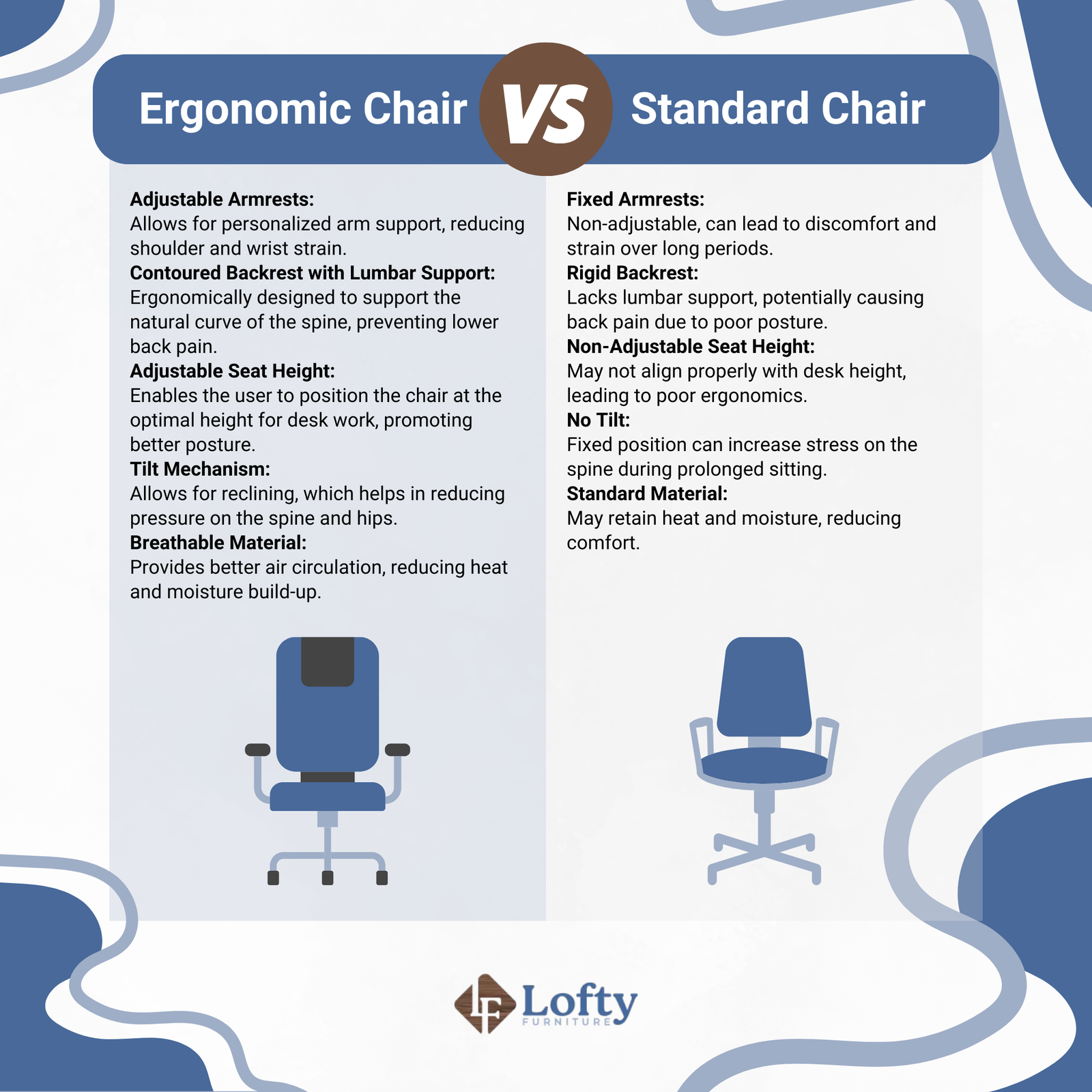
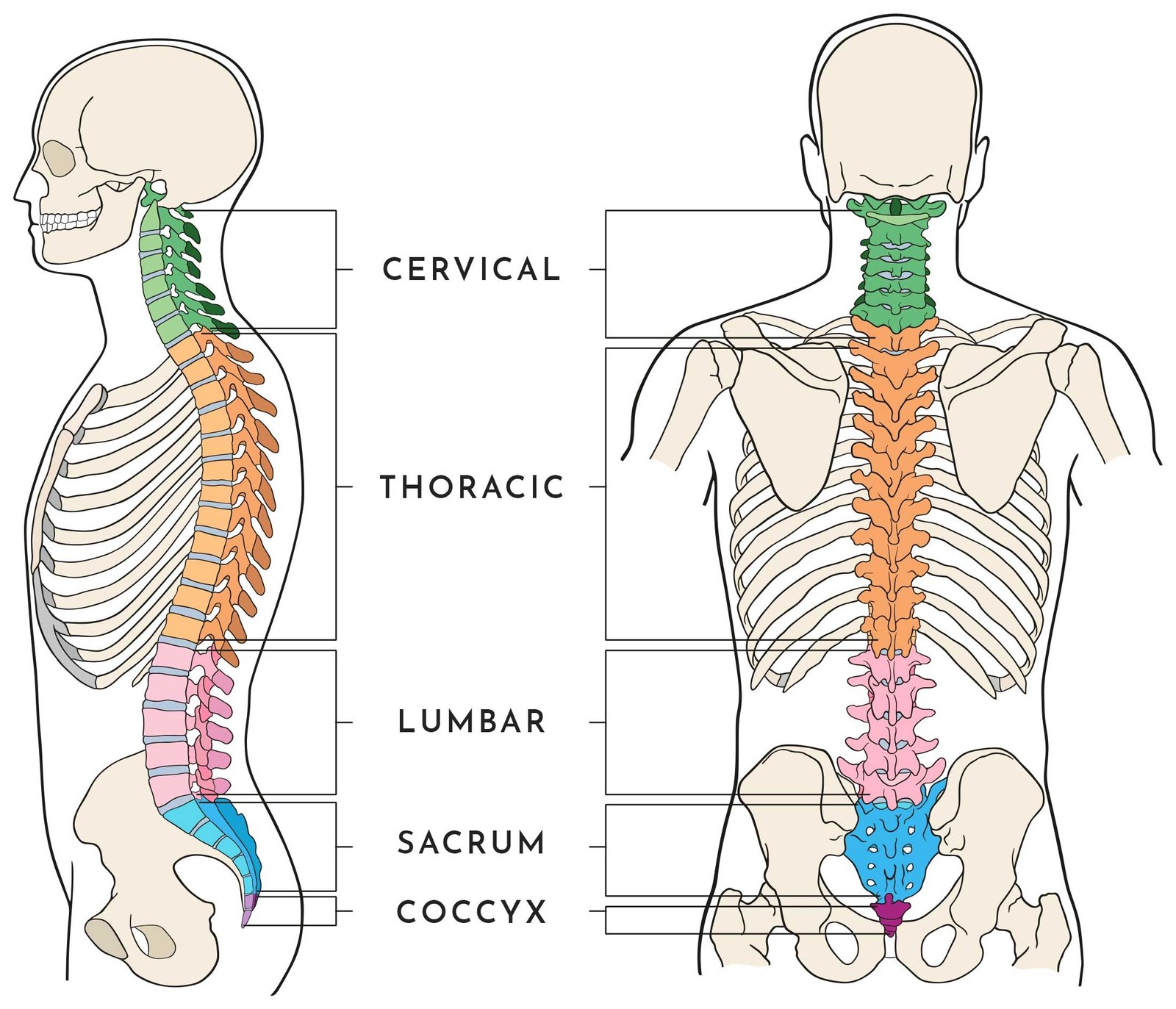
Ergonomic chairs work by maintaining the three natural curves of your spine: the cervical lordosis, thoracic kyphosis, and lumbar lordosis. When any of these curves flatten or reverse, disc pressure spikes. Standard chairs often push the lower back into a C-shape, increasing intradiscal pressure by up to 90 percent compared to standing.
Proper lumbar support fills that gap between your belt line and lower ribs. It should contact the spine at roughly the level of your navel. Too low and it supports nothing.
Too high and it jams into your thoracic spine, forcing your shoulders forward.
Seat depth matters just as much as lumbar height. If the seat pan extends past your knees by more than two finger widths, you compress the popliteal area and restrict circulation. If it’s too shallow, your thighs slide forward and your pelvis tilts backward, flattening the lumbar curve.
The tilt mechanism deserves special attention. Synchronous tilt moves the backrest and seat pan in a 2:1 ratio, keeping your feet flat while you recline. This preserves the relationship between your hips, knees, and ankles.
Fixed-tilt chairs either lock you upright or let you slump backward without proper knee support.
Armrests aren’t decorative. When set correctly, they allow your shoulders to drop and your elbows to rest at 90 to 100 degrees. Too high and they hike your trapezius muscles into permanent tension.
Too low and you reach forward, rounding your upper back against the lumbar support.
A quality headrest supports the crown of your skull or the base of your skull, never the back of your head where it pushes your face forward. Adjustable headrests move with you as you shift between upright working and reclined thinking positions.
Who This Guide Is For — And Where to Start
This guide serves anyone spending six or more hours seated daily who wants to reduce or prevent neck and back pain. That includes remote workers, office professionals, students, gamers, and hybrid employees splitting time between home and office setups.
If you’re shorter than 5-foot-4 inches or taller than 6-foot-4 inches, off-the-shelf chairs may not fit properly. Compact frames exist from brands like Sihoo and AmazonBasics, while tall-user options include the Herman Miller Aeron in size C or the Steelcase Leap with extended backrests. Check best tall desk chairs if you fall outside average height ranges.
People recovering from back injury should consult their physician before making seating changes. Certain conditions like spinal fusion or severe degenerative disc disease require specific postural constraints that generic ergonomic advice doesn’t address. A physiotherapist can recommend whether reclined seating or upright support suits your rehabilitation phase.
Employers outfitting home offices should prioritize chairs with BIFMA certification and warranties of at least ten years on mechanisms. Bulk purchasing often unlocks volume discounts, especially from manufacturers like HON and Steelcase through their commercial programs.
Where you start depends on identifying your primary pain driver. Ask yourself these questions before browsing:
- Do you wake up with neck stiffness or lower back ache?
- Does pain improve when you stand or walk around?
- Have you tried adjusting your current chair and still feel uncomfortable?
- Do your legs go numb during long sitting sessions?
- Has a healthcare provider recommended specific lumbar positioning?
Your answers point toward whether you need firm lumbar support, a reclining feature, better seat cushioning, or simply a chair sized correctly for your body. Skipping this diagnostic step wastes money on chairs that look good online but fail in practice.
Understanding your situation first saves hours of research. You’ll also want to know average office chair lifespan and when to replace so you can plan replacement cycles around your usage patterns rather than replacing broken chairs reactively.
Measuring Yourself for the Right Chair
Getting your measurements right eliminates half the frustration of online chair shopping. Most returns happen because buyers guessed at sizing instead of measuring accurately. Grab a flexible tape measure and follow this sequence.
Start with your total height. This determines whether you need a compact, standard, or tall frame. Most chairs accommodate 5-foot-0 inches to 6-foot-2 inches.
Outliers should look for models specifically rated beyond those ranges.
Next, measure your inseam from the floor to the underside of your thigh where it meets your torso. This number directly predicts the seat depth you need. Add two to three inches to your inseam measurement for ideal seat depth.
Someone with a 30-inch inseam should target a seat depth of 32 to 33 inches.
Weigh yourself and compare against chair weight capacities. Standard models support 250 to 300 pounds. Heavy-duty options from brands like Big and Tall or Steelcase extend to 400 or 500 pounds.
Exceeding weight limits voids warranties and compromises mechanism performance over time.
Measure your shoulder width and hip breadth. These determine whether a narrow or wide seat pan feels comfortable. Narrow frames suit slimmer builds.
Wide seats accommodate broader hips and prevent inner-thigh compression.
Record your preferred desk height. Armrests should align within one inch above or below your keyboard surface when your shoulders are relaxed. If your desk sits unusually high or low, you’ll need four-dimensional armrests to compensate.
Here’s a quick reference chart based on common body types:
| Height Range | Weight Range | Recommended Seat Depth | Chair Size Category |
|---|---|---|---|
| Under 5’4″ | Under 140 lbs | 15.5 to 17 inches | Compact or Small |
| 5’4″ to 5’8″ | 140 to 170 lbs | 17 to 19 inches | Standard |
| 5’8″ to 6’2″ | 170 to 230 lbs | 19 to 21 inches | Standard or Large |
| Over 6’2″ | Over 230 lbs | 21 to 23 inches | Tall or Big & Tall |
If you fall between sizes, round up the seat depth rather than down. Shallow seats cut off circulation. Deep seats let you slide back into lumbar support without compromising knee clearance.
Bring these numbers into your shopping process. Manufacturers list exact dimensions on product pages, usually under specifications or details tabs. Cross-reference your measurements before adding anything to your cart.
Don’t skip checking return policies either. Some retailers offer 30-day trials with free pickup. Others charge restocking fees or require you to cover return shipping.
Returns for fit issues should never cost you more than the savings you hoped to gain.
Key Features That Matter Most for Neck and Back Pain
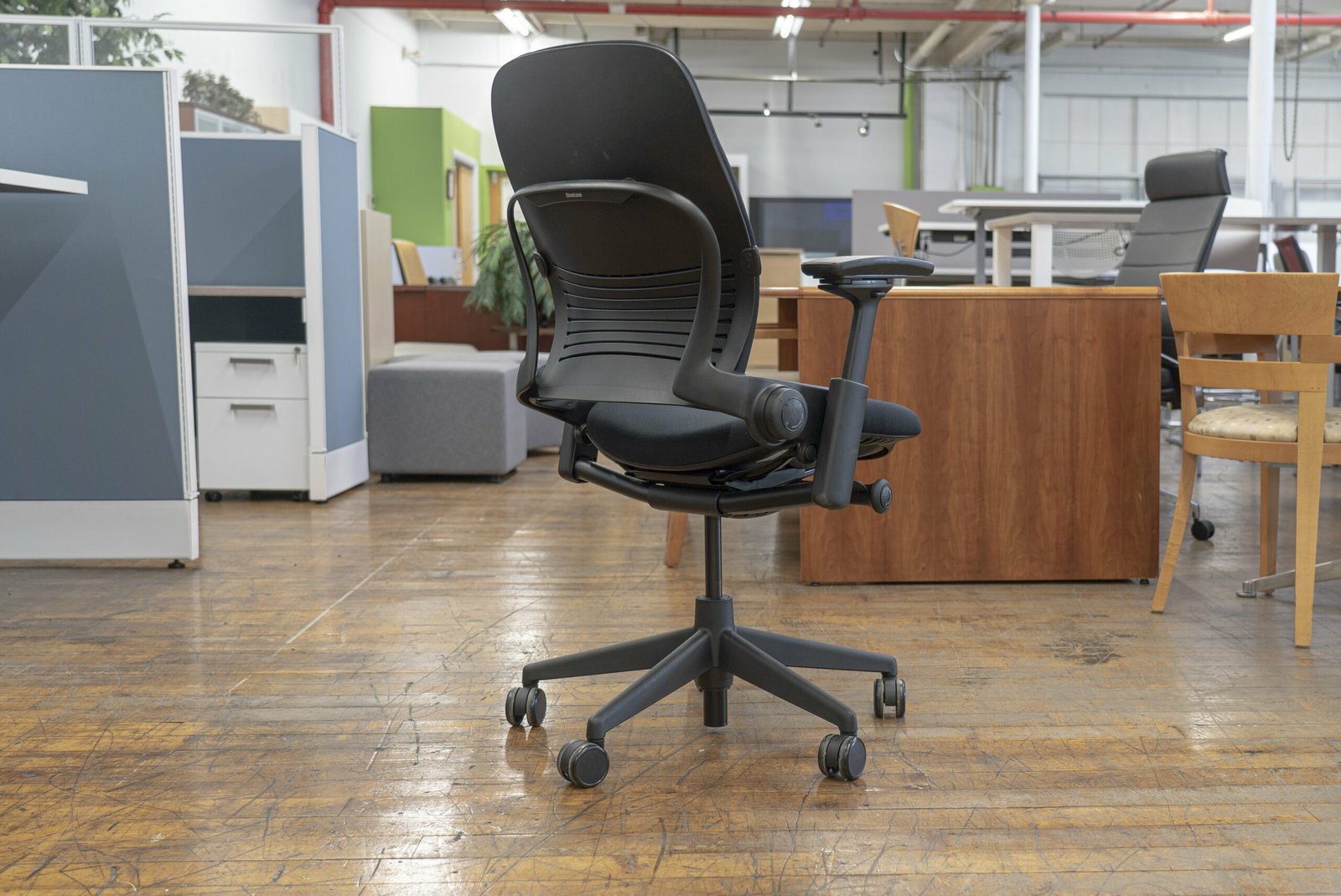
Image source: Bing (Web (fair-use with source credit))
Not every adjustable feature delivers equal value. Some add real comfort. Others are marketing extras that rarely get used.
Focus your evaluation on these five pillars.
Adjustable Lumbar Support
Look for lumbar systems that adjust both vertically and horizontally. Vertical adjustment places the support at the correct spine level. Horizontal adjustment controls how far the pad presses into your back.
Firmness variation across models affects comfort significantly. Mesh-backed chairs rely on frame tension rather than padding, which some users prefer and others find insufficient for severe lower back pain.
Seat Depth Adjustment
A sliding seat pan lets you fine-tune support length without changing the entire chair. This matters enormously for people whose leg lengths don’t match standard proportions. Fixed seat depths force compromises: either your lumbar support misses its mark, or your knees press into the seat edge.
Four-Dimensional Armrests
Four-way adjustment means height, width, depth, and pivot are all movable. Height sets elbow angle. Width positions arms away from your rib cage.
Depth controls how far the pads reach forward. Pivot angle matches your natural arm swing. Two-dimensional armrests only adjust height and sometimes width, leaving depth and angle unaddressed.
Synchro-Tilt Mechanism
A true synchro-tilt moves the backrest and seat at a coordinated ratio, typically 2:1. This keeps your feet planted and your spine aligned as you recline. Tension control lets you customize resistance based on body weight.
Lighter users need less resistance. Heavier users need more. Without tension adjustment, the tilt either slips under you or locks stiffly in place.
Headrest Adjustability
The best headrests move up, down, forward, backward, and sometimes pivot side to side. They should support the occipital ridge or the top of the skull, never the forehead or lower neck. A poorly positioned headrest pushes your chin forward and strains the cervical spine.
Removable headrests offer flexibility if you prefer working without one.
Other features worth noting include breathable mesh backs for hot climates, high-density foam cushions for pressure relief, and waterfall seat edges to protect circulation. Less critical but nice-to-have options include built-in footrests, lateral腰支持, and integrated massage functions that tend to add cost without proportional ergonomic benefit.
Budget models often cut corners on two of these pillars while advertising all five. Mid-range chairs typically deliver three fully adjustable systems plus two with limited range. Premium chairs offer five fully adjustable features with durable mechanisms backed by decade-long warranties.
Knowing which tiers exist helps you set realistic expectations at every price point.
Some buyers consider lift chair costs as alternatives if mobility assistance is needed alongside ergonomic support. These serve different purposes but share the goal of reducing physical strain during transitions between sitting and standing.
Budget Tiers and What to Expect at Each Price Point
Ergonomic chairs span a wide price range, and understanding what you get at each tier prevents overpaying or buying junk. The market clusters into three clear bands with distinct expectations.
Under $500: Entry-Level Ergonomics
Budget chairs deliver basic adjustability with compromises in materials and longevity. You’ll find mesh backs, fixed lumbar curves, and plastic armrests that feel flimsy after a year. Seat cushions often use lower-density foam that flattens quickly.
These chairs work for occasional use or part-time remote workers. If you sit less than four hours daily, an under-$500 model can provide meaningful relief compared to a standard dining chair. Check budget office chair recommendations for specific models in this bracket.
Warranties typically cover one to three years. Mechanisms may fail within that window, especially on cheaper gas lifts. Assembly usually takes 30 to 45 minutes with basic tools included.
$500 to $1,000: Mid-Range Sweet Spot
This range offers the best value for full-time remote workers. Chairs here feature adjustable lumbar support, synchro-tilt mechanisms, and higher-quality foam or premium mesh. Armrests often include at least height and width adjustment.
Brands like Herman Miller (refurbished), Steelcase (entry models), Autonomous, and HON populate this segment. Warranties extend to five to ten years on mechanisms. Mesh durability improves significantly, resisting sagging for seven or more years with daily use.
You should expect solid build quality without the absolute premium materials found in top-tier models. Plastic components give way to aluminum bases. Fabric choices become more varied.
Over $1,000: Premium Investment Chairs
Premium chairs justify their cost through materials, precision engineering, and decade-long warranties. The Herman Miller Aeron, Steelcase Leap V2, and Humanscale Diffrient represent this category. These chairs adapt to body movement while maintaining structural support across thousands of adjustment cycles.
Warranties commonly span ten to twelve years, covering mechanisms, cylinders, and casters. Some brands offer lifetime warranties on frames. Refurbished premium chairs appear frequently at 40 to 60 percent off retail, providing excellent value if you verify condition and remaining warranty.
Assembly is straightforward for most premium models. Components arrive pre-assembled or require minimal tooling. Expected lifespan ranges from eight to fifteen years with proper maintenance, depending on usage intensity and body weight.
Here’s a quick breakdown of what changes across tiers:
| Feature | Under $500 | $500–$1,000 | Over $1,000 |
|---|---|---|---|
| Lumbar Support | Fixed or basic adjustable | Fully adjustable | Multi-axis adjustable |
| Tilt Mechanism | Basic tilt lock | Synchro-tilt | Precision synchro-tilt |
| Armrests | 2D adjustable | 3D or limited 4D | Full 4D with soft tops |
| Seat Cushion | Low-density foam | High-density foam | Premium foam or mesh |
| Warranty | 1–3 years | 5–10 years | 10–12+ years |
| Expected Lifespan | 2–4 years | 5–8 years | 10–15+ years |
Price alone doesn’t guarantee comfort. A well-adjusted budget chair beats a poorly set up premium model. Always factor in adjustability features, not just cost, when evaluating value.
For broader pricing context, general chair cost guides can help you understand how ergonomic chairs compare to other seating categories in your budget.
Top Picks by Use Case and Body Type
No single chair fits every body and pain profile. Matching your situation to specific models saves money and frustration. Here are practical recommendations organized by common scenarios.
Best for Lower Back Pain
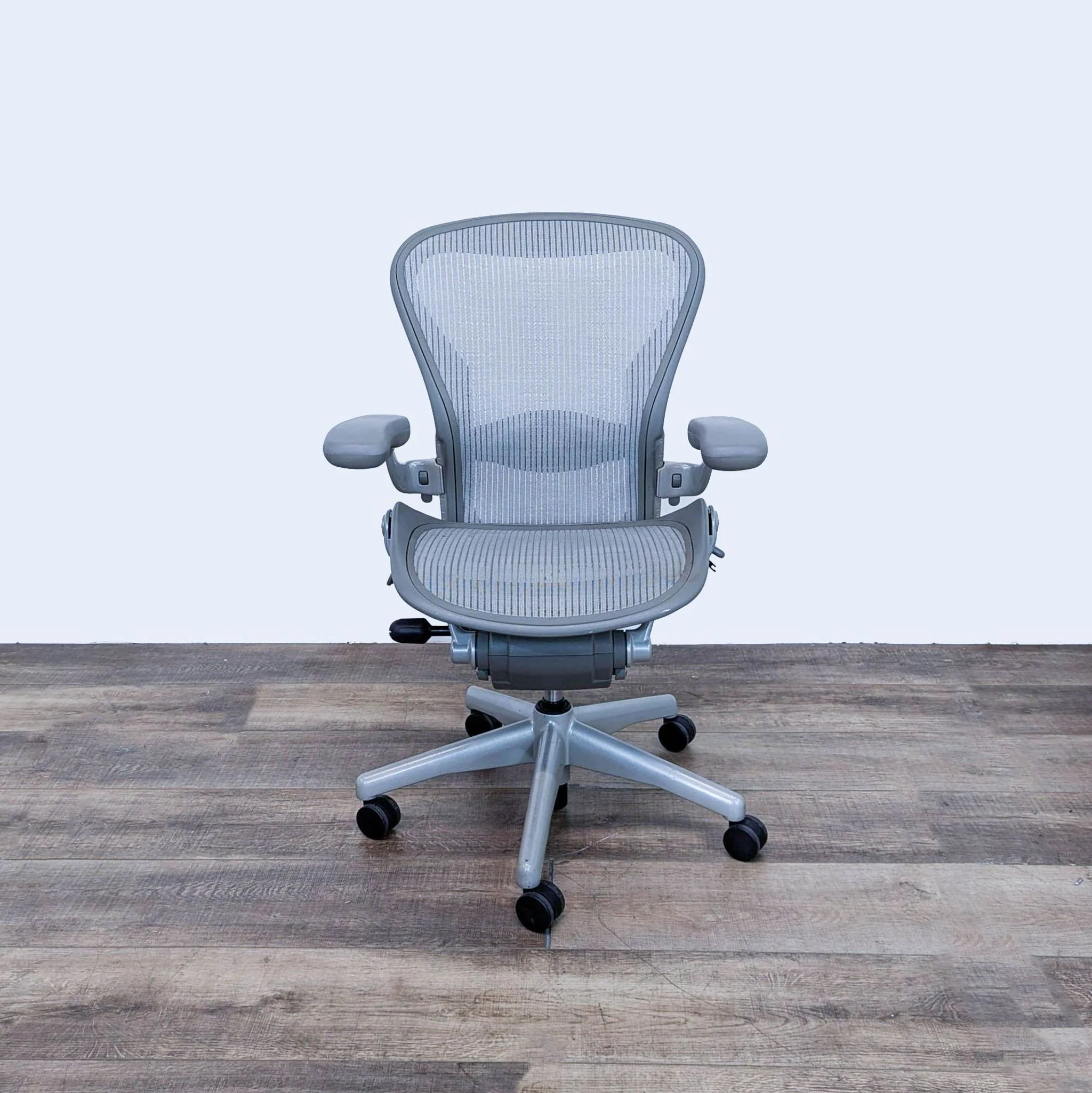
Chairs with deep, adjustable lumbar support rate highest for lumbar issues. The Steelcase Leap V2 earns consistent praise for its LiveBack technology, which adapts to spinal curvature during movement. Herman Miller Embody targets the lower spine with a pixelated support grid that distributes pressure evenly across the backrest.
If lumbar pain dominates, prioritize adjustable seat depth alongside lumbar height. This combination ensures your pelvis stays tilted forward while your lower back receives targeted support. Avoid chairs where lumbar adjustment only moves up and down without depth control.
Best for Neck Pain
Neck pain demands a headrest that supports the cervical curve without forcing your chin forward. The Herman Miller Mirra offers an optional headrest that adjusts vertically and horizontally. Humanscale Freedom includes an integrated headrest that responds automatically to head movement.
Fixed headrests on cheaper chairs often cause more harm than good. They push the head into extension or flexion depending on your seating position. Adjustable headrests let you dial in the exact contact point for your unique cervical anatomy.
Best for Tall Users
Tall users above 6 feet struggle with standard chairs that cut off lumbar support or crowd the knees. Herman Miller Aeron in size C accommodates heights up to 6 feet 6 inches. Steelcase Leap with the tall back option extends lumbar coverage appropriately.
Look for seat depth of 20 inches or more and overall backrest height exceeding 24 inches. Standard chairs top out around 19 inches of seat depth, which compresses behind the knees for taller frames. Check tall desk chair recommendations for detailed options.
Best for Short Users
People under 5 feet 4 inches need compact chairs with reduced seat depth and lower maximum seat heights. Sihoo M57 and AmazonBasics high-back mesh chairs accommodate shorter statures well. IKEA Markus works for some shorter users due to its deep seat and low minimum height, though it lacks extensive adjustability.
Seat height should allow feet to rest flat with thighs parallel to the floor. If your feet dangle or you need a footrest, the chair maximum height is likely too high regardless of other features.
Best for Heavy Users
Heavy-duty options support 300 to 500 pounds without mechanism failure or cushion collapse. Steelcase Big & Tall series handles up to 400 pounds. Herman Miller Aeron size B accommodates up to 350 pounds with appropriate seat size selection.
Weight capacity directly affects mechanism longevity. Exceeding rated limits voids warranties and accelerates wear on gas lifts and tilt mechanisms. Always choose a chair rated at least 50 pounds above your body weight for safety margin and long-term durability.
Best for Hot Climates
Mesh backs dominate hot environments due to superior airflow compared to foam or fabric. Herman Miller Aeron uses Pellicle mesh that maintains support while promoting ventilation. Steelcase Setu features a flexible mesh back suspended from a cantilevered frame.
Upholstered chairs trap heat against the skin, increasing sweating and discomfort during prolonged sitting. Mesh solutions may feel firmer initially but adapt well once broken in. Consider climate when choosing materials, especially in regions with extended heating seasons.
Best Value Under $500
Budget winners balance adjustability with reasonable durability. Autonomous ErgoChair Pro delivers multiple adjustment points at mid-range pricing. HON Ignition 2.0 provides commercial-grade reliability at office-supply prices.
Flexispot EC3 offers solid basics for home offices.
Verify that budget models include adjustable lumbar support rather than fixed curves. Fixed lumbar padding rarely aligns correctly across different body types, defeating the purpose of the feature.
Matching your specific needs to these categories narrows the search significantly. Your primary pain location and body dimensions should drive selection more than brand names or marketing claims.
Side-by-Side Comparison of Leading Models
Comparing top chairs side by side reveals tradeoffs that single reviews obscure. The following table highlights key specifications across five widely recommended models as of 2026.
| Model | Lumbar Adjust | Seat Depth Range | Headrest | Weight Capacity | Warranty | Best For |
|---|---|---|---|---|---|---|
| Herman Miller Aeron | Height + Depth | 3 sizes available | Optional | 350 lbs | 12 years | All-day sitters, hot climates |
| Steelcase Leap V2 | Height + Depth | Fixed 16–21″ | Available | 400 lbs (B&T) | 12 years | Dynamic movement, lower back pain |
| Herman Miller Mirra | Height + Depth | Fixed 15–19″ | Optional | 300 lbs | 12 years | Versatile positioning, medium budgets |
| Humanscale Freedom | Fixed mesh tension | Fixed 18–20″ | Integrated auto-adjust | 300 lbs | 15 years | Minimal adjustment preference, neck pain |
| HON Ignition 2.0 | Height adjustable | Fixed 17–20″ | Optional | 300 lbs | 12 years | Office environments, hybrid workers |
Each model excels in different areas. The Aeron dominates in breathability and size options but carries a premium price tag. The Leap V2 offers the most comprehensive adjustment suite for its class, making it suitable for variable body types.
The Mirra bridges the gap between premium features and moderate cost. Freedom appeals to users who want automatic adjustments without fiddling with levers. HON delivers commercial durability at accessible pricing.
Key differences worth noting:
- Lumbar adjustment: Aeron and Leap V2 both offer height and depth control. Humanscale relies on mesh tension that self-adjusts to body weight. Fixed lumbar on budget models often misses the mark for non-standard body types.
- Seat depth: Only the Aeron provides multiple size options. Other models use fixed depths that work for average proportions but frustrate outliers.
- Headrest inclusion: Some models include headrests standard. Others charge extra or leave them optional. Factor this into total cost comparisons.
- Weight capacity: Leap V2 and its Big & Tall variant handle the heaviest users. Aeron’s 350-pound rating requires selecting the correct size.
- Warranty length: Humanscale leads with 15 years. Herman Miller and Steelcase both offer 12 years. HON matches at 12 years on mechanisms.
Refurbished options from authorized dealers provide significant savings on premium models. Herman Miller and Steelcase certified refurbished programs include full warranties identical to new purchases. Third-party refurbishers vary in quality, so purchase only from manufacturers or authorized partners.
Online retailers sometimes bundle accessories like seat cushions, lumbar pillows, or mat sets. Evaluate whether bundled items add genuine value or simply inflate the perceived deal. A $200 bundle with unwanted accessories rarely beats buying a base chair plus selective upgrades.
This comparison should inform your shortlist. Next, understanding common pitfalls prevents costly mistakes regardless of which model you choose.
Common Mistakes When Choosing and Using an Ergonomic Chair
Even well-researched buyers fall into predictable traps. Awareness of these errors protects your investment and maximizes comfort gains.
Buying Without Proper Measurements
Many shoppers select chairs based on height alone. This ignores inseam length, hip width, and shoulder breadth that determine fit. A chair perfect for someone 5-foot-8 at 160 pounds may torture a 5-foot-10 person at 200 pounds due to seat depth and width mismatches.
Measure before browsing. Your numbers eliminate guesswork and reduce return likelihood. Retailers list exact dimensions for every model.
Cross-reference them against your measurements rather than assuming average sizing applies universally.
Setting Lumbar Support Incorrectly
Wrong lumbar placement creates more problems than it solves. Too high forces the thoracic spine into flexion. Too low fails to support the natural lordotic curve.
Correct placement sits at the belt line, filling the concave curve of the lower back.
Adjust lumbar height with your shirt off or thin clothing to feel the bony prominences of your pelvis. The support should rest just above the iliac crest, never on the ribs or sacrum.
Ignoring Seat Depth Consequences
Shallow seats leave thighs unsupported, shifting weight onto the ischial tuberosities and increasing lower back strain. Deep seats press against the popliteal space, restricting circulation and causing leg numbness. Ideal depth leaves two to three finger widths between the seat edge and the back of your knees.
Test seat depth by sitting all the way back. Slide two fingers between your knee and seat edge. If you can’t fit fingers or they slide in easily, the depth is wrong for your proportions.
Placing Armrests Wrong
High armrests hike shoulders upward, compressing cervical nerves and triggering tension headaches. Low armrests force forward reaching, rounding the upper back against lumbar support. Correct height positions elbows at 90 to 100 degrees with shoulders relaxed downward.
Armrests should also clear desk edges without interference. Desks at unusual heights require armrests that adjust vertically beyond typical ranges.
Assuming Expensive Equals Suitable
A $2,000 chair poorly adjusted performs worse than a $400 chair properly configured. Adjustment literacy matters more than price tag. Read manuals, watch setup videos, and experiment with every lever before judging comfort.
Factory settings rarely match individual bodies. Out-of-box configurations represent average assumptions, not personalized ergonomics.
Delaying Replacements Until Failure
Components degrade gradually. Gas lifts lose pressure slowly. Mesh stretches over years.
Foam compresses without immediate warning signs. Waiting until something breaks wastes money on medical bills and productivity loss.
Track usage hours and model age. Replace mechanisms showing excessive play or sinking. Swap worn cushions before they compromise alignment.
Proactive maintenance extends functional lifespan considerably.
Understanding these mistakes helps you avoid them. Now let’s walk through proper setup to ensure your chair delivers maximum benefit.
How to Set Up and Optimize Your Chair for Maximum Relief
Proper setup transforms any ergonomic chair from uncomfortable furniture into a pain-reduction tool. Follow this sequence carefully instead of adjusting random levers and hoping for the best.
Step 1: Adjust Seat Height First
Sit in the chair with feet flat on the floor. Thighs should rest parallel to the ground or slope slightly downward toward the knees. Adjust the height lever until knees form approximately 90-degree angles.
If feet don’t reach the floor comfortably, add a footrest rather than raising the seat excessively.
Check that your hips sit slightly higher than your knees when feet are planted. This pelvic tilt encourages the natural lumbar curve. Reverse positioning flattens the lower back and increases disc pressure.
Step 2: Set Seat Depth
Slide the seat pan forward or backward until two to three fingers fit between the front edge and the back of your knees. This clearance preserves circulation while maximizing thigh support. Test by sitting fully back in the chair.
Your lumbar support should contact the small of your back firmly without gaps.
Users with longer torsos relative to leg length may need minimal seat depth. Those with proportionally longer legs require deeper settings. Measure your actual needs rather than defaulting to factory positions.
Step 3: Position Lumbar Support
Raise or lower lumbar height until the pad contacts the natural inward curve of your lower spine, roughly at belly button level. Adjust depth control so support fills the gap without pressing painfully into vertebrae. You should feel even compression along the lumbar region, not pinpoint pressure on individual bones.
Stand up and walk around. Sit back down and reassess. Lumbar positioning shifts slightly as muscles relax and spine settles into supported alignment.
Small tweaks often improve comfort dramatically.
Step 4: Align Armrests
Lower armrests until elbows rest at 90 to 100 degrees with shoulders dropped naturally. Wrists should align straight with forearms when typing, not bent upward or downward. Armrest width positions arms away from the rib cage without forcing shoulders inward.
Adjust armrest depth so they support forearms without pressing against the desk edge. Pivot angle matches your natural arm swing during keyboard and mouse use.
Step 5: Calibrate Tilt Tension
Recline slightly and adjust tension until you can move effortlessly but the chair doesn’t snap back violently. Lighter users need less resistance. Heavier users require more tension to prevent bottoming out.
Test by leaning back and forth. The mechanism should hold position without drifting or requiring constant muscle effort.
Lock the tilt at your preferred working angle if you rarely recline. Keep it unlocked if frequent position changes reduce fatigue throughout the day.
Step 6: Position the Headrest
Adjust headrest height so it supports the occipital ridge at the skull base, not the forehead or upper neck. Move it forward or backward until gentle contact occurs without pushing your face forward. Tilt angle should cradle the head neutrally when reclined.
Remove or lower the headrest entirely if it interferes with upright posture or monitor viewing. Headrests serve reclined thinking positions, not keyboard work.
Additional optimization steps include setting monitor height so the top third sits at eye level, positioning the keyboard directly in front without twisting, and arranging frequently used items within easy reach to minimize stretching. Combine proper chair setup with ergonomic workstation principles for comprehensive protection against repetitive strain.
Your environment matters too. Adequate lighting reduces neck flexion from leaning toward screens. Proper cable management prevents tripping hazards near the chair.
Floor mats reduce caster resistance on hard surfaces.
Following this sequence ensures every adjustment works together cohesively. Misaligned settings cancel each other out no matter how expensive the chair.
These setup guidelines draw from NIOSH ergonomic workplace guidelines which emphasize systematic adjustment procedures for seated workstations. Proper configuration yields measurable reductions in musculoskeletal discomfort during prolonged sitting tasks.
Maintenance, Repairs, and When to Replace Your Chair
Regular maintenance extends chair lifespan significantly and prevents premature failures that leave you sitting on a compromised seat. Most breakdowns stem from neglect rather than manufacturing defects. Simple upkeep routines catch problems early and save money over time.
Which Parts Wear Out First?
Gas lift cylinders lose pressure gradually, causing the chair to sink slowly during use. This typically happens after three to five years of daily operation, depending on weight capacity adherence. Replacement cylinders cost $20 to $60 and often restore full functionality without buying a new chair.
Tilt mechanisms experience the most stress during reclining cycles. Metal fatigue develops around pivot points and tension adjustment screws. Worn gears produce grinding noises or fail to hold positions securely.
Mechanism replacements range from $40 to $150 depending on model complexity.
Casters degrade from floor friction and debris accumulation. Hard floor casters wear smoother and quieter over time. Carpet casters collect hair and dust that impedes rolling.
Replacing caster sets costs $15 to $40 and restores mobility effortlessly.
Seat cushions compress permanently with extended use. High-density foam retains shape better than budget alternatives but still settles after four to six years. Sagging creates pressure points that defeat lumbar support benefits.
Reupholstering services exist for premium chairs, while budget models often require full replacement.
Mesh backs develop permanent stretching in lower-quality versions. Premium mesh like Herman Miller’s Pellicle maintains tension longer due to advanced materials and weaving techniques. Visible sagging indicates the mesh can no longer provide adequate support.
Cleaning and Caring for Different Materials
Mesh surfaces require regular vacuuming to remove dust and debris that accelerate fiber degradation. Use a soft brush attachment on low suction. Occasional wiping with mild soap and water removes oils and sweat residue.
Never saturate mesh, as moisture damages underlying foam and frame components.
Foam cushions absorb perspiration and body oils that break down internal structure. Vacuum fabric-covered foam regularly. Spot clean spills immediately with damp cloth and gentle detergent.
Allow thorough drying before returning to use to prevent mold growth.
Leather and vinyl upholstery benefit from conditioning treatments applied every six to twelve months. Silicone-based products maintain flexibility and prevent cracking. Avoid petroleum-based cleaners that degrade material integrity over time.
Plastic and metal frames withstand wiping with appropriate cleaners. Aluminum bases resist corrosion but accumulate grime in crevices. Nylon components may discolor with prolonged UV exposure near windows.
Signs Your Chair No Longer Provides Adequate Support
Several indicators suggest replacement is necessary rather than repair. Persistent pain despite proper adjustment signals the chair can’t accommodate your body anymore. Component failures that cost more than half a replacement chair justify evaluating new options.
Observe these warning signs closely:
- Gas lift fails to hold height adjustments within minutes
- Tilt mechanism produces loud grinding or won’t lock securely
- Seat cushion shows visible compression valleys that don’t recover
- Mesh displays permanent sagging in load-bearing areas
- Base cracks or wobbles despite tightening all connections
- Wheels no longer roll smoothly after cleaning and replacement attempts
- Armrests flex excessively or detach despite hardware inspection
- Overall structure feels unstable during normal use
If three or more issues appear simultaneously, replacement likely makes financial sense versus piecemeal repairs. One isolated problem rarely warrants discarding an otherwise functional chair.
Extending Lifespan Through Proactive Care
Establish a monthly inspection routine. Check bolt tightness, caster rotation, and mechanism smoothness. Lubricate moving parts with silicone spray annually.
Rotate seat cushions quarterly to promote even wear patterns.
Avoid exceeding weight ratings consistently. Even chairs rated for 300 pounds perform better when operated at 80 percent capacity or below. Overloading accelerates component fatigue and voids warranty coverage in many cases.
Keep chairs away from direct sunlight to prevent UV degradation of plastics, fabrics, and foams. Heat exposure weakens adhesive bonds and dries out materials prematurely.
Store documentation including receipts, warranties, and assembly manuals in one accessible location. Manufacturer contact information proves invaluable when filing warranty claims or ordering replacement parts.
Understanding wear patterns helps you budget for eventual replacement rather than reacting to sudden failures. Most quality chairs deliver five to eight years of reliable service with proper care. Premium models often exceed ten years under equivalent conditions.
Planning ahead for replacement chair costs factors into long-term budgeting decisions. Knowing lifecycle costs helps you evaluate true value beyond initial purchase price.
Safety, Certifications, and Warranty Considerations
Chair safety standards exist to protect users from structural failures and hazardous design flaws. Understanding these certifications helps you make informed purchasing decisions backed by independent testing.
BIFMA Compliance and What It Means
BIFMA (Business and Institutional Furniture Manufacturers Association) establishes performance standards for commercial seating. Their tests evaluate structural integrity, stability, durability, and safety across thousands of cycles.
Key BIFMA certifications to look for include:
- BIFMA X5.1: General purpose chair tests covering strength, durability, and safety
- BIFMA X5.4: Task chair specifications addressing ergonomic requirements and mechanical hazards
- BIFMA X5.5: Lounge chair standards applicable to casual seating applications
- ANSI/BIFMA e3: Sustainability certification measuring environmental impact throughout product lifecycle
Chairs bearing BIFMA certification undergo rigorous testing protocols. These include drop tests, cycle testing for mechanisms, tip resistance evaluations, and load capacity verification. Compliance doesn’t guarantee comfort but confirms basic safety and durability expectations.
Weight Limits and Tip Resistance Standards
Every chair carries a maximum weight rating determined through controlled testing. Exceeding these limits compromises structural integrity and voids warranties. Standard residential chairs typically support 250 to 300 pounds.
Commercial-grade models handle 300 to 400 pounds. Heavy-duty options reach 500 pounds or more.
Tip resistance prevents chairs from overturning during normal use. BIFMA requires minimum stability margins based on center of gravity calculations. Poorly designed chairs may tip backward during reclining or sideways when reaching for objects.
Always verify weight capacity matches your body weight plus any additional load from leaned-back positions. Include clothing and accessories in calculations when possible.
Reading Warranty Terms Carefully
Warranty coverage varies significantly between manufacturers and price tiers. Some cover only mechanisms. Others include cushions, casters, and external components.
Length ranges from one year for budget models to lifetime for premium frames.
Key warranty distinctions to understand:
- Parts-only warranties cover replacement components but not labor costs
- In-home service warranties include technician visits for repairs
- Comprehensive warranties cover all parts, labor, and sometimes shipping
- Pro-rated warranties reduce coverage value over time rather than maintaining full protection
Read fine print regarding exclusions. Normal wear items like casters and armrest pads often carry shorter coverage periods. Damage from misuse, modifications, or commercial use typically voids residential warranties.
Warranty transferability matters if you plan to resell the chair. Some manufacturers honor warranties for original purchasers only. Others provide transferable coverage for secondary buyers.
Claim processes vary considerably. Some require photo documentation and troubleshooting steps before approving replacements. Others process straightforward swaps with minimal paperwork.
Understanding procedures upfront prevents frustration during disputes.
Avoiding Recalled or Uncertified Products
Product recalls occasionally occur due to safety deficiencies. The Consumer Product Safety Commission maintains a database of recalled furniture items searchable by brand and model number. Verify current recall status before purchasing, especially for discounted or refurbished units.
Uncertified chairs lacking BIFMA or equivalent testing may contain structural weaknesses invisible during brief showroom evaluation. Cheap imports sometimes fail basic stability requirements, posing tip-over risks particularly for children or heavier users.
Purchase from authorized dealers whenever possible. Unauthorized resellers may distribute gray market goods lacking proper warranty support or safety certifications.
Medical Device Claims and Liability
Manufacturers cannot claim their chairs diagnose, treat, cure, or prevent medical conditions without FDA clearance. Ergonomic chairs qualify as office furniture, not medical devices. Any health benefit claims stem from general ergonomic principles rather than therapeutic assertions.
If your condition requires specific postural constraints, consult healthcare providers before relying solely on chair adjustments. Severe spinal conditions may need medical seating solutions beyond commercial ergonomic offerings.
Workplace compliance varies by jurisdiction. Some regions require employers to provide ergonomic seating matching employee needs. Documentation of accommodation requests and chair selection processes protects both parties legally.
Safety awareness and informed purchasing decisions protect your investment and your wellbeing. Proper certification verification ensures you receive products meeting established performance thresholds.
For additional context on different chair categories, exploring desk chair recommendations might help you understand how task chairs differ from other seating types in terms of safety and function.
Frequently Asked Questions About Best Chairs for Neck & Back Pain Relief
Can an ergonomic chair actually cure back pain?
No. Ergonomic chairs reduce mechanical stress on your spine but don’t treat underlying medical conditions. They prevent pain worsening and support healing when combined with proper movement habits and professional care.
How long does it take to adjust to a new ergonomic chair?
Most users adapt within one to two weeks. Your body needs time to rebuild muscle memory around proper alignment. Discomfort during the first few days is normal as previously weakened muscles engage properly.
Is a mesh chair better than a cushioned one for back pain?
It depends on your climate and firmness preference. Mesh promotes airflow and works well in hot environments. Cushioned seats provide consistent pressure distribution and may suit users who prefer softer support.
Both types offer equal ergonomic potential when properly adjusted.
Do I really need an adjustable headrest?
Only if you experience neck pain or recline frequently. Fixed headrests often misalign with your cervical curve and worsen tension. Adjustable headrests let you position support exactly where your neck needs it most.
Can I use an ergonomic chair if I have scoliosis?
Yes, but consult your physician first. Scoliosis requires customized support that varies by curvature severity and direction. Some ergonomic chairs offer lateral腰支持 attachments or custom cushioning options worth discussing with your care team.
How often should I replace my office chair?
Quality ergonomic chairs last five to fifteen years depending on usage intensity and maintenance. Replace sooner if components fail, warranty expires, or your body changes significantly. Budget for replacement as part of long-term workstation planning.