Finding the best office chair for short person remains a frustrating search. Most chairs assume an average height, leaving petite users with dangling feet, thigh pressure, and misaligned lumbar support. That mismatch can trigger lower back pain, poor circulation, and shoulder strain over time.
This guide breaks down exactly what to look for, how to measure yourself, and which chairs actually fit small frames without guesswork.
Manufacturer specifications show that ideal seat heights range from 15 inches to 20 inches for users under 5 feet 4 inches. Seat depth and armrest adjustability matter just as much as height alone. With the right adjustments, you can achieve proper posture, reduce fatigue, and work comfortably for hours.
Let's walk through the key factors that make or break a chair for short users.
Quick Answer
The best office chair for short person offers adjustable seat height between 15 and 20 inches. It should have a seat pan depth under 18 inches to avoid cutting off circulation. Look for models with forward-tilting lumbar support and 4D armrests.
Herman Miller Aeron (size B), Steelcase Leap V2, and Secretlab Titan EVO Small/Medium consistently rank highest for petite users. Always test or verify return policies before committing.
Why Standard Office Chairs Fail Short Users
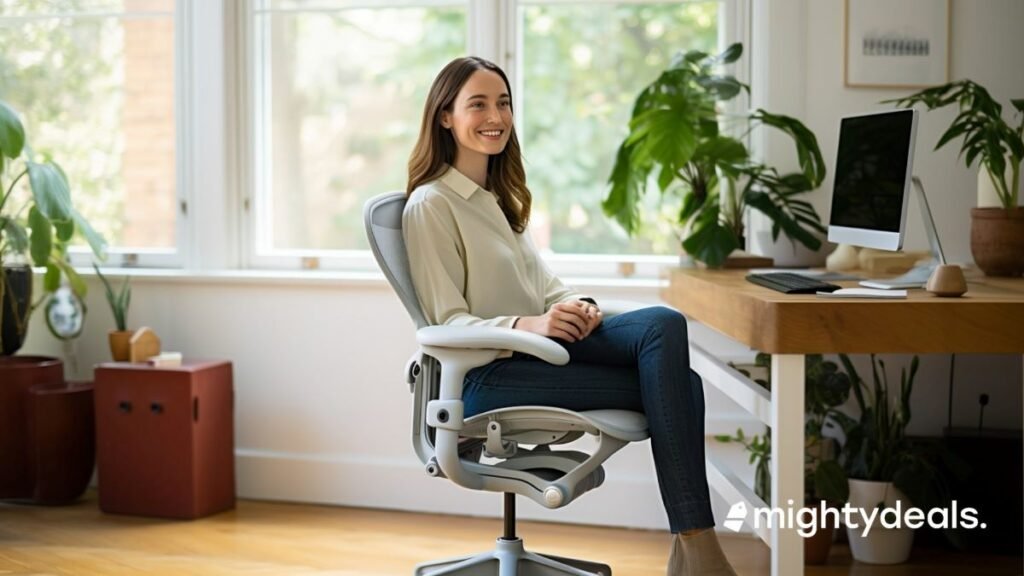
Most office chairs are designed around median male height in North America and Europe. That means seat bottoms sit too high, backs rise too tall, and armrests hit above elbow level for shorter people. When your feet don't reach the floor, your body shifts forward to find stability.
You end up sliding into the seat instead of sitting back against support.
The "feet dangling" problem and its real impact on posture
Dangling feet create immediate tension in your thighs and lower back. Your pelvis tilts backward, flattening the natural curve of your spine. Over time, this can lead to disc compression and chronic discomfort.
Per ergonomic guidelines from the National Institute for Occupational Safety and Health (NIOSH), feet should rest flat on the floor or a footrest to maintain neutral alignment.
How seat depth mismatch causes thigh pressure and poor circulation
A seat pan that's too deep presses against the back of your knees. This restricts blood flow and can cause numbness or tingling during long sits. It also forces you to perch on the front edge of the cushion instead of sitting fully back.
The pressure against your hamstrings creates discomfort and reduces focus.
When armrests force your shoulders up and strain your neck
Armrests set too high pull your shoulders upward toward your ears. This lifts the trapezius muscles and creates constant tension in your neck and upper back. Lowering your desk isn't always practical, so the chair needs to adjust independently.
Proper armrest height allows your shoulders to relax while your elbows rest at about 90 degrees.
The Critical Adjustments Only Petite-Friendly Chairs Offer
Not all "ergonomic" chairs adapt to smaller bodies. Many offer basic height adjustment but lack the finer controls short users need. True petite-friendly designs provide multi-axis adjustments across the seat, back, and arms.
These features close the gap between standard sizing and your actual dimensions.
Seat height range that actually dips low enough
Standard task chairs often start at 17 or 18 inches minimum seat height. For users under 5'4", that's still too high to plant feet firmly. Look for models with a minimum height of 15 to 16 inches.
Some brands publish exact ranges, like 14.5 to 20.5 inches, which covers more petite frames. Verify the range fits your inseam before buying.
Seat pan depth that supports without cutting off circulation
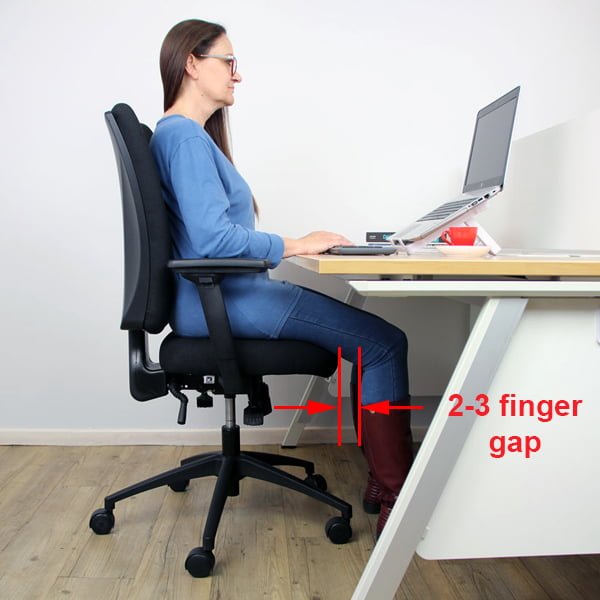
Seat depth determines how much thigh support you get without knee pressure. Ideally, there should be 2 to 4 fingers of space between the seat edge and the back of your knees. Chairs with adjustable seat depth let you slide the pan forward or backward.
Fixed-depth chairs work only if the measurement aligns with your leg length.
Lumbar support positioned for shorter torsos
Lumbar support must hit the curve of your lower back, not your mid-back or hips. Taller chairs place support too high for short torsos. Petites need chairs with downward-adjustable or forward-tilting lumbar pads.
Some mesh chairs offer height-adjustable support columns that move with you.
Armrests that adjust in height, width, and angle
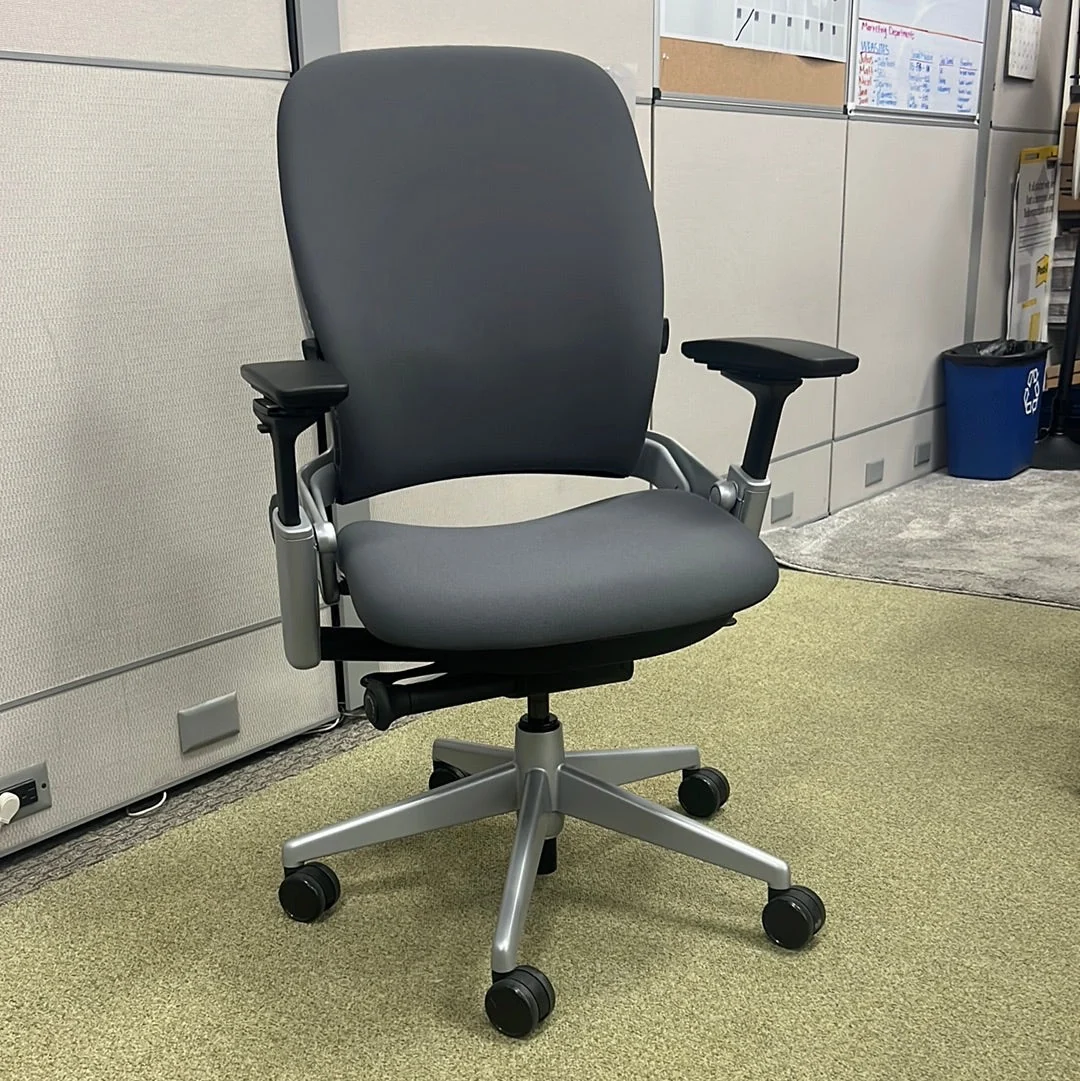
Basic armrests only go up and down. Petite users need width and pivot adjustments too. Wide-set armrests push elbows apart and strain shoulders.
Narrow or fixed armrests dig into ribs. Four-dimensional arms move in height, width, depth, and angle. This lets you cradle your forearms without lifting your shoulders.
How to Measure Yourself for the Right Chair
Buying a chair blind risks regret and returns. Measuring your body first narrows the field quickly. You'll know exactly what specs to check and which models to ignore.
Follow these three measurements and match them to manufacturer charts.
The 3 measurements that matter most
First, measure your inseam from crotch to floor while standing barefoot. Second, measure your seat width across your hips while sitting on a hard surface. Third, note your overall height.
Inseam directly informs minimum seat height. Hip width guides seat pan width. Height helps gauge backrest scale.
How to use those numbers with manufacturer sizing charts
Brands like Herman Miller, Steelcase, and Humanscale publish detailed size guides. Input your measurements into their chairs-finder tools when available. If not, compare your inseam against listed seat-height ranges.
If your inseam is 28 inches, for example, you likely need a min height around 15 inches and a max around 19 inches. Cross-reference with seat depth limits to avoid thigh pressure.
When to skip standard sizes and look for "petite" or "compact" models
Some brands label certain models as petite-friendly or compact. These typically feature lower seat ranges, shorter backrests, and narrower frames. If standard ergonomic chairs leave your feet dangling or your shoulders hunched, seek out these specialized lines.
They're engineered specifically for smaller stature users who need proper support without compromise.
Best Budget Options Under $400 for Small Frames
You don't have to spend a fortune to find a fitting chair. Budget options exist, but they come with trade-offs. Adjustability is usually limited, materials may wear faster, and weight capacity might be lower.
Still, several models under $400 handle petite users reasonably well.
Task chairs with genuine seat-height range
Look for task chairs listing a minimum seat height of 16 inches or less. Brands like HON, Branch, and Amazon Basics offer models in this range. Check specs before assuming "adjustable" means low enough.
Some cheap chairs only drop to 17 or 18 inches, which still leaves shorter users hanging. Read customer reviews for real-world height feedback.
Trade-offs you accept at this price point
At sub-$400, expect fixed lumbar height, non-adjustable armrests, or simpler tilt mechanisms. Cushions may flatten sooner than premium foam or mesh. Plastic components can feel less durable.
However, these chairs still provide core ergonomics if they match your dimensions. Prioritize seat-height range and depth over flashy extras.
Who these chairs work for (and who they don't)
Budget petite chairs suit light to moderate use, occasional sitters, or students. They work well if your measurements fall within the chair's range. Heavy daily users or those with back issues may outgrow them faster.
Consider investing in a mid-range option if you sit 6+ hours daily. For reference, see our breakdown of top-rated budget ergonomic seats to compare value across price tiers.
Top Mid-Range Picks ($400–$1,000) Built for Short Torsos
The mid-range tier is where petite users find the sweet spot. Chairs here offer meaningful adjustability without premium pricing. You'll get adjustable lumbar, seat depth, and armrests in one package.
These models balance comfort, durability, and fit for most small-frame professionals.
Adjustable lumbar, seat depth, and armrests in one package
Brands like Staples, Flash Furniture, and Ergochair produce mid-range models targeting shorter users. Look for chairs with seat slides, 3D or 4D arms, and forward-tilting lumbar. These features collectively solve the main pain points: dangling feet, thigh pressure, and misplaced support.
Verify each adjustment range against your measurements.
Mesh vs. upholstered: which feels better over long hours
Mesh breathes well and conforms to shape, but can feel firm on the thighs. Upholstered foam cushions distribute weight softly but retain heat. Petite users often prefer mesh for hip clearance and adjustable seats.
If you run warm or sit all day, mesh wins. If you want plush padding, choose dense high-resilience foam that doesn't bottom out.
Real-world comfort for 8-hour workdays
Mid-range chairs hold up through consistent use if built with quality materials. Nylon bases, Class 4 gas cylinders, and reinforced mechanisms last longer. User reviews frequently mention reduced back pain and improved focus after switching to properly adjusted models.
Check warranty length. Three to 5 years is standard in this tier. For broader comparisons, explore our guide to the best desk chairs for everyday support.
Premium Chairs That Actually Fit Under 5'4"
The premium tier delivers chairs engineered specifically for petite frames. Models here justify their cost through refined adjustability, durable materials, and long warranties. Herman Miller, Steelcase, and Humanscale lead this space with designs that adapt to smaller bodies without compromise.
Herman Miller, Steelcase, and Humanscale models that adapt
The Herman Miller Aeron comes in three sizes. Size B fits users 5'0" to 6'2". Size C works for those under 5'0".
Both feature PostureFit SL lumbar support and adjustable seat depth. The Steelcase Leap V2 offers adjustable lumbar height, seat depth, and 4D armrests. It accommodates a wide range of body types while maintaining proper alignment.
Humanscale Freedom and Diffusion chairs use body-weight-sensitive tilts and minimal manual adjustments, making them intuitive for smaller users who prefer simplicity.
Why the extra cost pays off in longevity and alignment
Premium chairs use higher-grade materials that resist sagging and wear. Mesh tension stays consistent over years. Cushion foam retains shape longer.
The precision in adjustability mechanisms reduces the learning curve. You spend less time tweaking and more time working comfortably. Proper alignment from day one prevents strain accumulation that leads to chronic pain.
For context on what drives price differences, our analysis of how much a wheelchair costs highlights how component quality scales with investment across seating categories.
Lifetime warranties and resale value considerations
Herman Miller and Steelcase offer 12-year or lifetime warranties on many models. This covers mechanisms, upholstery, and structural components. Resale value remains strong because these brands retain demand.
If you plan to upgrade later, premium chairs recover a significant portion of their original cost. Budget and mid-range options depreciate faster. Factor resale potential into your total cost of ownership calculation.
Side-by-Side: Key Specs Compared for Petite Buyers
Comparing specifications side-by-side removes guesswork. You can quickly identify which chairs meet your minimum requirements. Use this table as a reference when evaluating options.
Always verify current specs on manufacturer sites as models update frequently.
| Chair Model | Min Seat Height | Max Seat Height | Seat Depth | Lumbar Range | Armrest Adjust | Price Tier |
|---|---|---|---|---|---|---|
| Herman Miller Aeron (Size B) | 15.75" | 19.75" | Fixed 16.5" | PostureFit SL (height fixed) | 4D | Premium |
| Herman Miller Aeron (Size C) | 14.5" | 18.5" | Fixed 15.5" | PostureFit SL (height fixed) | 4D | Premium |
| Steelcase Leap V2 | 15.75" | 20.5" | Adjustable 13.25"-17.75" | Adjustable height | 4D | Premium |
| Humanscale Freedom | 16" | 20.5" | Fixed 17.5" | Integrated (self-adjusting) | 2D/4D optional | Premium |
| Secretlab Titan EVO (Small) | 16.1" | 19.7" | Fixed 19.3" | Adjustable lumbar | 4D | Mid-Premium |
| Branch Ergonomic Chair | 16" | 20" | Adjustable 15"-19" | Adjustable height | 3D | Mid-Range |
What to Do When No Chair Fits Your Exact Dimensions
Sometimes no off-the-shelf chair matches your measurements perfectly. This is common for very short or unusually proportioned users. Solutions exist beyond just buying a different chair.
Small modifications can bridge the gap between your body and standard designs.
Adding a footrest: what works and what's just a gimmick
A footrest restores proper leg angle when seat height can't drop low enough. Choose a sturdy, adjustable model with a non-slip surface. Angled or textured tops prevent feet sliding.
Simple plastic platforms often wobble and slip. Invest in a quality footrest like those used in specialized ergonomic setups. Avoid cheap foam-covered pads that compress unevenly.

Seat cushions and their real effect on height and angle
Thick seat cushions raise your sitting position. This worsens the dangling-feet problem unless combined with a lower chair base. Some cushions angle forward to reduce thigh pressure.
Look for wedge-shaped or contoured designs. Gel-infused or memory foam options add comfort but don't solve fit issues. Use cushions only as supplemental comfort, not as a primary fit solution.
When to consider a standing desk converter instead
If chair adjustments still fail to align your workspace, evaluate standing desk converters. They allow you to alternate between sitting and standing throughout the day. Properly set converters let you work at counter height without bending shoulders or hunching.
This reduces dependency on a single seated posture. Combine with an anti-fatigue mat if you stand frequently. For broader workstation guidance, review our breakdown of the best ergonomic chairs for working from home.
Setup Mistakes That Ruin the Fit (Even With the Right Chair)
Buying the correct chair is only half the battle. Improper setup negates all the adjustability features. Many users leave chairs at factory defaults, missing critical customizations.
These mistakes create new problems or amplify existing discomfort. Follow these guidelines to set up your chair correctly from the start.
Setting seat height wrong and creating new problems
Seat height determines everything else. Too high, and your feet dangle, straining your thighs and back. Too low, and your knees rise above your hips, flattening lumbar support.
Start with feet flat on the floor. Adjust height until thighs are parallel to the ground. Your knees should bend at roughly 90 degrees.
If using a footrest, set chair height so thighs still slope slightly downward.
Ignoring tilt tension until your back pays for it
Tilt tension controls how easily you recline. Too loose, and you tip backward uncontrollably. Too tight, and reclining becomes impossible.
Adjust tension so you can lean back with minimal effort but return smoothly. Most chairs have a knob under the seat. Turn clockwise to increase tension.
Test by leaning back gently. You should move freely without sliding forward unexpectedly.
Leaving armrests too high and straining your shoulders
Armrests should support your forearms, not your shoulders. Raise them until your elbows rest at about 90 degrees. Your shoulders should stay relaxed, not shrugged upward.
If armrests force your shoulders up, lower them or widen them. Check that your wrists stay straight, not bent upward. Proper armrest position keeps your upper back aligned and reduces neck tension.
Long-Term Comfort: Maintenance and Adjustment Tips
Chairs shift over time. Mechanisms loosen, cushions compress, and settings drift from daily use. Regular maintenance preserves comfort and extends lifespan.
A few simple checks each month keep your chair performing optimally. Address minor issues before they become major discomforts.
Monthly checks to keep the chair supporting you correctly
Inspect gas cylinder for smooth height adjustment. Lubricate tilt mechanisms if they feel stiff. Tighten loose bolts and screws.
Check caster movement and replace any that drag or wobble. Review armrest stability and re-tighten connections. Verify lumbar support remains positioned correctly as cushioning settles.
Document any changes in comfort to catch issues early.
When to replace cushions, arm pads, and casters
Upholstery shows visible wear, cracks, or permanent indentations. Arm pads become slippery or tear. Casters stop rolling smoothly even after cleaning.
Gas cylinders lose pressure and won't hold height. Replacement parts are available from manufacturers or third-party suppliers. Replace worn components promptly rather than enduring declining comfort.
Partial replacements are far cheaper than buying a new chair.
Signs your chair no longer fits as your habits change
Your work style shifts, requiring different postures or longer sits. Body weight changes significantly affect how support feels. New injuries or chronic conditions alter your support needs.
If you outgrow a chair's adjustability range, it's time to reassess options. Consider whether a different model or accessory would better serve your current needs. Don't force a poor fit.
Evaluate upgrades when adjustments no longer solve discomfort.
Safety and Weight Limits You Can't Ignore
Weight limits aren't just suggestions. They're engineering boundaries that protect your safety and maintain warranty coverage. Exceeding a chair's rated capacity risks mechanism failure, base collapse, or unstable tilting.
These failures can cause serious injury. Always verify both your weight and the combined dynamic load when reclining.
Why exceeding the weight limit voids warranties and risks collapse
Manufacturers test chairs to specific stress thresholds. When you exceed those limits, components like gas cylinders, tilt mechanisms, and five-point bases experience accelerated wear. Failure modes include sudden drops, base cracking, or caster detachment.
Most warranties explicitly state that exceeding rated capacity voids coverage. Check the label on your chair for the maximum user weight. Typical ranges span 250 to 400 pounds for standard models.
Stability issues with very light users on heavy-base chairs
Some premium chairs have robust bases rated for heavier users. If you're under 120 pounds, these bases may feel overly stiff or resistant to tilting. The counterbalance weights designed for taller or heavier frames can make recline mechanisms unresponsive.
Test the tilt function before committing to a purchase. Some brands offer lighter-tension mechanisms for petite users.
Certifications to look for (BIFMA, ANSI) and what they mean
BIFMA certification indicates independent testing for structural integrity, durability, and safety. Look for the BIFMA logo on product listings. ANSI/HFES 100 standards address ergonomic design principles.
While not always labeled, compliance with these standards ensures proper adjustability ranges. Reputable manufacturers publish test reports and certification documentation on their websites. Avoid chairs without clear safety certifications, especially for heavy daily use.
Which Chair Matches Your Work Style?
Different work patterns demand different chair features. A developer coding eight hours daily needs different support than a manager who takes frequent calls and moves between desks. Match your primary activity to the right chair category.
This alignment prevents overbuying or underbuying for your actual needs.
All-day sitters (programming, writing, design)
Continuous sitting requires maximum lumbar support and pressure distribution. Prioritize chairs with adjustable seat depth and forward-tilting lumbar. Mesh backs promote airflow during long sessions. 4D armrests allow precise forearm positioning.
Herman Miller Aeron and Steelcase Leap excel here. Invest in premium options if you sit six or more hours daily. The extra cost pays off in reduced fatigue and fewer breaks.
Intermittent users (meetings, brief desk work)
Shorter daily sits don't justify premium pricing. Mid-range task chairs with basic adjustments serve intermittent users well. Focus on seat height range and basic lumbar support.
Fixed armrests are acceptable if you don't rest your arms frequently. Styles like the Branch Ergonomic or Staples Hyken provide adequate support for two to four hour sessions. Save your budget for other ergonomic upgrades like monitor arms.
Hybrid workers who switch between sitting and standing
Standing desk converters change how you interact with your chair. You may sit for focused work then stand for calls or collaboration. Look for chairs with easy tilt functions and stable base balance.
Quick adjustment knobs help transition between positions. Consider a model with a synchro-tilt mechanism that moves the backrest and seat together. This maintains posture consistency during position changes.
For workspace optimization tips, explore our guide on essential ergonomic accessories for remote setups.
Final Verdict: How to Choose Your Perfect Match
Choosing the right chair comes down to matching your body measurements with verified adjustability ranges. Skip style preferences until you've confirmed fit. Follow this decision flow to narrow options efficiently.
Each step eliminates chairs that won't work for your frame.
A quick decision flow: measure → match specs → test if possible → buy with confidence
Start with your inseam measurement. Eliminate any chair whose minimum seat height exceeds your comfort threshold. Next, check seat depth ranges.
Reject models with fixed depths longer than your leg length allows. Then verify lumbar adjustability reaches your lower back curve. Finally, confirm armrests reach your elbow height when shoulders are relaxed.
Test through trial periods or retailer return policies before final commitment.
The one feature that matters most if you can only pick one
Seat height range is the non-negotiable foundation. Everything else depends on proper foot placement and thigh support. Without correct height, lumbar alignment fails and armrests misalign.
Prioritize chairs with the lowest minimum height that still meets your other criteria. You can always add accessories for secondary needs. You cannot fix an incompatible base height.
When to walk away from a "great-looking" chair that doesn't fit
Aesthetic appeal shouldn't override ergonomic function. Chairs that look impressive but require compromise create long-term discomfort. Walk away if you must: use a footrest constantly, perch on the seat edge, shrug your shoulders to reach armrests, or feel pressure behind your knees.
No chair design justifies chronic strain. Return to the measurement process and identify which specification gap caused the mismatch. Adjust your search parameters accordingly.
Frequently Asked Questions
Can I use a regular office chair if I'm short?
Most standard chairs sit too high for proper foot contact. You can modify the setup with a quality footrest and careful armrest adjustment. However, dedicated petite-friendly chairs offer better inherent fit without workarounds.
What's the minimum seat height I should look for?
Aim for a minimum seat height of 15 to 16 inches for users under 5'4". This range typically allows feet to rest flat on the floor with knees bent at approximately 90 degrees. Verify exact specifications on manufacturer sites.
Are expensive ergonomic chairs worth it for short users?
Premium chairs provide superior adjustability ranges and build quality that justify higher prices for daily users. Budget options can work for occasional use if they meet your minimum height requirements. Calculate your annual usage hours to determine value threshold.
How do I know if a chair's lumbar support is positioned correctly?
Proper lumbar support should contact the inward curve of your lower back, roughly at belt-line level. It should feel supportive without pressing into your spine. If it hits your mid-back or hips, the adjustment range is insufficient for your torso length.
Should I prioritize mesh or fabric seats as a short person?
Mesh surfaces distribute weight evenly and promote airflow during long sits. Fabric cushions offer softer initial comfort but may retain heat. Both materials work for petite users.
Choose based on climate preferences and perceived comfort rather than material alone.
Can I return an office chair if it doesn't fit after all?
Many retailers offer 30-day return windows for ergonomic chairs. Factor return shipping costs into your decision. Premium brands often include white-glove delivery and setup services that simplify returns.
Read return policies carefully before purchasing.
Do I need a special chair if I weigh under 130 pounds?
Lightweight users should check tilt tension ranges. Some chairs feel too stiff for lighter frames. Look for models with adjustable tension or lighter counterbalance systems.
Verify weight capacity includes margin for comfort, not just safety limits.