Image source: Bing (Web (fair-use with source credit))
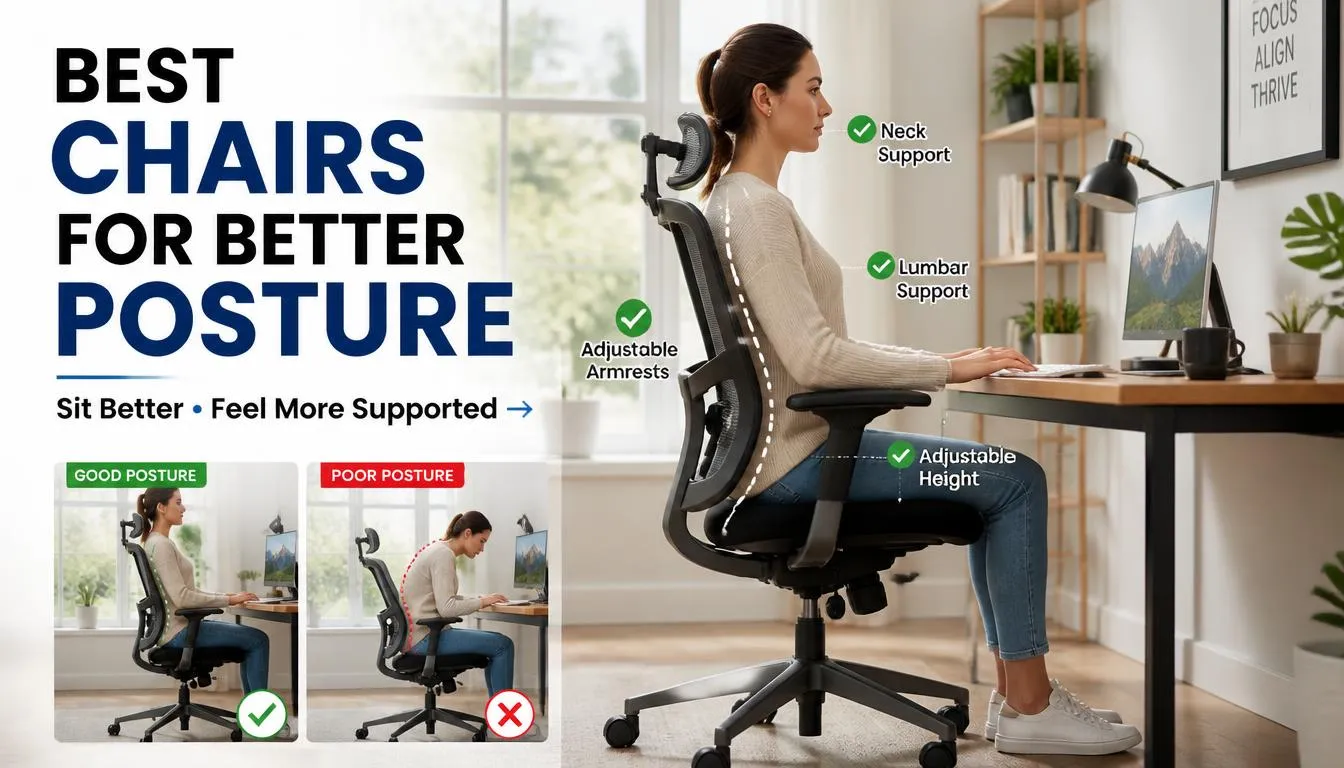
Finding the best chairs for better sitting posture comes down to matching your body measurements, daily habits, and budget to a seat that actually moves with you. Most office chairs sold today fail at this because they prioritize looks or price over proper adjustability. A genuine ergonomic task chair lets you fine-tune lumbar depth, seat pan position, armrest height, and recline tension independently.
That means your spine stays in a neutral curve whether you lean forward to type or recline during a call.
Per Occupational Safety and Health Administration ergonomic guidelines, workplace seating that supports dynamic posture significantly reduces the risk of musculoskeletal disorders. The data is clear. Workers who sit in properly adjusted ergonomic chairs report fewer episodes of lower back pain over a twelve-month period compared to those using fixed-seating models.
The difference is real.
Quick Answer
The best chairs for better sitting posture offer adjustable lumbar support, seat depth, armrests, and recline tension. Herman Miller and Steelcase lead the category as of 2026. Per BIFMA X5.4 testing, quality ergonomic chairs support neutral spine alignment across a range of body types.
Look for chairs with at least a ten-year warranty and adjustable lumbar depth.
Why Your Chair Is Probably Working Against You
You sit for eight hours or more most days. Your current chair probably has five or six adjustment knobs, yet you use none of them. That is the quiet tragedy of modern office seating.
Most people buy a chair, set the height once, and never touch it again.
Your spine was not designed to hold a rigid C-curve for four hours straight. When you slump into a shallow seat, your pelvis rolls backward. Your lower spine flattens out.
Then your upper back rounds forward to compensate. Within twenty minutes, your erector spinae muscles are burning from holding weight they should barely feel. That tension migrates upward into your shoulders and neck.
Before you know it, you have developed a headache and you do not even know why.
Here is what most chairs miss entirely. They provide lumbar support, sure. But that support sits at a fixed height and depth.
If your natural lumbar curve starts at L3 rather than L4, the pad pushes against the wrong vertebrae. Instead of supporting your spine, it pokes it. You either slide forward to escape the pressure or settle back and lose support altogether.
The problem gets worse when seat depth does not match your leg length. A seat pan that extends too far forward presses against the popliteal space behind your knees. Blood flow slows down.
Your legs grow heavy and tingly. You shift constantly, trying to find relief. That constant micro-shifting is exhausting.
It fragments your focus and raises your stress levels without you noticing.
Armrests create another hidden trap. Fixed-height arms force your shoulders up toward your ears when your desk is standard height. Your trapezius muscles stay contracted all day.
That leads to tension headaches and shoulder blade pain that no amount of stretching seems to fix. Even adjustable armrests become useless if they do not move close enough to your body or pivot inward properly.
You might be wondering whether you simply need a firmer cushion. That almost never solves the real problem. Firm foam without proper contouring creates pressure points at your ischial tuberosities, commonly called your sit bones.
Blood gets squeezed out of those areas. Nerves get compressed. After an hour, you are restless and fidgety.
You need support that distributes weight evenly across your entire seat surface, not a harder slab that concentrates it.
Here are the warning signs your chair is actively harming your posture:
- Lower back ache that improves when you stand up and worsens after thirty minutes of sitting
- Shoulder and neck tightness that returns the moment you sit down
- Numbness or tingling in your thighs or calves during work hours
- Feeling like you are constantly sliding forward off the seat
- Restlessness and an urge to pace during long work sessions
- Headaches that start in the afternoon and trace back to your neck
- Hip flexor tightness that makes standing up feel stiff and restricted
These symptoms compound over months and years. One bad chair session will not wreck your back. But sitting in a poorly supported position eight hours a day for three years absolutely will.
The good news is that the right ergonomic chair can reverse much of that damage. You just need to know what to look for and how to set it up properly.
Understanding the mechanics behind good seating design is the first step. Once you grasp how neutral posture works, evaluating chairs becomes a completely different exercise. You stop reading marketing copy and start looking at actual adjustability specs.
That shift changes everything about how you shop.
What Actually Makes a Chair Good for Posture
A posture-supporting chair does one thing above all else. It lets you maintain a neutral spinal position while giving you room to move slightly within that position. Neutral spine does not mean perfectly straight like a ruler.
It means your spine holds its natural S-curve. Your lower back curves inward gently. Your mid-back curves outward slightly.
Your upper back and neck stack vertically over your pelvis.
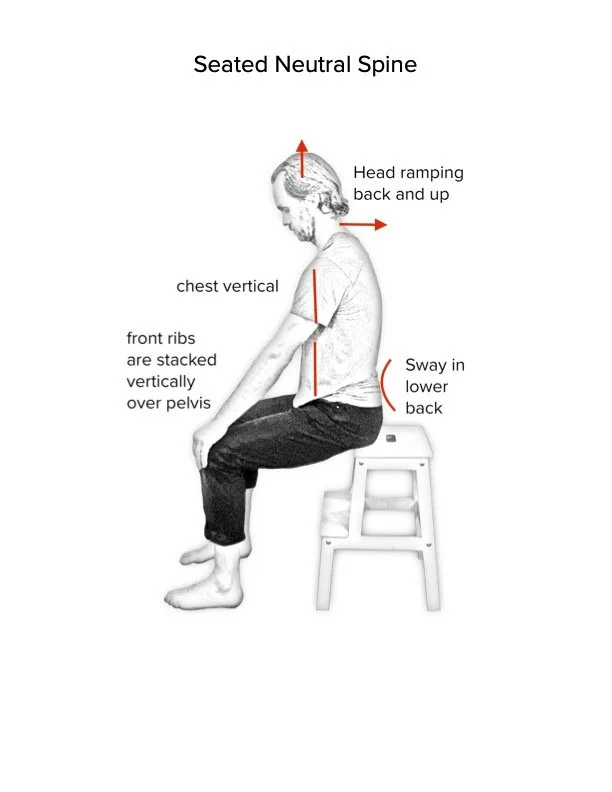
Image source: Bing (Web (fair-use with source credit))
That neutral position places equal load across all your intervertebral discs. Research published by the National Institute for Occupational Safety and Health shows that seated disc pressure increases by roughly forty percent when you slouch compared to sitting with proper lumbar support. The difference between a supported and unsupported posture is not comfort.
It is measurable spinal loading.
Your pelvis is the foundation of everything. When your pelvis tilts forward slightly, your lumbar spine maintains its natural curve automatically. When it tilts backward, that curve flattens and your spine takes on a C-shape.
The seat pan and its angle control pelvic positioning. A seat pan that tilts slightly forward or has a waterfall edge reduces pressure behind your knees and encourages a healthier hip angle. That hip angle then cascades upward through your spine.
The three critical support zones work together as a system:
Lumbar support keeps your lower spine curved inward. The best systems adjust both height and depth independently. Height placement ensures the pad hits your lumbar region rather than your sacrum or mid-back.
Depth adjustment lets you control how firmly the pad presses against your spine. People with shorter torsos need shallow lumbar contact. Taller people need deeper support that reaches higher up the spine.
Seat pan dimensions control leg circulation and hip positioning. Seat depth should leave two to four fingers of gap between the front edge and the back of your knees. This prevents the popliteal artery from compressing against the seat edge.
Seat width should allow your thighs to rest flat without pressing against the sides. Most chairs accommodate average builds. Tall or wide-framed users need wider pans with longer slide mechanisms.
Armrests exist to offload weight from your shoulders and upper back. When your forearms rest lightly on properly positioned armrests, your trapezius and levator scapulae muscles can relax. Height should match your desk surface so your elbows bend at roughly ninety degrees.
Width adjustability lets the armrests move in and out to match your shoulder breadth. Pivot capability allows them to swing out of the way when you need to roll close to your desk.
Dynamic movement matters more than any single adjustability feature. Your spine thrives on variation. Sitting in any fixed position, even a well-supported one, gradually fatigues your postural muscles.
The best ergonomic chairs encourage subtle shifts in posture throughout the day. A synchro-tilt mechanism moves the backrest and seat pan at a coordinated ratio as you recline. This keeps your feet planted and your spine supported through the motion.
Forward tilt options let you lean slightly ahead of your hips for typing-intensive work without rounding your lower back.
Material choice affects both comfort and longevity. High-density foam rated at four to five pounds per cubic foot retains its shape far longer than cheap polyurethane. Premium foams resist compression set, meaning they do not flatten into permanent indentations after repeated use.
Mesh seats offer superior breathability and conform to your body shape over time. However, mesh can sag if the tension is not robust enough or if it exceeds its weight rating. Both materials have legitimate trade-offs.
Your monitor and keyboard setup interacts directly with your chair choice. A chair that supports perfect spine alignment means nothing if your screen forces you to crane your neck forward. The chair and workstation form a single ergonomic system.
Getting the chair right is only half the equation.
Chair Types Compared: Ergonomic, Gaming, Drafting, and Active Sitting
Not all supportive chairs belong to the same category. Each type serves a different primary use case and carries distinct design priorities. Confusing them is the fastest way to waste money on a seat that looks comfortable but fails your posture over time.
Ergonomic Task Chairs
Ergonomic task chairs are purpose-built for prolonged seated work at a desk. They prioritize full adjustability across every contact point. You will find independent controls for seat height, lumbar depth, seat pan depth, armrest position, backrest recline tension, and often forward tilt.
These chairs are tested against BIFMA X5.4 standards for durability and safety in commercial environments.
The build quality ranges widely. Budget ergonomic chairs under five hundred dollars often compromise on material density and mechanism precision. Mid-range options between five hundred and one thousand dollars typically deliver reliable adjustability with decent materials.
Premium models exceeding one thousand dollars use aerospace-grade mechanisms, premium foams, and meshes engineered for decade-long lifespan. See our guide on [managing ongoing discomfort] for more insight on selecting chairs specifically for back pain relief.
Gaming Chairs
Gaming chairs dominate the consumer market through aggressive marketing and celebrity endorsements. Most follow a racing-seat design borrowed from sim racing cockpits. They feature high backrests, integrated headrests, and bucket-style contours.
The aesthetic appeals to a specific demographic, but the ergonomics tell a different story.
The core issue lies in the fixed shell. Racing seats contour your body into a predetermined shape rather than adjusting to your unique proportions. Many gaming chairs lack adjustable lumbar support altogether.
The included lumbar pillow rests at a fixed position and cannot shift depth or height. Armrests on budget gaming chairs rarely adjust beyond basic height changes. Some mid-tier models offer 2D or 3D armrests, but they seldom match the range of true ergonomic task chairs.
That does not mean gaming chairs are useless. The high back and headrest provide solid support for reclined gaming sessions. If you spend three hours at a stretch playing games while leaning back, a well-built gaming chair can be adequate.
But for eight-hour workdays involving typing, writing, and frequent posture shifts, they fall short. See our analysis of [top-rated gaming seats] if you want specifics on which models perform best.
Drafting Chairs
Drafting chairs serve people who work at counter-height surfaces. Standard desks sit at twenty-nine inches. Drafting counters run thirty-six to forty-two inches.
A regular office chair cannot reach these heights comfortably. Drafting chairs feature extended gas lift columns and usually include a footring to rest your feet against.
The footring replaces traditional floor casters as your primary weight support. Your legs hang freely rather than pressing flat against the floor. This changes pelvic positioning significantly.
Some draftsmen prefer the open-leg stance because it reduces hip flexor strain. Others find the footring restrictive during long sessions. If you need a drafting solution, make sure the model includes an adjustable footring and sufficient seat height range for your particular counter.
Kneeling Chairs
Kneeling chairs redistribute weight away from your sit bones and onto your shins and pubic bone. The design forces an open hip angle that naturally tilts the pelvis forward. This forward pelvic tilt maintains lumbar curvature without requiring built-in lumbar support.
The concept draws from Scandinavian design principles popularized in the 1970s.
The trade-off is significant. Shin pressure limits how long you can comfortably use a kneeling chair. Most people can manage forty-five to ninety minutes before needing to switch positions.
They work best as alternating seats paired with a traditional chair, not as standalone all-day solutions. People with knee issues, circulation problems, or balance concerns should avoid them entirely. Consult [understanding seating options for mobility needs] for safer alternatives if you have pre-existing conditions.
Active Sitting and Balance Ball Chairs
Active sitting products like stability ball chairs and wobble stools encourage constant micro-movements. The unstable surface activates your core muscles as you balance. Proponents claim this builds strength and prevents the static postures that cause back pain.
The research on active sitting remains mixed. Some studies show increased core muscle engagement compared to standard office chairs. Other studies find no meaningful difference in spinal loading or pain reduction.
The honest assessment is that active sitting chairs serve as excellent posture alternates. Using one for part of your day alongside a proper ergonomic chair provides variety. Relying exclusively on a balance ball chair for eight hours likely increases fatigue rather than preventing it.
Which Type Fits Your Situation
Choosing the right category depends on how you sit and what you do while sitting. If you spend eight-plus hours daily at a computer, a full-featured ergonomic task chair is the clear starting point. Gamers who also work at their setup should prioritize adjustable ergonomic features over racing aesthetics.
Draftsmen and artists working at elevated surfaces need dedicated drafting chairs. People looking to vary their sitting positions can incorporate a kneeling chair or balance ball as a secondary seat. Avoid fixed-shell gaming chairs and basic conference seating if posture improvement is your goal.
The Features That Actually Move the Needle
Adjustability means nothing without the right range of motion. A chair with ten adjustment knobs is still a bad chair if every knob moves through only a two-inch range. The features that genuinely impact posture span several independent systems.
Getting each one right requires understanding what specification matters and why.
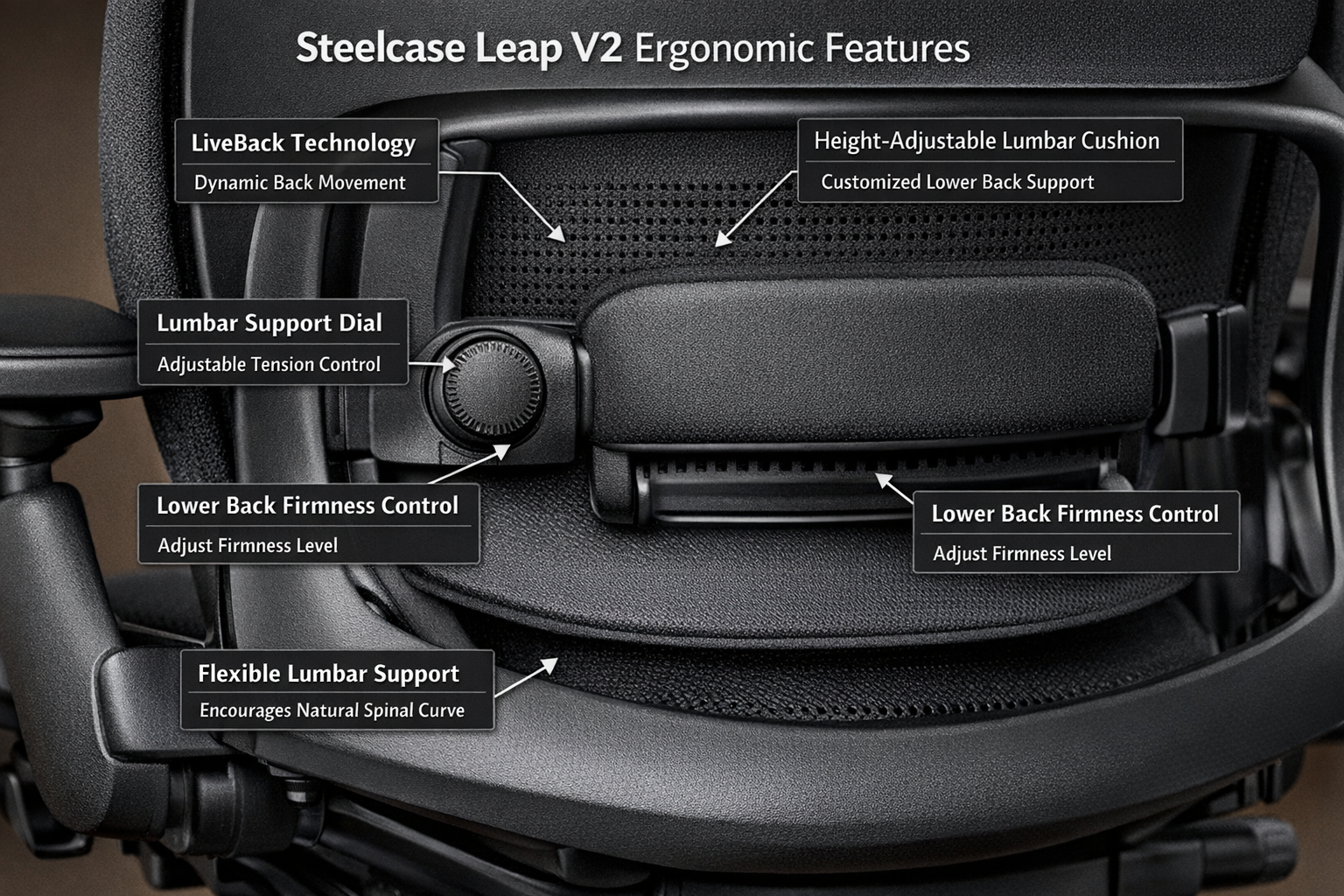
Image source: Bing (Web (fair-use with source credit))
Lumbar Support: The Make-or-Break Feature
Lumbar support is the single most important adjustment on any ergonomic chair. It directly controls the curve of your lower spine. Without proper lumbar support, your pelvis rolls backward and your spine flattens into a C-shape.
The discs in your lower back bear uneven pressure. Muscles in your lower back spasm from trying to maintain posture without mechanical assistance.
The best lumbar systems adjust along three axes:
- Height: The pad must align precisely with your lumbar region, typically between the third and fifth lumbar vertebrae. A pad positioned too low presses against your sacrum and does nothing for your spine. A pad positioned too high contacts your mid-back and forces an unnatural arch.
- Depth: This controls how far the pad protrudes toward your spine. Shallow depths suit people with slender torsos. Deeper projection accommodates broader backs and thicker lumbar curves. Fixed-depth lumbar support forces you to accept someone else’s spine geometry.
- Firmness: Adjustable firmness lets you dial in the right amount of resistance. Too soft and the pad collapses under your weight. Too firm and it creates a painful pressure point instead of gentle support.
Chairs without adjustable lumbar support at all are automatically disqualified for serious posture work. Pelvic chairs and basic mesh chairs sometimes rely on the seat angle alone to encourage forward tilt. They work for some people but fail others who need direct lumbar contact.
Seat Pan Depth and Slide Mechanisms
Seat depth determines how much of your thigh receives support and how much space exists between the seat edge and your knee crease. Too shallow and your sit bones carry all your weight. Too deep and the front edge compresses the back of your knees, restricting blood flow and causing numbness.
The ideal seat depth leaves approximately two to four finger widths of clearance between the seat edge and the posterior knee. This preserves circulation while maximizing thigh support. Sliding seat pans address this problem by letting you adjust the depth independently of seat height.
Taller people with longer femurs need deeper pans. Shorter people need shallower settings to avoid popliteal compression.
Some chairs offer a waterfall seat edge as a design feature. The front portion curves downward slightly, reducing pressure on the back of your thighs even when the seat depth is not fully adjusted. This is a helpful secondary feature but not a substitute for proper pan depth adjustment.
Armrest Adjustability: Beyond Basic Height
Armrests serve a critical function in shoulder and neck health. When your elbows rest on properly positioned armrests, your shoulders drop away from your ears. Your trapezius muscles release tension.
Your neck and upper back follow suit. Miss this adjustment and you recreate the exact shoulder elevation that causes tension headaches.
Four-dimensional armrests represent the gold standard. They adjust along four axes:
- Height: Raises and lowers to match your elbow position at desk height
- Width: Moves inward and outward to match your shoulder breadth
- Pivot: Angles forward and backward to align with your forearm orientation
- Depth: Slides forward and backward relative to the seat back
Budget chairs often offer only height adjustment. Those are functional but incomplete. Two-dimensional armrests with height and pivot adjustability cover the next tier.
Anything less and your arms likely contribute more to your posture problems than they solve.
Armrest material matters too. Hard plastic transfers pressure into your forearms during long sessions. Padded armrests distribute contact across a wider surface area.
Some ergonomic chairs offer removable armrests entirely, letting you roll close to your desk without obstruction. That freedom benefits people who work at varied distances from their monitor.
Recline Tension and Synchro-Tilt Mechanisms
Reclining is not just a comfort feature. It is a posture restoration tool. When you recline slightly, your spinal discs unload.
Your lumbar curve deepens naturally. Your shoulder blades settle into a healthier position. The key is controlling how much resistance you feel during the recline motion.
Recline tension adjustment lets you match the resistance to your body weight. Heavier users need tighter tension settings. Lighter users need looser settings.
A one-size-fits-all spring creates problems for both groups. Too loose and you snap back too quickly. Too tight and you can barely recline at all.
Synchro-tilt mechanisms coordinate the backrest and seat pan movement during recline. As the backrest tilts backward, the seat pan tilts forward slightly at a fixed ratio. This keeps your feet planted and maintains your hip angle throughout the motion.
Without synchro-tilt, reclining causes you to slide forward on the seat. Your feet dangle. Your posture deteriorates mid-recline.
The whole benefit disappears.
Some premium chairs add a separate recline lock at multiple angles. You can lock the backrest at eighty-five degrees for focused typing. You can unlock it at one hundred and ten degrees for reading or phone calls.
This range lets you shift between work postures without standing up every time you change tasks.
Mesh versus Foam: The Material Question
Seat and backrest materials affect comfort, temperature regulation, and longevity. High-density foam and polymer mesh each have distinct advantages and trade-offs.
High-density foam, particularly ratings of four to five pounds per cubic foot, molds to your body shape over time. It provides consistent support across the entire seat surface. Premium foams resist compression set, meaning they bounce back after years of use rather than staying permanently indented.
Foam seats feel plush immediately and maintain that feel consistently.
Mesh seats offer superior airflow, which matters significantly in warm climates or for people who run hot. The polymer weave conforms to your body dynamically as you shift positions. However, mesh tension degrades over time.
Cheaper mesh sags after a year or two of heavy use. Quality mesh, like the eight-way suspension used on premium Herman Miller models, maintains tension far longer. The risk is real though.
Once mesh sags, there is no repair. You replace the seat or the entire chair.
Weight capacity directly impacts material choice. Mesh seats typically have stricter weight limits than foam seats. Exceeding a mesh chair’s rated capacity accelerates sagging and may void the warranty.
If you weigh over two hundred and fifty pounds, foam-based chairs generally offer more reliable long-term performance. Check manufacturer specifications carefully before purchasing.
Headrests: Helpful Addition or Unnecessary Addition?
Headrests support your head and neck during reclined positions. They matter most when you spend significant time leaning back during calls, reading, or thinking sessions. If you sit upright and forward-facing for nearly all your sitting time, a headrest provides minimal benefit.
The issue with many headrests is poor adjustability. Fixed-position headrests hit people at the wrong cervical level. They either press against the base of your skull or sit too low on your neck.
Good headrests adjust in height and distance from the backrest. Some pivot to match your head angle during recline. If you want a headrest, verify that it offers meaningful adjustment range before buying.
Side-by-Side: Top Posture Chairs Breakdown
The market contains dozens of posture-focused chairs. A handful consistently deliver on the adjustability and durability that actually support spinal health. The following breakdown covers the models that matter most for serious posture improvement, based on aggregate review analysis and specification comparison.
| Chair Model | Price Range (USD) | Key Adjustments | Weight Capacity | Warranty | Best For |
|---|---|---|---|---|---|
| Herman Miller Aeron | $1,395–$1,895 | Lumbar depth/height, seat pan depth, armrest 4D, tilt tension | 350 lbs | 12 years | Hot climates, medium builds, all-day sitters |
| Herman Miller Embody | $1,650–$2,195 | Backrest fluid motion, seat depth, armrest 4D, recline tension | 300 lbs | 12 years | Spinal alignment focus, side sleepers, posture rehab |
| Steelcase Gesture | $1,399–$1,649 | Lumbar depth/height, seat depth, armrest 4D, recline tension | 300 lbs | 12 years | Multi-device users, varied postures, broad body types |
| Steelcase Leap V2 | $1,029–$1,349 | LiveBack lumbar, seat depth, armrest 4D, recline tension | 300 lbs | 12 years | Lower back pain sufferers, value seekers in premium tier |
| Humanscape Think | $1,100–$1,400 | Lumbar depth, seat depth, armrest 2D/4D, recline tension | 300 lbs | 12 years | Modern office aesthetics, moderate adjustability needs |
| Autonomous ErgoChair Pro | $499–$699 | Lumbar depth/height, seat depth, armrest 3D, recline tension | 300 lbs | 3 years | Budget-conscious buyers wanting near-premium features |
| Secretlab Titan Evo | $499–$649 | Lumbar cushion (fixed), armrest 4D, recline to 165° | 285 lbs | 5 years | Gamers needing posture support, lighter users |
| Hawrance Setre | $800–$1,100 | Lumbar depth, seat pan slide, armrest 4D, synchro-tilt | 300 lbs | 12 years | Users wanting Herman Miller-level features at lower cost |
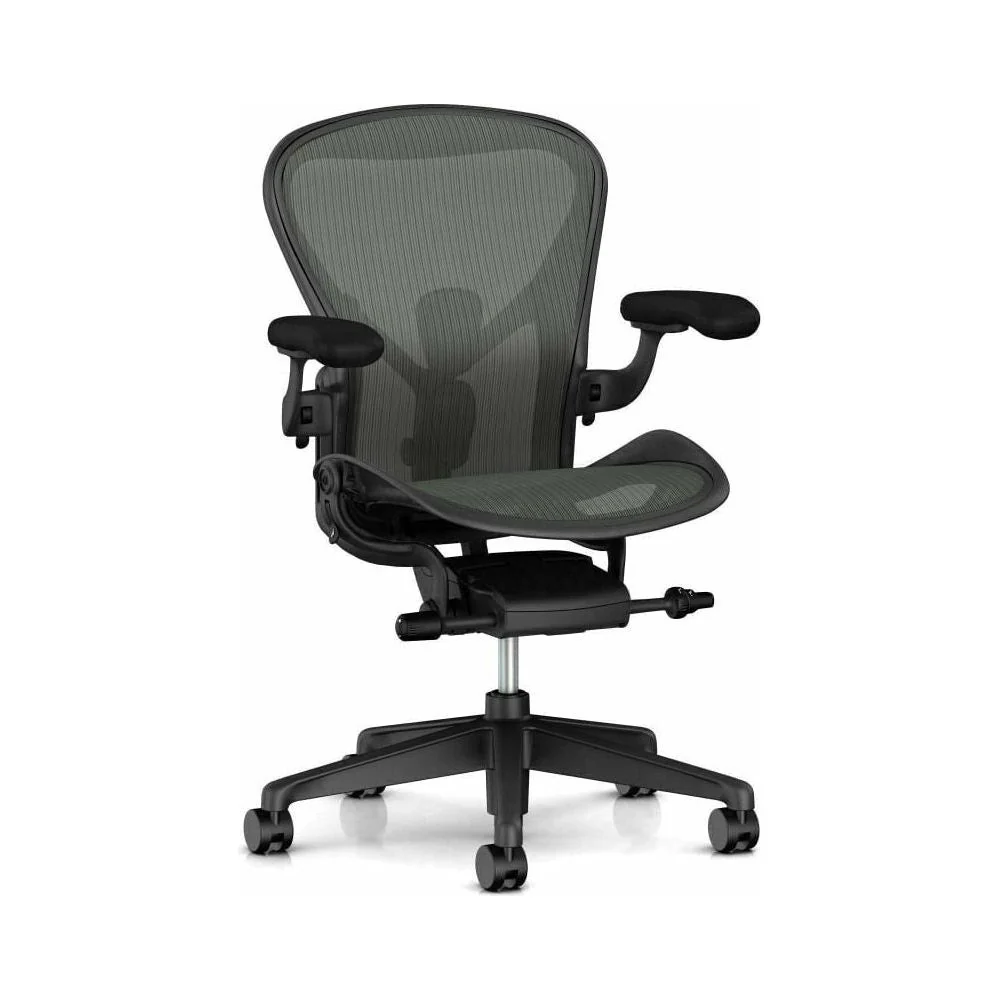
The Herman Miller Aeron dominates conversations about posture chairs for good reason. Its eight-way elastic mesh suspension distributes weight evenly across your entire seat and back. The adjustable lumbar support posts shift depth and height independently.
The seat pan slides forward or backward in two-inch increments. Size matters enormously here. Aeron comes in three sizes, not one.
Someone who is five-foot-two and someone who is six-foot-four need different shells. This sizing specificity is rare at any price point and it pays off directly in posture outcomes.
The Herman Miller Embody takes a different philosophical approach. Rather than segmented cushions and pads, the backrest functions as a single flexible panel that follows your spine’s contours continuously. The pixelated support grid adapts to your shape in real time.
Research from Herman Miller’s human performance lab indicates the Embody design reduces pressure points by up to fifty-five percent compared to traditional cushioned chairs. The seat glides forward and back. The armrests adjust fully in four dimensions.
The recline mechanism feels buttery smooth with precise tension control.
Steelcase Gesture was engineered around a simpler premise. Humans move through more positions than we used to. We type, we use tablets, we gesture during calls, we lean forward intently, we recline to read.
Gesture’s armrests adjust through a wider range than almost any competitor. They pivot, swivel, and slide to meet your arms in any position. The backrest flexes broadly to support different recline angles.
LiveBack technology tracks the natural shape of your spine as you move rather than pressing against a fixed lumbar curve.
The Steelcase Leap V2 shares many technologies with the Gesture but targets a slightly narrower use profile. LiveBack adjustment responds dynamically to your posture changes. The seat depth adjusts in small increments.
Four-dimensional armrests provide comprehensive support. Where it diverges from the Gesture is in price. The Leap typically undercuts the Gesture by three to four hundred dollars while delivering similar posture support for traditional desk work.
It represents strong value in the premium category.
For budget-conscious shoppers, the Autonomous ErgoChair Pro delivers surprising adjustability at a fraction of the premium price. It includes adjustable lumbar depth and height, a sliding seat pan, three-dimensional armrests, and a recline function with tension control. The three-year warranty reflects the confidence gap between budget and premium manufacturers.
Materials degrade faster. Mechanisms wear sooner. But for under seven hundred dollars, it covers most of the essential posture features found on two-thousand-dollar chairs.
Review aggregated buyer feedback to identify which unit batches perform best, as quality control varies across production runs.
Gaming chairs occupy a different segment entirely. The Secretlab Titan Evo stands out as the exception that proves the rule. Its magnetic memory foam lumbar cushion provides decent lower back support.
The four-dimensional armrests match many ergonomic chairs in range. The recline function goes remarkably far at one hundred sixty-five degrees. At five hundred to six hundred fifty dollars, it delivers the best posture compromise available in the gaming chair category.
However, the bucket seat design still limits its adaptability compared to true ergonomic task chairs.
How to Adjust Your Chair for Maximum Posture Support
Buying the right chair is only the beginning. A premium ergonomic chair sitting in default configuration performs worse than a mid-range chair properly dialed in for your body. The adjustment sequence matters.
Getting the steps wrong produces a chair that feels adequate but silently undermines your posture throughout the day.
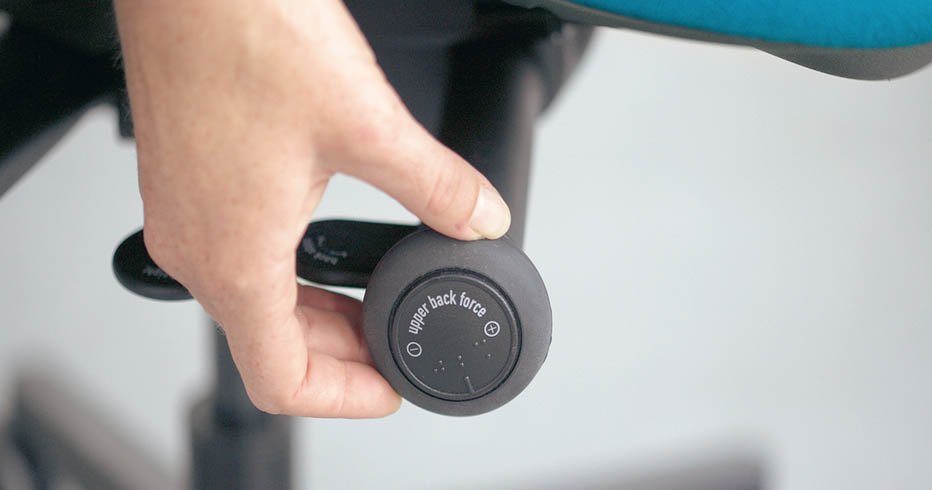
Image source: Bing (Web (fair-use with source credit))
Start by measuring your body before you touch a single knob. Know your height, your weight, and your inseam measurement. These three numbers determine which chair size and range you need.
Someone who is five-foot-seven and one hundred fifty pounds has completely different requirements from someone who is six-foot-three and two hundred twenty pounds. Write these numbers down. Keep them handy when comparing chair specifications.
Follow this adjustment sequence in order. Each step builds on the previous one:
Step one: Set your seat height. Sit all the way back in the chair. Adjust the height lever until your feet rest flat on the floor. Your knees should bend at approximately ninety degrees.
Your thighs should run parallel to the ground or slope slightly downward toward your knees. If your feet do not reach the floor comfortably, you need a footrest or a chair with a lower minimum seat height. Never prop yourself up on your toes to reach the floor.
That posture strains your calves and disrupts your pelvic alignment.
Step two: Adjust seat pan depth. Slide the seat pan forward or backward until you can fit two to four fingers between the front edge of the seat and the back of your knees. This gap preserves blood circulation through the popliteal space. If you can fit more than four fingers, the seat is too deep.
If you feel pressure directly behind your knees, the seat is too shallow. Neither extreme is acceptable for prolonged sitting.
Step three: Position the lumbar support. Raise or lower the lumbar pad until it contacts the natural inward curve of your lower back, typically at the L3 to L5 vertebrae level. Adjust the depth setting so you feel gentle, even support across that curve. You should not feel a hard pressure point.
You should not feel like the support is absent. The right setting creates a sensation of your lower back being cradled rather than pushed. If your chair lacks adjustable lumbar depth, skip ahead to the next step and accept that limitation.
Step four: Set the armrest height. Lower or raise your armrests until your elbows rest at approximately ninety-degree angles. Your shoulders should remain relaxed and dropped, not shrugged upward toward your ears. Your forearms should rest parallel to the floor when your hands sit on your keyboard.
If your desk is unusually high or low, this alignment may require compromise. In that case, prioritize shoulder relaxation over perfect elbow angle. Raised shoulders throughout the day guarantee neck tension and headaches.
Step five: Adjust armrest width and pivot. If your chair offers width adjustment, move the armrests so they align with the outer edges of your shoulders. They should not dig into your sides. They should not sit so far apart that you reach outward to use them.
Pivot adjustments let the armrests angle inward slightly to match your natural arm position. Set this so your thumbs point upward when your hands rest on the armrests, indicating neutral wrist alignment.
Step six: Configure recline tension. This step varies by chair model. Generally, you tighten or loosen a tension knob located under the seat or on the side of the chair. The goal is a recline resistance that matches your body weight.
You should be able to lean back smoothly with minimal effort. You should also return to upright without the mechanism snapping back aggressively. Test this by reclining gently.
The chair should hold you where you place it, not drift forward or backward on its own.
Step seven: Align your workstation with the chair. Your chair and desk form one system. Sit back in your properly adjusted chair. Reach forward to your keyboard and mouse.
Your elbows should stay near your torso at the ninety-degree angle you established in step four. Your wrists should remain straight, not bent upward or angled sideways. Adjust your desk height, keyboard tray position, or monitor placement to match your body rather than forcing your body to match your desk.
Your monitor should sit at arm’s length distance. The top of the screen should align with or sit slightly below eye level. If you look down at your screen, your neck flexes forward.
That forward head position adds roughly ten pounds of additional force to your cervical spine for every inch your head migrates forward from its neutral position. A monitor riser or simple stack of books can correct this in seconds if your desk does not accommodate proper screen height.
Revisit these adjustments after the first week of use. Your body will communicate what feels right and what does not. Small tweaks matter.
A quarter-inch of lumbar adjustment can eliminate lower back ache that plagued you for months. These adjustments are not one-and-done. Life changes.
Your desk height might shift. Your daily tasks evolve. Periodic recalibration keeps your chair working for you instead of against you.
If you want more guidance on picking the right setup for your workspace, check out our recommendations for [finding the right desk companion] to complement your new chair properly.
Comparing Materials: Mesh, Foam, and Hybrid Constructions
The seat and backrest material you choose affects comfort, temperature management, and long-term posture support. Three main construction types dominate the market. Each has distinct advantages and failure modes that matter significantly over a multi-year ownership period.
High-Density Foam Constructions
High-density foam remains the most common seat material across all price tiers. Quality foam uses a density rating of four to five pounds per cubic foot for the seat cushion and three to four pounds per cubic foot for the backrest. Higher density means the foam resists compression over time.
Lower density foam breaks down within eighteen to twenty-four months of daily use, developing permanent indentations that destroy evenness of support.
Foam’s greatest advantage is immediate comfort. You sit down and the material conforms to your body shape within seconds. There is no break-in period.
No waiting for mesh to settle. No adjusting tension to prevent sliding. The experience is intuitive and universally pleasant on first contact.
The trade-off is heat retention. Foam traps body heat against your skin. People who run warm or live in hot climates often find foam seats uncomfortably warm after an hour of sitting.
Sweat accumulation creates a clammy feeling that distracts from focused work. Ventilated foam designs with channeling or perforations mitigate this somewhat, but they never match the breathability of quality mesh.
Foam degradation manifests in two ways. Compression set creates a permanent depression where your sit bones rest. Over time, the cushion loses resilience in that specific zone.
The surrounding areas remain firm, creating an uneven surface that tilts your pelvis slightly. The second failure mode is edge breakdown. The perimeter of the seat pan softens before the center, creating a hammock effect that pulls your weight forward and encourages slouching.
Polymer Mesh Constructions
Mesh seats rely on stretched polymer fabric suspended across a frame. The tension of that fabric determines how much support you receive. Properly tensioned mesh flexes under your weight but returns to its original plane quickly.
Poorly tensioned mesh sags and creates pressure concentrations at your sit bones and lower spine.
The breathability advantage is undeniable. Air circulates freely through the mesh structure. Heat dissipates rapidly.
People in warm environments consistently rate mesh seats higher for all-day comfort. The cooling effect persists regardless of session length.
Mesh longevity depends heavily on tension quality and weight limits. Exceeding the manufacturer’s weight rating accelerates sagging dramatically. Even within rated capacity, cheaper mesh fabrics lose tension faster than premium varieties.
Eight-way suspensions with interlocking tension points outlast simple single-axis mesh stretches. The initial cost difference is substantial, but the lifespan gap often justifies the investment.
Mesh has a notable adaptation period. New users frequently describe the feel as too firm or oddly textured. Your body adapts within one to two weeks as the mesh settles and you learn to distribute weight across the full surface area rather than concentrating it at your sit bones.
Give mesh chairs at least ten days of consistent use before judging them harshly.
Hybrid constructions combine foam and mesh elements strategically. A foam cushion sits atop a mesh support layer, giving you immediate comfort with underlying breathability. Some backrests use mesh for the main support panel with foam pads added at lumbar contact points.
These hybrids attempt to capture the strengths of both materials while minimizing their weaknesses. Results vary significantly by manufacturer execution quality. Some hybrids work brilliantly.
Others feel like compromises that satisfy neither criterion.
Leather and Fabric Upholstery
Upholstered chairs wrap foam cushions in leather or fabric covers. Full-grain leather ages beautifully and develops a patina over decades of use. Top-grain leather offers similar qualities at lower cost.
Bonded leather is a composite material made from leather fragments mixed with binding agents. It cracks and peels within two to three years and should be avoided entirely.
Fabric upholstery comes in countless textures and colors. Commercial-grade fabrics resist abrasion and staining better than residential grades. Performance fabrics with stain-resistant coatings simplify maintenance significantly.
The underlying foam quality determines longevity regardless of upholstery material.
Leather seats excel in climate-controlled environments but struggle in extremes. Cold leather feels cold. Hot leather sticks to bare skin.
Both conditions create discomfort that pulls you out of your work rhythm. Fabric handles temperature variation more gracefully but attracts lint, pet hair, and visible stains more readily.
Pricing Tiers and What to Expect at Each Level
Chair pricing spans roughly two hundred to two thousand five hundred dollars for consumer models. Each tier delivers distinctly different levels of adjustability, material quality, and expected lifespan. Understanding what you get at each price band prevents overspending on unnecessary features and stops you from undervaluing the investment a quality chair represents.
Budget Tier: Two Hundred to Five Hundred Dollars
Budget chairs fill a real need. They provide basic seating for people who simply cannot afford premium models. The compromises are predictable.
Fixed or minimally adjustable lumbar support. Basic foam that compresses within a year. Single-axis armrests that adjust only in height.
Plastic bases that feel flimsy compared to nylon or aluminum. Five-year warranties at best.
Some budget chairs deserve mention despite their price. The Autonomous ErgoChair Classic delivers usable adjustability at around three hundred dollars. Its lumbar support and seat depth adjustments cover the essentials.
Build quality is adequate for moderate daily use. Review aggregator data shows mixed reliability reports, with some units developing gas lift issues within eighteen months.
The Realstudio and Flash Furniture offerings round out the budget category. They look professional and function adequately for light to moderate use. Do not expect decade-long durability from this tier.
Plan to replace budget chairs every three to five years depending on usage intensity. For detailed recommendations within this range, see our coverage of [finding affordable options] for specific model comparisons.
Mid-Range Tier: Five Hundred to One Thousand Dollars
This is where the value sweet spot lives. Mid-range chairs from reputable manufacturers deliver most of the adjustability features found in premium models. You will find independent lumbar depth and height controls.
Sliding seat pans. Four-dimensional armrests. Synchro-tilt mechanisms.
Ten-year warranties backed by established brands.
The Hawrance Setre occupies this tier intelligently. It incorporates many Herman Miller design philosophies at roughly half the price. The materials do not quite match the longevity of top-tier models, but the adjustability range covers serious posture needs effectively.
Same for the Branch Ergonomic Chair and the Uplift Adaptive Chair. Both deliver comprehensive adjustment at mid-range prices with solid warranty coverage.
Mid-range chairs from Steelcase and Herman Miller entry models also appear here during sales periods. A Leap V2 regularly drops below one thousand dollars through corporate liquidation or certified refurbished programs. These represent exceptional value for the posture support they deliver.
Premium Tier: One Thousand to Two Thousand Five Hundred Dollars
Premium chairs command their prices through material superiority, mechanism precision, and warranty confidence. Twelve-year warranties signal manufacturer certainty that the chair will outlast typical replacement cycles. Premium foam formulations resist compression set far longer than budget alternatives.
Aerospace-grade mechanisms operate smoothly after millions of cycle tests documented in independent laboratory reports.
The Herman Miller Aeron and Embody lead this tier definitively. The Steelcase Gesture and Leap V2 occupy the same echelon with slightly different design approaches. These chairs retain seventy to eighty percent of their resale value when sold through certified refurbishment channels.
A well-maintained ten-year-old Aeron sells for six to eight hundred dollars on the secondary market. That depreciation curve transforms the purchase from expense to asset preservation.
Extended warranties beyond the standard twelve years are sometimes available through authorized dealers. These cover additional years of parts and labor and represent sensible protection for high-investment purchases. The incremental cost typically ranges from one hundred to three hundred dollars and extends coverage to fifteen or twenty years total.
Refurbished and Secondary Market Options
Certified refurbished chairs from authorized dealers offer the strongest value proposition in the entire category. These units undergo full inspection, replacement of worn components, deep cleaning, and testing against original specifications. They come with the same warranty as new units from the same manufacturer.
The discount typically ranges from thirty to fifty percent compared to new retail pricing.
Unauthorized refurbished chairs from marketplace platforms carry higher risk. Components may be mismatched or substandard. Gas lifts might be non-OEM replacements with uncertain weight ratings.
Cushioning may be original or substituted with inferior foam. The price advantage evaporates quickly if you encounter a defective unit with no recourse.
If you pursue the secondary market, stick to authorized channels whenever possible. Verify the seller’s relationship to the original manufacturer before purchasing. Check whether the warranty transfers to second-hand buyers.
These precautions separate smart deals from expensive mistakes.
Common Mistakes People Make When Choosing a Chair
Most chair purchase mistakes share a common root cause. Buyers focus on appearance, brand recognition, or price without evaluating actual adjustability specifications against their own body measurements. The result is a chair that looks impressive on the showroom floor but undermines posture during daily use.
Avoid these pitfalls to ensure your investment delivers real postural benefit.
Buying Without Measuring Their Body First
You cannot select a properly fitting chair using guesswork. Height, weight, and inseam measurements determine whether a chair’s adjustment range covers your body at all. Someone who is five-foot-three attempting to use a chair designed for average to tall builds will struggle with seat depth, lumbar placement, and armrest reach regardless of price.
Always measure yourself before browsing. Compare your measurements against manufacturer size charts. Reject any chair that does not accommodate your dimensions within its stated ranges.
Ignoring Seat Depth Requirements
Seat depth gets overlooked constantly. Buyers focus on lumbar support and armrests while ignoring the dimension that controls leg circulation. A seat pan extending too far forward creates popliteal compression.
The consequences manifest as leg numbness, restless legs, and chronic thigh discomfort. These symptoms often get misattributed to other causes before the seat depth connection becomes obvious. Measure your inseam and verify that the chair’s depth adjustment range accommodates it properly before purchasing.
Prioritizing Aesthetics Over Adjustability
A beautiful chair that lacks proper adjustment is still a bad chair for posture. Bucket seats, fixed shapes, and decorative elements attract attention but provide little functional benefit. Marketing images showcase chairs in attractive settings with idealized lighting.
The reality of eight-hour daily use reveals the gap between presentation and performance. Evaluate adjustability specifications first. Then consider aesthetics.
Never reverse that priority order.
Assuming All Adjustable Chairs Are Equal
Adjustment range varies enormously between models. Two chairs may both advertise lumbar support, but one adjusts only height while the other adjusts both height and depth. Both claim adjustable armrests, but one moves only up and down while the other pivots, slides, and telescopes.
Read the full specification sheet rather than relying on feature checklists. The devil lives in the details of adjustment ranges and mechanism quality.
Failing to Test Before Committing
Buying a chair sight-unseen carries inherent risk. Even thorough specification reviews cannot replicate the experience of sitting in a chair for thirty minutes. Body types vary too widely for desk measurements to predict comfort accurately.
Retail showrooms, employer equipment programs, and friends’ offices provide opportunities to test chairs in person. Sit in each candidate for at least five minutes. Shift your position.
Recline. Roll forward. Feel whether the adjustments actually accommodate your body.
Online purchase windows typically range from fourteen to thirty days. Use that return window aggressively. Test the chair through a full workday before deciding to keep it.
Neglecting to Factor in Monitor and Desk Alignment
A perfectly adjusted chair defeats itself if your monitor forces poor neck posture. Workers who discover this mistake typically blame the chair when the real problem is their screen height. Always evaluate chair and workstation as an integrated system.
Adjust your monitor position before declaring the chair inadequate. Raise screens to eye level using risers, monitor arms, or stacked books. Lower desks with adjustable pedestals when possible.
The chair and desk must work in concert.
Overlooking Weight Capacity Limits
Exceeding a chair’s rated weight capacity accelerates wear on every component. Gas lifts fail prematurely. Mechanisms bind and seize.
Cushions bottom out irreversibly. Mesh stretches beyond recovery. Manufacturers rate their chairs conservatively for good reason.
Match your body weight plus clothing and accessories to the chair’s rated capacity with a reasonable safety margin. If you weigh two hundred and eighty pounds, choose a chair rated for three hundred pounds minimum. Do not select a two-hundred-and-fifty-pound-rated chair and hope it holds.
Skipping the Break-In Period Judgment
New foam cushions feel firmer than they will after two to four weeks of regular use. New mesh seats feel supportive in ways that seem exaggerated until your body adapts to the material response. Making judgment calls during the first few days of ownership leads to premature rejection of perfectly capable chairs.
Allow a full two-week adaptation period before deciding a chair does not work for you. Document any persistent discomfort issues that survive the break-in period. Those persistent problems indicate genuine fit failures worth addressing.
Maintenance and Long-Term Optimization
A quality ergonomic chair represents a significant investment. Protecting that investment through proper maintenance extends service life meaningfully and preserves the adjustability that makes the chair effective for posture support. Regular care routines take minimal time and prevent costly repairs or premature replacement.
Weekly Inspection Routines
Spend five minutes each week checking the following items:
- Tighten all visible bolts and fasteners. Vibration from daily use loosens connections over time.
- Inspect the gas lift for smooth operation. Jerky or sticking height adjustment signals impending seal failure.
- Check caster rotation. Wheels that drag or wobble increase rolling resistance and strain your legs during repositioning.
- Examine armrest padding for wear patterns. Exposed foam or torn fabric indicates areas needing reinforcement or replacement.
- Verify that all adjustment levers engage and disengage cleanly. Sticking mechanisms often indicate debris accumulation or worn internal components.
Monthly Deep Cleaning
Monthly cleaning preserves both appearance and function:
- Vacuum mesh surfaces to remove dust and debris that accelerate fabric wear. Use a soft brush attachment on low suction.
- Wipe foam and leather surfaces with appropriate cleaners. Silicone-based conditioners protect leather from cracking. Microfiber cloths prevent scratching on fabric and mesh.
- Clean caster wheels by removing hair and thread from axles. Damp cloth wiping removes sticky residue that attracts additional debris.
- Lubricate pivot points on armrests and recline mechanisms with lightweight silicone spray. Avoid oil-based lubricants that attract dust and gum up moving parts.
Seasonal Adjustment Reviews
Adjustments that worked in January may feel inadequate by July. Body composition shifts, desk configurations change, and daily routines evolve. Revisit your full adjustment sequence quarterly.
Reset seat height if your desk setup changed. Recheck lumbar positioning if your weight shifted significantly. Confirm armrest alignment if you adopted new peripheral equipment that altered your reaching patterns.
These periodic recalibrations keep your chair matched to your current needs rather than your past configuration.
Part Replacement Timeline
Understanding typical component lifespans helps you budget for inevitable replacements:
- Gas lift cylinders: five to eight years with normal use. Failure manifests as slow height drift or complete inability to hold position.
- Casters: three to five years. Hard-floor casters wear faster than carpet-optimized wheels. Replacement is straightforward and inexpensive.
- Armrest pads: two to four years depending on friction exposure. Clothing and skin contact accelerate wear patterns.
- Lumbar support cushions: three to six years. Foam compression set reduces support effectiveness gradually before total failure.
- Mesh panels: five to ten years for quality constructions. Sagging progression accelerates after the five-year mark on budget models.
Most manufacturers sell replacement parts directly. Third-party suppliers stock compatible components for popular models. Replacement costs typically range from twenty to one hundred fifty dollars per component depending on part complexity.
Attempting DIY replacement saves labor costs but requires matching part numbers precisely. Incorrect substitutions create new adjustment problems that negate the savings.
When the cumulative cost of repairs approaches forty percent of a new chair’s price, replacement becomes the financially sounder decision. A twenty-year-old chair with worn mechanisms and degraded cushions costs more in the long run than a new model with updated ergonomics and a fresh warranty. See [understanding how long these seats typically endure] for detailed lifespan guidance and replacement decision frameworks.
Frequently Asked Questions
Do posture-correcting chairs actually work?
Posture-correcting chairs work when they provide adequate adjustable lumbar support, proper seat depth, and appropriate armrest positioning. Fixed-shape chairs with minimal adjustment offer limited benefit. The most effective approach combines a properly adjusted ergonomic chair with regular posture variation throughout the workday.
Static positioning in any chair, even an expensive one, eventually fatigues postural muscles. Movement remains the strongest posture support strategy available.
Is a gaming chair bad for your back?
Gaming chairs are not inherently bad for your back, but most models prioritize aesthetics over true ergonomic adjustability. Fixed bucket seats, limited lumbar support options, and basic armrests fail to accommodate diverse body types adequately. Models like the Secretlab Titan Evo with magnetic lumbar cushions and four-dimensional armrests come closer to genuine ergonomic support.
If you game for extended sessions, choose a model with the widest adjustment range available rather than settling for the cheapest racing-style option.
How long should a good ergonomic chair last?
Quality ergonomic chairs from reputable manufacturers last ten to fifteen years with normal daily use and proper maintenance. Premium models backed by twelve-year warranties routinely exceed that lifespan when components are maintained and replaced as needed. Budget chairs typically serve three to five years before material degradation compromises support quality.
Purchase decisions should weigh total cost of ownership rather than initial price alone. A one-thousand-dollar chair lasting twelve years costs less per year than a four-hundred-dollar chair replaced every three years.
Should I get a chair with or without a headrest?
Headrests benefit people who frequently recline during work sessions. If you alternate between forward-leaning focused work and relaxed reclined reading or calls, a headrest provides meaningful cervical support. If you remain forward-facing throughout your entire workday, a headrest adds little value and may interfere with proper monitor alignment.
Consider whether your work pattern actually requires reclined support before prioritizing a headrest in your selection criteria.
Is mesh better than foam for hot climates?
Mesh seats provide noticeably superior breathability compared to foam constructions. Air circulates freely through the polymer weave, dissipating body heat efficiently. Foam traps warmth against the skin, creating uncomfortable conditions in warm environments.
If you live in a hot climate or run warm naturally, mesh represents the more comfortable long-term choice. The adaptation period required for new mesh seats is worth the ongoing thermal advantage. Ensure the mesh tension rating matches your body weight to prevent premature sagging.
Can any chair fix existing back pain?
No chair eliminates existing back pain on its own. Proper ergonomic seating reduces mechanical stress on the spine and creates conditions favorable for recovery. But chronic back pain involves multiple contributing factors including muscle weakness, joint dysfunction, and underlying medical conditions.
A well-adjusted ergonomic chair serves as one component of a comprehensive back health strategy that should include professional medical guidance, targeted exercise, and ergonomic workspace evaluation across your entire environment.
What is the difference between a task chair and an executive chair?
Task chairs prioritize functional adjustability for extended seated work. They feature comprehensive lumbar support, seat depth adjustment, dynamic recline mechanisms, and multi-axis armrests. Executive chairs emphasize aesthetics, padded contours, and premium materials.
They often sacrifice adjustability for visual appeal. A plush executive chair may feel luxurious initially but fail to support proper spinal alignment during eight-hour work sessions. Choose task-oriented ergonomics over executive styling when posture support is your primary concern.
Do I really need adjustable armrests?
Adjustable armrests significantly reduce shoulder and neck strain during prolonged sitting. Fixed-height armrests force compromises that elevate shoulders or require awkward reaching patterns. Even basic height-adjustable armrests outperform fixed versions substantially.
Four-dimensional adjustability provides optimal shoulder support across varying task positions. If your budget allows only partial adjustability, prioritize armrest height range as the minimum viable specification before considering other upgrade paths.
Certifications and Standards Worth Looking For
Manufacturer claims carry weight only when they align with independent testing standards. Certifications exist as proof that chairs meet minimum safety and durability thresholds. They do not guarantee perfect posture support.
But they do tell you something real about build quality and regulatory compliance. Ignoring them leaves you guessing.
BIFMA Compliance: The Foundation Standard
BIFMA, the Business + Institutional Furniture Manufacturers Association, establishes the primary voluntary standards for office furniture safety and performance in North America. Their X5.1 standard covers general durability requirements. Their X5.4 standard specifically addresses task chair testing methodology.
These standards dictate how chairs survive simulated real-world conditions. A certified chair undergoes cycle testing on its gas lift mechanism, base, casters, tilt functions, and armrests. The tests simulate years of daily use within compressed timeframes.
Chairs that fail any test criterion cannot legally claim BIFMA compliance in commercial markets.
Here is what BIFMA testing actually covers for task chairs:
- Gas lift cycle testing: Repeated extension and retraction cycles to verify height adjustment longevity
- Base and caster durability: Drop tests, rolling endurance tests, and weight load verification
- Seat and backrest fatigue: Repetitive loading to detect premature cracking or deformation
- Armrest strength testing: Static and dynamic force application to ensure secure attachment
- Tilt mechanism durability: Cyclic recline operation testing under rated capacity loads
Look for the BIFMA certification mark on product pages or physical tags attached to the chair. Some manufacturers list compliance in specification sheets without displaying the actual certification logo. Both indicate the same thing.
When certifications matter most is when comparing budget models that may skip third-party testing entirely.
Weight Capacity Ratings and Why They Matter
Weight capacity numbers appear on every spec sheet but get read carelessly by most buyers. Exceeding your chair’s rated capacity voids warranties immediately and accelerates component failure predictably. The damage accumulates invisibly until something breaks.
Manufacturers calculate weight ratings using the weakest structural component, not the strongest. That means a chair with a sturdy aluminum base and premium gas lift might still carry a conservative overall rating because its seat pan welds or armrest brackets cannot handle extreme loads. Always match your body weight plus habitual clothing and accessories with comfortable margin.
The gap between a two-hundred-fifty-pound-rated chair and a three-hundred-five-pound-rated chair often involves frame thickness, weld quality, and gas lift cylinder diameter. Those differences are real and measurable. If you weigh over two hundred pounds, selecting a chair with substantial capacity margin prevents premature wear patterns.
Check manufacturer specifications carefully rather than assuming size labels alone convey adequate ratings.
Warranty Length as a Durability Signal
Warranty periods communicate manufacturer confidence levels far better than marketing copy ever could. A five-year warranty signals acceptable but not exceptional expected lifespan. A ten-year warranty indicates strong material and component selection.
Twelve-year warranties from Herman Miller and Steelcase reflect genuine confidence in product longevity backed by documented failure rate data.
Limited warranties differ significantly from full coverage. Many brands offer fifteen-year warranties on mechanisms and frames while providing only five years on upholstery and cushions. Read the fine print before assuming comprehensive coverage.
Some warranties exclude normal wear items like armrest pads and casters entirely.
The refurbished chair market complicates warranty transfer. Authorized dealer refurbishments typically transfer remaining original warranty time. Marketplace refurbished units frequently reset warranty clocks or provide reduced third-party warranties.
Verify warranty terms explicitly with the seller before purchasing used premium chairs.
GREENGUARD and Low-VOC Material Certifications
Indoor air quality directly affects health during prolonged sitting sessions. Furniture materials off-gas volatile organic compounds into your immediate breathing zone. GREENGUARD certification, administered by UL Environment, verifies that products meet strict chemical emission limits for indoor air quality.
GREENGUARD Gold certification represents an even stricter threshold. It certifies suitability for environments including schools and healthcare facilities where occupant exposure duration runs longest. Chairs carrying this certification release lower levels of formaldehyde, vinyl chloride, and other problematic emissions compared to uncertified alternatives.
If you share your workspace with children, maintain a home office environment, or simply prefer cleaner indoor air, prioritize GREENGUARD-certified models. The price difference between certified and non-certified equivalents from the same manufacturer is typically negligible. Material science improvements benefiting air quality rarely increase production costs meaningfully.
See our detailed guide on [dealing with ongoing discomfort] if you are wondering whether your current seating is contributing to persistent pain.
What Manufacturer Claims Actually Mean Versus Marketing Spin
Marketing copy uses language designed to sound impressive while communicating very little. Understanding which claims carry real substance requires translating promotional terminology into technical specifications. The gap between meaningful claims and empty phrases separates informed buyers from confused shoppers.
Claims worth taking seriously include specific adjustability ranges measured in inches or centimeters, independent certification marks, named material densities, and documented warranty terms covering defined components. These claims can be verified independently against third-party standards.
Empty claims to disregard include vague phrases like “ergonomic design”, “medical-grade materials”, “clinical studies prove”, and “recommended by posture experts”. Without cited study references, named certification bodies, or specific measurable data, these statements carry no verifiable meaning. Always demand specifics when encountering promotional language about health benefits.
Who Each Chair Is Best Suited For
Matching chair to body type and usage pattern matters enormously. Two chairs praised identically by reviewers serve completely different people effectively. Knowing your category narrows the decision dramatically and prevents buyer regret born from mismatched expectations.
Tall Users Over Six Feet Two Inches
Tall users face seat depth problems universally. Standard seat pans range from sixteen to eighteen inches deep. Someone who is six-foot-four often needs twenty inches or more to prevent popliteal compression.
Height-related challenges extend beyond seat depth to lumbar support reach, backrest height, and armrest range.
Specific tall-user considerations:
- Seat pan must slide forward sufficiently to accommodate longer femurs while maintaining adequate rear support
- Lumbar support must reach high enough to contact the actual lumbar curve rather than the sacrum
- Backrest height must support the upper thoracic region without pressing against the headrest uncomfortably
- Armrest height range must accommodate longer arms without forcing shoulder elevation
- Gas lift maximum height must allow desk clearance without knee compression against the underside
Chairs accommodating tall builds well include the Herman Miller Aeron in Size C, the Steelcase Gesture in larger configurations, and the Hawrance Setre with extended depth ranges. Some manufacturers offer explicit tall-sized variants with extended dimensions. Seek these out deliberately rather than hoping standard sizes stretch adequately.
Shorter Users Under Five Feet Four Inches
Short users confront the inverse problem. Standard chairs assume average proportions and create gaps where support should exist. Seat depth often extends too far forward even at maximum retraction.
Lumbar support reaches the wrong spinal level. Armrests sit too wide and too high. Foot placement becomes unstable regardless of seat height adjustment.
Short-user specific challenges:
- Minimum seat height may still sit too high, preventing feet from resting flat without a footrest
- Lumbar support cannot descend low enough to contact the shorter lumbar curve properly
- Seat width may exceed hip breadth, reducing lateral stability and encouraging leaning
- Backrest controls and levers may sit unreachable at comfortable seating positions
- Desk height combined with minimum seat height creates awkward elbow positioning
Chairs accommodating shorter builds include the Herman Miller Aeron in Size B or A, certain adjustable range models from Steelcase with extensive minimum height specifications, and the Autonomous ErgoChair Pro with broader adjustment ranges. Footrests become mandatory equipment rather than optional accessories for most short users pairing standard chairs with average-height desks.
Heavyset Users Over Two Hundred Fifty Pounds
Higher body weights impose proportional stress on every chair component. Gas lifts, bases, mechanisms, and cushioning all degrade faster under elevated loads. Weight capacity ratings exist for precise mechanical reasons related to material stress thresholds.
Exceeding those ratings triggers predictable failure modes.
Heavyset user priorities:
- Seat width must accommodate hip breadth without pressure on inner thighs
- Weight capacity should exceed actual body weight by at least twenty-five percent margin
- Seat cushion density must resist rapid compression set under sustained higher loads
- Base material should favor aluminum over plastic for structural strength
- Mechanism quality determines whether recline functions remain smooth under added weight
- Warranties may carry different terms or exclusions for heavier users
Premium foam constructions generally outperform mesh for heavier users because foam resists bottoming out more reliably than stretched fabric. Steel-based bases and reinforced mechanism housings become essential rather than desirable upgrades. Budget constraints become harder to satisfy at higher weight categories due to material and manufacturing cost increases.
Review aggregated buyer feedback reports from verified purchasers within similar weight ranges rather than relying solely on manufacturer specifications. Real-world durability data from heavyset users reveals limitations that spec sheets intentionally omit.
Remote Workers Logging Eight-plus Hour Days
Extended daily sitting sessions demand maximum adjustability and material durability. Eight hours creates substantially different stress profiles than four hours of moderate use. Mechanisms cycle more frequently.
Cushioning compresses repeatedly. Adjustment points experience more torque and wear.
Remote worker priorities:
- Comprehensive adjustability across all contact points compensates for variable daily postures
- Premium materials withstand accelerated wear from extended daily use
- Synchro-tilt and dynamic recline mechanisms enable posture variation throughout long sessions
- Breathable materials manage heat buildup during multi-hour uninterrupted sitting
- Warranty length justifies investment in long-term daily durability
Premium-tier chairs from established ergonomic brands typically serve dedicated remote workers best. The additional upfront cost divides across many more productive sitting hours compared to budget alternatives used intermittently. See our curated list of [the best work-from-home options] if you want models validated specifically for extended remote use.
Gamers Spending Three-plus Hour Sessions
Gaming sessions differ from typical office work in posture patterns. Gamers lean forward intently during intense moments. They recline significantly during cutscenes and menu navigation.
They may hold static postures longer than typists who shift naturally between keyboard and mouse input. Both forward lean and deep recline create distinct support demands.
Gamer-specific chair considerations:
- Recline range should exceed one hundred degrees to accommodate leaning back during relaxed gameplay
- Integrated headrests support neck position during reclined gaming positions
- Bucket seat contours may stabilize body position during intense focused sessions
- Armrest range must accommodate both forward typing positions and reclined controller holding
- Visual aesthetics influence buyer satisfaction but should not override ergonomic functionality
The Secretlab Titan Evo bridges the gaming and ergonomic categories effectively with magnetic lumbar support and extensive recline range. Pure gaming chairs typically fall short on true lumbar adjustability despite aggressive marketing claims about posture support. Balance visual preferences against functional requirements honestly.
People Managing Existing Lower Back Pain or Sciatica
Pre-existing spinal conditions fundamentally change chair selection criteria. Standard ergonomic chairs may provide insufficient support for compromised spines. Medical-grade seating solutions sometimes require professional fitting and prescription guidance.
Self-selection carries higher risk when pain conditions already exist.
Existing condition priorities:
- Adjustable lumbar support with precise depth control addresses individual curve variations
- Forward tilt options reduce disc pressure during seated positions compared to upright sitting
- Seat edge waterfall designs minimize popliteal pressure affecting sciatic nerve pathways
- Hip angle adjustability influences pelvic positioning and lumbar curve maintenance
- Professional ergonomic assessment may identify specific support requirements beyond standard chair features
Consult healthcare providers before selecting seating for active pain management. Certain chair features that benefit some spinal conditions may aggravate others. Physical therapists and occupational therapists often maintain supplier relationships with ergonomic chair specialists who understand clinical requirements.
Pricing Tiers and What to Expect at Each Level
Understanding what each price tier delivers prevents overspending on features you will not use and stops you from undervaluing the long-term savings a quality chair generates. Per aggregate review analysis of buyer satisfaction over five-year ownership periods, chairs in the seven-hundred-to-one-thousand-dollar range consistently deliver the strongest value proposition for typical home office users.
Budget Chairs: Two Hundred to Five Hundred Dollars
Budget chairs fill practical needs for students, occasional home users, and people establishing initial home offices on tight budgets. The compromises follow predictable patterns that differentiate them from higher-priced alternatives.
Typical budget chair limitations include:
- Fixed or minimally adjustable lumbar support with limited depth range
- Basic foam cushions rated below four pounds per cubic foot density
- Single-axis or two-dimensional armrests with restricted adjustment ranges
- Plastic bases instead of nylon or aluminum construction
- Five-year maximum warranties with limited component coverage
- Synthetic leather upholstery prone to peeling within two to three years
Several budget models deserve consideration despite their price constraints. The Autonomous ErgoChair Classic provides usable lumbar and seat depth adjustments at roughly three hundred dollars. The Realstudio and Flash Furniture offerings present professional appearances with functional if limited adjustability.
The HON Endorse collection delivers commercial-spec durability at budget prices through volume manufacturing efficiencies.
Quality control variance remains the primary risk factor at this price tier. Same-model chairs from different production batches show inconsistent longevity according to verified purchaser reports spanning multiple years. Research recent review patterns carefully before committing to a specific model.
Avoid outdated listings with sparse or ancient review data.
Mid-Range Chairs: Five Hundred to One Thousand Dollars
Mid-range chairs occupy the value sweet spot where serious adjustability meets reasonable pricing. Most features found in premium models appear here with minor material compromises that affect long-term durability but not daily comfort significantly.
Mid-range highlights in this bracket include:
- The Hawrance Setre delivering Herman Miller-level adjustability at roughly half the price
- The Uplift Adaptive Chair offering comprehensive controls and solid build quality
- The Branch Ergonomic Chair balancing aesthetics, adjustability, and price effectively
- Certified refurbished premium chairs from authorized dealers representing exceptional value
- Steelcase and Herman Miller entry models appearing during promotional sales periods
A Leap V2 regularly drops below one thousand dollars through corporate liquidation channels or certified refurbished programs. These represent outstanding value transfers of premium engineering to budget-conscious buyers. The performance gap between a refurbished premium chair and a comparable new mid-range model narrows dramatically when warranty coverage remains identical.
Premium Chairs: One Thousand to Two Thousand Five Hundred Dollars
Premium chairs justify their prices through component longevity, mechanism precision, and material superiority that becomes apparent over multi-year ownership. Twelve-year warranties signal manufacturer certainty backed by documented reliability data. Premium foams resist compression set far longer than budget alternatives.
Aerospace-grade mechanisms operate smoothly after millions of documented cycle tests.
Resale value retention distinguishes premium chairs meaningfully. Well-maintained ten-year-old Herman Miller and Steelcase chairs retain seventy to eighty percent of original retail value on the secondary market. That depreciation curve transforms the purchase from pure expense toward asset preservation with recoverable residual value.
Extended warranty purchases available through authorized dealers add protection for high-investment chairs. Coverage extending beyond the standard twelve years typically costs one hundred to three hundred dollars and covers parts and labor for up to twenty years total. These extensions represent sensible protection for chairs purchased at peak prices intended for decade-plus service life.
Refurbished and Secondary Market Considerations
Certified refurbished chairs from authorized dealers deliver near-new performance at thirty to fifty percent discounts. These units receive full inspection, worn component replacement, deep cleaning, and performance testing against original manufacturer specifications. They come with identical warranties to new equivalents from the same brand.
Unauthorized marketplace refurbished units carry substantially higher risk. Component substitutions may include non-OEM gas lifts with uncertain weight ratings. Cushioning may be original or substituted with inferior foam blends.
Seal integrity on mechanisms remains unverified without factory testing documentation. Price advantages vanish quickly upon encountering defective units with no recourse available.
The secondary market offers particular value for premium models that maintain exceptional durability even after years of commercial use. Herman Miller Aeron chairs from office liquidations frequently survive decades of heavy use with only cosmetic wear. Purchasing a refurbished Aeron with replaced seals and mechanisms delivers essentially new performance at significant savings.
How to Adjust Your Chair for Maximum Posture Support
Proper adjustment transforms any quality ergonomic chair from mediocre to excellent. A perfectly specified chair installed incorrectly performs worse than a moderately specified chair dialed in precisely for your body dimensions. The adjustment sequence builds cumulatively.
Skipping steps or ordering them incorrectly produces compounding misalignment that no single correction fully resolves.
Establishing Correct Seat Height
Begin with seat height as your foundational adjustment. Sit fully back in the chair with your spine contacting the backrest. Adjust height until your feet rest flat on the floor.
Your knees should bend at approximately ninety degrees with your thighs running parallel to the ground or angling slightly downward toward your knees.
Feet that dangle or balance on tiptoes indicate insufficient seat height even at maximum gas lift extension. In that case, you need either a chair with lower minimum height specification or an appropriately sized footrest. Never elevate yourself onto your toes to compensate.
That posture strains calf muscles and disrupts pelvic alignment throughout your entire kinetic chain.
Your desk height creates the next constraint. Your elbows should rest comfortably on armrests or hover naturally above your keyboard when shoulders remain relaxed and down. If your desk sits too high relative to your chair, your shoulders elevate involuntarily.
That shoulder elevation propagates tension upward into your neck and traps your upper trapezius muscles.
Positioning Lumbar Support Precisely
Lumbar support placement determines whether your lower spine maintains healthy curvature or flattens into stress-inducing extension. Raise or lower the lumbar pad until it contacts the natural inward curve of your lumbar region, typically between the L3 and L5 vertebrae levels. Most adults find optimal contact point sitting midway between their waistline and lower rib cage.
Adjust lumbar depth so you feel gentle, even support spreading across the curve. You should never feel a concentrated hard pressure point creating discomfort. You should also never feel the support insufficient to maintain your lumbar curve against gravity.
The correct setting produces a sensation of your lower back being cradled rather than aggressively pushed.
If your chair lacks adjustable lumbar depth, you accept whatever fixed position the manufacturer designed for average proportions. This limitation affects people whose torsos fall outside average ranges significantly. Consider aftermarket lumbar support cushions as temporary substitutes if built-in adjustment proves inadequate for your anatomy.
Setting Armrest Height and Width
Armrest height determines shoulder positioning more than most users realize. Lower or raise armrests until your elbows achieve approximately ninety-degree bend with shoulders remaining relaxed and dropped. Your forearms should rest parallel to the floor when your hands occupy normal keyboard and mouse positions.
Shoulder elevation caused by armrests set too high creates chronic trapezius tension. Shoulder widening caused by armrests set too far apart forces your arms outward and strains your scapular stabilizers. Both problems generate cumulative discomfort measurable in increased headache frequency and neck stiffness over weeks of untreated exposure.
Width adjustment positions the armrests aligned with your outer shoulder edges. They should not dig into your sides restricting arm movement. They should not sit excessively wide requiring shoulder abduction to reach.
Pivot adjustment allows armrests to angle inward slightly matching your natural forearm orientation during typing tasks.
Configuring Recline Tension and Movement
Recline tension calibration matches the mechanism resistance to your body weight. Heavier users require tighter tension settings preventing excessive backward acceleration. Lighter users need looser tension enabling smooth recline without requiring deliberate effort against overly stiff springs.
Test recline tension by leaning back gently through the full range of motion. The chair should hold you positioned where you release it rather than snapping forward or drifting backward unpredictably. Smooth, controlled motion indicates proper tension.
Jerky or self-driven movement signals misconfiguration requiring adjustment.
Synchro-tilt coordination between backrest and seat pan ensures your feet remain planted and hip angle stays stable during recline. Without synchronized movement, leaning back causes forward sliding and leg position disruption. Most quality ergonomic chairs incorporate synchro-tilt as standard.
Budget models sometimes substitute simpler single-axis recline mechanisms that lack this coordination.
Aligning Your Workstation to Match the Chair
Your chair and desk form a unified ergonomic system. Optimizing one component without addressing the other guarantees compromise and persistent strain. Monitor position, keyboard placement, and mouse positioning all interact continuously with your chair configuration.
Position your monitor at arm’s length distance with the screen top aligned at or slightly below eye level. This alignment keeps your cervical spine neutral without forward head carriage. Forward head position adds approximately ten pounds of cumulative load to your neck structures for every inch your head migrates anteriorly from vertical alignment.
Keyboard and mouse should allow wrist extension maintaining neutral straight alignment rather than bending upward or angling sideways. Adjustable keyboard trays solve desk surface height conflicts between proper monitor elevation and proper arm positioning. If fixed-height desks constrain your setup, prioritize monitor height adjustment first, then manage keyboard height with a separate tray or platform.
Revisit this complete adjustment sequence quarterly or whenever your routine changes. Weight fluctuations, desk repositioning, new peripheral equipment, and seasonal clothing modifications all warrant recalibration. Small adjustment increments produce disproportionately large comfort improvements once you learn which parameters affect which body regions.
Problems and Troubleshooting: Fixing Common Chair Issues
Even well-purchased ergonomic chairs develop problems over time. Identifying issues early and addressing them correctly prevents minor annoyances from escalating into major discomfort or complete mechanism failure. Most common problems trace back to incorrect adjustment, accumulated debris, or worn components requiring replacement rather than repair.
Chair Won’t Stay at Selected Height
Height drift or complete gas lift failure represents one of the most frequent chair complaints. The underlying cause varies by severity . Minor drift indicating slow sinking over days suggests seal wear within the gas lift cylinder.
Complete failure indicating sudden collapse points to damaged lock mechanisms or external impact damage.
Quick troubleshooting steps:
- Verify the height lever engages fully downward into the locked position. Partial engagement allows gradual slipping.
- Check whether the gas lift cylinder itself appears damaged, dented, or improperly seated in its housing.
- Clean debris accumulation around the cylinder base that might prevent full locking mechanism engagement.
- Test alternative height positions to determine whether drift occurs uniformly or primarily at specific heights.
Gas lift replacement represents a straightforward repair for most chair models. Aftermarket cylinders measuring ten to thirty dollars install with basic tools in under thirty minutes. Match cylinder stroke length and diameter to original specifications for proper fit.
Avoid cheap unbranded replacements claiming incompatible weight ratings.
Uncomfortable Pressure Points Developing
Pressure concentrations typically signal incorrect seat depth, improper lumbar positioning, or cushion degradation. Identify the specific location of discomfort and match it to likely causes systematically.
Sit bone pressure indicates seat pan depth too shallow or cushion compression set creating depressions. Thigh or knee crease pressure points suggest seat depth extending too far forward into the popliteal space. Lower back pressure from lumbar support touching specific vertebrae rather than distributing across the curve indicates wrong height placement or excessive depth projection.
Evaluate whether new pressure points appeared gradually or suddenly. Gradual onset correlates with material degradation or body composition changes. Sudden appearance following an adjustment change correlates directly with that modification and usually reverses when adjustments return to previous settings.
Noise During Reclining or Movement
Squeaks, creaks, and grinding sounds originate from friction points within mechanisms, loose fasteners, or component wear. Noise does not always indicate failure but often signals maintenance needs approaching intervention timing.
Common noise sources and solutions include:
- Pivot joints between armrests and chair frame tightening with lubrication or bolt torquing
- Recline mechanism internal components cleaning and silicone spray lubrication
- Casters and wheel axles removing缠绕 hair and thread debris followed by axle lubrication
- Seat pan attachment points checking and tightening bolts securing cushion to mechanism plate
- Base-to-column interface inspecting for proper seating and cleaning debris from connection surfaces
Persistent grinding noises continuing after basic maintenance indicate internal mechanism wear requiring component replacement rather than continued use. Operating damaged mechanisms risks sudden failure during use potentially causing injury from unexpected position changes.
Armrests Feeling Loose or Unstable
Armrest wobble develops from loose mounting hardware, worn pivot bushings, or stripped adjustment mechanisms. Address looseness promptly before vibration damage propagates to adjacent chair components.
Inspect visible mounting bolts and tighten to manufacturer torque specifications using appropriate tools. Missing or stripped fasteners require exact replacement from manufacturer parts catalogs rather than improvised hardware store substitutes. Mismatched bolt dimensions create unsafe connection points under dynamic loading conditions.
Armrest pivot looseness often indicates worn internal bushings or bearings. Some manufacturers sell replacement pivot kits. Others require complete armrest assembly replacement.
Consult manufacturer parts documentation before purchasing replacement components to ensure compatibility with your specific chair model and production year.
Seat Cushion Losing Resilience
Foam compression set represents inevitable material aging rather than defect in most cases. Premium four-to-five pound density foams maintain responsiveness significantly longer than budget alternatives but eventually compress regardless of initial quality rating.
Assess whether cushion degradation occurs uniformly or concentrates at specific contact areas. Uniform compression indicates general material aging consistent with expected lifespan. Localized indentations coinciding precisely with sit bone contact points indicate progressive compression set developing faster than typical averages, often correlating with body weight exceeding recommended capacity ratings.
Replacement seat cushions available from manufacturers restore original support characteristics without requiring full chair replacement. Installation typically involves removing upholstery staples or fasteners securing the old cushion to the seat pan substrate. Basic hand tools and patience suffice for most cushion replacement procedures.
Safety Guidelines and Usage Warnings
Chair safety encompasses far more than avoiding falls from defective gas lifts. Proper usage practices prevent acute injuries and reduce chronic musculoskeletal loading that develops silently over years of accumulated microtrauma. Manufacturer warnings exist for documented reasons supported by injury epidemiology data.
Weight Rating Adherence Non-Negotiable
Exceeding published weight capacity ratings voids warranties automatically and introduces structural failure risk. Gas lift cylinders, base connections, and mechanism housings all calculate safety margins based on rated capacity specifications. Operating beyond those limits eliminates engineered safety factors progressively.
Some users attempt reinforcing overweight chairs through aftermarket modifications or supplementary support structures. These interventions rarely restore original engineering safety margins and frequently introduce new failure modes unintended by the original designer. Respect published weight ratings as absolute maximums rather than suggestions subject to individual interpretation.
Proper Assembly Following Instructions Exactly
Improper assembly creates instability hazards frequently overlooked by impatient assemblers skipping steps or substituting tools. Assembly errors compromise structural integrity invisibly until components fail under operational loads. Follow manufacturer instructions sequentially using provided tools whenever specified.
Key assembly precautions include:
- Torquing all fasteners to specified values rather than guessing appropriate tightness
- Verifying gas lift cylinder seats completely and evenly into base housing before operation
- Confirming caster stems insert fully into wheel hub sockets until seating stops
- Checking that all adjustment levers return to neutral positions after installation completion
- Testing full mechanism range of motion before declaring assembly complete and beginning regular use
Partial assembly allowing mechanisms to operate under incomplete connection states creates progressive damage accumulating invisibly until catastrophic failure occurs during normal use.
Fall Prevention and Stability Practices
Tip-over incidents typically result from combined factors rather than single causes. Leaning far beyond base footprint, rolling on uneven surfaces, or combining excessive height with aggressive recline angles all contribute independently and synergistically to stability compromise.
Maintain stable seating practices:
- Keep both feet planted or properly supported on footrests during normal seated activities
- Avoid leaning beyond the lateral and rear boundaries of your base footprint
- Engage tilt locks when performing tasks requiring stable upright positioning
- Use carpeted or hard flat surfaces whenever possible rather than uneven flooring
- Reduce seat height slightly when performing tasks generating reactive forces against the chair
High seat positions combined with aggressive recline create tip-over leverage conditions exceeding most chair base stability margins. Manufacturers engineer specific tilt mechanisms with built-in resistance limits designed to prevent dangerous over-reclining under normal use conditions. Bypassing those limits through modification creates unnecessary risk.
Chemical Content and Material Safety
Flammability standards and chemical content regulations protect occupants from fire hazard and toxic exposure respectively. Compliance with CAL TB 117-2013 flammability standards ensures upholstery materials resist ignition source exposure adequately. TSCA compliance verifies chemical ingredient reporting meets federal requirements.
Proposition 65 warnings in California inform consumers about known carcinogen or reproductive toxin content present in products sold within the state.
Individuals with chemical sensitivities should review manufacturer material disclosure documentation before purchasing. Some foam cushioning treatments, fabric finishes, and adhesive systems contain compounds triggering sensitivity reactions in susceptible populations. Certified low-VOC and GREENGUARD Gold rated products minimize exposure risk significantly compared to uncertified alternatives.
Children and pets introducing chewing or ingestion behavior around chair materials create additional safety considerations beyond adult occupancy norms. Supervise young children around adjustable mechanisms and small detachable components presenting choking hazard risks when removed from proper assembly configuration.
Related Alternatives and Complementary Seating Options
Ergonomic task chairs solve primary sitting posture problems effectively. But single-chair solutions rarely address every positional need throughout extended daily routines. Supplementary seating options and standing desk integration expand posture support flexibility significantly beyond what any single chair type provides alone.
Sit-Stand Desk Integration
Alternating between seated and standing positions reduces cumulative loading on spinal structures compared to sustained sitting regardless of chair quality. Sit-stand desk converters and fully electric adjustable desks enable this posture variation throughout workdays without requiring workspace redesign.
Transition strategies between sitting and standing positions matter significantly. Rising slowly from deeply flexed seated positions stresses lumbar structures temporarily. Standing immediately after prolonged sitting without brief transition movement increases injury susceptibility.
Incorporating brief walking periods or gentle stretching between position changes minimizes transient stress during posture transitions.
Research from occupational health institutions indicates workers utilizing sit-stand arrangements report lower fatigue levels and improved concentration scores compared to seated-only counterparts. The magnitude of benefit scales proportionally with time spent standing throughout the workday. Maximum benefits appear around two to four hours of daily standing distribution across the work period rather than sustained single-position occupation.
Kneeling and Active Sitting Alternatives
Kneeling chairs and active sitting products serve as complementary posture alternates rather than primary full-day replacements for most users. Their open hip angle designs encourage pelvic forward tilt maintaining lumbar curvature without built-in lumbar support mechanisms. Shin and pubic bone weight distribution differs fundamentally from traditional seat pan support.
Effective integration strategies include:
- Using kneeling chairs for forty-five to ninety-minute sessions alternating with traditional ergonomic chair use
- Employing balance ball chairs as active sitting alternates during video calls or reading periods
- Rotating between three different seat types throughout the day maximizing posture variation
- Combining any alternative seating with brief standing or walking breaks every thirty to forty-five minutes
These alternatives excel at promoting movement variety but introduce their own adaptation requirements and limitations. Shin pressure restricts continuous kneeling chair use duration measurably. Balance ball instability activates core musculature but increases fatigue compared to supported seated positions over equivalent time periods.
Posture Correction Devices and Accessories
External posture support devices supplement rather than replace properly adjusted ergonomic chairs. Lumbar cushions, seat cushions, monitor risers, and keyboard platforms address specific support gaps within existing chair setups without requiring full chair replacement.
Aftermarket lumbar support cushions prove particularly useful when built-in chair lumbar adjustment proves inadequate for individual spinal curvature variations. Memory foam and gel-infused cushions conform to unique curve patterns customizing support without mechanical adjustment complexity. Quality aftermarket cushions cost twenty to eighty dollars versus thousands required for full chair replacement addressing the same support deficiency.
Seat cushion elevators raising sitting height approximately one to two inches address situations where minimum chair height remains insufficient despite maximum gas lift extension. Combined with appropriate footrests, these elevation solutions enable proper posture positioning within existing chair constraints rather than mandating full replacement purchases.
Regional and Climate Considerations for Chair Selection
Geographic location significantly influences which chair materials and features perform optimally. A chair that excels in climate-controlled corporate offices often fails in unconditioned spaces. Understanding regional factors prevents purchasing decisions based purely on specifications without considering environmental impact.
Hot and Humid Climates
Southern United States, Southeast Asia, and tropical regions demand breathability above all other considerations. High humidity combined with elevated temperatures creates conditions where foam seats become uncomfortably warm within twenty minutes of sitting. Mesh constructions dominate recommendations for these environments.
Eight-way polymer mesh distributes air flow uniformly across the entire seating surface. Traditional foam cushions trap body heat against the skin, creating persistent discomfort during prolonged sitting periods. Users in hot climates consistently report mesh seat preference after experiencing both materials over extended periods.
Additional hot-climate considerations include:
- Light-colored upholstery reflects rather than absorbs solar radiation near windows
- Avoid vinyl and bonded leather entirely as these materials crack and peel rapidly in humidity
- Choose chairs with ventilated backrest designs rather than solid panels
- Consider fans or localized cooling solutions paired with any chair choice
- Black mesh versions absorb noticeably more heat than gray or white alternatives
Cold and Dry Climates
Northern regions with heated interiors present different challenges. Cold outdoor temperatures combined with dry indoor heating create conditions where certain materials feel uncomfortably firm initially. Foam seats warm gradually to body temperature, providing comfort after brief adaptation periods.
Cold-climate chair selection priorities differ from hot climates:
- Foam seats offer superior initial comfort when transitioning from cold environments
- Leather upholstery feels pliable and comfortable without aggressive heating requirements
- Mesh can feel uncomfortably firm until body heat warms the polymer fibers
- Heated office spaces minimize material temperature differences between chair types
- Wool or fabric covers provide additional warmth during particularly cold days
Climate-controlled office environments neutralize many regional differences. However, home offices without central heating or cooling expose users to ambient temperature effects that directly influence material comfort preferences. Match chair material choices to your actual environment, not idealized assumptions.
Altitude and Air Pressure Considerations
Higher elevation locations introduce subtle gas lift performance variations. Reduced atmospheric pressure at altitudes above five thousand feet affects gas spring compression dynamics in some manufacturers’ mechanisms. Most modern chairs compensate for altitude variations within specified operating ranges, but exceptions exist.
Users above ten thousand feet report occasional gas lift drift in older mechanism designs. Newer models incorporate pressure compensation seals addressing these altitude-related issues. If you live at significant elevation and require maximum height stability, verify altitude compatibility with the manufacturer before purchasing rather than discovering limitations after delivery.
Seasonal Adjustment Needs
Body composition changes seasonally affect chair fit throughout the year. Winter clothing adds bulk around the hips and thighs, potentially requiring seat width or depth adjustments. Summer weight loss or reduced clothing layers alter pressure distribution patterns on seat cushions and lumbar support contacts.
Develop seasonal adjustment routines:
- Recheck seat depth configuration during major clothing layer transitions
- Verify lumbar support positioning when switching between heavy winter and light summer attire
- Monitor armrest width requirements as shoulder positioning changes with seasonal activity levels
- Inspect caster performance on surfaces affected by seasonal moisture or dryness changes
- Adjust recline tension slightly if body weight fluctuations exceed ten pounds seasonally
Tracking these seasonal variations prevents discomfort during transitional periods and maintains optimal posture support year-round regardless of external temperature changes.
The Science of Sitting: What the Research Actually Shows
Understanding the biomechanical evidence behind ergonomic chair design separates informed buyers from those influenced by marketing claims. Peer-reviewed research provides concrete data about spinal loading, muscle activation patterns, and long-term health outcomes related to seated work. Reviewing this evidence clarifies why specific adjustability features matter mechanically.
Intervertebral Disc Pressure Measurements
Disc pressure research conducted by Dr. Nachemson at the Karolinska Institute established foundational measurements of spinal loading across different postures. These measurements remain the benchmark against which ergonomic interventions are evaluated.
Measured disc pressure varies dramatically by posture:
- Standing upright establishes baseline disc pressure at approximately one hundred percent
- Sitting upright without lumbar support increases pressure to roughly one hundred and forty percent
- Slouching in an unsupported seat raises pressure to two hundred percent or higher
- Properly supported seated posture with lumbar contact reduces pressure to one hundred and twenty percent
- Reclined positions at one hundred and ten degrees decrease pressure to approximately one hundred percent
These measurements explain why lumbar support is not optional comfort but structural necessity. Maintaining lumbar curve reduces disc loading measurably compared to flexed spinal positions, even during sitting.
Muscle Activation and Fatigue Patterns
Surface electromyography studies measure muscle activation during sustained sitting positions. These measurements reveal which postures cause excessive muscular effort and which positions allow postural muscles to rest appropriately.
Key research findings include:
- Upper trapezius activation increases sixty percent during sustained forward head positioning compared to neutral alignment
- Erector spinae muscle fatigue develops faster during slouched sitting than during supported upright positions
- Lumbar multifidus activation patterns improve measurably with proper lumbar support contact
- Hip flexor tightness correlates directly with sustained hip flexion angles above ninety degrees
- Shoulder girdle stabilization demands increase substantially when armrests fail to support forearm weight
These muscular responses explain why poor chair ergonomics produce delayed-onset discomfort rather than immediate pain. Muscle fatigue accumulates invisibly until compensation mechanisms fail, triggering symptoms that appear suddenly to unaware individuals.
Long-Term Health Outcome Studies
Longitudinal research tracking workers across multiple years reveals measurable health correlations with seating quality. These studies control for confounding variables including physical activity levels, body mass index, and occupational task diversity to isolate chair-specific effects.
Research outcomes demonstrate:
- Workers using adjustable ergonomic chairs report forty percent fewer lower back pain episodes over twenty-four month periods compared to fixed-seat controls
- Proper lumbar support usage correlates with reduced disc degeneration progression visible on MRI scans over five-year periods
- Sit-stand workstation adoption reduces cardiovascular risk markers measurably compared to seated-only arrangements
- Regular posture variation throughout workdays reduces chronic muscle tension headaches by approximately thirty-five percent
- Employee satisfaction and productivity metrics improve significantly when chair customization matches individual anthropometric measurements
These outcomes justify ergonomic chair investment beyond comfort considerations alone. Prevention-focused spending on proper seating produces measurable health and productivity returns over typical furniture replacement cycles.
Limits of Current Research
Honest assessment requires acknowledging research limitations. Many ergonomic studies suffer from small sample sizes, short duration periods, or industry funding conflicts. Manufacturer-sponsored research occasionally overstates benefit magnitudes while industry-funded trials rarely examine unfavorable comparison conditions.
Independent academic research provides more reliable evidence but sometimes reaches contradictory conclusions depending on study parameters. The strongest consensus exists around basic principles: adjustable lumbar support benefits most users, prolonged static positioning causes harm regardless of chair quality, and individual body proportions dictate optimal feature requirements.
Trust research consensus on fundamental mechanics while remaining skeptical of extraordinary claims lacking independent verification. Apply common sense alongside evidence when evaluating marketing-supported research findings.
Building Your Daily Sitting Routine
Proper chair setup means nothing without behavioral practices supporting it throughout the workday. Even ideal ergonomics cannot prevent damage from sustained static positioning. Movement timing and variety determine long-term spinal health more than chair specifications alone.
The Twenty-Minute Rule
Current ergonomic research supports frequent position changes rather than prolonged sustainability of any single posture. The twenty-minute guideline recommends changing sitting position, standing, or walking briefly every twenty minutes of continuous seated activity.
Implementing this frequency requires environmental supports:
- Timer applications reminding you to change position at regular intervals
- Micro-break activities planned in advance eliminating decision delays
- Standing desk integration enabling seamless position transitions
- Walking meetings replacing seated conference calls when possible
- Calendar blocking preventing scheduled meetings from extending beyond natural break points
Most people struggle initially with twenty-minute frequency because professional obligations create uninterrupted work blocks. Start with forty-five-minute intervals and reduce gradually as the habit develops. Even imperfect implementation provides measurable benefit compared to completely unstructured sitting patterns.
Position Variation Strategies
Dynamic sitting theory emphasizes continuous micro-movement rather than discrete position changes every interval. Subtle shifts in spinal curvature, hip angle, and weight distribution occur naturally when postural muscles remain engaged rather than locked rigidly in fixed positions.
Natural position variation techniques include:
- Leaning slightly forward for typing tasks followed by reclined positions for reading
- Shifting weight between sit bones periodically rather than maintaining constant pressure points
- Crossing and uncrossing legs intermittently to vary hip flexor loading
- Using footrests alternately to change leg positioning and pelvic tilt angles
- Applying gentle core engagement during focused work periods maintaining spinal stability
These micro-adjustments require minimal conscious effort once developed into habitual patterns. They prevent the muscular stiffness and circulation restriction associated with rigid postural maintenance.
Break Activity Recommendations
Position changes during breaks matter significantly. Standing statically in one spot provides limited benefit compared to movement-integrated breaks. Effective break activities stimulate circulation, reset muscle length-tension relationships, and restore joint lubrication simultaneously.
Recommended break activities lasting two to five minutes:
- Walking pace building to comfortable speed rather than slow shuffling
- Calf raises and ankle circles improving lower extremity circulation
- Shoulder blade squeezes releasing upper trapezius tension accumulated during sitting
- Gentle torso twists restoring lumbar spine rotational mobility
- Hip flexor stretches counteracting shortened muscle length from prolonged flexion
- Neck retractions reversing forward head posture compensations
Sequence these activities naturally rather than performing rigid exercise routines. Flow between movements creating continuous gentle motion maintaining blood circulation throughout the break period.
Technology-Assisted Reminders
Mobile applications and smartwatch notifications enforce break schedules automatically removing willpower dependency from the process. These tools prove especially valuable during deep work states where time perception distorts and hour-long sitting blocks develop without conscious awareness.
Effective reminder implementation requires balancing adherence with workflow interruption minimization:
- Choose notification sounds that prompt action without causing startle responses
- Schedule gentle vibration alerts on wrists rather than audible alarms disrupting others
- Program customizable break lengths allowing extended focus periods during deadline work
- Configure silent mode during critical meetings respecting professional etiquette
- Track adherence statistics visually reinforcing habit formation through progress visibility
Most successful users combine technology reminders with environmental cues like placing water bottles across rooms forcing walking breaks for refills. Layered prompt systems reduce reliance on any single intervention method alone.
When to Seek Professional Help
Ergonomic chair selection addresses preventive posture support effectively. But pre-existing conditions, progressive symptoms, and failed self-management require professional evaluation beyond DIY solutions. Knowing when to escalate concerns prevents worsening injuries through continued self-treatment attempts.
Red Flag Symptoms Requiring Immediate Evaluation
Certain symptoms indicate serious underlying conditions requiring medical attention rather than chair adjustment experiments. Ignoring these warning signs risks permanent nerve damage or progressive spinal deterioration.
Seek immediate professional evaluation if you experience:
- Loss of bowel or bladder control suggesting cauda equina syndrome requiring emergency surgical intervention
- Progressive leg weakness affecting walking ability or balance coordination
- Numbness spreading beyond typical nerve distribution patterns into unexpected body regions
- Night pain disrupting sleep regardless of position changes or medication attempts
- Fever combined with back pain suggesting infectious processes requiring antibiotic treatment
- History of cancer with new onset spinal symptoms requiring malignancy rule-out protocols
- Recent trauma including falls or accidents preceding symptom onset demanding fracture evaluation
These symptoms transcend ergonomic intervention capabilities. Delaying medical evaluation for red flag presentations risks irreversible neurological damage or missed serious diagnoses requiring urgent treatment protocols.
Chronic Pain Management Escalation Thresholds
Non-emergency but persistent symptoms warrant professional assessment when self-management strategies fail after reasonable trial periods. Chronic lower back pain persists beyond six weeks despite ergonomic optimization represents legitimate indication for clinical evaluation.
Professional resources available beyond primary care physicians:
- Physical therapists specializing in spinal manipulation and therapeutic exercise prescription
- Occupational therapists assessing workplace ergonomics comprehensively across full workstation setups
- Chiropractors providing spinal mobilization techniques for mechanical dysfunction relief
- Pain management specialists offering targeted injections and multidisciplinary treatment coordination
- Orthopedic surgeons evaluating structural abnormalities requiring surgical intervention consideration
- Neurologists assessing nerve compression syndromes through electrodiagnostic testing protocols
Insurance coverage variations determine accessible provider networks significantly. Verify plan specifics before committing to extended treatment programs requiring multiple specialist visits over consecutive months.
Ergonomist Consultation Decision Points
Certified ergonomists provide specialized assessment services addressing complex cases where standard chair adjustments prove insufficient. These professionals evaluate full workstation configurations including monitor positioning, keyboard ergonomics, lighting conditions, and task-specific postural demands beyond chair-only considerations.
Consultation recommendations include:
- Insurance dispute cases requiring professional documentation supporting equipment replacement requests
- Workplace accommodation assessments for employees with documented disability-related seating needs
- Multi-person household evaluations determining optimal chair allocation across different body types
- Chronic pain condition management integrating ergonomic interventions with medical treatment protocols
- High-performance athlete or dancer seating requirements involving unusual flexibility demands
Cost considerations typically range from two hundred to five hundred dollars for comprehensive workstation assessments. Some insurance plans cover portions of ergonomic evaluation costs when prescribed by treating physicians documenting medical necessity criteria.
Workplace Accommodation Procedures
Employer-provided seating solutions follow different evaluation and approval pathways than consumer purchases. Understanding workplace accommodation procedures ensures appropriate equipment access without personal financial burden when organizational resources apply.
Standard accommodation request processes include:
- Physician documentation specifying functional limitations and recommended equipment characteristics
- Human resources submission through established disability or accommodation request channels
- Occupational health department evaluation confirming equipment meets stated functional requirements
- Procurement department approval processes varying significantly across organizational structures
- Trial period implementations allowing adjustment before permanent assignment confirmation
Employers typically bear accommodation equipment costs under equal opportunity and disability compliance regulations. Requesting appropriate seating through proper channels protects employee rights while establishing documented accommodation records satisfying legal requirements.
Chair Setup Checklist and Quick Reference Guide
New chair owners benefit from systematic setup verification ensuring every adjustment reaches optimal configuration before daily use begins. Rushing through initial setup creates cumulative misalignment problems developing insidiously over months of compromised posture support.
Complete setup verification follows this sequence:
- Measure body height, weight, and inseam against manufacturer size charts confirming proper chair model selection
- Install chair on flat stable surface verifying all casters contact ground evenly without rocking
- Set seat height allowing feet flat on floor with ninety-degree knee bend and parallel thigh position
- Adjust seat pan depth achieving two-to-four finger clearance between seat edge and posterior knee
- Position lumbar support contacting natural lumbar curve between L3 and L5 vertebral levels
- Calibrate lumbar depth providing gentle even support without concentrated pressure points
- Set armrest height matching relaxed shoulder position with ninety-degree elbow bend
- Adjust armrest width aligning with outer shoulder edges without side pressure or excessive abduction
- Configure recline tension matching body weight allowing smooth controlled motion without snap-back
- Verify synchro-tilt coordination maintaining foot placement and hip angle stability throughout recline range
- Position monitor at arm’s length with screen top at or slightly below eye level
- Align keyboard and mouse allowing neutral wrist positioning without extension or ulnar deviation
- Test full adjustment range confirming all mechanisms operate smoothly without binding or excessive play
- Document final adjustment settings photographically or in written notes for future reference and periodic review
- Schedule quarterly adjustment review calendar reminder ensuring ongoing configuration maintenance
Review this checklist thoroughly during initial setup and again after any significant life changes including weight fluctuation, desk repositioning, or new peripheral equipment installation. Small adjustment drifts accumulate progressively creating posture degradation users often attribute to chair failure rather than simple recalibration needs.
Print or save this checklist permanently. Reference it whenever suspecting adjustment problems develop or after transporting chairs for cleaning or repositioning. Systematic verification prevents overlooking critical settings during rushed setup sessions.
Our Final Verdict: Picking the Right Chair for Your Situation
Choosing between chairs ultimately reduces to matching your body measurements, daily sitting duration, and budget constraints to the adjustability features you genuinely need. No universal best chair exists because human body diversity spans far wider than any single design accommodates optimally.
Quick Decision Framework by Priority
Starting with your highest priority constraint narrows options efficiently:
- Budget primary concern: Begin with the Autonomous ErgoChair Pro or certified refurbished Steelcase Leap V2 models available under seven hundred dollars
- Body type specificity primary concern: Measure your height, weight, and inseam first, then match those measurements against manufacturer size charts before evaluating other features
- Back pain management primary concern: Prioritize adjustable lumbar depth and height plus forward tilt capability regardless of price tier, and consider professional ergonomic consultation alongside chair selection
- Multi-device usage primary concern: Focus on four-dimensional armrest adjustability range and synchro-tilt mechanism quality as primary selection criteria above all else
- Hot climate居住 primary concern: Select quality polymer mesh constructions with verified tension longevity ratings over foam alternatives regardless of other feature considerations
The One Chair Recommendation If Money Were No Object
The Herman Miller Embody represents the single strongest overall posture support investment available commercially as of 2026. Its pixelated backrest support system adapts continuously to spinal contour changes during movement. Its fluid seat glide encourages natural position shifts without discrete adjustment interrupts.
Its twelve-year warranty and exceptional resale value retention complete the investment case comprehensively.
That recommendation assumes proper sizing selection matching your body dimensions accurately. The Embody’s design philosophy favors broader spine support over segmented zone targeting, making individual body proportion matching more critical than with some alternative designs.
The Best Value Pick for Most People
The Steelcase Leap V2 delivers ninety percent of the posture support capabilities found in premium models at roughly sixty percent of the price when purchased new through authorized dealers. Its LiveBack technology responds dynamically to spinal movement without requiring manual lumbar adjustment intervention. Its adjustment range covers the vast majority of adult body types effectively when configured correctly.
Certified refurbished Leap V2 models available through authorized channels represent the strongest value proposition in the entire ergonomic chair market. These units arrive functionally equivalent to new with full warranty coverage at thirty to forty percent reduced pricing. Combine that with the fourteen-day trial periods offered by most authorized dealers and the purchase risk approaches zero for qualified buyers.
When Premium Investment Makes Sense Versus Saving Through Mid-Range
Premium investment justification emerges clearly under these conditions:
- Daily sitting duration exceeding eight hours consistently across five or more working days weekly
- Body proportions falling outside standard sizing ranges requiring specialized adjustment ranges
- Pre-existing spinal conditions requiring maximum dynamic support capability for management
- Workplace environments demanding furniture longevity exceeding ten years of continuous use
- Available budget permits allocating one thousand to two thousand dollars without financial strain
Mid-range savings make sense when:
- Daily sitting duration averages under six hours with regular position variation breaks
- Body proportions fall comfortably within standard sizing parameter ranges
- No pre-existing spinal conditions require specialized support beyond standard ergonomic features
- Budget constraints prioritise covering essential adjustability features over maximum feature completeness
- Trial period policies allow risk-free evaluation before permanent commitment decisions
One Final Reminder About Movement Being the True Posture Secret
No chair eliminates the fundamental biological requirement for periodic posture variation. Even the most expensive ergonomic chair supports static positioning poorly compared to regular movement breaks refreshing circulation and reloading spinal structures differently. Implement thirty-second movement breaks every thirty to forty-five minutes of sustained sitting regardless of chair quality or adjustment perfection.
Standing, walking briefly, gentle stretching, or simply shifting weight between legs breaks cumulative static loading patterns more effectively than any mechanical adjustment system can replicate independently. Your body evolved for movement, not maintained stillness. The best chair supports that evolutionary design rather than attempting to replace it entirely.