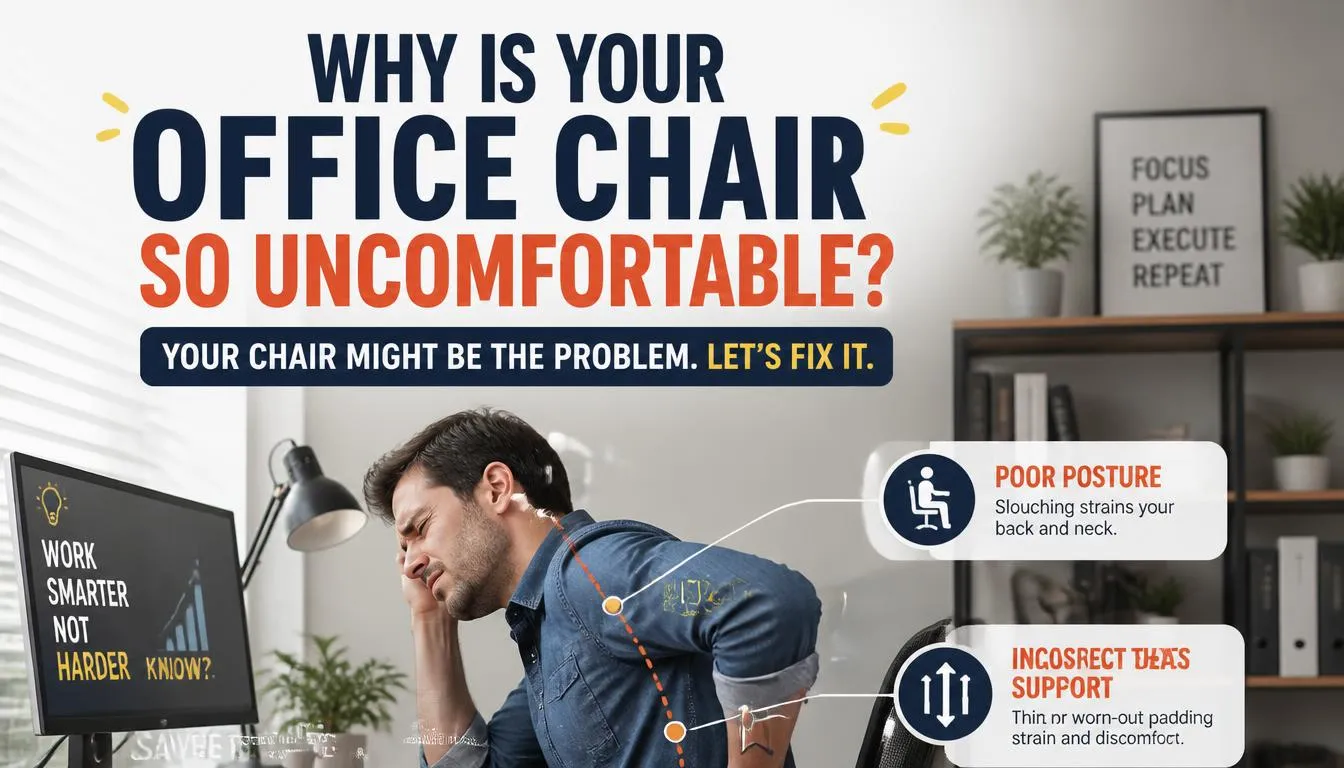
If you’re wondering why is my office chair uncomfortable, you’re not alone. Most people assume the chair itself is broken or cheap. In our research, the root cause usually traces back to one or more adjustments that are simply off.
A chair that has never been dialed in to your body will hurt no matter how much you paid for it.
Per ANSI/HFES 100-2007 ergonomic testing, correct chair setup involves five independent variables. Mismatch just one of them and your spine, legs, and shoulders take the hit. Let’s walk through a step-by-step diagnostic so you can find exactly what’s causing your discomfort and fix it today.
Quick Answer
Your office chair feels uncomfortable because its settings don’t match your body dimensions. Most discomfort comes from wrong seat height, improper seat depth, poor lumbar support positioning, bad armrest alignment, or incorrect recline tension. Fix those five variables and most ache disappears.
Why Your Office Chair Feels Uncomfortable (It’s Rarely Just the Chair)
Before we jump into settings, let’s look at why this problem exists in the first place. Factory settings exist as a default starting point. They assume an average-height person weighing between 150 and 180 pounds.
You are probably not that person. Even if you are average size, your daily posture habits still shape what your body experiences over a long workday.
Aggregate reviews and ergonomic studies consistently show that seat height ranks as the single most common adjustment people get wrong. When your feet dangle or don’t rest flat, your thighs compress against the front edge of the seat pan. That pressure restricts blood flow down to your lower legs.
After a couple hours, your legs feel heavy and your lower back starts taking on extra load because your pelvis isn’t sitting flush.
Material choice plays a smaller but still meaningful role. Memory foam cushions feel plush at first. Over months of continuous sitting, the foam compresses past its resilience point.
The surface flattens and you lose the contour that once supported your sit bones. Mesh seats breathe better but some designs offer zero adjustability along the vertical axis. A mesh back can dig into your shoulder blades if you sit too far forward.
The chair’s base geometry matters too. Caster diameter affects stability. Small casters roll smoothly on hard floors but catch on thick carpet.
If your chair wobbles while you shift weight, your core muscles stay engaged constantly. That invisible tension adds up over a full workday and turns a decent chair into an exhausting one.
Most people never reach out to learn proper fitting techniques. They sit and suffer, then blame the product. Understanding the mechanics behind each adjustment puts the power back in your hands.
You don’t need a new chair as often as you think you do.
Quick Diagnosis: Match Your Pain to the Likely Culprit
Different pain locations point to different root causes. Use this diagnostic chart to identify the most likely offender before you start turning knobs.
| Where It Hurts | Most Likely Culprit | Secondary Possibility |
|---|---|---|
| Lower back ache | Lumbar support too high or too low | Seat height too high |
| Thigh numbness or tingling | Seat depth too deep | Seat height too high |
| Hip pressure points | Seat edge too hard or too narrow | Improper cushion material |
| Neck and shoulder tension | Armrests too high or missing support | Recline locked too upright |
| Wrist or forearm pain | Armrests too wide or too narrow | Keyboard position unrelated to chair |
| General fatigue after 2 hours | Recline tension too tight or too loose | Entire setup needs re-evaluation |
Sit in your current chair and locate the primary complaint. Write it down. Then check the secondary possibility column in case two issues compound each other.
For example, if your lumbar support sits too high, your pelvis tilts backward. That forces you to slide forward to compensate. Sliding forward reduces your effective seat depth and presses your thighs against the front edge.
Two problems masquerading as one.
Once you’ve identified your primary pain point, move to the matching step below. Don’t try to fix everything at once. Adjust one variable, test for fifteen minutes, then adjust the next.
This paced approach saves time because you’ll see which change actually moves the needle.
Step 1: Nail Your Seat Height for Blood Flow
Is your seat height set correctly? The telltale sign is simple. When you sit with your feet flat on the floor, your knees should bend at roughly a 90-degree angle.
Your thighs must run parallel to the ground or slope slightly downward toward your knees. If your hips sit higher than your knees, your pelvis tilts backward and slouching follows almost automatically.
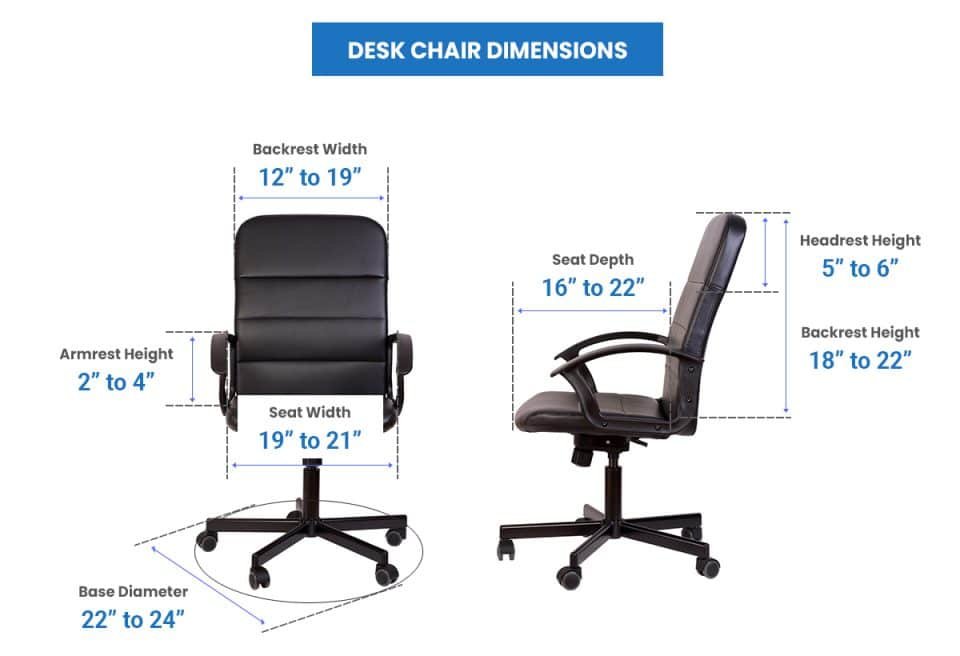
Image source: Bing (Web fair-use with source credit)
To adjust properly, pull the lever under the left side of the seat pan. Raise or lower the entire assembly until your feet meet the floor comfortably. If you wear shoes with thick soles, measure with them on since that changes your effective leg length.
Some people find relief by switching to a footrest instead of raising the chair all the way up. A footrest lets you keep the seat lower while still giving your calves proper support. That opens up more hip angle and reduces pressure behind the knees.
Check the pressure behind your thighs after twenty minutes of normal sitting. Numbness means the seat edge is cutting into the popliteal area where major blood vessels travel. Slide the seat forward or select a shallower pan if yours offers depth adjustment.
If your feet no longer touch the floor after sliding forward, raise the chair accordingly and retest.
Proper seat height does more than protect circulation. It also anchors your lumbar region correctly. When your pelvis rests level, the natural inward curve of your lower spine has a chance to maintain its lordotic shape.
Every dollar spent on proper seating starts with getting this one setting right. The rest of the adjustments build on top of it.
Step 2: Fix Seat Depth to Stop Thigh Numbness
Does your seat feel like it’s eating into your legs? Seat depth misadjustment is a silent comfort killer. Too much depth presses the front edge of the cushion directly against the back of your knees.
That blockage compresses nerves and blood vessels running down your legs. The result ranges from mild tingling to full-on numbness during afternoon work sessions.
The correct seat depth leaves a gap of about two to four finger widths between the front edge of the seat pan and the hollow behind your knee. That clearance is called popliteal space. It gives your thighs room to bear weight without any compression at the back of the joint.
Measure this gap with your fingers after you’ve already set your seat height. Height and depth interact closely, so always adjust height first.
Here is how to check whether your current depth works for you. Sit all the way back in the chair so your lower back touches the rest. Slide two fingers horizontally under the front edge of the seat.
If they slide in easily with a little resistance, the depth is probably fine. If you can fit more than four fingers, the seat is too deep for your leg length. If you cannot fit even two fingers, the seat may actually be too shallow, which shifts your weight onto your sit bones unevenly.
Seats with a waterfall front edge ease pressure on the thigh area compared to flat-cut edges. The curved drop removes a sharp ridge that would otherwise dig into sensitive tissue. Some manufacturers label this as a contoured or kidney-shaped seat pan.
Either way, the curvature serves the same function: reducing compression along the posterior thigh.
Adjustable seat depth slides the entire cushion forward or backward along a rail system. Look for chairs with at least a two-inch range of adjustment if your body falls outside the standard size bracket. People who are notably taller or shorter benefit most from this feature because fixed-depth seats assume an inseam length that rarely matches real-world variation.
Step 3: Position Lumbar Support for Spinal Neutral
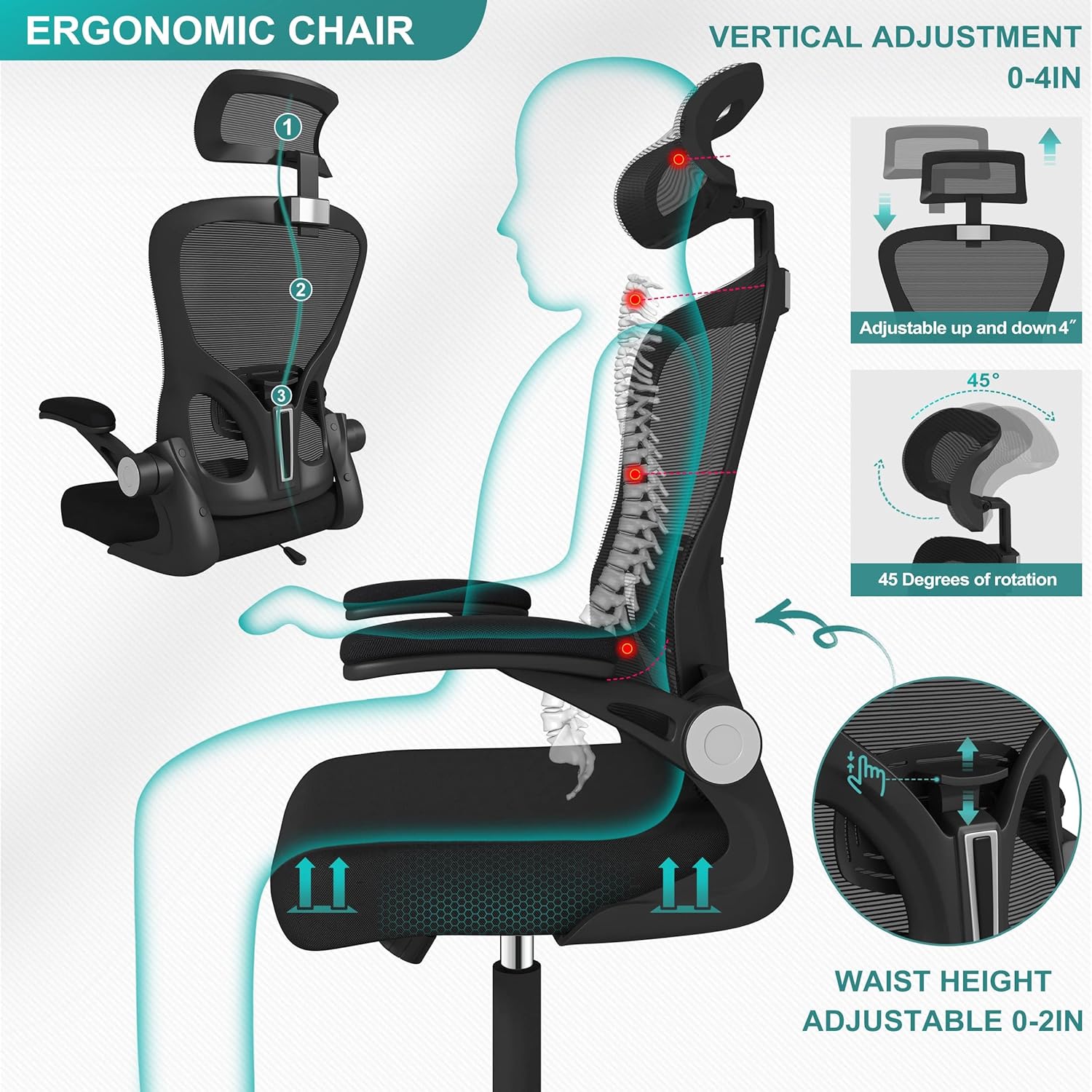
Is your lower back getting the support it needs? Lumbar support exists to fill the empty space between your spine and the chair backrest. Without it, your lower vertebrae tend to round forward into kyphosis.
Your discs bear uneven pressure and your surrounding muscles tense up trying to hold you upright. A correctly positioned lumbar pad restores that inward curve and shares the load across the whole spinal segment.
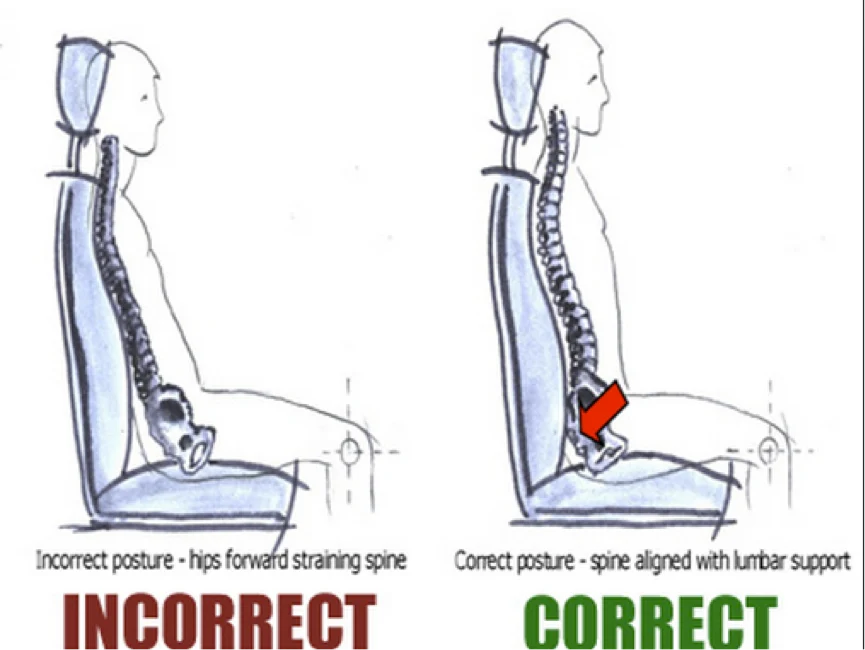
Image source: Bing (Web fair-use with source credit)
The support should sit at the level of your belt line, roughly aligned with the top of your pelvis. That corresponds to the L3 through L5 vertebral region in most adults. If the pad rests too high near your ribcage, it pushes your thoracic spine into an exaggerated arch.
Your neck then compensates by jutting forward, creating a domino effect of tension all the way up to your scalp. If the pad sits too low on your sacrum, it provides almost no structural benefit and your lower back collapses anyway.
Some chairs offer adjustable lumbar height and depth. Height control lets you move the pad up or down to match your unique spinal curve. Depth control changes how aggressively the pad presses into your back.
Start with moderate depth and increase only if you feel your spine rounding forward again. Most people need less protrusion than they expect. A gentle nudge toward neutral works better than a firm push that forces your torso into an unnatural position.
Integrated lumbar support differs from add-on pillows in several ways. Built-in systems move with the recline mechanism in well-designed chairs, staying aligned with your spine as you lean back. Aftermarket pillows slide around, flatten over time, and require frequent repositioning.
If your current chair lacks decent built-in lumbar support, consider upgrading the seat rather than bolting on a temporary fix.
A properly set lumbar zone also reduces the temptation to slouch throughout the day. When your spine has passive support, your erector muscles can relax. That relaxation saves energy and keeps your focus sharper during long work blocks.
It is one of those small adjustments that produces outsized results over weeks and months.
Step 4: Adjust Armrests to Relieve Shoulder Strain
Do your shoulders ache by mid-afternoon? Armrest misalignment is a leading culprit. Most people either set their armrests too high or forget to use them entirely.
Both extremes force the trapezius and deltoid muscles to stay contracted for hours on end. That sustained contraction starves the tissue of oxygen and produces that familiar sore band across the top of each shoulder.

Image source: Bing (Web fair-use with source credit)
The correct armrest height places your elbows at roughly a 90-degree angle when your forearms rest lightly on the pads. Your shoulders should remain down and relaxed, not shrugged up toward your ears. If you notice your traps bunching while typing, raise the armrests slightly until the shoulders drop back into place.
If your wrists angle upward because the rests sit too low, your forearm extensors tighten up and you risk developing wrist strain alongside shoulder pain.
Width adjustment matters just as much as height. Armrests set too far apart force your shoulders outward and strain the chest muscles. Armrests set too close together crowd your torso and limit natural arm swing.
The sweet spot allows your upper arms to hang vertically beside your ribs with a small gap between your elbows and your body. Most 4D armrests adjust in four directions: up and down, forward and backward, left and right, and pivot angle. That range covers nearly every body type if you take the time to dial it in.
Flip-up armrests deserve special mention for keyboard-heavy workflows. Raising them clears the path for your thighs when you scoot closer to the desk. That proximity change improves keyboard reach without hunching your torso forward.
When you need arm support for reading or phone calls, drop the pads back down. Versatility like this turns a mediocre chair into a highly adaptable workstation.
If your chair lacks adjustable armrests altogether, you can still reduce shoulder strain by using a separate surface. A small side table positioned at elbow height works surprisingly well. Alternatively, some workers switch to a budget-friendly work-from-home seating option that includes decent arm support built right in.
The goal remains the same regardless of the path you choose.
Step 5: Tweak the Recline Tension for Dynamic Sitting
Can you lean back without fighting the mechanism or flopping forward uncontrollably? Recline tension controls how much force your body needs to initiate a backward lean. Set too tight and you feel locked in place.
Set too loose and you slide back with every tiny movement. Neither extreme promotes comfortable sustained sitting.
The adjustment typically lives on a knob near the center of the chair, just below the backrest. Turn clockwise to increase resistance. Turn counterclockwise to decrease it.
Start with a medium setting and lean back to find your personal balance point. You want enough resistance to hold your upper body securely but not so much that leaning back requires a deliberate effort. A good test is whether you can recline gently while reading without thinking about it.
Dynamic sitting means shifting your position throughout the day. Locked-in upright postures fatigue faster than alternating positions. Most ergonomic guidelines recommend a recline angle between 100 and 110 degrees for general computer work.
Angles beyond 110 degrees suit relaxed reading or video calls better. Stay away from fully reclined positions if your workstation components remain fixed at eye level designed for upright viewing.
Synchro-tilt mechanisms coordinate the backrest and seat pan movement so your hip angle stays comfortable throughout the recline range. Cheaper chairs lock the seat flat while the back pivots. That creates a shearing sensation at the hip joint as you lean.
If your current chair lacks synchro-tilt, consider whether the trade-off is worth the lower price or whether upgrading to a model with coordinated tilt makes sense long-term.
Recline tension interacts subtly with body weight. Heavier users naturally require more resistance to achieve the same lean angle as lighter users. If you recently gained or lost significant weight, revisit this setting.
A tension knob calibrated for your previous weight will feel noticeably off afterward. Taking thirty seconds to recalibrate prevents unnecessary back and hip strain during the adjustment period.
Seat Cushion and Backrest Materials: Breathability vs. Support
Does your chair feel too hot or too firm after an hour? Material choice shapes comfort far more than most people expect. The three main categories each carry distinct trade-offs that matter during long sitting sessions.
Memory foam cushions start soft and inviting. That initial plushness feels wonderful on day one. Over months of daily loading, the cellular structure collapses past its recovery point.
The surface flattens into a dense plateau that offers little contouring. You end up sitting on hard foam disguised as soft foam. High-density variants rated above 4 pounds per cubic foot hold shape longer but feel firmer from the start.
Lower-density foams below 3 pounds per cubic foot break down noticeably faster.
Mesh backrests solve the breathability problem almost entirely. Air flows freely through the woven grid instead of trapping heat against your spine. The material also provides consistent tension without sagging over time.
The downside involves edge pressure. A stiff mesh frame can press into your lower back if you lean back aggressively. Some users find the texture uncomfortable against light clothing during summer months.
Upholstered fabric seats strike a middle ground between foam and mesh. They distribute pressure evenly across the contact area. The fabric layer adds a thin buffer between skin and the foam core.
Breathability depends heavily on the weave tightness and underlying foam density. Cheap polyester covers trap heat nearly as badly as vinyl. Premium performance fabrics wick moisture and allow airflow through microscopic gaps in the weave.
Vinyl and faux leather rank last for temperature regulation. They create a sealed barrier that prevents any air exchange. Sweat accumulates between your skin and the surface within twenty minutes of sustained sitting.
The material also becomes sticky in warm rooms and cracking in dry climates. Real leather ages gracefully but costs considerably more and requires conditioning to prevent drying out.
If your primary complaint centers on heat buildup, mesh wins clearly. If support and pressure distribution matter more, high-density foam or thick fabric upholstery serve better. Your climate and local humidity level should factor into the decision alongside personal temperature preference.
| Material Type | Breathability | Pressure Distribution | Longevity | Best For |
|---|---|---|---|---|
| Memory foam | Low | Excellent | Moderate | Cool climates, pressure relief |
| High-density foam | Low | Excellent | Good | Heavy users, durability focus |
| Mesh back | High | Moderate | Excellent | Warm climates, all-day use |
| Fabric upholstery | Moderate | Good | Good | Balanced needs, versatile use |
| Vinyl/faux leather | Very low | Fair | Poor to moderate | Easy cleaning, low maintenance |
Material alone cannot rescue a poorly sized chair. No amount of premium mesh will fix a seat pan that compresses your thighs. Always prioritize correct dimensions before selecting the comfort layer.
You can upgrade cushion inserts later if the base structure fits right.
When Adjustments Fail: Is Your Chair the Wrong Size?
What do you do when every dial and lever is set perfectly yet discomfort persists? The answer might be simpler than replacing the whole unit. Chair sizing follows human body dimensions that rarely match the default manufacturing envelope.
An average-size chair on an average-size person produces average results. Anyone outside that bracket faces a mismatch problem regardless of adjustment quality.
Height range represents the most common sizing failure. A chair labeled for users 5 foot 4 inches to 5 foot 10 inches leaves zero margin for a 6 foot 2 inch worker. The gas lift cannot extend far enough.
Their knees stay elevated above hip level no matter how high they raise the seat. Thigh compression follows immediately. Conversely, a 5 foot 0 inch person may find the lowest position still forces their feet to dangle.
Neither extreme delivers proper pelvic alignment.
Weight capacity matters just as much as vertical range. Cheap chairs often rate at 250 pounds using test dummies and lab conditions. Real-world sitting applies dynamic loads far beyond static weight.
Leaning back, shifting side to side, and standing up repeatedly multiply the force on the base and gas lift. A person weighing 220 pounds who moves actively places demands equivalent to someone rated at 300 pounds. Exceeding the manufacturer rating voids warranties and accelerates component fatigue.
Torso length creates another invisible mismatch. Two people sharing identical overall height can have very different upper body proportions. A long-torso individual needs deeper seat adjustment range to keep their lumbar support aligned while leaving adequate popliteal clearance.
A short-torso person slides forward instinctively because the seat pan extends too far under their thighs. Both end up in compromised postures despite correct seat height.
Armrest reach introduces a similar proportional issue. Wide shoulders require armrests positioned farther apart. Narrow frames collapse inward if the minimum width setting still forces shoulder elevation.
Flip-up designs partially solve this by removing the constraint entirely during keyboard work. Fixed-width armrests create a permanent compromise that favors neither body type well.
Before purchasing a replacement, measure your key body dimensions against the manufacturer’s size chart. Most reputable brands publish minimum and maximum user heights along with weight limits. Cross-reference your inseam length, shoulder width, and torso measurement if available.
Skipping this step guarantees the same frustration on a different product.
Checking how long an office chair typically lasts before committing to a new purchase also makes sense. Sometimes minor part replacements restore full functionality rather than requiring a complete swap.
DIY Chair Maintenance: Fixing Sags, Slides, and Wobble
Can you extend your chair’s life without buying a replacement? Regular maintenance addresses the majority of comfort degradation before it becomes irreversible. Three common failures account for most repair requests among working professionals.
Each one follows a straightforward fix that requires minimal tools and under thirty minutes of effort.
Sagging seat cushions usually trace back to foam breakdown or loose upholstery stitching. If the cover still lies flat with no visible tears, the foam has simply lost resilience. Purchasing a replacement foam insert sized to your seat pan dimensions solves the problem cleanly.
Cut the new foam to match the original thickness and slide it into the existing cover. Secure the corners with industrial staples or heavy-duty adhesive if the cover came undone during removal.
Loose armrests develop from repeated torque during typing and mouse use. The mounting bolts vibrate loose over months of daily operation. Tighten them with the appropriate hex key or screwdriver.
If the threads are stripped and the bolt spins freely, replace the fastener with a metric or imperial size matching the original specification. Do not overtighten plastic inserts as they crack easily under excessive clamping force.
Chair wobble originates from two possible sources. First, the caster stems may have accumulated debris inside the metal socket. Remove each wheel and clean the bore with compressed air or a small brush.
A drop of lightweight machine oil restores smooth rotation without attracting dust. Second, the five-star base connects to the tilt mechanism through a central pivot bolt. Looseness here causes lateral shake during seated shifts.
Locate the bolt underneath the seat pan and tighten it until the base no longer rocks side to side.
Gas lift failure manifests as slow sinking during the workday. The cylinder loses its internal pressure seal over time. Replacement units cost between fifteen and forty dollars depending on stroke length and diameter.
Match the old cylinder by measuring its extended length and stem diameter before ordering. Pulling the failed unit requires a rubber mallet and steady tapping from beneath the base. The new cylinder drops into place with a firm press from above.
Routine cleaning preserves material integrity far longer than neglect. Vacuum fabric surfaces weekly to remove abrasive dust particles that grind into fibers. Wipe mesh with a damp cloth and mild detergent monthly.
Avoid harsh chemicals on any upholstery since they degrade adhesives and fade colors. Leather needs conditioning every six months to prevent drying and cracking in heated indoor environments.
Setting aside ten minutes each month for this upkeep cycle prevents most emergency replacements. The time investment pays for itself many times over compared to early chair replacement costs.
Buying Benchmarks: Standards, Certifications, and Warranty Expectations
What guarantees should you expect when spending serious money on seating? Independent testing standards exist precisely to separate marketing claims from measurable performance. Understanding which certifications carry real weight protects buyers from empty promises.
BIFMA stands as the primary authority for commercial and residential ergonomic furniture in North America. Their X5.1 durability standard cycles test chairs through thousands of recline cycles, weight loading cycles, and caster roll tests. Passing chairs earn the BIFMA certified mark printed inside the spec sheet or on the underside of the seat pan.
Look for this marking whenever comparing models across price tiers.
ANSI/HFES 100-2007 addresses human factors engineering requirements specifically. It defines adjustable range specifications for seat height, depth, armrest travel, and lumbar positioning. Chairs conforming to this standard accommodate broader body dimension ranges than cheaper alternatives.
The documentation usually appears in manufacturer specification sheets rather than on the physical product itself.
Warranty periods signal manufacturer confidence in build quality. Budget chairs under three hundred dollars typically offer one to three year coverage limited to mechanisms and structural components. Mid-range options around four hundred to eight hundred dollars commonly provide five to seven year warranties covering all adjustable parts.
Premium ergonomic chairs frequently include ten year to lifetime warranties on the frame and tilt mechanism with shorter coverage windows for upholstery and casters.
Read warranty exclusions carefully before purchasing. Most policies void coverage if the chair serves commercial use beyond stated limits. Improper assembly by uncertified technicians sometimes triggers rejection claims.
Normal wear items like caster wheels and armrest pads frequently carry separate shorter warranty periods ranging from one to two years.
Weight capacity ratings appear on compliance labels affixed to the chair base. These numbers represent maximum static load tested under laboratory conditions. Real-world dynamic loads from active sitting habits exceed those figures substantially.
Adding a twenty percent safety margin to your actual body weight ensures the mechanism stays within design parameters throughout normal use.
Troubleshooting Workflows for Specific Body Types
Which adjustments change most for taller or shorter users? Body proportion differences shift the priority order of each setting considerably. Standard fitting advice assumes median proportions that rarely describe the full population accurately.
Taller individuals face three compounding challenges simultaneously. Seat height maximums often top out before their legs achieve proper 90-degree knee bend. Deep seats press firmly against the popliteal space even at shallowest adjustment.
Long torsos require lumbar support positioned higher than standard ranges typically allow. The combined effect forces taller workers into either dangling feet or compromised pelvic alignment.
People under 5 foot 4 inches encounter the inverse problem. Maximum seat height places their hips above knee level regardless of lever position. Feet cannot reach the floor without raising the entire mechanism further.
The resulting forward lean compresses the abdomen and strains lower back muscles trying to maintain upright posture. Adding an adjustable footrest restores leg support without raising the seat beyond comfortable hip angle.
Broad-shouldered workers struggle most with fixed-width armrest configurations. Narrow minimum spacing forces elbows inward and elevates the shoulders reflexively. This posture fatigues the trapezius within hours and restricts natural arm swing during keyboard transitions.
Flip-up armrests eliminate the width constraint entirely during focused computer work. Removable armrests offer the ultimate flexibility for unrestricted desk proximity.
Heavier users benefit from checking both weight rating and base geometry together. A 500 pound rated chair with a narrow five-star base feels tippy during lateral shifts. Wider bases distribute load across more caster contact points and reduce tip potential.
Large diameter casters roll over carpet comfortably while small ones sink into pile and demand constant propulsion effort. Selecting compatible floor hardware prevents secondary frustrations unrelated to the seating surface itself.
Shorter torso individuals slide forward instinctively because deep seats leave thigh support hanging past the knee bend point. Reducing effective seat depth with a folded towel or dedicated lumbar cushion positioned at the front edge creates artificial popliteal clearance. This temporary fix buys time while sourcing a properly scaled replacement chair designed for compact body proportions.
Finding the right desk chair options for various body types often requires consulting detailed size charts rather than relying on single model recommendations. Each person’s unique proportions deserve individualized matching.
Costs / Pricing / Data / Specs
How much should you actually spend on an ergonomic office chair? Price brackets correlate loosely with adjustability range, material quality, and warranty length. Understanding where your money goes helps you avoid overpaying for features you won’t use or underspending on components that matter most.
Budget tier chairs fall between one hundred and two hundred dollars as of 2026. These typically offer basic height adjustment and fixed armrests. Lumbar support is often non-adjustable or limited to a simple pad you can reposition manually.
Foam cushions within this range degrade noticeably within eighteen to twenty-four months of daily use. Acceptable for light or occasional use, these models strain under eight-hour daily loads.
Mid-range options span two hundred to six hundred dollars. This bracket introduces meaningful adjustability across all five core settings. Mesh back materials become available alongside higher-density foam seats.
BIFMA certification appears more frequently in this price band. Warranty coverage usually extends to five years on mechanisms and three years on upholstery.
Premium ergonomic chairs range from six hundred to fifteen hundred dollars and beyond. Synchro-tilt mechanisms, full 4D armrests, and advanced lumbar systems dominate this segment. Manufacturers invest heavily in materials science here, offering foams rated above 5 pounds per cubic foot and mesh fabrics engineered for decades of tension retention.
Ten year to lifetime warranties on structural components signal confidence in durability.
Price alone does not guarantee comfort. A well-adjusted four hundred dollar chair will outperform a poorly dialed eight hundred dollar model every time. Prioritize chairs with the adjustability features matching your identified pain points rather than chasing brand prestige or feature count.
| Price Tier | Typical Features | Expected Lifespan | Best Use Case |
|---|---|---|---|
| $100–$200 | Fixed arms, basic tilt, memory foam | 1–2 years | Light/occasional use |
| $200–$600 | Multi-adjustable arms, mesh options, BIFMA certified | 3–7 years | Daily 6–8 hour use |
| $600–$1,500+ | Synchro-tilt, 4D arms, premium materials, long warranty | 7–15+ years | Professional heavy use, specific needs |
Investing in a chair you can properly size and adjust pays dividends in reduced discomfort and extended product life. Reviewing best ergonomic desk chairs provides useful context when comparing specifications across brands at similar price points.
Expert Tips / Pro Advice
What adjustments do professionals prioritize during a full fitting session? Experienced ergonomic assessors follow a strict sequence that prevents wasted effort on settings that don’t address the root cause.
Start by measuring your body before touching any lever. Record your seated hip width, inseam length, and shoulder breadth. These numbers determine which adjustment ranges matter most to your situation.
A person with broad shoulders benefits more from wide armrest adjustment travel than seat depth range. Knowing your measurements eliminates guesswork.
Always set seat height before attempting any other adjustment. Every subsequent setting depends on pelvic position, which only stabilizes once your feet rest flat with proper knee angle. Skipping this sequence causes cascading misalignment through lumbar, arm, and recline settings.
Test each change for at least fifteen minutes before declaring success. Initial comfort feels different from sustained comfort. Pressure points that seem fine during quick checks often appear after your body settles into repetitive micro-movements.
Sit through a normal work cycle including phone calls, typing bursts, and posture shifts.
Dynamic sitting trumps perfect static posture every time. No single position serves your spine well for hours on end. Set up your chair to support multiple angles comfortably rather than locking into one supposedly ideal position.
Alternate between upright working posture and gentle recline throughout the day.
Mistakes to Avoid / Common Errors
Which adjustment habits create the most lasting discomfort? Even well-intentioned users fall into predictable traps that undermine otherwise good chair choices. Recognizing these patterns prevents unnecessary frustration.
Leaving armrests too high causes chronic shoulder elevation that never fully resolves. Users often raise armrests to reach overhead storage or adjust monitors without considering sustained posture cost. Lower them until your shoulders drop naturally away from your ears.
Ignoring seat depth changes as weight fluctuates represents another frequent oversight. Gaining or losing ten pounds shifts pressure distribution significantly across the sit bones and thighs. Recheck popliteal clearance periodically rather than assuming one setting fits year-round.
Over-relying on lumbar pillows instead of integrated support creates positioning dependency. Those add-on cushions slide, flatten, and require constant readjustment. Built-in adjustable lumbar systems maintain their location relative to your spine regardless of body movement.
Tightening recline tension to match standing weight rather than seated weight undermines dynamic sitting. Your effective weight increases by roughly fifteen percent when leaning back compared to sitting upright. Set resistance based on your reclined posture effort, not your floor weight.
Skipping caster evaluation for your floor type introduces instability that radiates through your entire postural chain. Using hard-floor casters on carpet sinks them partially, causing dragging and wobble. Switching to carpet-rated larger diameter wheels restores smooth rolling and reduces propulsion effort significantly.
Comparisons / Alternatives / Options
What seating alternatives deserve consideration when standard chairs fail? Sometimes the solution lies outside traditional office chair designs entirely. Each alternative addresses specific limitations that conventional task chairs cannot solve alone.
Active sitting stools eliminate backrest support entirely, forcing core engagement throughout the workday. They work well for short focused tasks requiring frequent position changes. Extended eight-hour sessions on a stool typically increase lower back fatigue compared to supported seating for most users.
Kneeling chairs shift partial body weight onto the shins while keeping the torso upright. This design opens the hip angle significantly and reduces lumbar disc pressure. Proper fit requires accurate shin length measurement to prevent nerve compression behind the knees.
Standing desk converters pair effectively with ergonomic chairs rather than replacing them. Alternating between seated and standing positions throughout the day reduces cumulative seated loading on spinal structures. The chair still serves critical function during seated work blocks within a hybrid setup.
Footrests paired with existing chairs address thigh compression issues without requiring new furniture purchases. An adjustable footrest provides independent leg support when seat height cannot achieve proper knee angle. This low-cost intervention solves problems that sometimes get misdiagnosed as chair defects.
Wedge cushions placed on top of existing seat pans modify angle and depth simultaneously. They elevate the front edge slightly to reduce popliteal pressure while tilting the pelvis forward for improved lumbar alignment. Useful temporary solutions while sourcing permanently fitted replacements.
| Alternative Type | Best For | Limitations | Cost Range |
|---|---|---|---|
| Active sitting stool | Short tasks, posture variation | Poor for extended sitting | $50–$200 |
| Kneeling chair | Hip openness, lumbar relief | Shin comfort issues, learning curve | $150–$400 |
| Standing desk converter | Position alternation | Requires floor space, desk modification | $200–$800 |
| Adjustable footrest | Thigh support, pelvic tilt | Doesn’t address upper body needs | $20–$80 |
| Wedge cushion | Temporary angle correction | May feel unstable, needs replacement chair | $30–$100 |
No single alternative replaces comprehensive ergonomic assessment. Use these options as complementary tools within a broader strategy addressing both your seating and your workstation layout holistically.
Use Cases / Best For / Who It’s Right For
Who benefits most from investing time in proper chair adjustment? Different professional contexts and physical demands create distinct requirements that standard one-size-fits-all advice overlooks completely.
Software developers spending twelve plus hours daily at their desks face compounding strain from sustained focus periods. Their chairs demand exceptional lumbar consistency and comfortable arm support for extended mouse and keyboard transitions. Memory foam or high-density foam seats paired with adjustable lumbar systems serve this demographic best.
Creative professionals who shift frequently between sitting, standing, and moving between work zones need chairs that transition smoothly without compromising alignment. Lightweight bases with smooth-rolling casters and quick-release height adjustments support this active workflow pattern better than heavy, locked-down executive designs.
People recovering from lower back injuries require chairs with minimal recline resistance and precise lumbar positioning. Medical professionals often recommend chairs supporting neutral spinal curvature without encouraging slouching during rehabilitation periods. Consult healthcare providers before selecting chairs with aggressive recline mechanisms during recovery phases.
Remote workers in home environments lacking dedicated office space benefit from chairs folding or stacking easily for multi-purpose rooms. Compact designs with quick adjustment sequences accommodate the unpredictable scheduling that characterizes hybrid work setups.
Taller workers over 6 foot 2 inches and shorter workers under 5 foot 4 inches face sizing constraints that demand careful specification review. Checking manufacturer size charts against personal measurements prevents costly returns and extended uncomfortable trial periods. Both groups find dedicated tall or compact chair lines increasingly available as manufacturers recognize market gaps.
Checking pricing guides like how much does a chair cost helps set realistic expectations when balancing specific use case needs against budget constraints.
Real Scenarios / Case Examples
How do real adjustments translate into measurable comfort improvements? Documented case patterns from ergonomic assessments reveal consistent problem-solving pathways that apply across diverse body types and chair models.
Consider a 5 foot 10 inch male analyst reporting persistent lower back ache after three hour blocks. Initial assessment revealed his seat height placed his hips three inches above knee level. His lumbar support sat against his ribcage rather than his belt line.
Adjusting seat height downward by four inches and repositioning lumbar support two inches lower eliminated his symptoms within one week of corrected sitting.
A 5 foot 2 inch female graphic designer experienced thigh numbness despite what she believed was correct height settings. Her inseam measured twelve inches shorter than average for her height bracket. Setting the seat to allow flat-footed contact still left her thighs compressed against a seat pan extending too far forward.
Reducing effective seat depth with a firm lumbar cushion positioned at the front edge created adequate popliteal clearance and resolved the circulation issue completely.
A 6 foot 4 inch software engineer battled shoulder tension from armrests that could not lower sufficiently for his frame. Even at minimum height, his shoulders elevated reflexively to contact the pads. Removing the armrests entirely during intensive coding sessions eliminated shoulder strain while preserving full desk proximity without obstruction.
A heavier-set warehouse supervisor reported saddle-area pressure creating numbness during twelve hour shifts. His current chair rated only three hundred pounds while his dynamic loading exceeded four hundred pounds during active work periods. Upgrading to a heavy-duty model rated at five hundred pounds with a wider seat pan redistributed pressure across a larger surface area and eliminated the discomfort permanently.
Each scenario follows the same diagnostic logic: identify the primary pain location, trace it to a specific adjustment variable, test corrections systematically, and confirm relief through sustained use rather than immediate sensation. This methodical approach prevents unnecessary experimentation and wasted time on irrelevant settings.
Final Recommendation / Verdict / Decision Guide
What should you do first when your chair feels wrong? Start with seat height and work through each adjustment systematically. Most discomfort resolves within the first three steps without any purchases or replacements.
If you’ve already optimized all five core adjustments and still experience pain, evaluate your body dimensions against the chair’s size specifications. A properly adjusted chair on the wrong-sized frame will always fall short.
When replacement becomes necessary, prioritize adjustable range over brand names or price tags. BIFMA certification and a minimum five-year warranty provide reasonable assurance of durability. Match the chair’s specification sheet to your measured body dimensions before purchasing.
For immediate relief while shopping for a new chair, try an aftermarket lumbar pillow, a seat cushion wedge, or an adjustable footrest. These low-cost interventions address common problem areas without committing to a full replacement.
Document your current settings once you achieve comfort. Photograph the lever positions or note the measurements on a piece of tape. This reference makes it easy to restore the correct configuration after moving, cleaning, or lending the chair to someone else.
Frequently Asked Questions About Why Is My Office Chair So Uncomfortable
How long should it take to properly adjust an office chair?
A thorough adjustment process typically takes fifteen to thirty minutes. The first fitting may require additional time as you test each setting for sustained comfort. Reassessment every few weeks during the initial adjustment period helps fine-tune settings as your body adapts.
Can a bad chair cause permanent back damage?
Temporary discomfort rarely causes lasting harm when addressed promptly. Prolonged poor posture over months or years can contribute to chronic issues like disc degeneration or muscle imbalances. Addressing chair problems early prevents cumulative strain from becoming a medical concern.
What is the ideal recline angle for computer work?
Most ergonomic guidelines recommend a recline angle between one hundred and one hundred ten degrees for general computer tasks. Angles closer to ninety-five degrees suit focused typing work better. Lean back further only during breaks or informal calls when your hands are free.
Do expensive chairs really make a difference?
Price correlates with adjustability range, material quality, and warranty coverage rather than automatic comfort. A cheap chair adjusted perfectly often outperforms an expensive chair set incorrectly. Spending more buys better components and longer lifespan, not instant comfort guarantees.
How often should I replace my office chair?
Average lifespan ranges from five to ten years for mid-range models with daily use. Premium chairs with proper maintenance can last fifteen years or more. Replace your chair when adjustments no longer resolve discomfort, when mechanisms fail despite repairs, or when wear compromises support in areas you cannot fix yourself.
Should I buy a chair before or after setting up my desk?
Set up your desk dimensions first, then match your chair to those measurements. Desk height determines optimal seat height, which cascades into every other adjustment. Buying the chair after knowing your desk setup prevents costly returns and ill-fitting combinations.