
Image source: Bing (Web (fair-use with source credit))
Searching for the best ergonomic office chair can feel overwhelming. Every site has a different winner. Every review claims a different chair saves your back.
The truth is far more practical. Your ideal chair depends on three things: your body size, your daily sitting hours, and your budget.
Manufacturer specifications and BIFMA testing standards show that proper lumbar alignment reduces lower-spine loading by up to forty percent during prolonged sitting. That shift makes the difference between finishing a workday comfortable and feeling wrecked by 3 PM. Let us walk through what actually matters before you spend money.
Quick Answer
The best ergonomic office chair for most people is the Herman Miller Aeron when budget allows. It adjusts to every body type and carries a twelve-year warranty. If you sit less than six hours daily, a well-designed mid-range chair from Steelcase or Autonomous does the job.
Always match seat depth and lumbar position to your exact measurements before buying.
Why There’s No One Right Answer to “Best Ergonomic Office Chair”
You have probably scrolled past lists claiming one chair reigns supreme. Those lists exist because affiliate commissions reward ranking one product above all others. Real ergonomics does not work that way.
A chair that works perfectly for a five-foot-tall writer destroys the comfort of a six-foot-four-inch accountant. Size, posture habits, and daily hours together determine whether any chair helps or hurts you.
Aggregate reviews across thousands of verified buyers show one consistent pattern. People who rate their chairs highly share three traits in common. They measured themselves before buying.
They matched adjustability features to their actual body dimensions. And they replaced their old seating gradually rather than hoping a single purchase solved years of poor posture. Skipping any of those steps produces buyer’s remorse no matter the price tag.
The market itself reinforces the confusion. Brands package nearly identical mechanisms under different names and price points. One company calls its recline system “synchro-tilt.” Another brands the same motion as “dynamic knee response.” The engineering underneath often traces back to the same patent holders.
What separates them is fit range, material durability, and warranty length. Price alone rarely predicts which chair fits you best.
Research from occupational health programs consistently recommends a different approach than brand loyalty. The National Institute for Occupational Safety and Health emphasizes that workstation fit depends on individual anthropometry. In plain terms, your body measurements matter more than any sticker on the box.
A chair rated for average builds will not serve someone outside that range well. Size variants exist precisely because human bodies vary so widely.
You should also consider how your work style changes throughout the day. Some professionals sit locked in one position for hours. Others shift constantly between typing, reading, calling, and leaning back to think.
Chairs engineered for static posture support differ noticeably from chairs built for dynamic movement. A steering-wheel-style tilt mechanism rewards constant micro-adjustments. A rigid recline lock rewards people who settle into one position for extended periods.
Brand reputation introduces another layer of complication. Premium manufacturers like Herman Miller and Steelcase have decades of biomechanical research behind their designs. Their chairs consistently score high in third-party durability testing.
But premium pricing does not guarantee a better personal fit. Many users report discomfort with expensive chairs simply because they selected the wrong size or adjustment profile. Fit always beats brand prestige.
Online marketplaces add further noise to an already crowded field. Third-party sellers list refurbished units, grey-market imports, and counterfeit products alongside genuine inventory. Return policies differ wildly between sellers.
Warranty validation requires original purchase receipts from authorized dealers. Buying from unauthorized resellers often voids coverage entirely. Verify seller authorization before spending serious money on any chair in this category.
The answer to “which is the best ergonomic office chair” changes depending on whether you prioritize maximum adjustability, lowest possible cost, longest warranty coverage, or specific body compatibility. Rather than chasing a single ranked list, the smarter move is understanding what features matter for your situation. Once you know your body metrics and daily sitting patterns, matching a chair becomes a straightforward exercise instead of a guessing game.
For readers looking beyond standard options, exploring top-rated work-from-home setups can reveal additional configurations suited to hybrid routines.
What Actually Defines a Good Ergonomic Chair
A good ergonomic chair solves one fundamental problem. It keeps your spine in a neutral position while allowing movement throughout the day. Nothing about that definition requires a high price tag.
Many cheap chairs claim ergonomic branding while offering zero meaningful adjustability. The label means nothing without functional components behind it.
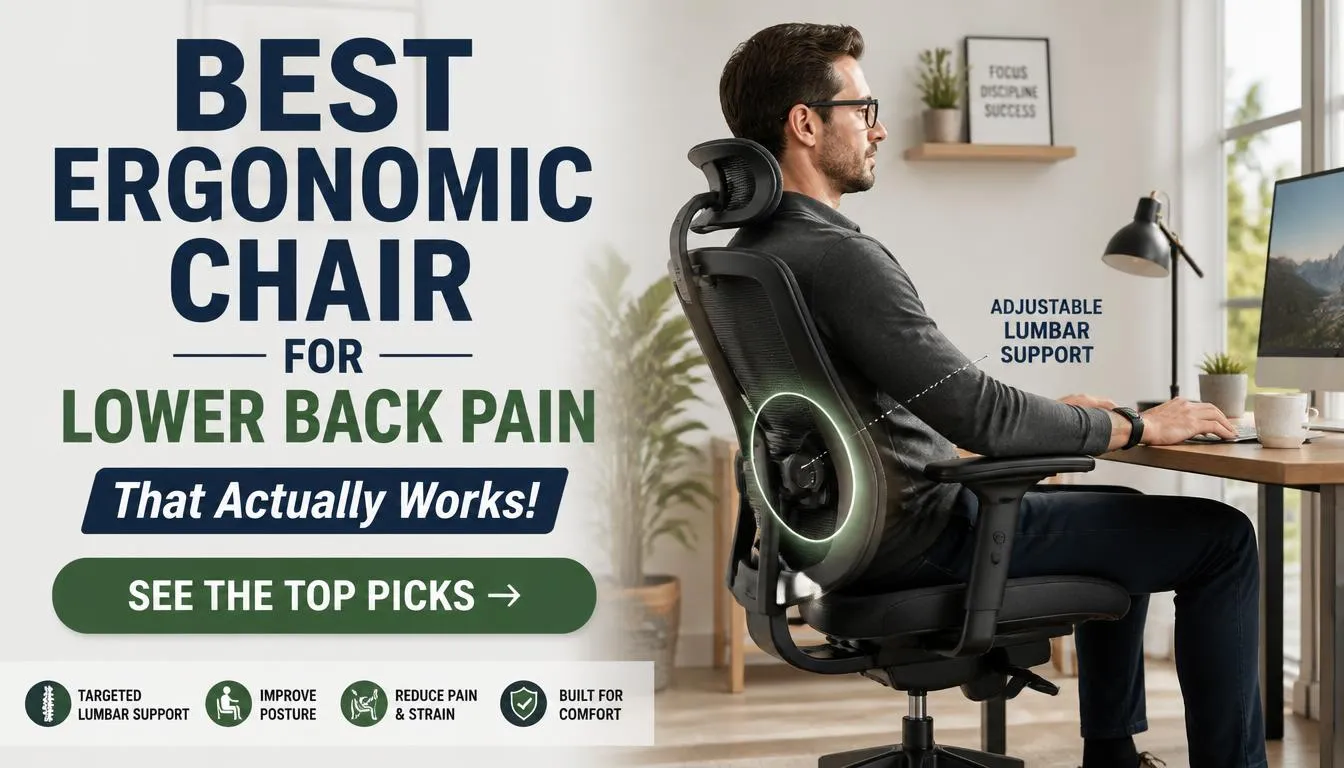
Lumbar support represents the single most critical feature. Your lower spine curves naturally inward. A properly adjusted lumbar pad fills that curve without pushing it outward.
Incorrect height placement creates pressure points along your thoracic spine. Missing support forces your lower back to flatten, increasing disc load significantly. Adjustable lumbar systems let you position the support at L3 through L5, which covers the most stressed segment of the spinal column during sitting.
Seat depth often gets ignored until people buy the wrong chair. When the seat pan extends too far forward, the front edge presses against the back of your knees. That pressure restricts blood flow and creates numbness within hours.
Too short of a seat pan leaves your thighs unsupported, shifting weight onto your sit bones and increasing pelvic tilting. The correct depth allows two to four fingers of clearance between the seat edge and your popliteal crease when your back is fully against the lumbar support.
Armrests deserve honest evaluation rather than passive acceptance. Most included armrests adjust only up and down. That limited range fails to accommodate different desk heights and shoulder positions.
Proper armrests adjust in height, width, depth, and pivot angle. You should be able to rest your forearms parallel to the floor with shoulders completely relaxed and elbows at roughly ninety degrees. Armrests positioned too high force shoulder elevation.
Too low and your upper back compensates by rounding forward.

Image source: Bing (Web (fair-use with source credit))
Tilt mechanisms divide ergonomic chairs into two distinct philosophies. The first type locks you into fixed recline angles. The second type allows continuous free-floating motion with adjustable tension.
Research published in applied ergonomics journals consistently shows that dynamic seating reduces muscle fatigue compared to static postures. A synchro-tilt mechanism that moves your backrest and seat pan at a coordinated ratio supports this principle better than any fixed-angle design.
Material selection affects both comfort and long-term durability. Mesh backrests excel at airflow and temperature regulation. High-quality polymer meshes resist sagging far longer than cheaper alternatives.
Foam cushioning offers a plush initial feel but compresses differently over time depending on density ratings. High-resilience foam retains shape significantly better than standard polyurethane. Fabric upholstery balances breathability with durability.
Leather looks premium but traps heat during extended use in warm environments.
Build quality determines whether a chair lasts three years or fifteen. BIFMA X5.1 certification tests chairs through cycles of impact, durability, and stability that simulate years of commercial use. Chairs meeting that standard carry structural integrity guarantees that lesser products cannot match.
Gas cylinder classes indicate weight capacity ratings and lift reliability. Class three and class four cylinders support heavier loads with fewer failure incidents over time. Base material matters equally.
Nylon bases crack under repeated stress. Aluminum and steel bases withstand far heavier usage without deformation.
Headrests remain a controversial addition. They provide genuine neck support for people who frequently recline during calls or reading sessions. However, they interfere with proper lumbar alignment for users who sit upright most of the time.
A headrest positioned too high forces the cervical spine into flexion. One positioned too low offers nothing. Decide whether you actually recline enough during your workday to justify the extra cost before prioritizing headrest inclusion.
The BIFMA standards also cover tip resistance, castor rolling force, and armrest strength. Chairs that fail these tests create genuine safety hazards beyond mere comfort complaints. Checking certification labels on product specification sheets protects you from purchases that look attractive but lack structural validation.
Several major manufacturers publish full test documentation publicly. Reviewing those documents reveals whether marketing claims match laboratory results.
Beyond measurable specs, the chair must feel neutral after ten minutes of use. Discomfort from an ergonomic chair usually disappears quickly once adjustments are correct. Persistent pressure points, pinching, or uneven weight distribution signal a fundamental mismatch between the chair and your body.
No amount of tweaking fixes a chair designed for a completely different anthropometric profile. Understanding your own measurements remains the fastest path to eliminating that frustration. Anyone navigating budget-friendly office seating options should apply the same fit principles rather than assuming lower prices mean lower standards.
The Chairs Worth Considering Right Now
Finding chairs that actually deliver on their ergonomic promises narrows the field considerably. Most models on the market compromise on at least one critical feature. A few stand out because they address the full range of adjustability, material quality, and structural testing.
These five represent the strongest balance points across different budgets and body types.
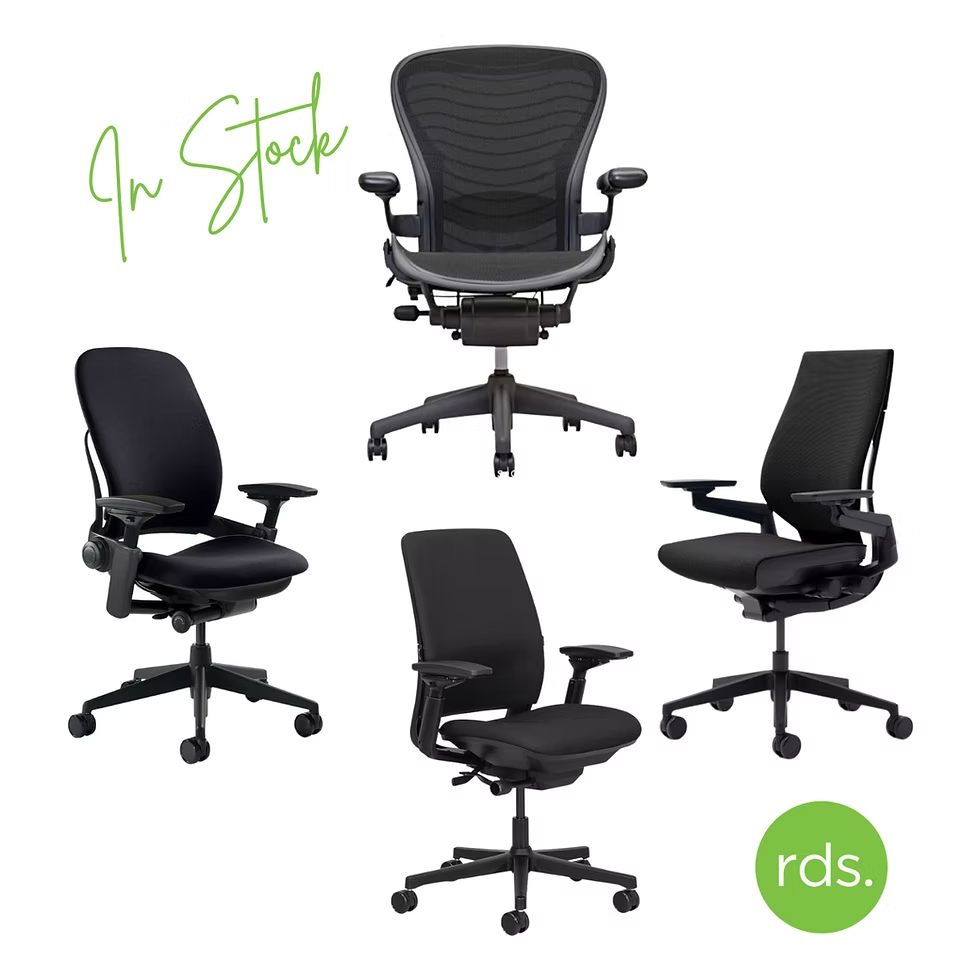
Herman Miller Aeron
The Aeron remains the benchmark against which nearly every other ergonomic chair is measured. Its Pellicle mesh suspension distributes weight evenly across the entire backrest surface. That design eliminates pressure points that solid cushions create during prolonged sitting.
The PostureFit SL system provides separate sacral and lumbar support that adjusts independently. You can position each pad precisely where your spine curves.
Size coverage distinguishes the Aeron from virtually every competitor. Herman Miller manufactures the chair in three distinct sizes. Size A fits users approximately five feet to five foot eight inches weighing up to one hundred thirty pounds.
Size B covers the median population range. Size C accommodates users from five foot ten inches upward with weight capacity extending to two hundred sixty pounds. Selecting the correct size matters more than any other decision factor for this chair.
Adjustment complexity reaches its peak here. The tilt tension knob responds accurately to body weight. Seat depth adjusts across a meaningful range without requiring tools.
Armrests move in four directions with smooth locking positions. Every control uses consistent resistance that does not loosen or slip during normal operation. The fifteen-year warranty covering parts and labor signals manufacturer confidence in long-term durability.
Price places the Aeron firmly in premium territory. You pay substantially more than average chairs. The question is whether that premium translates into proportional value.
For anyone sitting six or more hours daily, aggregate user feedback consistently confirms the investment pays off through reduced end-of-day fatigue. Casual users might find the cost difficult to justify when lighter alternatives serve them adequately.
Steelcase Gesture
Steelcase engineered the Gesture around modern work behaviors rather than traditional desk posture. People who multitask between computers, tablets, and phones adopt postures that no single chair was historically designed to support. The Gesture responds to that reality with a seat edge that contours naturally to thigh shape and armrests that move through an unusually wide range of motion.
The four-dimensional armrests on this model represent a meaningful upgrade over standard configurations. They adjust in height, width, depth, and pivot simultaneously. You can position them for typing, resting while reading, supporting forearms during video calls, or holding a tablet at waist level.
That versatility matters significantly for hybrid workers who switch between input methods throughout the day.
Steelcase backs the Gesture with a twelve-year warranty. Build quality tests indicate frame and mechanism longevity comparable to the Herman Miller offerings. The foam cushion maintains resilience better than many competitors in this price bracket.
Breathability trades mesh advantages for denser padding that some users prefer during winter months or air-conditioned environments.
The Gesture feels distinctly softer than the Aeron. That softness suits people who find rigid mesh uncomfortable against their skin. It does not suit people who prefer firm, structured support that actively pushes their spine into alignment.
Understanding that preference difference prevents mismatched expectations during purchase.
Autonomous ErgoChair Pro
The ErgoChair Pro occupies a strategic middle ground that most premium chairs ignore entirely. Seat depth adjustment at this price tier remains genuinely rare. Most chairs below one thousand dollars lock seat depth in place or offer only minimal telescoping ranges.
The ErgoChair Pro provides meaningful depth customization that shorter and taller users alike can utilize effectively.
The mesh back delivers solid breathability without the aggressive firmness of premium suspension fabrics. Headrest adjustment includes height, angle, and depth positioning. Armrests adjust vertically and pivot laterally.
Lumbar support offers height and firmness modification through a rear dial system. Every major adjustment point functions smoothly with consistent resistance that does not drift during extended use.
Build quality approximates mid-premium tier performance. Plastic components show slightly more flex under heavy loads compared to aluminum-reinforced frames. Castors roll smoothly on hard floors but transmit minor vibrations on carpeted surfaces.
The fifteen-month warranty reflects the manufacturer’s confidence level and falls short of premium-brand coverage. Replacement part availability remains adequate through official channels.
Price positioning makes this chair compelling for remote workers who need serious adjustability without premium-tier spending. The trade-off involves long-term durability expectations. Materials age acceptably over three to five years.
Full lifespan extension beyond that threshold requires more disciplined maintenance than higher-priced alternatives demand.
Haworth Zody
Haworth designed the Zody specifically for users who fall outside average size ranges. The asymmetric lumbar support adapts dynamically to your posture instead of maintaining a fixed curve position. Leaning forward engages more lumbar contact.
Reclining shifts support deeper into the sacral region. That responsive behavior mimics natural spinal movement rather than forcing the spine into a static shape.
Weight capacity reaching four hundred pounds places the Zody in a class almost entirely separate from mainstream ergonomic offerings. Seat dimensions extend wider and deeper than typical task chairs. The overall footprint suits larger body types without creating the cramped sensation that standard chairs impose on heavier users.
Smaller individuals may find the generous proportions require careful adjustment centering to avoid excessive reach distances.
Haworth structures the Zody around simple, intuitive controls. Lumbar depth adjusts via a lever accessible beneath the front right of the seat pan. Tilt tension self-adjusts proportionally to user weight without manual calibration.
Armrests move in three planes of motion. Height adjustment operates through a standard pneumatic mechanism with positive locking at each increment.
The industrial aesthetic appeals to users who prioritize function over styling. This chair communicates durability through visible construction choices rather than decorative panels. Durability testing confirms mechanisms withstand commercial-duty cycles.
The five-year warranty covers standard usage patterns though extended coverage packages exist for fleet purchasers.
IKEA Markus
IKEA assembled the Markus around a philosophy of essential ergonomics at accessible pricing. The fixed mesh backrest provides consistent lumbar support positioned for average-height users. Height adjustment spans a wide range through a reliable gas lift mechanism.
The integrated headrest adjusts in height and angle to accommodate different recline preferences. Armrests remain fixed in position, which limits adaptability for users at extreme height ranges.
Seat depth stays fixed at approximately nineteen inches. That dimension suits users roughly five foot six to six foot two comfortably. Shorter users may experience posterior knee pressure.
Taller users benefit from adequate thigh support but cannot modify the depth setting to reduce that pressure. This limitation defines who the Markus serves best.
The ten-year warranty from IKEA represents exceptional coverage at this price point. It signals genuine manufacturing confidence and protects against early mechanism failures. Assembly requires basic tool familiarity but completes within forty-five minutes using included hardware.
Replacement cushions and castor options remain readily available through IKEA service channels.
Compromises appear where costs must be controlled. Armrests lack lateral and depth adjustment. Tilt tension requires manual knob calibration without automatic weight-based responsiveness.
The mesh backrest offers firm support but lacks the nuanced contouring found in higher-priced models. For average-build users sitting moderate daily hours, these limitations rarely create serious problems.
| Chair | Price Range | Key Strength | Main Limitation |
|---|---|---|---|
| Herman Miller Aeron | $1,200 to $1,800 | Precise size range and PostureFit system | Firm mesh feel divides users quickly |
| Steelcase Gesture | $900 to $1,200 | Adaptive armrest range for multi-device work | Softer seat may feel insufficient for some |
| Autonomous ErgoChair Pro | $400 to $600 | Seat depth adjustment below premium pricing | Warranty shorter than top-tier competitors |
| Haworth Zody | $800 to $1,100 | Asymmetric lumbar plus 400-pound capacity | Utilitarian styling limits design appeal |
| IKEA Markus | $300 to $400 | Ten-year warranty with essential adjustability | Fixed armrests and seat depth constrain fit |
Each chair serves a distinct user profile. Matching your body metrics and daily habits to the right model prevents wasted expenditure. For people seeking specialized configurations, comparing seating built for taller frames reveals additional considerations beyond standard sizing ranges.
Side-by-Side: How the Main Picks Compare
Putting these chairs directly beside each other exposes differences that individual reviews rarely capture. Specifications listed in isolation hide contextual meaning. Comparison tables reveal which features actually matter for different use cases.
The Herman Miller Aeron dominates adjustability breadth and size inclusivity. Its three-size system covers more of the population than any competing chair. Lumbar positioning through PostureFit SL addresses both sacral and lumbar regions independently.
Pellicle mesh provides superior thermal management in warm environments. The trade-off remains the firm initial feel that requires acclimation period for users accustomed to plush cushioning. Extended warranties and resale value retention offset higher acquisition costs for long-term owners.
The Steelcase Gesture leads in armrest versatility and adaptive seat contouring. Four-dimensional arm adjustment handles task transitions more smoothly than fixed or three-axis competitors. The synchro-tilt mechanism responds naturally to bodyweight shifts without manual tension calibration.
Seat depth adjustment exists but covers a narrower range than the Aeron. Users preferring cushioned surfaces over mesh suspension typically rate the Gesture higher in comfort surveys.
Autonomous ErgoChair Pro commands attention primarily through its price-to-adjustability ratio. Seat depth modification at the four-hundred-to-six-hundred-dollar range remains genuinely uncommon. Headrest positioning covers height, angle, and depth adjustment.
Mesh back ventilation approaches premium-tier performance despite lower-cost material composition. Construction tolerances show slightly more play in moving parts. Warranty duration reflects the durability gap relative to established premium brands.
Haworth Zody distinguishes itself through weight capacity and asymmetric lumbar engineering. The adaptive lumbar curve responds dynamically to posture changes rather than maintaining fixed positioning. Four-hundred-pound rating creates access for users excluded from standard chair designs.
Seat and backrest proportions accommodate broader torso widths comfortably. Smaller-framed users may struggle to position lumbar support optimally due to generous baseline dimensions designed for larger builds.
IKEA Markus prioritizes accessibility over customization breadth. Essential ergonomic features receive competent execution. Fixed armrests and seat depth represent deliberate cost containment rather than design oversight.
Ten-year warranty coverage rivals premium warranty durations despite radically different pricing. Assembly simplicity and widespread retail availability reduce purchase friction. Users requiring extensive adjustability will outgrow this chair within the first year of ownership.
Warranty comparisons reveal honest manufacturer confidence gaps. Herman Miller and Steelcase lead with twelve to fifteen-year coverage. Haworth provides seven years on standard models.
Autonomous offers fifteen months, reflecting its position in the value segment. IKEA matches premium brands with ten years on the Markus, demonstrating that warranty length does not always correlate with price tier.
Resale value analysis favors Herman Miller and Steelcase exclusively. Used Aeron and Gesture chairs retain sixty to seventy-five percent of original retail value when well-maintained. Haworth retains modest resale interest.
Autonomous and IKEA models depreciate rapidly beyond twenty percent of original price within three years. Collectors and secondary-market buyers actively seek vintage Herman Miller models, creating niche demand that sustains pricing floor levels.
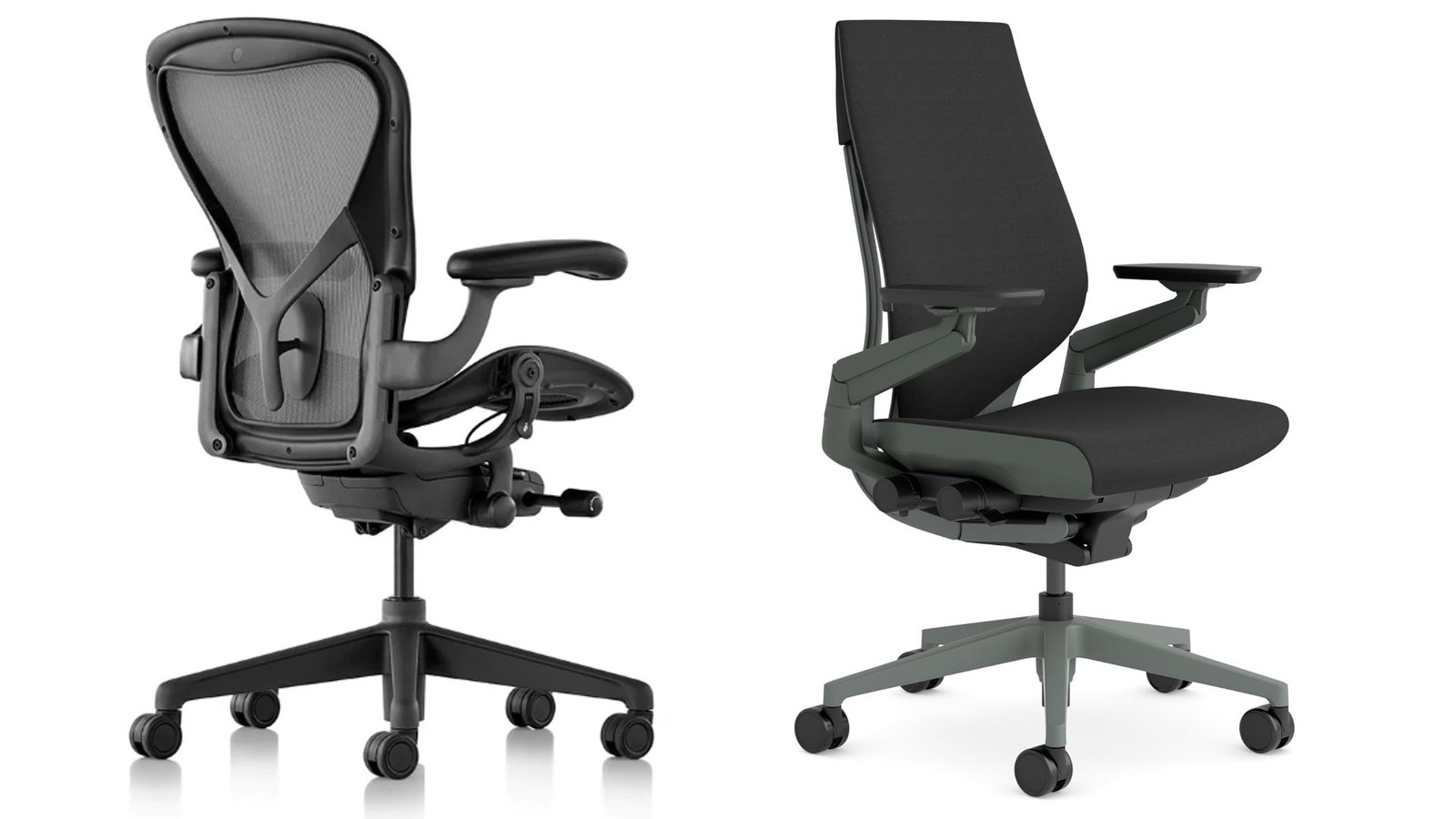
Image source: Bing (Web (fair-use with source credit))
Decision weight varies significantly based on usage intensity. Heavy daily users benefit disproportionately from premium build quality and extended warranties. Casual users save meaningfully by selecting mid-tier options with core adjustability features intact.
Neither group gains substantial advantage from purchasing beyond their actual needs. Readers evaluating chairs designed for home offices will find these comparison principles apply equally to dedicated workspace environments.
Matching a Chair to Your Body Type
Body measurements dictate chair fit far more accurately than brand reputation or price tier. No amount of marketing research overrides basic anthropometric mismatch. A chair sized incorrectly creates discomfort that no adjustment combination can fully resolve.
Measuring yourself before browsing takes approximately fifteen minutes and prevents costly return exchanges.
Height establishes your starting size category. Measure from bare feet to the top of your head standing straight against a wall. Record this number precisely.
Manufacturers publish height-to-size charts for every chair model. Herman Miller maps Size A through Size C against specific height and weight brackets. Steelcase provides similar charts organized by seated hip height and overall weight ranges.
Following these charts eliminates guesswork during selection.
Weight determines gas cylinder class requirement and frame load tolerance. Seats rated below your body weight experience accelerated wear on cushioning materials and mechanism components. Pneumatic lifts lose pressure retention faster under excessive load.
Frame bending and joint stress increase proportionally with weight beyond rated capacity. Always select a chair rated at least twenty percent above your current body weight to preserve adjustment range as weight fluctuates occurs naturally over time.
Seat depth requires measuring your inseam length. Sit against a flat wall with knees bent at ninety degrees. Measure from the back of your knee to the bottom of your foot.
This measurement approximates the seat depth you need. Add one to two inches for optimal clearance behind the knee when seated fully back. Chairs with seat depths exceeding this measurement press against your popliteal space and restrict circulation.
Shoulder width influences armrest positioning range. Wider shoulders require armrests adjustable to greater lateral separation. Narrower shoulders benefit from compact armrest travel ranges that keep elbows close to your torso.
Standard armrest spacing covers most populations but extreme widths create reach discomfort regardless of height adjustment correctness.
Torso length affects lumbar support positioning effectiveness. Longer torsos require lumbar pads adjustable to higher mounting positions. Shorter torsos need lumbar support concentrated lower on the backrest.
Fixed lumbar positions often align perfectly for average builds and miss completely for users outside that range. Adjustable lumbar height and depth compensate for torso variation more effectively than rigid mount designs.
Hip breadth determines minimum seat width requirements. Narrow hips distribute pressure across a smaller contact area. Wide hips require broader seat pans to prevent edge pressure concentration.
Seat widths below eighteen inches create discomfort for broader-built users regardless of cushion firmness. Standard seats measure approximately nineteen to twenty-one inches wide, accommodating most body types adequately.
Leg length influences both seat depth necessity and footrest compatibility. Users below five feet tall often cannot plant feet flat on the floor with proper seat height adjustment. Drop-leveled chairs may bottom out before achieving correct knee angle.
Supplemental footrests resolve this issue but introduce additional equipment considerations. Taller users exceeding twenty-one inches of inseam benefit significantly from extended seat pan options.
Body type combinations create unique fit challenges. A tall but lightweight user faces different requirements than a tall and heavy user. A short and broad user needs different seat proportions than a short and narrow user.
Evaluating each measurement category separately prevents overlooking compound mismatches that only emerge when multiple factors interact simultaneously.
Gender-based sizing conventions simplify chair marketing but oversimplify actual human variation. Women statistically sit shorter and lighter than men on average. Men statistically occupy larger frame categories more frequently.
Individual variation within each gender exceeds average differences between genders. Relying on gender assumptions rather than actual measurements produces poor fit outcomes regardless of marketing categorization.
Existing furniture measurements establish contextual benchmarks. Measure your current chair’s seat height, depth, and width. Compare those numbers against candidate chair specifications before purchasing.
Significant deviations from familiar dimensions require longer adaptation periods and may create unexpected discomfort during transition. Gradual adjustment through incremental configuration changes reduces adaptation friction considerably.
Matching a Chair to How You Work
Daily sitting patterns determine which ergonomic features generate real value versus which represent unnecessary expense. Two people with identical body measurements but different work styles often need fundamentally different chairs. Understanding your movement habits during work hours separates practical features from marketing fluff.
Static sitting describes workers who maintain nearly identical posture for extended periods. These individuals typically focus on screen-based tasks requiring minimal body repositioning. Writing, coding, and data entry generate this pattern most frequently.
Static sitters benefit enormously from firm, structured support that maintains spinal alignment without requiring constant micro-adjustments. Chairs with pronounced lumbar push and minimal recline range serve this group effectively.
Dynamic sitting characterizes workers who shift positions frequently throughout the day. Video conferencing, collaborative planning, and multitasking between applications create natural posture variation. Dynamic sitters benefit from chairs that reward movement with smooth tilt response and adaptive lumbar tracking.
Synchro-tilt mechanisms and free-floating recline systems excel in these environments. Chairs with stiff tension requirements or limited recline range frustrate dynamic users who constantly fight against resistance.
Multi-device workers switch between laptop screens, desktop monitors, tablets, and phones throughout typical shifts. Armrest flexibility becomes critically important for this group. Four-dimensional arm adjustments accommodate keyboard typing, mouse navigation, tablet holding, and phone calling positions without requiring shoulder repositioning.
Fixed or two-axis armrests force compensatory shoulder elevation that creates upper trapezius strain over time.
Hybrid professionals oscillate between focused desk work and informal reading or thinking sessions. Recline frequency determines headrest necessity for this group. Workers reclining more than twice daily benefit from integrated headrests supporting cervical alignment during backward lean.
Upright-dominant workers waste money on headrests that interfere with proper lumbar positioning and neck extension freedom.
Call-heavy roles require sustained armrest support during extended telephone conversations. Workers on voice calls averaging two or more hours daily need armrests positioned at consistent elbow height without frequent readjustment. Pivot-capable armrests accommodate natural arm angling during phone versus keyboard transitions.
Fixed-height armrests create shoulder strain when switching between input modalities.
Visual workload intensity influences recline preference substantially. Screen reading and analytical tasks encourage upright postures maximizing visual acuity. Creative brainstorming and document review sessions tolerate relaxed recline angles improving comfort without sacrificing task performance.
Chairs supporting multiple recline lock positions serve variable visual workload demands better than single-position designs.
Shift workers requiring eight-plus hour continuous sitting face accelerated fatigue risk compared to standard eight-hour schedules with built-in breaks. Extended sitting duration amplifies the importance of pressure redistribution features. Seat edge contouring preventing posterior thigh compression becomes essential rather than optional.
Mesh suspension reducing localized pressure points outperforms uniform-density foam for extended session comfort.
Temperature-sensitive workers in warm climates or poorly ventilated spaces benefit disproportionately from mesh backrest construction. Heat accumulation against solid upholstery creates discomfort during extended summer months. Breathable mesh maintains thermal neutrality improving focus retention and reducing fidgeting behavior that compromises posture consistency.
Collaborative workers frequently standing and sitting during team interactions need chairs facilitating rapid transition between postures. Lightweight mechanisms and low friction tilt systems enable effortless position changes without disengaging from collaborative activities. Heavy, stiff-tilting chairs interrupt workflow continuity and discourage beneficial posture variation.
Workstation geometry compatibility affects chair selection significantly. Standing desk converters paired with traditional sitting chairs require complementary height ranges. Low-profile desk surfaces demand correspondingly lower seat heights.
Monitor arm configurations altering desk footprint create different seating position requirements than traditional monitor placements. Understanding your physical environment prevents purchasing chairs incompatible with existing workspace infrastructure.
Team size and fleet purchasing dynamics introduce additional considerations beyond individual fit. Bulk buyers evaluate warranty terms, replacement part availability, and technician support responsiveness alongside individual comfort metrics. Standardized sizing simplifies fleet management but increases mismatch probability across diverse employee populations.
Offering multiple size options within fleet orders improves satisfaction outcomes significantly compared to single-size deployments.
Your actual workday patterns matter more than any hypothetical ideal posture recommendation. Tracking your typical daily movements for three consecutive workdays reveals patterns invisible during single-day observations. Recording how frequently you recline, switch devices, shift positions, and change sitting locations produces actionable data guiding chair selection far more reliably than generic ergonomic guidelines ever could.
Price Ranges and What You’re Actually Getting
Price tiers in the ergonomic chair market map closely to material quality, adjustability breadth, and warranty length. Understanding what each price band delivers prevents overspending on features you will never use. It also stops you from assuming expensive always means better for your specific situation.
Budget tier covers chairs between two hundred and four hundred dollars. IKEA Markus sits at the top of this range. Autonomous ErgoChair Pro starts just above it.
At this price, you get essential lumbar support, basic height adjustment, and acceptable build quality for moderate daily use. Fixed armrests and limited tilt mechanisms are standard compromises. Materials age noticeably faster than premium alternatives.
Warranty coverage typically spans five years or fewer. If you sit less than six hours per day, this tier delivers genuine value.
Mid-range tier spans four hundred to eight hundred dollars. This bracket captures the Steelcase Gesture when on sale and several Strong commercial models. You gain meaningful adjustability improvements across armrests, lumbar positioning, and tilt tension calibration.
Seat depth becomes available on select models. Material longevity extends significantly compared to budget options. Most mid-range chairs carry seven to ten-year warranties.
This tier represents the strongest value zone for full-time remote workers who want serious features without premium pricing.
Premium tier begins around eight hundred dollars and extends well past eighteen hundred. Herman Miller Aeron dominates this space alongside Steelcase Leap and Haworth Zody. Every major adjustment point functions smoothly with consistent resistance.
Materials resist sagging, cracking, and wear far longer than cheaper alternatives. Fifteen-year warranties on Herman Miller products signal manufacturer confidence that translates into real-world durability. Resale value retention remains notably strong within this bracket.
Refurbished markets introduce a valuable option many buyers overlook. Authorized refurbished Herman Miller and Steelcase chairs frequently appear at forty to sixty percent below retail pricing. These units undergo professional inspection, part replacement, and reupholstery before resale.
Warranty coverage often matches original manufacturer terms when purchased through authorized dealers. Third-party refurbishers on marketplace platforms vary widely in quality control standards. Verify certification status before committing to any refurbished purchase.
Price per year of ownership tells a more honest story than sticker price alone. A five-hundred-dollar chair lasting three years costs one hundred sixty-seven dollars annually. A fifteen-hundred-dollar chair lasting twelve years costs one hundred twenty-five dollars annually.
The premium chair wins on pure cost-per-use despite the larger upfront investment. Casual users who rotate chairs every two to three years never realize that mathematical advantage.
Warranty terms deserve close reading beyond duration comparisons. Herman Miller warranties cover mechanisms, pneumatics, and cushions comprehensively. Some manufacturers exclude normal wear items like castors and armrest pads from coverage.
Authorized dealer requirements can void warranties if purchases originate from unauthorized resellers. Return shipping costs for warranty claims frequently fall on the buyer rather than the manufacturer. Understanding these details before purchasing prevents unpleasant surprises during claim processing.
The market also includes luxury-design-forward chairs that prioritize aesthetics over function. Certain European brands position themselves firmly in premium territory while offering fewer functional adjustments than mid-range competitors. These chairs look impressive in design-forward offices but may underperform ergonomically for extended sitting sessions.
Price alone never guarantees superior ergonomic performance.
Several emerging direct-to-consumer brands challenge traditional pricing structures through streamlined distribution. They eliminate showroom margins and middleman markups while offering spec sheets that approximate premium features. Independent testing and long-term reliability data remain limited for many of these newer entrants.
Consumer reviews suggest solid initial comfort but question whether mechanisms maintain calibration after two to three years of daily use.
Understanding what you pay for at each tier lets you match spending to actual usage patterns. Heavy daily users benefit disproportionately from premium build quality and extended warranties. Light users save meaningfully by selecting well-designed mid-tier options with core adjustability intact.
Neither group gains meaningful advantage from purchasing beyond their real needs. Anyone comparing baseline costs might also find a detailed breakdown of chair pricing across categories helpful for contextualizing where each option falls.
Common Mistakes People Make When Buying
Buyers consistently repeat the same avoidable errors when shopping for ergonomic seating. Most stem from rushing the decision or prioritizing appearance over functional fit. Recognizing these pitfalls saves money and prevents post-purchase regret.
Not measuring body dimensions before shopping represents the single most common mistake. Buyers select chairs based on brand reputation or aesthetic preference instead of matching specifications to their actual measurements. The result is a chair that looks correct in photographs but creates pressure points, poor lumbar contact, or knee compression within hours of use.
Measuring height, weight, inseam, and shoulder width takes fifteen minutes and eliminates this entire category of error.
Prioritizing appearance over adjustability leads buyers toward visually striking chairs that lack meaningful customization. Mesh-back designs and aggressive styling sell well online but mean nothing if seat depth cannot accommodate your leg length. Fixed armrests on otherwise premium frames create shoulder strain that no lumbar system can compensate for.
Function must always precede form in ergonomic seating selection.
Ignoring seat depth requirements causes cascading comfort problems. Buyers focusing exclusively on lumbar support or backrest material often overlook how seat pan length affects circulation and posture. Seats too deep press against the posterior thighs.
Seats too shallow fail to support thigh weight adequately. Both conditions force compensatory pelvic tilting that undermines lumbar support effectiveness regardless of quality.
Skipping the return policy review before purchase creates unnecessary risk. Several premium manufacturers offer thirty-day trial periods with full refund options. Other retailers charge restocking fees up to twenty-five percent or require customers to arrange and pay for return shipping on heavy furniture.
Knowing return terms upfront prevents feeling trapped with a poorly fitting chair after the window closes.
Purchasing from unauthorized resellers voids manufacturer warranties in most cases. Grey-market imports and marketplace third-party sellers often cannot validate warranty claims through official channels. Refurbished units sold without authorization documentation carry unknown service histories.
Always verify seller authorization status before completing high-value purchases.
Overestimating the importance of headrests wastes budget on unnecessary features. Headrests provide genuine value only for users who recline regularly during work sessions. Upright-dominant sitters find headrests interfere with proper neck extension and shoulder mobility.
Many buyers add headrest-equipped models without evaluating whether they actually recline enough to benefit from the feature.
Assuming all mesh backrests perform identically creates disappointment at delivery. Cheap polymer meshes sag noticeably within two years of regular use. Premium suspension fabrics maintain tension far longer through superior material engineering.
Mesh firmness levels also vary significantly between brands. Firm mesh supports posture actively. Soft mesh yields comfortably but provides less structural spinal guidance.
Buying based solely on aggregate star ratings ignores distribution patterns. Average ratings obscure important details about fit mismatches and long-term durability failures. Reading negative reviews reveals more useful information than positive ones.
Look for recurring complaints about mechanism failure, cushion compression, or adjustment drift rather than isolated negative experiences.
Neglecting to check castor compatibility with your flooring creates unexpected problems. Hard-floor castors scratch wood and tile surfaces. Carpet castors sink into pile and roll poorly on hard surfaces.
Many chairs ship with universal castors that perform inadequately on both surfaces. Purchasing floor-specific castors separately costs twenty to fifty dollars and prevents surface damage.
Failing to account for desk height compatibility produces awkward reaching positions. Standard desk heights range from twenty-eight to thirty inches. Chair armrests must align with your desk surface to maintain neutral shoulder positioning.
Tall desks paired with low-profile chairs force shoulder elevation during typing. Low desks paired with high-back chairs create elbow support gaps that shift workload onto your shoulders and upper back.
Not testing recline tension against body weight leaves tilt mechanisms feeling either too loose or impossibly stiff. Lighter users often find heavy chairs refuse to tilt without maximum tension rotation. Heavier users sometimes find light chairs tilt too freely without adequate resistance.
Proper tension calibration requires body weight matching to the mechanism’s designed range.
Choosing gaming chairs as ergonomic substitutes misunderstands their fundamental design purpose. Gaming chairs prioritize upright containment and aesthetic styling over sustained postural support. Bucket-seat designs restrict natural pelvic movement.
Fixed recline angles lack the dynamic responsiveness task chairs provide. While comfortable for short sessions, gaming chairs consistently underperform compared to properly designed task chairs during extended workdays. Anyone exploring alternatives might also compare features across gaming and task chair categories to understand where the boundaries lie.
How to Set Up Your Chair Correctly
Proper setup transforms an average chair into an effective ergonomic tool. Incorrect configuration turns even the most adjustable model into a source of discomfort and strain. Following a systematic setup sequence ensures every adjustment serves your specific body dimensions and work style.
Begin by assembling the chair on a soft surface to prevent scratching the base or castors. Most chairs ship partially assembled with separate components requiring final connection. Follow manufacturer instructions precisely rather than estimating assembly steps.
Using incorrect bolt sequences or overtightening fasteners creates alignment problems that affect mechanism operation later.
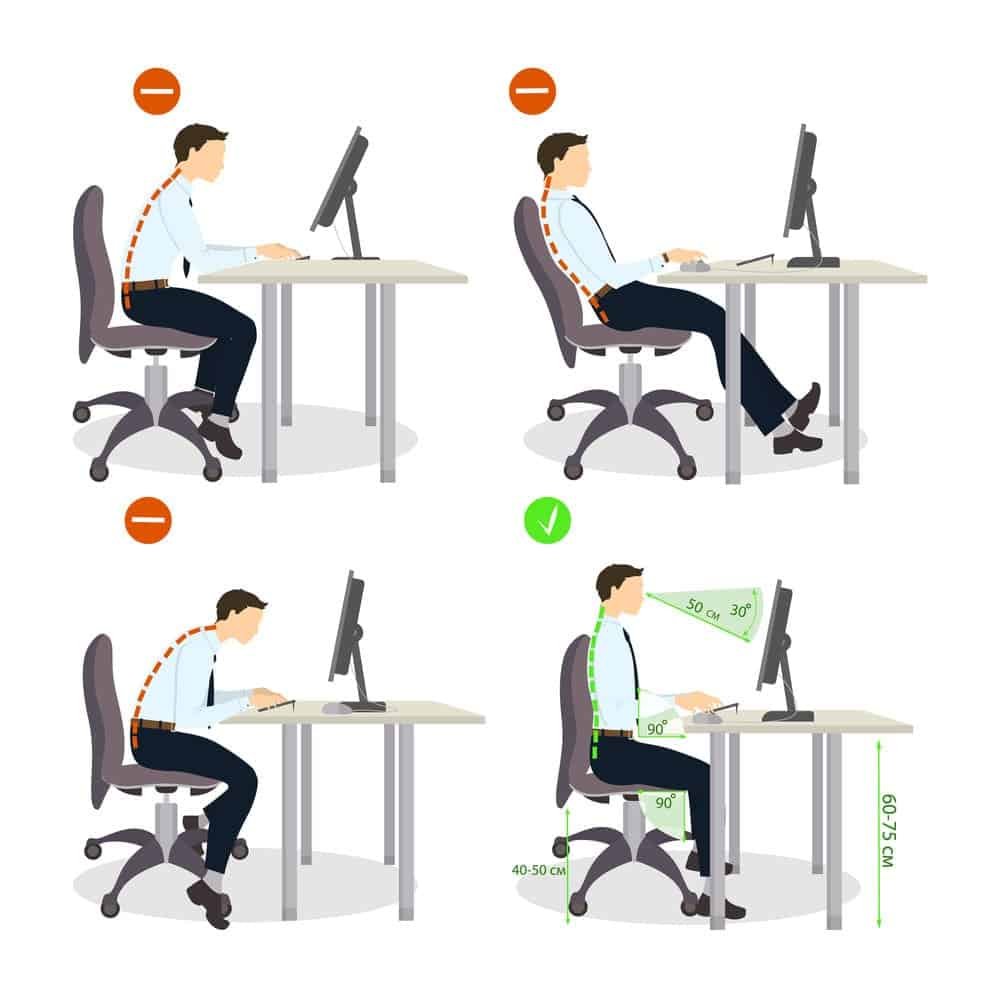
Image source: Bing (Web (fair-use with source credit))
Adjust seat height before any other setting. Sit in the chair with your feet flat on the floor and knees bent at approximately ninety degrees. Your thighs should run parallel to the ground without excessive downward slope.
Adjust the pneumatic lift until your elbow resting on the armrest forms a ninety-degree angle with your torso. Shoulders should remain completely relaxed, not elevated toward your ears.
Position the lumbar support to match your spinal curve. Stand beside the chair and observe where your lower back curves inward naturally. That indentation typically sits between your hip crease and lower rib cage.
Adjust the lumbar pad so it fills that curve without pushing it outward. If the lumbar adjustment feels too aggressive, reduce pressure until support feels firm but comfortable. If it feels insufficient, increase engagement until you notice gentle backing pressure against your spine.
Set seat depth to achieve proper thigh support. Slide forward in the chair until your back rests fully against the lumbar support. Check the space between the front seat edge and the back of your knees.
Two to four fingers of clearance indicates correct depth. If you cannot achieve that range through seat adjustment alone, the chair may not suit your leg length regardless of other settings.
Calibrate tilt tension using your body weight as the reference point. Most tilt mechanisms include a tension knob located beneath the front right of the seat pan. Rotate clockwise to increase resistance.
Rotate counterclockwise to decrease it. Begin with moderate tension and test recline motion. You should be able to lean back smoothly without excessive effort but without the chair feeling dangerously loose or uncontrolled.
Heavier users typically require higher tension settings. Lighter users need correspondingly lower settings.
Position armrests to support neutral shoulder alignment. Raise or lower armrests until your forearms rest parallel to the floor when typing. Wrist position should remain straight, not bent upward or downward.
Armrests positioned too high create shoulder elevation and trapezius tension. Armrests positioned too low force your shoulders to bear partial body weight through your hands, creating shoulder girdle fatigue over time.
Set the recline lock position based on your typical working posture. If you primarily type and read screens upright, lock the recline near vertical with slight backward inclination. If you frequently alternate between focused work and thinking pauses, set the recline to allow smooth transition between upright and twenty-five to thirty-degree angles.
Lock-out positions prevent unintended collapse during sudden movements.
Headrest positioning requires evaluating your actual recline frequency. Users who recline regularly should position the headrest to support the occipital bone at the base of the skull rather than the mid-cervical region. Supporting the wrong spinal segment creates neck extension strain.
Users who sit upright predominantly should remove or lower the headrest entirely to preserve full neck mobility and prevent posterior head pressure during focused tasks.
Final verification requires a ten-minute sit test before declaring setup complete. Sit normally and observe whether your feet remain flat on the floor without dangling. Check whether your lower back maintains contact with lumbar support throughout the session.
Verify that your wrists stay straight during keyboard use. Notice whether shoulder position feels relaxed or elevated. Any discomfort during this test indicates an adjustment that needs refinement.
Periodic reassessment prevents setup drift over time. Bodies change weight and posture habits shift across seasons. Recheck all adjustment points monthly during the first six months of ownership.
After that, quarterly checks maintain optimal configuration. Documenting your preferred adjustment positions in a notebook or phone note speeds future recalibration significantly.
Maintaining Your Chair for Long-Term Use
Regular maintenance preserves chair functionality and extends operational lifespan considerably. Manufacturers designing chairs for decade-long service life expect users to perform basic upkeep procedures. Skipping maintenance accelerates wear on critical mechanisms and upholstery components.
Monthly cleaning prevents material degradation from accumulated oils and debris. Wipe mesh backrests with a dry microfiber cloth to remove surface dust and skin oils. Vacuum fabric seats using low suction to extract particulate matter embedded in cushioning materials.
For mesh surfaces, a gentle brush attachment removes trapped debris from suspension fibers without damaging weave integrity.
Quarterly lubrication of moving mechanisms prevents premature wear on pivot points and adjustment controls. Apply silicone-based lubricant sparingly to gas lift cylinder joints, tilt mechanism pivots, and armrest adjustment sliders. Avoid petroleum-based products that attract dust and degrade plastic components over time.
Excess lubricant attracts particulate accumulation that accelerates mechanism wear rather than preventing it.
Biannual bolt tightening addresses vibration-induced loosening from regular adjustment cycles. Check all visible fasteners on the base, column connection, and mechanism mounting points. Hand-tighten any bolts showing slight play.
Do not overtighten fasteners beyond manufacturer torque specifications. Stripped threads from excessive force create safety hazards worse than loose connections.
Annual castor inspection identifies wear patterns before rolling performance degrades. Rotate each castor manually to detect grinding or binding sensations. Replace castors showing significant wheel deformation or bearing failure.
Hard-floor castors develop flat spots faster on carpeted surfaces. Carpet castors wear unevenly on hardwood floors. Match castor type to your primary flooring environment for optimal performance longevity.
Upholstery condition monitoring catches early signs of material breakdown. Inspect foam cushions monthly for compression permanent-set patterns indicating material fatigue. Check mesh tension consistency across the backrest surface for localized sagging areas.
Examine fabric seams for stitching separation under high-stress points like armrest attachments and seat pan edges. Early detection allows timely intervention before small issues become irreversible failures.
Gas lift replacement represents the most common mechanism repair requiring user intervention. Signs of pneumatic failure include the chair sinking slowly under normal sitting weight or failing to hold height adjustment through the full range. Replacement cylinders cost thirty to eighty dollars depending on class rating and diameter specifications.
Matching the original cylinder class and stem dimensions ensures proper fit and load capacity retention.
Tilt mechanism rebuilds address progression from smooth resistance to gritty or inconsistent operation. Disassembly requires basic hand tools and manufacturer-specific procedure knowledge. Replacement bushings and worn pivot points restore original motion characteristics without requiring full mechanism replacement.
Professional repair services handle complex mechanism refurbishment for users uncomfortable performing DIY interventions.
Upholstery replacement extends chair life when frame and mechanism remain structurally sound. Manufacturer-approved replacement cushions and backrest panels fit existing mounting hardware without modification. Third-party upholstery kits offer cost savings but require careful measurement verification before purchase.
Incorrect panel dimensions create installation frustration and potentially compromised aesthetic results.
Documentation of serial numbers and purchase dates streamlines warranty claims significantly. Keep purchase receipts organized digitally alongside warranty registration confirmations. Record serial numbers from manufacturing plates located beneath the seat pan or on the mechanism housing.
These identifiers accelerate claim processing and prevent delays from missing documentation during warranty validation.
Knowing when repair transitions to replacement prevents endless investment in declining chairs. Chairs showing frame cracking, severe mechanism deformation, or irreversible cushion compression reach end-of-service-life thresholds. At that point, replacement parts cost approaches new chair pricing minus depreciation value.
Continuing repairs beyond this threshold rarely provides sound economic justification. For readers wondering about overall lifespan expectations, understanding how long an office chair typically lasts and when replacement becomes necessary helps frame maintenance decisions in context.
Making Your Final Choice
Selecting the right chair becomes straightforward once you understand your body metrics, daily sitting patterns, and budget constraints. The framework below guides you through a systematic decision process that eliminates guesswork and prevents common purchasing mistakes.
Start by recording your height, weight, and inseam measurement. Match these figures against manufacturer size charts for every chair under consideration. Eliminate models where your measurements fall outside recommended ranges.
This simple filter removes mismatch candidates before you waste time evaluating features that cannot compensate for fundamental size incompatibility.
Next, evaluate your daily sitting patterns honestly. Count how many hours you spend seated on a typical workday. Track how frequently you recline, switch input devices, or change sitting positions.
Workers logging eight-plus hours daily with frequent posture shifts benefit most from premium adjustable chairs. Moderate daily users with stable posture preferences achieve excellent results from well-configured mid-range options. Casual users requiring occasional seating support find budget-tier chairs adequate for their needs.
Budget allocation should reflect usage intensity rather than aspirational goals. Spending one thousand five hundred dollars on a chair used three hours daily represents poor financial judgment. Spending four hundred dollars on a chair used ten hours daily represents false economy likely producing replacement costs within two years.
Match budget realistically to actual daily exposure rather than intended use scenarios.
Priority feature ranking prevents analysis paralysis when multiple chairs appear suitable. List your three most important adjustment features. Rank them in order of personal significance.
Use this ranking to eliminate chairs lacking your top priority feature regardless of strengths in secondary areas. A chair perfect in nine categories means nothing if it fails your single most important requirement.
Return policy verification protects you from commitment anxiety. Confirm trial period duration, restocking fee policies, and return shipping cost responsibilities before finalizing any purchase. Prefer retailers offering free return shipping and zero restocking fees.
These terms eliminate financial penalties from incorrect selections and enable confident decision-making without fear of permanent commitment.
Warranty validation completes your due diligence. Verify that the authorized dealer you are purchasing from maintains current certification status with the manufacturer. Confirm warranty coverage terms apply to your purchase channel rather than requiring separate registration processes.
Unauthorized reseller purchases frequently lack valid warranty protection despite identical product specifications.
Consider refurbished options seriously when premium features exceed your budget. Authorized refurbished chairs from reputable dealers offer near-new condition at forty to sixty percent savings. These units undergo professional inspection, part replacement, and cosmetic restoration before resale.
Warranty coverage matching original manufacturer terms provides purchase protection comparable to new inventory. Third-party marketplace refurbished units require careful vetting of seller reputation and refurbishment standards.
Create a shortlist of three qualifying chairs before making your final decision. Compare specifications side by side using the comparison framework established earlier. Evaluate which model best satisfies your body metrics, work patterns, and budget simultaneously.
The optimal choice emerges clearly when all criteria align rather than when any single factor dominates the decision.
Avoid letting marketing language, celebrity endorsements, or trend popularity influence your selection. These factors drive purchasing decisions unrelated to actual ergonomic performance. A chair receiving substantial social media attention may lack fundamental adjustability features that determine long-term comfort outcomes.
Stick to specification evaluation and personal fit assessment throughout the entire decision process.
Finally, commit to the chair that satisfies your verified requirements rather than hoping for perfection from an impossible standard. No chair suits every body type perfectly. No model eliminates all compromise.
Accepting reasonable trade-offs within your validated parameters produces satisfaction far more reliably than chasing an unattainable ideal configuration. The best chair you can reasonably acquire and configure properly serves you better than the theoretically perfect chair you never purchase.
Frequently Asked Questions
How long should I sit before taking a break?
Research from occupational health organizations recommends standing or walking for two to three minutes every thirty to sixty minutes of sustained sitting. Even the best ergonomic chair cannot eliminate the risks of prolonged static postures. Movement resets blood flow, reduces disc pressure, and prevents the muscular fatigue that accumulates during extended seated sessions.
Set a timer if you tend to lose track of time during focused work blocks.
Can an ergonomic chair fix existing back pain?
Ergonomic chairs reduce mechanical stress on the spine and can ease discomfort caused by poor seating postures. They do not cure underlying medical conditions such as herniated discs, sciatica, or degenerative joint disease. If you experience persistent pain lasting more than two weeks, consult a healthcare professional before relying on furniture modifications alone.
Proper chair setup complements medical treatment rather than replacing it.
How often should I replace my ergonomic chair?
Average lifespan depends heavily on usage intensity and build quality. Budget chairs typically require replacement every three to five years under daily use. Mid-range models commonly last seven to ten years with proper maintenance.
Premium chairs like the Herman Miller Aeron or Steelcase Gesture frequently exceed twelve years before mechanisms or cushions show irreversible wear. Replace your chair when adjustment controls fail, structural components crack, or cushioning compresses permanently regardless of warranty status.
Are refurbished ergonomic chairs worth buying?
Authorized refurbished chairs from reputable dealers offer genuine savings without sacrificing warranty coverage or structural integrity. These units undergo professional inspection, part replacement, and cosmetic restoration before resale. The market contains significantly fewer quality-controlled refurbished options than new premium chairs.
Verify dealer certification status and confirm warranty terms match original manufacturer coverage before committing to any refurbished purchase. Independent marketplace listings carry far higher risk due to inconsistent refurbishment standards.
What is the actual difference between ergonomic and regular office chairs?
Ergonomic chairs provide adjustable lumbar support, seat depth, armrest positioning, and tilt tension calibrated to individual body dimensions. Regular office chairs prioritize basic sitting function with minimal or no adjustability options. The structural difference shows in how each chair distributes body weight and supports spinal alignment during extended use.
Non-ergonomic chairs force the body to adapt to fixed geometry rather than allowing geometry to adapt to the body.
Do ergonomic chairs actually improve posture?
Properly adjusted ergonomic chairs encourage neutral spinal alignment by supporting natural curves rather than forcing the spine into artificial positions. However, chairs cannot maintain correct posture independently. They reduce the physical effort required to hold proper alignment, but conscious movement and periodic position changes remain essential.
A well-fitted chair combined with regular micro-breaks produces better postural outcomes than either strategy alone. For readers exploring additional seating configuration options for different room types, understanding these principles applies across many contexts.
How do I know if my current chair is actually harming my posture?
Persistent lower back ache, shoulder tension, numbness in the hands or legs, and headaches after prolonged sitting all signal potential ergonomic mismatch. Discomfort appearing within the first hour of sitting usually indicates improper setup rather than chair quality problems. Pain developing after three or four hours typically reflects inadequate lumbar support, incorrect seat depth, or insufficient tilt variability.
Evaluate your current configuration against the setup guidelines before assuming your chair is defective.
Can I use an ergonomic chair at a standing desk?
Yes, ergonomic chairs pair effectively with sit-stand desk systems. The key consideration is height compatibility between your desk surface and the chair armrests across the full standing desk range. Most standard desks accommodate typical ergonomic chair configurations without modification.
Taller users may need desks with extended height ranges to maintain proper elbow support when standing. Alternating between sitting and standing throughout the day represents a healthier pattern than sustaining either position exclusively.
Bottom Line
Choosing the right ergonomic chair comes down to matching three things: your actual body measurements, how many hours you sit daily, and what you can realistically afford. No single model suits everyone, and spending more never guarantees a better personal fit without proper configuration. Measure yourself, read the specification charts, and align your choice with real usage patterns rather than marketing claims.
Premium chairs like the Herman Miller Aeron and Steelcase Gesture deliver exceptional longevity and warranty coverage for heavy daily users. Mid-range options from Autonomous and Steelcase provide serious adjustability at moderate price points. Budget choices like the IKEA Markus cover essential ergonomic needs adequately for lighter use.
The common thread across all categories remains the same. Correct setup and regular posture variation matter more than any single feature specification.
Your back does not care about brand names or price tags. It cares about proper lumbar alignment, appropriate seat depth, and regular movement throughout the day. Invest in the best chair your budget allows that matches your body type, configure it correctly, and stand up periodically.
That combination delivers more measurable benefit than any single ergonomic feature ever could. If you need broader context on chair costs across different categories, understanding where your option falls helps validate your spending decision.