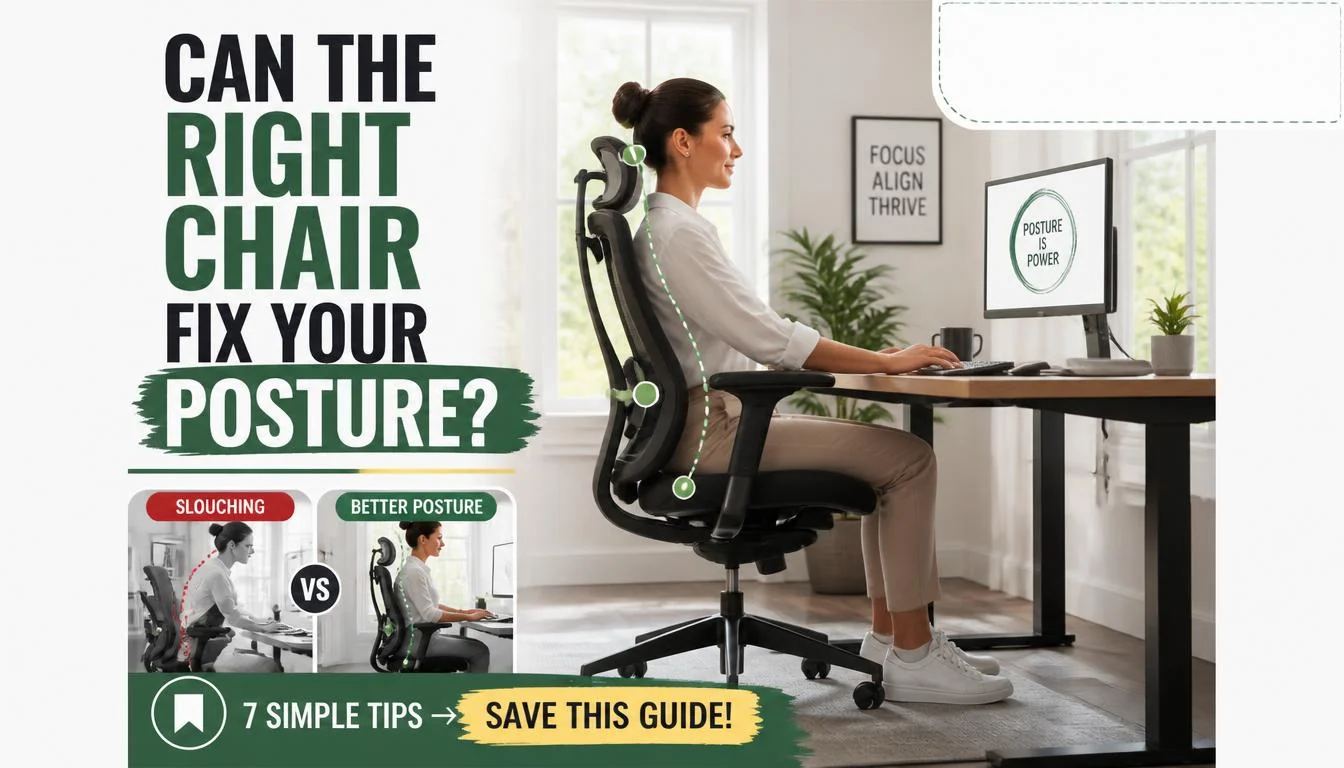
What you sit on every day is quietly reshaping your spine. If you spend eight hours a day hunched over a laptop, the chair beneath you isn’t just furniture. It’s a biomechanical tool that either supports or sabotages your posture.
We’ve seen countless people complain about chronic lower back pain without realizing their seating setup is the primary culprit. The difference between a supportive ergonomic chair and a generic office seat can mean the gap between ending the day with energy or ending it in discomfort.
Per BIFMA standards, a properly fitted ergonomic task chair should maintain your spine’s natural lumbar lordosis while keeping your hips aligned above your knees. Manufacturer specifications indicate that lumbar support placement matters more than cushion thickness. Curve alignment is what keeps disc pressure distributed evenly.
Understanding how seating mechanics affect your body will help you make an informed choice, starting with the science behind proper sitting alignment.
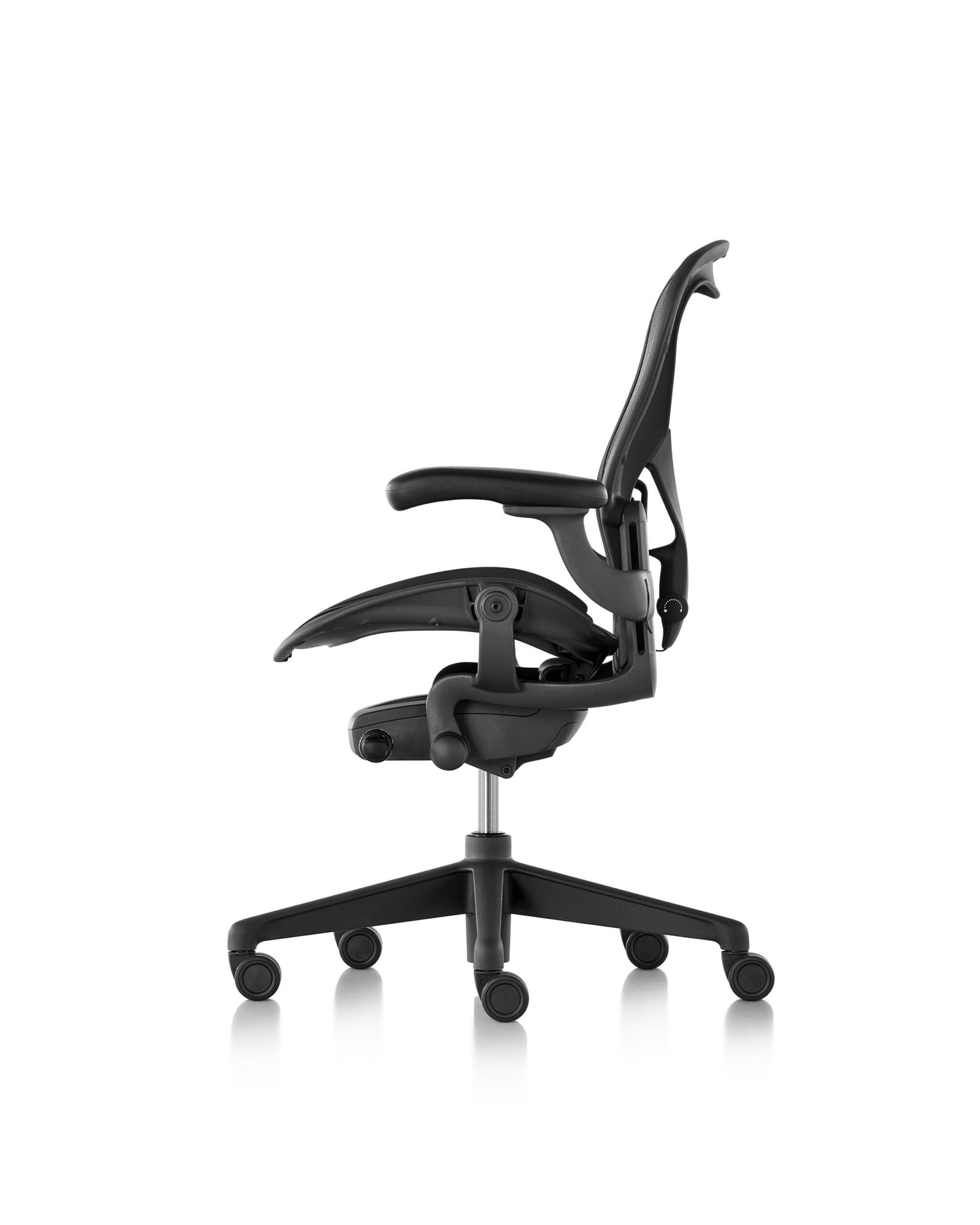
Quick Answer
How the Right Chair Improves Posture works by maintaining your spine’s natural curves while keeping your hips aligned above your knees. Proper lumbar support preserves your lower back’s inward curve. Adjustable seat depth prevents pressure behind your knees.
Recline tension encourages micro-movements that reduce disc compression. A well-fitted chair distributes weight across your sit bones instead of your tailbone. This simple shift reduces strain on your neck, shoulders, and lower back throughout the day.
Why Your Chair Matters More Than You Think
The Hidden Cost of Sitting Wrong
Most people underestimate how much time they spend seated. The average office worker sits between eight and ten hours per day. Combine that with commuting and screen time, and you’re looking at twelve-plus hours of static posture daily.
Your body wasn’t designed to hold one position for that long without support.
When you sit poorly, gravity pulls your spine into a C-curve. Your head juts forward. Your shoulders round inward.
This cascade starts at your pelvis and works its way up. The muscles along your spine fatigue from constant overwork. Meanwhile, your hip flexors tighten from being perpetually shortened.
The domino effect of poor seating:
- Posterior pelvic tilt flattens your lumbar curve
- Flattened lumbar curve increases disc pressure by up to 40 percent
- Increased disc pressure triggers muscle spasms and inflammation
- Muscle spasms cause compensatory shoulder elevation
- Shoulder elevation creates chronic neck and tension headaches
People often blame their workstation setup when the real issue traces back to the seat itself. A desk at the wrong height won’t fix a chair that forces your feet to dangle. A monitor positioned correctly won’t save you if your lumbar support sits too low.
The chair is the foundation everything else builds upon.
Investment in a quality ergonomic chair pays dividends. Research from the National Institute for Occupational Safety and Health shows that proper seating equipment combined with ergonomic training reduces musculoskeletal disorder reports by 30 to 50 percent. The upfront cost pales compared to the medical bills and lost productivity from chronic back issues.
The chair market has exploded as remote work became permanent for millions. You’ll find everything from $80 budget options to $1,500 premium systems. Each category offers different levels of adjustability and durability.
Before diving into pricing, understanding what actually moves the needle helps you avoid spending money on features that look impressive but deliver little benefit.
The Biomechanics: How Posture Changes When You Sit
Spinal Alignment and Pelvic Positioning
Your spine has three natural curves: cervical lordosis in the neck, thoracic kyphosis in the upper back, and lumbar lordosis in the lower back. These curves act as shock absorbers. They distribute mechanical load efficiently when maintained in their neutral positions.
Slouching collapses these curves into a single C-shape.
The pelvis serves as the anchor point for your entire spinal column. Tilt it backward, and your lumbar spine flattens. Tilt it forward excessively, and your lower back arches too deeply.
Both positions create uneven disc loading. Neutral pelvic positioning keeps the lumbar curve intact and balanced.
A properly designed chair promotes anterior pelvic tilt through its seat angle and lumbar contour. This tilt maintains the lumbar lordosis that protects your discs. Without this support, most people slide into posterior pelvic tilt within minutes.
You might not notice it happening, but your spine registers the change immediately.
The relationship between seat angle and pelvic position is critical. A flat seat encourages sliding forward and slouching. A slight forward tilt of five to eight degrees encourages the pelvis to rotate into a neutral position.
This subtle geometry change reduces lumbar strain significantly over a full workday.
Pelvic position and its downstream effects:
| Pelvic Position | Lumbar Curve | Disc Pressure | Muscle Activity |
|---|---|---|---|
| Posterior tilt | Flattened | Highest | Excessive |
| Neutral | Maintained | Normal | Balanced |
| Anterior tilt | Over-arched | Elevated | Moderate |
Most people spend their workday in a posterior tilt state without realizing it. Their chair lacks the contours and adjustments needed to maintain neutral alignment. The result is cumulative microtrauma that manifests as chronic pain months or years later.
Disc Pressure and Muscle Engagement
Intervertebral discs bear the brunt of postural changes during sitting. Disc pressure varies dramatically depending on spinal position. Standing places moderate pressure on your discs.
Sitting with poor posture can increase that pressure by nearly 40 percent compared to standing.
Research published in the journal Spine measured disc pressure across different sitting positions. The findings showed that reclining at 100 to 110 degrees with lumbar support reduced disc compression significantly. This angle range mimics the natural curvature your spine maintains when standing upright.
Muscle engagement follows a predictable pattern during seated work. The erector spinae muscles along your lower back work continuously to resist slouching. When lumbar support is absent, these muscles fatigue faster.
Fatigued muscles lose their ability to stabilize the spine, leading to further postural collapse.
The core muscles play a smaller role in seated stability than most people assume. Unlike standing or walking, sitting allows the skeleton to bear much of your weight. This is why proper chair design matters more than core strength for postural health during prolonged sitting.
A chair that supports your spine lets your muscles relax rather than exhaust themselves fighting gravity.
What “Neutral Spine” Actually Means
Neutral spine doesn’t mean rigid perfection. It means your vertebrae maintain their natural curvature without excessive deviation. Think of it as a spectrum rather than a single locked position.
Your spine should be able to move freely within a healthy range while returning to its neutral state when at rest.
A chair promoting neutral spine provides support where your body naturally curves inward. The lumbar region requires firm contouring to prevent flattening. The thoracic area benefits from gentle support that discourages rounding.
The cervical region may need a headrest for tasks requiring extended upward gaze.
Key indicators of neutral spine maintenance:
- Your ears align vertically with your shoulders
- Your shoulders rest horizontally without shrugging
- Your lower back maintains its inward curve
- Your weight distributes evenly across both sit bones
- You can breathe deeply without restriction
Achieving neutral spine in a chair isn’t just about comfort. It’s about reducing the mechanical stress that accumulates over thousands of sitting hours. The features that enable this alignment matter far more than cosmetic design elements or price premiums.
The Chair Features That Actually Move the Needle
Lumbar Support: Placement Over Padding
Lumbar support gets marketed aggressively, but most people choose the wrong feature entirely. Thickness doesn’t equal effectiveness. Placement does.
A narrow, firm lumbar pad positioned at your belt line outperforms a wide, plush cushion placed too high or too low every time.
Your lumbar spine curves inward between your ribs and hips. This lordotic curve needs support at exactly that location to maintain its shape. Lumbar supports positioned too high press against your mid-back and flatten your lower curve.
Supports placed too low simply dig into your sacrum without addressing the actual curve.
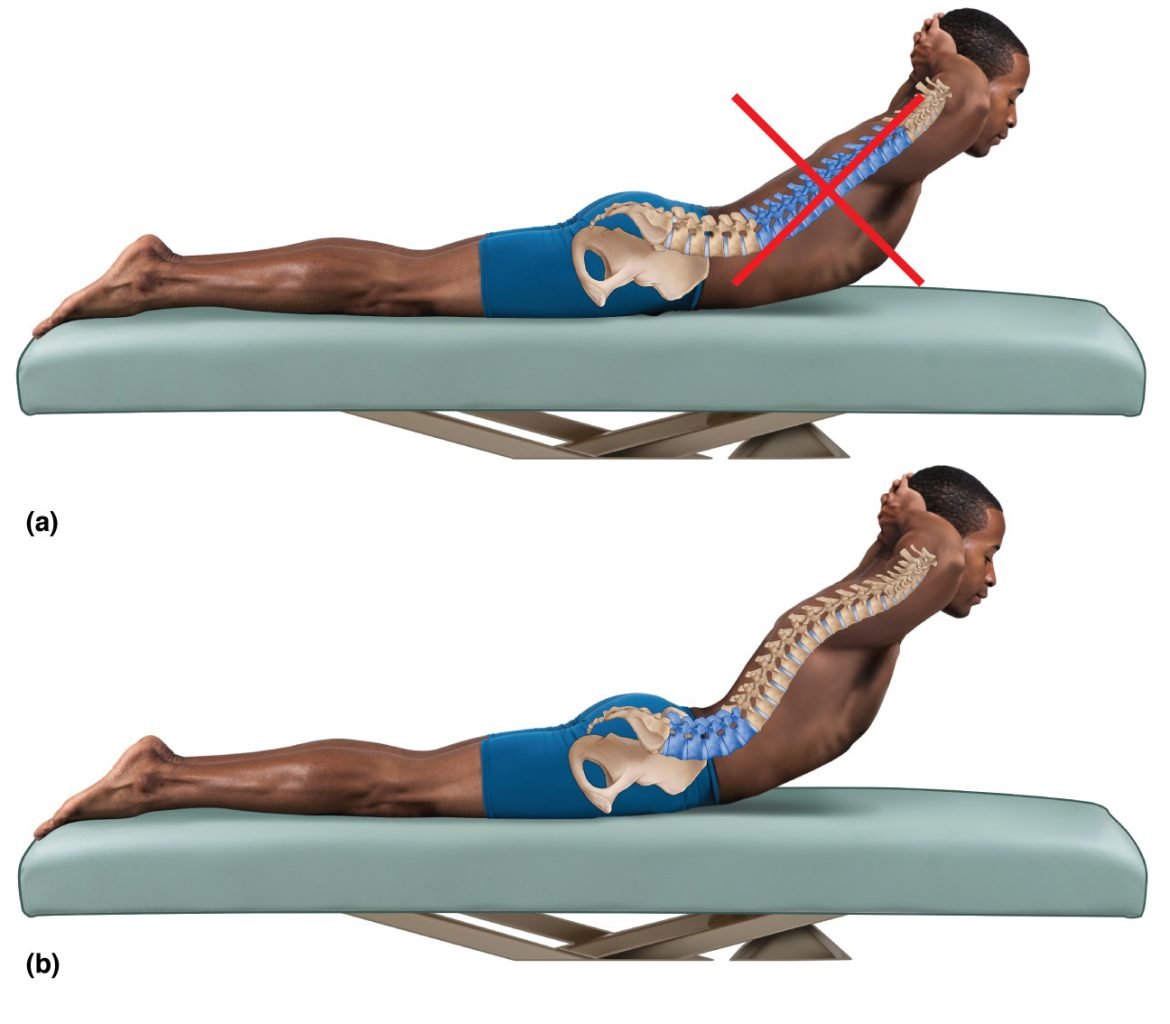
Adjustable lumbar systems offer several advantages:
- Height adjustment accommodates different torso lengths
- Depth control lets you dial in support firmness
- Curvature matching preserves individual spinal contours
- Independent adjustment separates lumbar from backrest function
Fixed lumbar supports come pre-shaped into the backrest. They work reasonably well for average-height users but fail people who are significantly taller or shorter. If you’re between 5’2″ and 5’10”, a fixed lumbar contour might suit you fine.
Outside that range, you’ll want independent height and depth adjustment.
Material composition also affects lumbar performance. Mesh backs offer dynamic support that conforms as you shift position. Foam inserts provide consistent pressure distribution but may compress over time.
Hybrid designs combine both approaches, using mesh for breathability and foam zones for targeted support.
Your local guide on best office chairs for back pain highlights how lumbar mechanics separate good chairs from great ones. Look for chairs where lumbar adjustment operates independently from recline tension. Coordinated mechanisms limit your ability to fine-tune both parameters simultaneously.
Seat Depth and Thigh Clearance
Seat depth determines how well your thighs receive support without compromising circulation. The front edge of your seat should contact your thighs two to four finger-widths below your knees. Too deep, and the edge presses behind your knees, compressing blood vessels and nerves.
Too shallow, and you slide forward, losing lumbar contact and forcing your feet to over-grip for stability.
Proper seat depth allows your lower legs to hang freely while your thighs rest comfortably on the cushion. Weight distributes across your entire thigh surface rather than concentrating at the back edge. This even distribution prevents the tingling and numbness that signals compromised circulation.
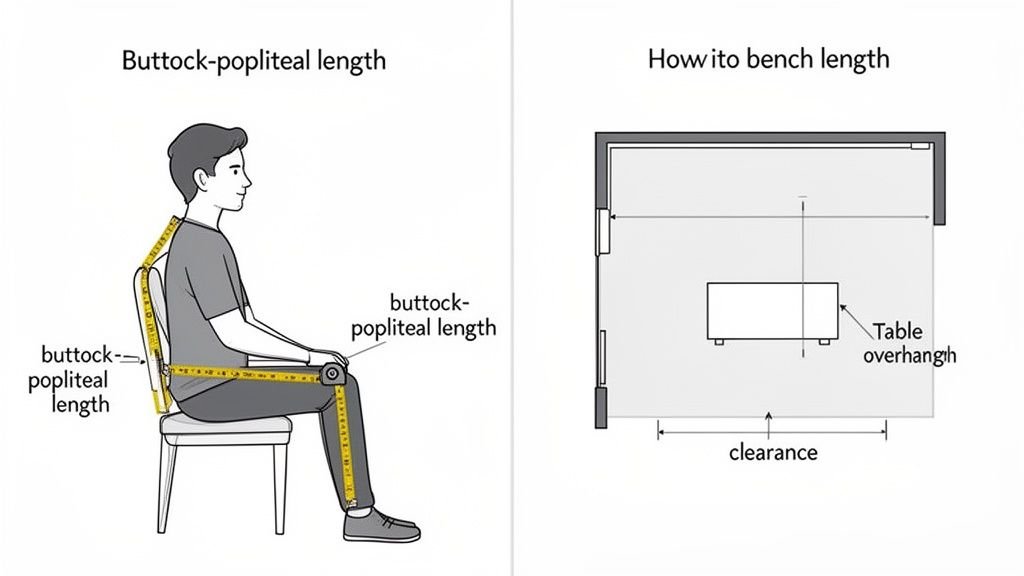
Seat depth guidelines by body type:
| Body Type | Recommended Seat Depth | Measurement Method |
|---|---|---|
| Short stature (under 5’4″) | 15 to 16 inches | Knee to buttock measurement minus two inches |
| Average stature (5’4″ to 5’10”) | 16 to 18 inches | Knee to buttock measurement minus one inch |
| Tall stature (over 5’10”) | 18 to 20 inches | Knee to buttock measurement minus half an inch |
Many budget chairs offer only fixed seat depths around 18 inches. This works adequately for average-height users but leaves shorter individuals with excessive depth and taller individuals sitting on the knife’s edge of support. Adjustable seat depth mechanisms solve this problem by extending or retracting the front portion of the cushion.
Waterfall seat edges represent another critical design feature. Rounded front corners reduce pressure behind the knees more effectively than sharp square edges. A waterfall design gently slopes downward at the front, minimizing contact pressure where your thighs meet your calves.
This simple geometric detail prevents circulation issues during prolonged sitting.
Recline Tension and Dynamic Movement
Static sitting kills productivity and posture equally. Recline tension transforms a passive seat into an active support system. Proper recline mechanism allows you to lean back and return to upright without locking into either position.
Continuous movement prevents any single posture from becoming habitual or strained.
Synchro-tilt mechanisms coordinate seat pan movement with backrest recline. As you lean back, the seat pans forward slightly, maintaining your thigh support and pelvic angle. This coordination preserves your neutral spinal position throughout the recline range.
Basic tilt mechanisms pivot only the backrest while the seat remains stationary, causing you to slide forward and lose lumbar contact.
Recline tension categories and their applications:
- Light tension (5 to 15 pounds): Suitable for lighter users and frequent small adjustments
- Medium tension (15 to 30 pounds): Ideal for average-weight users doing standard desk work
- Heavy tension (30 to 50 pounds): Designed for heavier users or sustained reclined positions
- Fixed tilt lock: Best for focused tasks requiring stable upright positioning
Manufacturers express tension ranges differently across brands. Herman Miller chairs typically span 10 to 40 pounds of resistance. Steelcase models offer similar ranges with distinct adjustment mechanisms.
Budget options often provide coarse tension settings or fixed angles rather than continuous adjustment.
The healthiest sitting pattern combines periodic recline with regular position changes. Leaning back at 110 to 130 degrees reduces lumbar disc pressure significantly compared to rigid 90-degree positioning. However, alternating between upright focus and reclined relaxation prevents the fatigue that comes from holding any single angle too long.
Armrests and Shoulder Relaxation
Armrests often get treated as luxury add-ons. They actually serve important postural functions when properly adjusted. Correct armrest height allows your shoulders to remain down and relaxed rather than elevated to support your forearms.
Elevated shoulders create chronic trapezius tension and contribute to headaches and neck strain.
The relationship between armrest height and keyboard position deserves attention. If your armrests force your elbows above shoulder height, your shoulders elevate automatically. This elevation persists even when you’re not typing, creating cumulative strain over thousands of work hours daily.
Armrests should support your forearms at approximately elbow height or slightly below.
Armrest adjustment parameters ranked by importance:
- Height adjustment: Critical for shoulder positioning
- Width adjustment: Important for desk proximity and elbow angle
- Pivot capability: Useful for varying input device positions
- Depth adjustment: Helpful for supporting different arm lengths
Four-dimensional armrests offer the most comprehensive adjustment, moving in height, width, depth, and pivot. Two-dimensional options cover height and width adjustments. Basic chairs provide fixed armrests at a single position.
The investment in adjustable armrests pays dividends for users who switch between keyboard, mouse, and phone work throughout the day.
If you prefer arms-free working positions frequently, consider whether adjustable armrests might actually interfere. Some ergonomists recommend removing armrests entirely for certain tasks to encourage shoulder freedom and trunk movement. The key is choosing armrests that disappear out of your way when you don’t need them rather than forcing you to work around them constantly.
Material and Breathability for Long Sessions
Material selection affects comfort, temperature regulation, and long-term durability. Mesh backs excel at air circulation, preventing the heat buildup that distracts and fatigues during extended sitting. Foam cushions provide superior pressure distribution but retain more body heat than mesh alternatives.
Mesh materials vary considerably in quality and longevity. Premium mesh membranes maintain tension and resilience over years of use. Budget mesh variants sag and deform within months, losing their supportive properties entirely.
The difference between cheap and quality mesh becomes obvious during the first month of ownership and more pronounced over subsequent years.
Material comparison for sustained comfort:
| Material Type | Breathability | Pressure Distribution | Durability | Best For |
|---|---|---|---|---|
| Premium mesh | Excellent | Good | Excellent | Warm environments, hot climates |
| Foam cushion | Moderate | Excellent | Good | Pressure-sensitive users |
| Fabric upholstery | Low | Very good | Very good | Climate-controlled offices |
| Leather | Poor | Good | Excellent | Executive settings, infrequent use |
Foam density matters more than cushion thickness for pressure distribution. High-density foam retains its shape and support characteristics far longer than low-density alternatives. Check manufacturer specifications for foam density ratings when available.
Density measurements above 1.8 pounds per cubic foot generally indicate durable, supportive foam suitable for daily use.
Breathability impacts more than comfort. Excessive heat accumulation triggers sweating, restlessness, and decreased concentration. Users in warmer climates or poorly ventilated spaces benefit disproportionately from mesh-backed chairs.
The airflow-through-mesh design keeps your back dry and comfortable throughout extended work sessions without mechanical cooling aids.
Common Mistakes That Make Posture Worse
The “Too Soft Couch” Trap
Soft seating feels luxurious initially but destroys posture over time. Your body sinks into plush cushions without adequate support, forcing your postural muscles to work overtime to maintain any semblance of alignment. After twenty minutes on a soft couch, most people have slid into a slumped position they cannot sustain consciously.
Office chairs with overly plush cushions create the same problem. Thick seat padding distributes pressure well initially but compresses unevenly as you shift. One sit bone sinks deeper than the other, creating pelvic asymmetry.
Your spine compensates with lateral curvature, and the cycle of discomfort begins.
Signs your seating is too soft:
- You slide forward and need to readjust frequently
- One hip feels lower than the other after sitting
- Your lower back loses contact with the backrest
- You feel restless and uncomfortable within thirty minutes
- Your legs feel numb or tingling from uneven pressure
Firm seating with proper contours outperforms soft seating without structure every time. A moderately firm seat that maintains its shape provides consistent support regardless of how you shift position. The subtle pressure of firm surfaces actually encourages micro-movements that keep your circulation flowing and your muscles engaged appropriately.
Misconfigured Lumbar Support
Purchasing an ergonomic chair with lumbar support doesn’t guarantee proper support. Most people install lumbar cushions at the wrong height or adjust them incorrectly. The support must align precisely with your lumbar spine’s natural curve to provide benefit.
Misplaced lumbar support creates new pressure points and disrupts your spinal alignment.
Common lumbar support mistakes and corrections:
| Mistake | Symptom | Correction |
|---|---|---|
| Support too high | Mid-back pressure, flattened lower curve | Lower support to belt-line level |
| Support too low | Sacral digging, no lumbar contact | Raise support to fill waist gap |
| Support too firm | Localized pressure points | Reduce depth or switch to contoured pad |
| Support too soft | No meaningful curve maintenance | Increase firmness or replace cushion |
| Support centered | Uneven pressure distribution | Offset support slightly toward stronger side |
Individual spinal variations require individualized adjustment. People with hyperlordosis (excessive lower back curvature) need gentler lumbar support than those with hypolordosis (flattened lumbar curve). Trial and error with adjustment parameters helps you discover your optimal configuration.
The temptation to maximize lumbar support stems from the belief that more always equals better. Nothing could be further from the truth. Lumbar support should fill the gap between your lower back and the backrest without forcing your spine into any particular position.
A light touch maintaining your natural curve beats aggressive support disrupting your alignment.
Ignoring Foot Placement
Feet placement creates a foundation that supports everything above it. Feet dangling unsupported force your thighs to bear weight unequally. Your sit bones become the only contact points, increasing pressure on sensitive tissues.
Your legs tremble from muscle fatigue as you unconsciously grip the seat edge to stabilize yourself.
Footrests solve this problem for users whose feet don’t reach the floor comfortably. Even tall users sometimes need elevated feet if their chair height adjusts for armrest alignment rather than leg length. A simple footrest converts an otherwise unusable chair into a properly supported seating option.
Optimal foot positioning criteria:
- Feet rest flat on the floor or footrest
- Knees bend at approximately 90 to 100 degrees
- Thighs remain parallel to the floor without sloping downward
- Calves clear the seat edge by two to four finger widths
- Weight distributes evenly across both feet
Users under 5’4″ frequently struggle with standard chair heights. The solution isn’t stacking books or using unstable platforms. Adjustable footrests or step stools designed for office use provide stable, height-appropriate foot support.
Some ergonomic chairs offer built-in footrests or adjustable seat depths that accommodate shorter statures without accessories.
Chair-Desk Height Mismatch
Chair and desk height interaction creates a hidden postural trap. Even a perfectly adjusted chair becomes problematic when paired with an improperly positioned desk. Your arms angle upward or downward awkwardly, forcing your shoulders into compensatory positions that trigger tension and fatigue.
Standard desk height of 29 to 30 inches accommodates average arm lengths but leaves many users mismatched. Taller users reach upward, elevating their shoulders throughout work. Shorter users hunch downward, flattening their cervical spine and straining their upper back.
Adjustable desks or monitor risers resolve these conflicts by allowing independent positioning of work surfaces relative to seating.
Height mismatch symptoms and solutions:
| Symptom | Likely Cause | Solution |
|---|---|---|
| Shoulder elevation | Desk too high, arms reaching up | Lower desk or raise chair with armrests supporting forearms |
| Shoulder hiking | Armrests forcing shoulders up | Adjust armrest height or remove and free shoulders |
| Forward head lean | Monitor too low or too close | Raise monitor to eye level, increase viewing distance |
| Wrist extension | Keyboard too high relative to elbows | Lower keyboard surface or adjust chair-desktop relationship |
| Elbow strain | Arms hanging unsupported | Add adjustable armrests at proper height |
The keyboard-to-elbow relationship deserves particular attention. Your forearms should rest parallel to the floor when typing, with elbows bent at 90 to 100 degrees. This position keeps your wrists straight and your shoulders relaxed.
Any deviation creates compensatory patterns that accumulate strain over time.
Consider whether your workspace allows for dynamic repositioning. The ideal setup lets you alternate between keyboard-focused upright work and screen-focused reclined viewing without readjusting your entire environment. Dual-monitor configurations or laptop stands positioned at varying distances support this flexibility better than single fixed workstations.
How to Find Your Fit: A Step-by-Step Setup Guide
Measure First, Buy Second
Measuring your body dimensions before purchasing a chair prevents costly returns and frustration. Your height, inseam, and torso length determine which chair sizes and adjustment ranges will actually fit you. Checking manufacturer dimension charts against your measurements narrows your options significantly before browsing catalogs.
Essential measurements for chair sizing:
- Overall height: Determines headrest availability and backrest height requirements
- Inseam length: Sets minimum seat depth range and max seat height adjustments
- Torso length: Affects lumbar support positioning range and backrest proportion
- Hip width: Determines seat cushion width and armrest spread range
- Shoulder breadth: Influences backrest width and general frame proportions
People often skip measurement because they assume standard sizing works universally. Standard sizing covers the middle 60 percent of the population reasonably well. If you fall outside that range, generic chairs create persistent discomfort that no amount of adjustment can fully resolve.
Measuring takes fifteen minutes and saves hours of troubleshooting poor fits.
Some manufacturers publish detailed sizing guides online. Herman Miller, Steelcase, and Humanscale all provide anthropometric data mapped to their product lines. Cross-reference your measurements with these resources before making purchases.
Buying blind and adjusting later wastes time and money.
Adjusting Height: Feet Flat, Hips Above Knees
Correct chair height establishes the foundation for proper posture throughout your body. The basic rule is simple: your feet rest flat on the floor, and your hips sit slightly higher than your knees. Achieving this position ensures your thighs angle slightly downward, encouraging anterior pelvic tilt and lumbar curve maintenance.
Start with seat height adjustment. Raise or lower the chair until your feet plant firmly on the floor. Check that your knees bend between 90 and 100 degrees, not locked straight or compressed below 90.
Your thighs should slope downward from hips to knees, never rising upward.
Height adjustment verification checklist:
- Both feet rest flat without toe-tip balancing
- Knees form 90 to 100 degree angles
- Thighs slope downward from hips to knees
- Calves clear the seat edge freely
- Ankle joints remain comfortable, not cramped
After establishing seat height, verify your desktop relationship. Your elbows should rest at approximately desk height when shoulders remain relaxed and down. If your desk is fixed and your chair height satisfies foot placement, armrests bridge the remaining gap.
If your desk is adjustable, lower it to match your arm position rather than raising the chair uncomfortably high.
Adjustment mechanisms vary across chair types. Gas lift cylinders handle most height adjustments in modern chairs. Manual lever systems, screw mechanisms, or slide adjustments appear in older or specialized models.
Familiarize yourself with your chair’s adjustment method and practice locating controls without breaking your focus from work tasks.
Setting Lumbar: Curve Meets Curve
Lumbar adjustment transforms an ordinary chair into a posture-supporting tool. The process requires patience and careful observation of how your spine responds to different support positions. Small adjustments in height or depth produce noticeable differences in comfort and alignment over extended sitting periods.
Begin with seat height already established, then address lumbar positioning. Adjust support height until it contacts your lower back at belt-line level. This corresponds to the narrowest part of your torso between your rib cage and hip bones.
Support positioned too high presses against floating ribs. Support placed too low digs into your sacrum without addressing the lumbar curve.
Lumbar adjustment refinement steps:
- Set initial height at belt-line level
- Sit normally and assess lower back contact
- Adjust depth: firm enough to fill the gap, gentle enough to avoid pressure points
- Test recline: ensure lumbar support maintains contact throughout recline range
- Check prolonged sitting: reassess after twenty minutes of normal work
- Iterate based on feedback: small increments produce better results than large jumps
Firmness preferences vary by individual. Some users prefer perceptible support pushing into their lumbar region. Others prefer barely-there contact maintaining awareness without active pressure.
There is no universally correct firmness setting. Your comfort and posture maintenance over extended periods serve as the definitive test.
Fixed lumbar contours require different evaluation strategies. Since you cannot adjust these systems, test them by sitting in various positions. If the contour matches your natural curve well, the chair likely fits your body type.
If it misses your curve significantly, no amount of repositioning will compensate, and you should consider an alternative model with adjustable lumbar support.
Dialing in Recline and Armrests
Recline tension and armrest positioning fine-tune your chair after the foundational adjustments are complete. These secondary settings personalize comfort without fundamentally changing your posture. Getting them right eliminates minor annoyances that accumulate into significant distraction over hundreds of work hours.
Recline tension should allow you to shift position effortlessly without sliding back uncontrollably. Too loose, and you drift into extreme recline with minimal effort. Too tight, and you fight the mechanism constantly, discouraging movement entirely.
The sweet spot enables easy position changes while resisting unintended motion.
Armrest adjustment sequence:
- Set armrest height so shoulders depress naturally when forearms rest on pads
- Adjust width so armrests clear your rib cage without forcing elbows outward
- Configure depth so armrests bring your hands close to keyboard without reaching
- Enable pivot if you switch between typing and mouse-heavy tasks frequently
Test armrest positioning across multiple work scenarios. Type at your keyboard, operate your mouse, answer your phone, and take notes. Each activity demands slightly different arm positions.
The best armrests accommodate this variation rather than optimizing for a single posture and penalizing all others.
If your work involves frequent upper-body movement, consider removable or flip-up armrests. Fixed armrests constrain trunk rotation and limit your ability to shift positions naturally. Removable options eliminate this constraint while remaining available when support proves useful.
The 20-Minute Test Before You Commit
Any chair adjustment process needs empirical validation beyond theoretical optimization. The twenty-minute test checks whether your configurations translate into actual comfort and support during realistic work conditions. Sitting in a showroom for five minutes tells you nothing about all-day performance.
Set a timer and work through your typical tasks during the test period. Answer emails, type documents, attend video calls, and switch between applications. Pay attention to emerging discomfort patterns, position shifts you feel compelled to make, and areas of pressure or numbness developing over time.
Twenty-minute evaluation criteria:
| Time Interval | Assessment Focus |
|---|---|
| 0 to 5 minutes | Initial comfort, ease of getting settled |
| 5 to 10 minutes | Emerging pressure points, need for adjustment |
| 10 to 15 minutes | Sustained comfort, posture fatigue onset |
| 15 to 20 minutes | Overall impression, urge to change position |
| After test | Specific discomfort locations, desired modifications |
During the test, note any instinctive adjustments you make. Frequent repositioning suggests your current settings don’t match your body’s needs. Discomfort appearing after ten to fifteen minutes indicates a support gap worth addressing.
Complete comfort throughout the test suggests you’ve found a strong candidate for long-term use.
Document specific sensations rather than vague impressions. “Lower back feels supported” rates higher than “back feels good.” Specific observations guide targeted adjustments. Generalized comfort statements lead to random tweaking that rarely improves outcomes.
Treat the test like a scientific experiment with measurable variables and reproducible results.
This testing philosophy applies to any ergonomic decision. Whether selecting a chair from our recommendations for desk chairs or evaluating WFH seating options, empirical validation beats marketing claims consistently. Your body provides the final authority on what works, not brochure descriptions or salesperson testimonials.
Chair Types Compared: Which One Fits Your Situation
Task Chairs vs. Executive Chairs
Task chairs prioritize adjustability and movement over aesthetic bulk. They feature mesh backs, synchro-tilt mechanisms, and comprehensive adjustment ranges designed for active work patterns. Executive chairs emphasize padded comfort and formal appearance but often sacrifice the fine-tuning options that make task chairs superior for posture support.
The distinction matters because your work style determines which category delivers better outcomes. If you type, mouse, and switch between tasks frequently, a task chair’s dynamic adjustments keep you comfortable. If your role involves extended phone calls and minimal computer interaction, an executive chair’s plush support may feel more suitable initially.
However, the lack of lumbar adjustability in most executive models creates long-term postural risks that plush padding cannot offset.
Key differences between categories:
| Feature | Task Chair | Executive Chair |
|---|---|---|
| Back material | Mesh or light fabric | Leather or heavy upholstery |
| Lumbar adjustment | Independent height and depth | Usually fixed contour |
| Recline mechanism | Synchro-tilt standard | Often basic tilt lock |
| Seat depth adjustment | Common | Rare |
| Armrest adjustability | 4D typical | 2D or fixed |
| Price range | $200 to $1,200 | $400 to $2,000+ |
| Best for | 6+ hour daily use | 2-4 hour sessions |
Your assessment of best gaming chairs reveals similar compromises. Gaming chairs prioritize appearance and price over ergonomic completeness. They typically offer basic recline functions and fixed lumbar pillows rather than the sophisticated adjustment systems found in professional task chairs.
If gaming aesthetics appeal to you, ensure any selected model includes adjustable lumbar support and seat depth before purchasing.
Mesh Back vs. Foam Cushion
Mesh backs and foam cushions represent fundamentally different approaches to support. Mesh provides dynamic, adaptive support that conforms to your shape while allowing airflow. Foam offers consistent, predetermined support that maintains its shape regardless of your position but generates more heat.
Users in warm climates or poorly ventilated spaces benefit disproportionately from mesh construction. The open-weave structure permits continuous air circulation across your back, preventing the moisture buildup that triggers discomfort and distraction. Mesh performs particularly well in home offices without climate control or during summer months when temperature regulation matters most.
Foam cushions excel in pressure distribution and contour maintenance. High-density foam retains its supportive properties longer than mesh membranes, which can sag and lose tension over years of heavy use. If you experience pressure sensitivity on your sit bones or prefer a plush seating surface, foam construction delivers superior comfort compared to firm mesh alternatives.
Material selection decision factors:
- Warm environment with limited ventilation → Mesh preferred
- Cool climate or conditioned space → Either works adequately
- Pressure sensitivity or sit bone discomfort → Foam preferred
- Heavy daily use exceeding 8 hours → Premium foam may outlast budget mesh
- Budget constraints under $300 → Foam options dominate this segment
- Long-term investment exceeding $600 → Both materials perform well with quality construction
Premium chairs often combine both approaches strategically. Mesh backrests provide breathability and dynamic support for your spine, while foam seat cushions deliver pressure relief for your sit bones and thighs. This hybrid design captures the advantages of each material while minimizing their respective drawbacks.
You’ll find this configuration in many mid-range to premium models from manufacturers like Steelcase and Herman Miller.
Premium Ergonomic Brands vs. Budget Alternatives
Budget chairs under $200 sacrifice adjustment complexity and material durability to hit price targets. Fixed lumbar contours replace independent height and depth controls. Basic tilt mechanisms lack synchro-tilt coordination.
Seat cushions compress permanently within months rather than years. These compromises are acceptable for occasional use but create persistent discomfort during daily eight-hour work sessions.
Mid-range chairs between $200 and $600 introduce meaningful improvements. Adjustable lumbar support becomes standard. Seat depth mechanisms appear in select models.
Better foam density extends cushion lifespan. The gap between budget and mid-range represents where most users should target their spending for daily ergonomic needs.
Premium chairs above $600 deliver refined adjustment precision, superior materials, and extended warranties. Herman Miller’s ten-year warranty and Steelcase’s twelve-year coverage signal confidence in long-term durability. These chairs justify their premiums through cumulative cost savings across replacement cycles spanning decades rather than years.
When budget choices become problematic:
| Usage Pattern | Budget Chair Adequacy | Recommendation |
|---|---|---|
| Less than 2 hours daily | Acceptable | Any chair with basic support |
| 2 to 4 hours daily | Marginal | Mid-range with adjustable lumbar |
| 4 to 6 hours daily | Insufficient | Premium features recommended |
| 6+ hours daily | Inadequate | Invest in premium ergonomic system |
Your research into how much a chair costs by type confirms this tiered pricing structure. The question isn’t whether premium chairs cost more upfront. It’s whether the health benefits and durability justify the investment for your specific usage patterns and budget constraints.
When a Gaming Chair Makes Sense (and When a Traditional Ergonomic Doesn’t)
Gaming chairs fill a specific niche that traditional ergonomic chairs neglect. They offer aggressive styling, bucket-seat containment, and price points below comparable ergonomic task chairs. For users prioritizing aesthetics and occasional gaming sessions over sustained postural support, gaming chairs deliver acceptable value.
However, gaming chairs consistently score lower on objective ergonomic criteria. Fixed lumbar pillows sit at uniform positions regardless of individual anatomy. Recline tension often lacks precision adjustment.
Seat pans rarely offer depth modification. The aggressive bucket design encourages reclined postures unsuitable for keyboard and mouse work requiring upright trunk positioning.
Choose a gaming chair only if you accept its ergonomic limitations consciously. If your primary activity involves gaming rather than computer work, the reclined seating position aligns with how you’ll actually use it. If you alternate between focused work tasks and casual gaming, a traditional ergonomic chair serves both purposes better despite the higher initial investment.
Some modern gaming chairs have incorporated adjustable lumbar supports and improved recline mechanisms. If you’re set on the gaming aesthetic, prioritize models with these improvements over entry-level options. The best gaming chairs guide highlights which models bridge the gap between style and functionality effectively.
Who Needs an Upgrade Most
Remote Workers and Hybrid Teams
Remote workers face unique ergonomic challenges absent from traditional office environments. Their home setups rarely match employer-provided furniture quality or professional ergonomic assessments. Many remote workers inherit whatever seating exists in spare rooms or living spaces, accepting compromised support as inevitable.
Hybrid workers navigating between home and office face dual adjustment burdens. A chair optimized for home ergonomics may differ significantly from office equipment they must accommodate daily. This inconsistency creates confusion about proper positioning and undermines postural habits developed at either location.
Remote workers with dedicated home offices represent the highest-priority upgrade candidates. They control their full workspace setup and can invest in comprehensive ergonomic solutions without office policy restrictions. The return on investment through reduced discomfort and increased productivity justifies budget allocation for quality seating.
Remote work ergonomic indicators:
- Working from home more than three days per week
- Sharing living spaces without dedicated office areas
- Using dining chairs or sofas as primary seating
- Experiencing recurring back or neck pain during work sessions
- Spending six or more hours seated daily
If multiple indicators apply to your situation, prioritizing a quality ergonomic chair addresses the root cause rather than treating symptoms with stretches or pain medication alone. The investment compounds daily through improved comfort and sustained focus.
People with Existing Back Pain
Existing back pain demands careful chair selection because improper seating exacerbates conditions that already compromise spinal health. Users with diagnosed disc issues, spinal stenosis, or chronic muscle strain require chairs offering precise lumbar support and recline functionality to manage symptoms throughout workdays.
Acute back pain episodes often improve with proper seating support that reduces mechanical load on affected structures. Chronic conditions require consistent daily management through ergonomic optimization rather than occasional relief measures. The right chair becomes part of a comprehensive pain management strategy alongside physical therapy, exercise, and medical guidance.
Users experiencing persistent pain should consult healthcare providers before making seating investments. Certain conditions require specialized seating solutions beyond standard ergonomic chairs. Wheelchair seating standards and lift chair specifications outlined in our pricing guides provide reference points for understanding medical-grade seating requirements.
Pain-related selection considerations:
| Condition | Priority Features | Additional Support Needed |
|---|---|---|
| Lower back disc issues | Adjustable lumbar, recline function | Physical therapy guidance |
| Sciatica symptoms | Seat edge relief, even pressure distribution | Position changes every 30 minutes |
| Muscle strain | Soft but supportive cushion, gentle recline | Heat therapy integration |
| Arthritis limitations | Easy adjustment mechanisms, stable positioning | Occupational therapist consultation |
The connection between seating ergonomics and pain management extends beyond chair selection. Understanding how long an office chair lasts helps you plan replacements before degraded support worsens existing conditions. Worn foam cushions and sagging mesh lose their supportive properties gradually, creating a slow postural decline you might not notice until pain emerges.
Taller or Shorter Bodies (Off-the-Shelf Sizing Problems)
Standard chair sizing accommodates average body dimensions poorly for extremes outside that range. Users over 6’2″ find most chairs too short, with backrests ending well below shoulder level and headrests positioned uncomfortably high. Users under 5’4″ struggle with chairs requiring leg extensions they cannot achieve safely.
Off-the-shelf solutions fail these populations consistently. Adjustable features have limited ranges that don’t span the full spectrum of human dimensions. What fits the middle fifty percent of users creates persistent discomfort for everyone else.
Specialized sizing solutions exist but often carry premium price tags.
Tall users should prioritize chairs with extended backrests, adjustable headrests, and seat depth ranges accommodating longer thighs. Weight capacity matters less than dimensional fit for this population. Short users benefit from chairs with lower minimum seat heights, adjustable footrests, and compact frame designs preventing leg dangling.
Dimensional accommodation requirements:
| Body Type | Critical Measurements | Recommended Chair Specifications |
|---|---|---|
| Over 6’2″ | Total height, inseam length | Extended backrest, deep seat pan, headrest range |
| Under 5’4″ | Total height, inseam length | Low minimum seat height, shallow seat option, footrest compatibility |
| Over 250 lbs | Weight, hip width | High weight capacity, wide seat cushion, reinforced base |
| Under 120 lbs | Weight, hip width | Low tension recline, narrow seat options, easy adjustment mechanisms |
Best tall desk chairs provide specific model recommendations addressing these dimensional challenges. Users outside standard ranges should consult manufacturer dimension charts carefully rather than relying on generic size categories like “large” or “extra large.”
Longer Sitting Sessions (>4 Hours Daily)
Session duration dramatically influences chair quality requirements. Four-hour daily sitting tolerates basic ergonomic features reasonably well. Eight-hour sessions demand comprehensive adjustability and durable materials to maintain support consistency.
Sessions exceeding ten hours push chairs toward medical-grade seating standards.
Prolonged sitting introduces cumulative stress that shorter sessions avoid. Micro-movements become essential for circulation maintenance and muscle engagement. Dynamic recline mechanisms and active seating features transform passive support into active posture maintenance throughout extended periods.
Users logging extreme daily sitting hours should evaluate warranty lengths as quality indicators. Manufacturers confident in product durability offer longer warranties covering ten years or more. Shorter warranty periods suggest expected replacement cycles aligning with lighter usage patterns.
Duration-based quality thresholds:
| Daily Sitting Time | Minimum Quality Level | Expected Lifespan | Key Features Required |
|---|---|---|---|
| 2 to 4 hours | Basic ergonomic | 3 to 5 years | Fixed lumbar, basic tilt |
| 4 to 6 hours | Mid-range ergonomic | 5 to 8 years | Adjustable lumbar, synchro-tilt |
| 6 to 8 hours | Premium ergonomic | 8 to 12 years | Full adjustment suite, 10+ year warranty |
| 8+ hours | Professional grade | 12+ years | Medical-grade materials, comprehensive support |
Your investigation into wheelchair costs reveals how specialized seating requirements scale with usage intensity. The same principle applies to ergonomic chairs. Higher usage demands higher specification equipment justifying greater investment through extended service life and sustained comfort.
The Real Cost: Investment vs. Health Savings
Price Ranges and What They Buy You
Chair pricing spans three distinct tiers reflecting dramatically different feature sets and durability expectations. Budget options under $200 deliver basic seating with minimal adjustment capability. Mid-range chairs between $200 and $600 provide meaningful ergonomic improvements through adjustable lumbar support and basic tilt mechanisms.
Premium models exceeding $600 offer comprehensive adjustment systems, superior materials, and warranties spanning decades.
Understanding what each price tier purchases prevents underspending on critical features while avoiding overpaying for unnecessary refinements. The difference between $150 and $400 chairs typically involves lumbar adjustability and seat depth control. The difference between $400 and $800 chairs usually centers on build quality, material longevity, and warranty length rather than fundamentally different adjustment capabilities.
Price-to-feature correlations:
| Price Range | Typical Features | Expected Longevity | Best Use Case |
|---|---|---|---|
| Under $150 | Fixed lumbar, basic tilt, fixed armrests | 2 to 4 years | Occasional use, light budgets |
| $150 to $300 | Adjustable lumbar height, basic recline | 4 to 6 years | Moderate daily use |
| $300 to $600 | Multi-axis lumbar, synchro-tilt, 4D armrests | 6 to 10 years | Full-time remote work |
| $600 to $1,200 | Premium materials, decade warranties, refined adjustments | 10 to 15+ years | Professional-grade daily use |
| Over $1,200 | Custom configurations, exclusive materials | 15+ years | Executive settings, specialized needs |
Your exploration of lift chair costs demonstrates how medical-grade seating commands premium pricing. While ergonomic office chairs rarely reach those price points, the relationship between health functionality and cost holds true across seating categories.
Warranty Benchmarks That Signal Quality
Warranty length serves as a manufacturer confidence indicator more reliable than marketing claims. Companies standing behind products for extended periods demonstrate quality control and material durability expectations. Short warranties suggest anticipated failure modes aligning with planned replacement cycles.
Industry-standard warranty periods vary by category. Budget chairs typically warrant one to three years covering manufacturing defects only. Mid-range products extend coverage to five to seven years.
Premium ergonomic chairs commonly offer ten to twelve-year warranties encompassing all adjustment mechanisms and structural components.
Warranty inspection checklist:
- Coverage includes all adjustment mechanisms, not just structural frames
- Parts replacement covers wear items like casters and gas lifts
- Labor costs for repairs are included or clearly stated
- Transferability provisions exist if you sell or gift the chair
- Pro-rated coverage terms are reasonable if full replacement isn’t offered
Best cheap office chairs analysis reveals how budget options compromise warranty terms significantly. Shorter coverage periods and narrower scope reflect manufacturer expectations about product lifespan and failure rates within low-price segments.
When to Splurge vs. Save
Splurging pays dividends when daily usage exceeds six hours or when existing back problems require precise support optimization. The marginal cost of premium features spreads across thousands of sitting hours, reducing per-hour expense significantly. Users logging extensive daily sitting time benefit most from comprehensive adjustment systems and durable construction.
Saving makes sense for occasional users, shared household chairs, or environments where seating duration remains limited. A $200 chair serving two hours daily use provides better value than an $800 chair performing the same limited function. Match chair investment to actual usage intensity rather than aspirational daily patterns.
The decision tree simplifies considerably: calculate your expected daily sitting hours, multiply by days worked annually, and project total annual usage. Chairs supporting 2,000-plus hourly usage annually justify premium investment through extended service life and sustained performance. Lighter usage patterns allow budget alternatives to perform adequately.
The Hidden Cost of Not Upgrading
Ignoring chair quality creates compounding health costs manifesting as medical expenses, lost productivity, and diminished quality of life. Chronic back pain generates physician visits, imaging studies, physical therapy sessions, and potential surgical interventions. Each additional expense exceeds the price differential between adequate and inadequate seating over typical replacement cycles.
Productivity losses from discomfort-related breaks and reduced focus accumulate substantially. Users experiencing persistent pain take more frequent breaks, work slower, and complete fewer tasks effectively. The financial impact of reduced output often surpasses chair purchase costs within the first year of ownership.
Social and personal consequences extend beyond workplace metrics. Chronic pain affects mood, relationships, sleep quality, and recreational activities. The cumulative life impact of untreated postural strain justifies proactive investment in proper seating long before symptoms become severe.
Your assessment of best sleeping chairs illustrates how specialized seating requirements command premiums for specific health conditions. While everyday ergonomic chairs rarely need such specialized functions, the principle connecting health outcomes to seating quality applies universally across all sitting populations.
Maintenance and Long-Term Optimization
Cleaning and Material Care
Regular cleaning preserves chair materials and extends functional lifespan significantly. Dust accumulation degrades fabric breathability and hides wear patterns indicating needed adjustments or repairs. Scheduled maintenance catches developing problems before they create discomfort or safety issues.
Mesh back care requires gentle vacuuming with brush attachments to remove embedded debris without damaging membrane tension. Fabric cushions benefit from periodic spot cleaning with manufacturer-recommended solutions. Leather surfaces need conditioning every six to twelve months to prevent cracking and maintain suppleness.
Cleaning schedule by material type:
| Material | Frequency | Method | Products to Avoid |
|---|---|---|---|
| Mesh backs | Weekly | Vacuum with brush attachment | Harsh chemicals, abrasive tools |
| Fabric cushions | Bi-weekly | Spot clean with mild detergent | Bleach, steam cleaners |
| Leather surfaces | Monthly | Wipe with damp cloth, condition quarterly | Solvents, silicone sprays |
| Plastic components | Weekly | Wipe with soapy water | Abrasive cleaners, ammonia |
| Metal frames | Monthly | Dust and inspect for corrosion | Moisture retention, salt exposure |
Your investigation into reupholstering chair cushions provides guidance for extending cushion life beyond factory materials. While reupholstering suits certain chair types, regular cleaning and proper use practices usually suffice for maintaining original upholstery functionally.
Gas Lift and Caster Upkeep
Gas lift cylinders represent critical safety components requiring periodic inspection. Degraded gas lifts cause seats to sink slowly during use or fail to maintain height adjustments entirely. Casters wearing unevenly create rolling resistance and directional instability affecting comfortable movement around your workspace.
Gas lift inspection focuses on height maintenance consistency and smooth operation. Seats dipping below set height indicate cylinder failure requiring replacement. Stiff or jerky movement suggests internal seal degradation or debris contamination within the mechanism.
Caster evaluation examines wheel rotation smoothness, floor contact consistency, and debris accumulation. Carpet casters collect fibers and dust wrapping around axles, impeding rotation. Hard floor casters accumulate grit and small debris affecting rolling efficiency.
Regular cleaning prevents premature wear and maintains smooth mobility.
Maintenance troubleshooting guide:
| Symptom | Likely Cause | Corrective Action |
|---|---|---|
| Chair sinks during use | Gas lift seal failure | Replace gas lift cylinder |
| Height adjustment slips | Worn locking mechanism | Clean and lubricate, replace if damaged |
| Uneven caster wear | Floor debris accumulation | Clean wheels and axles regularly |
| Difficult rolling | Bearing failure or debris | Replace affected casters |
| Base wobble | Loose connections or cracked frame | Tighten hardware, inspect for damage |
Replacing worn components restores original functionality without requiring full chair replacement. Standard gas lift sizes follow industry conventions, making aftermarket replacements straightforward for most chair models.
Reassessing Your Setup Seasonally
Seasonal reassessment catches progressive discomfort development before it becomes chronic. Your body adapts subtly to seating conditions over weeks and months, normalizing minor misalignments that accumulate into significant postural deviation. Quarterly reviews prevent this gradual drift from going unnoticed.
Seasonal changes affect both your body and your environment. Weight fluctuations alter seat depth requirements and pressure distribution patterns. Temperature variations influence material firmness and breathing comfort preferences.
Activity level changes modify support needs as daily movement patterns shift.
Establish a simple assessment routine performed every three months. Evaluate current adjustment settings against present comfort levels. Identify emerging pressure points or support gaps.
Recalibrate mechanisms to address detected discrepancies before they create persistent discomfort.
Quarterly assessment checklist:
- Seat height accommodates current foot placement comfortably
- Lumbar support maintains consistent contact throughout sitting sessions
- Armrests position shoulders relaxed without elevation
- Recline tension allows comfortable position variation
- All adjustment mechanisms operate smoothly without binding
- No new pressure points or numbness develop during use
- Chair stability feels secure without wobbling or tipping concerns
This systematic approach transforms maintenance from reactive problem-solving into proactive comfort optimization, preserving your investment’s value throughout its usable lifespan.
Knowing When a Chair Is Worn Out
Gradual degradation renders once-excellent chairs inadequate through cumulative wear patterns. Foam compression permanently reduces cushion thickness and support firmness. Mesh membranes lose tension, creating sagging surfaces that fail to maintain spinal alignment.
Adjustment mechanisms wear internally, losing precision and consistency.
Recognizing end-of-life indicators prevents continuing use of compromised equipment. A chair requiring constant readjustment to maintain comfort has crossed from adequate to inadequate. Persistent discomfort despite optimal settings signals structural deterioration rather than user error.
Wear-out timeline by component:
| Component | Typical Lifespan | Failure Indicators |
|---|---|---|
| Foam seat cushion | 3 to 5 years | Permanent compression, uneven sinking |
| Mesh backrest | 5 to 8 years | Visible sagging, loss of tension |
| Gas lift cylinder | 5 to 10 years | Height drift, failure to lock |
| Casters | 3 to 5 years | Flat spots, bearing noise, wobble |
| Adjustment mechanisms | 5 to 8 years | Play in levers, inconsistent positioning |
| Frame and base | 10+ years | Cracks, bends, structural instability |
Total replacement cost calculations should weigh against ongoing medical expenses and productivity losses from continued use of degraded equipment. A $600 chair replacement every seven years costs approximately $85 annually. Annual physical therapy for chair-induced back problems routinely exceeds that amount significantly.
Reviewing how long office chairs last provides detailed lifespan expectations across price tiers and usage patterns. Understanding these timelines helps you budget replacements proactively rather than reacting to sudden failures during critical work periods.
When to See a Professional
Red Flags: Pain That Doesn’t Improve
Self-managed ergonomic improvements should produce noticeable comfort enhancement within two to four weeks of proper chair adjustment. Persistent pain despite optimal setup indicates underlying conditions requiring professional evaluation rather than continued equipment tweaking. Ignoring persistent symptoms risks chronic condition development from unaddressed mechanical stress.
Warning signs demanding immediate professional attention include radiating pain down legs, numbness or tingling in extremities, bowel or bladder function changes, and pain worsening despite rest and position modification. These symptoms suggest nerve compression or structural spinal issues beyond ergonomic intervention scope.
Symptoms requiring medical consultation:
| Symptom | Urgency Level | Likely Cause |
|---|---|---|
| Leg pain radiating below knee | High | Sciatic nerve compression |
| Numbness in groin area | Emergency | Cauda equina syndrome |
| Bowel/bladder dysfunction | Emergency | Spinal cord compression |
| Pain persisting beyond 4 weeks | Moderate | Muscular or joint pathology |
| Night pain disrupting sleep | Moderate | Structural spinal issue |
| Pain worsening with rest | High | Inflammatory or structural condition |
Emergency symptoms require immediate medical attention rather than ergonomic consultation. Non-emergency persistent pain warrants scheduling appointments with physicians or physical therapists for comprehensive evaluation and treatment planning.
Physical Therapy vs. Ergonomic Assessment
Physical therapists address movement patterns, muscle imbalances, and tissue healing through targeted exercises and manual therapy. Ergonomic assessors evaluate environmental factors, equipment selection, and positioning optimization for specific work tasks. Both professionals complement each other effectively when addressing posture-related complaints.
Physical therapy proves essential when pain originates from muscular dysfunction, joint restriction, or tissue damage requiring rehabilitation. Ergonomic assessment proves essential when pain stems from environmental factors, equipment mismatch, or positioning errors correctable through setup optimization. Many users benefit from both approaches simultaneously for comprehensive problem resolution.
When each professional helps most:
| Situation | Primary Professional | Complementary Support |
|---|---|---|
| Acute injury or flare-up | Physical therapist | Ergonomic assessment for prevention |
| Chronic pain without diagnosis | Physician first, then PT | Ergonomic optimization |
| Equipment uncertainty | Ergonomic assessor | PT for associated muscle issues |
| Post-surgical rehabilitation | Physical therapist | Ergonomic modifications for recovery |
| Preventive posture improvement | Ergonomic assessor | PT for strengthening weak areas |
Coordinate care between professionals when multiple issues coexist. Physical therapists often recommend specific ergonomic features addressing identified movement limitations. Ergonomic assessors reference therapeutic guidelines ensuring equipment selections support ongoing treatment plans.
Working with an Occupational Therapist
Occupational therapists specialize in enabling daily activity participation through environmental modification and adaptive strategies. Their expertise extends beyond pain management into functional capacity preservation and work participation optimization. Users with complex health conditions benefiting from occupational therapy often receive ergonomic recommendations as part of comprehensive treatment plans.
OT evaluations consider your specific daily activities, physical limitations, and environmental barriers systematically. They identify precise modifications enabling continued participation in valued activities despite health constraints. Chair selection represents one component of broader environmental adaptation strategies addressing multiple activity domains.
OT-relevant considerations for seating:
- Ability to transfer independently in and out of seating
- Pressure relief capabilities for prolonged sitting tolerance
- Position change facilitation for circulation maintenance
- Accessibility of adjustment mechanisms given physical limitations
- Compatibility with assistive devices or mobility aids
Best shower chairs and best stair chair lifts demonstrate how occupational therapy principles apply across various seating contexts. The same functional assessment approach guides ergonomic chair selection for work environments.
Combining Chair Fixes with Movement Breaks
Equipment optimization alone cannot compensate for prolonged static posturing regardless of chair quality. Movement breaks interrupt sustained loading patterns, restore circulation, and reset muscular activation sequences compromised by immobility. Chair ergonomics and movement behavior synergize more effectively than either approach alone.
Recommended break frequency ranges from standing or walking briefly every thirty to sixty minutes. Micro-breaks lasting one to three minutes sufficiently interrupt sustained postural stress without disrupting workflow significantly. Movement variety matters more than duration, engaging different muscle groups and joint positions during each break period.
Movement integration strategies by work style:
| Work Pattern | Recommended Break Cadence | Movement Type |
|---|---|---|
| Continuous focused work | Every 30 minutes | Standing stretch or brief walk |
| Meeting-heavy schedule | Between meetings | Position change during transitions |
| Creative/thinking tasks | Every 45 minutes | Recline or walk-and-think session |
| Collaborative work | Constantly changing positions | Natural movement reduces need for scheduling |
| Evening/screen work | Every hour | Full position reset with walking |
Combine behavioral modifications with environmental supports like standing desk converters, balance balls for occasional use, or walking meetings when appropriate. Multiple seating options within your workspace enable natural movement variation without requiring dedicated exercise breaks disrupting workflow continuity.
Understanding best travel chairs illustrates how portable ergonomic solutions extend movement-friendly practices beyond home offices. The principle of varying positions applies universally regardless of seating location or temporary workspace configurations.
Your Decision Checklist: Final Recommendation
The Non-Negotiables Before Buying
Certain features separate chairs worth investing in from decorative seating disguised as ergonomic equipment. These non-negotiables protect your spine regardless of price tier or brand prestige. Compromising on any single item typically creates persistent discomfort that worsens over years rather than months.
Essential feature checklist before purchase:
- Adjustable seat height with stable gas lift mechanism
- Independent lumbar support with height and depth adjustment
- Seat depth adjustment or appropriate fixed depth for your leg length
- Recline tension adjustment allowing comfortable position variation
- Armrests adjustable in at least two dimensions (height and width)
- Stable five-point base with appropriate casters for your floor type
- Weight capacity rating exceeding your body weight by at least twenty percent
- Warranty covering minimum five years on all mechanisms
Chairs missing two or more items from this list rarely provide adequate long-term support. Budget alternatives sacrificing multiple features require replacement within three to four years anyway, making the per-year cost comparable to premium options delivering comprehensive adjustment.
Prioritize adjustability over appearance during selection. Sleek designs attract attention but empty feature lists betray practical performance. A visibly complex chair with numerous adjustment levers typically serves your postural needs better than minimalist aesthetics prioritizing showroom appeal over functional capability.
Quick Win Adjustments to Try Today
You likely can improve your current seating comfort immediately without purchasing new equipment. Minor adjustment tweaks addressing common configuration errors resolve many persistent discomfort complaints within hours rather than weeks.
Common fixes requiring no tools or expense:
- Raise seat height if your knees sit above hip level
- Lower seat height if your feet dangle or press against desk underside
- Move lumbar support higher if it contacts your mid-back instead of lower back
- Reduce lumbar depth if you feel localized pressure points instead of curve support
- Lower armrests if your shoulders elevate while resting forearms on pads
- Increase recline tension if you slide forward constantly fighting backward drift
These adjustments address approximately sixty percent of reported discomfort cases according to ergonomic assessment databases. Users who implement these corrections report immediate noticeable improvement within twenty-four hours of proper configuration.
Your existing chair may already possess adjustment capabilities you haven’t discovered or utilized. Consult your owner’s manual or manufacturer documentation identifying every available control before concluding your current seating is inadequate. Many users operate chairs with half their adjustment potential unused simply because mechanisms remain hidden or unintuitive.
Best WFH chairs often include adjustment guides demonstrating proper setup procedures. Even premium models benefit from periodic recalibration as your body dimensions shift seasonally or activity patterns change throughout different work phases.
The Long Game: Chair + Movement = Posture
Sustainable postural health requires combining optimal equipment with consistent movement behavior. No chair substitutes for the physiological benefits of regular position changes and muscular engagement throughout your workday. Equipment enables better posture but cannot generate it autonomously.
The most ergonomic chair in the world fails its purpose if you remain frozen in one position for eight consecutive hours. Blood flow stagnates, discs dehydrate under constant compression, and postural muscles fatigue from sustained static loading regardless of how well-supported you appear externally.
Integrate movement into your daily routine systematically rather than hoping occasional position changes occur spontaneously. Schedule brief walks, set standing reminders, practice micro-stretches at your desk, and alternate between focused upright work and relaxed reclined thinking sessions throughout each day.
Movement integration strategies by work style:
| Work Pattern | Recommended Break Cadence | Movement Type |
|---|---|---|
| Continuous focused work | Every 30 minutes | Standing stretch or brief walk |
| Meeting-heavy schedule | Between meetings | Position change during transitions |
| Creative/thinking tasks | Every 45 minutes | Recline or walk-and-think session |
| Collaborative work | Constantly changing positions | Natural movement reduces need for scheduling |
| Evening/screen work | Every hour | Full position reset with walking |
Combine behavioral modifications with environmental supports like standing desk converters, balance balls for occasional use, or walking meetings when appropriate. Multiple seating options within your workspace enable natural movement variation without requiring dedicated exercise breaks disrupting workflow continuity.
When to Walk Away from a Chair
Knowing when replacement becomes necessary prevents continued investment in deteriorating equipment. Some chairs reach end-of-life gracefully through gradual wear signaling. Others fail catastrophically requiring immediate attention to avoid injury or discomfort escalation.
Recognize warning signs indicating replacement necessity rather than attempting endless repair attempts. Persistent sagging despite adjustment maximization, cracked frames under normal use, gas lifts failing repeatedly after replacement, and mechanisms refusing to maintain settings all signal structural deterioration beyond economical repair.
Replacement decision framework:
| Condition | Repairable? | Replacement Indicated |
|---|---|---|
| Worn casters | Yes, easy swap | No |
| Degraded lumbar cushion | Sometimes, model-dependent | Consider if replacement unavailable |
| Failing gas lift | Yes, standard replacement part | No unless multiple components failing |
| Cracked frame or base | No | Yes, safety hazard |
| Permanent seat compression | No | Yes, comfort unachievable |
| Multiple mechanism failures | Depends on age and cost | Evaluate versus replacement price |
Economic calculations guide replacement timing reasonably. If annual maintenance costs exceed thirty percent of replacement price, replacement typically proves more economical. If your chair serves you well except for one worn component costing eighty percent of new chair price to repair, replacement clearly makes financial sense.
Review comprehensive lifespan guidance when evaluating best wooden rocking chairs or best wingback chairs for comparison context. Different chair categories serve different purposes and timelines, but the principle of recognizing end-of-life indicators applies consistently across all seating types.
Your final decision should balance current comfort levels, anticipated future usage intensity, and replacement economics together. A chair providing marginal comfort today will likely provide equally marginal comfort tomorrow while costing you more in persistent discomfort and potential health consequences than the price difference between adequate and superior seating options.
Frequently Asked Questions About Chair Can Fix Your Posture
Can a chair really fix my bad posture?
Chairs support proper posture but cannot retrain habitual movement patterns alone. A quality ergonomic chair reduces mechanical stress allowing muscles to function without compensatory overload. However, sustained postural improvement requires combining equipment support with conscious movement variation and strengthening exercises.
Consider the chair as enabling better posture rather than automatically correcting it.
What’s the best angle for recline?
Research indicates reclining between 100 and 110 degrees reduces lumbar disc pressure significantly compared to rigid 90-degree positioning. This angle range maintains spinal curvature while distributing load more evenly across disc structures. Alternate between upright focus positions and slight recline throughout the day rather than remaining locked in any single angle.
Do I need armrests?
Armrests help when properly adjusted to support forearms at elbow height while keeping shoulders relaxed. They become detrimental when forcing shoulder elevation or restricting trunk movement freedom. Choose adjustable armrests that disappear out of your way when not needed rather than fixed versions constraining your movement options permanently.
How do I know if lumbar support is high enough?
Lumbar support should contact your lower back at belt-line level where your spine curves naturally inward. If support presses against your rib cage instead, it sits too high. If it digs into your sacrum without filling the waist gap, it sits too low.
Adjust until you feel gentle supporting contact maintaining your natural curve without pressure points.
Should I alternate between sitting and standing?
Alternating between sitting and standing positions reduces sustained loading on any single posture pattern. Even imperfect standing breaks improve circulation and reduce disc compression compared to continuous sitting. Ideal scenarios involve varying positions every thirty to forty-five minutes rather than remaining static for extended periods regardless of posture choice.
Are expensive chairs worth it for home use?
Expensive chairs justify their premiums through extended durability, comprehensive adjustability, and longer warranty coverage proving manufacturer confidence. If you sit more than four hours daily, premium features meaningfully impact comfort and long-term health outcomes. Casual users spending two hours daily may find mid-range options delivering sufficient support at lower cost.